


Every show has seats that never sold - and no one was working on them. When an event is cancelled, stop ticket sales, confirm the refund obligations that apply to your event, reconcile paid orders, and return eligible payments through the original payment channel wherever supported. Tell purchasers what will be refunded, how booking fees are treated, and when you will send the next update; do not promise a bank settlement date you cannot verify.
- How to handle ticket refunds when an event is cancelled: stop sales, verify orders, confirm obligations, refund, and reconcile.
- Separate refund approval, payment submission, and bank settlement in every cancellation update.
- ZunaroSpace event ticketing suits independent organisers who want their storefront, box office and kiosk on one live inventory.
- Check booking-fee treatment separately; a cancelled event does not establish which payment charges your provider returns.
Why this matters
A cancellation creates a payment job and a communication job. Sending an announcement does not return money, and submitting a refund does not establish that the purchaser has received it. Keep those jobs connected through the order record.
Your 2026 cancellation procedure should assign responsibility for approving refunds, submitting them, answering enquiries and checking exceptions. Before relying on bulk processing, read the guide to automatic ticket refunds after a cancellation. Treat automation as a workflow to verify, not a substitute for checking the affected orders.
Close the cancellation when the payments reconcile, not when the announcement goes out.
How to handle ticket refunds when an event is cancelled
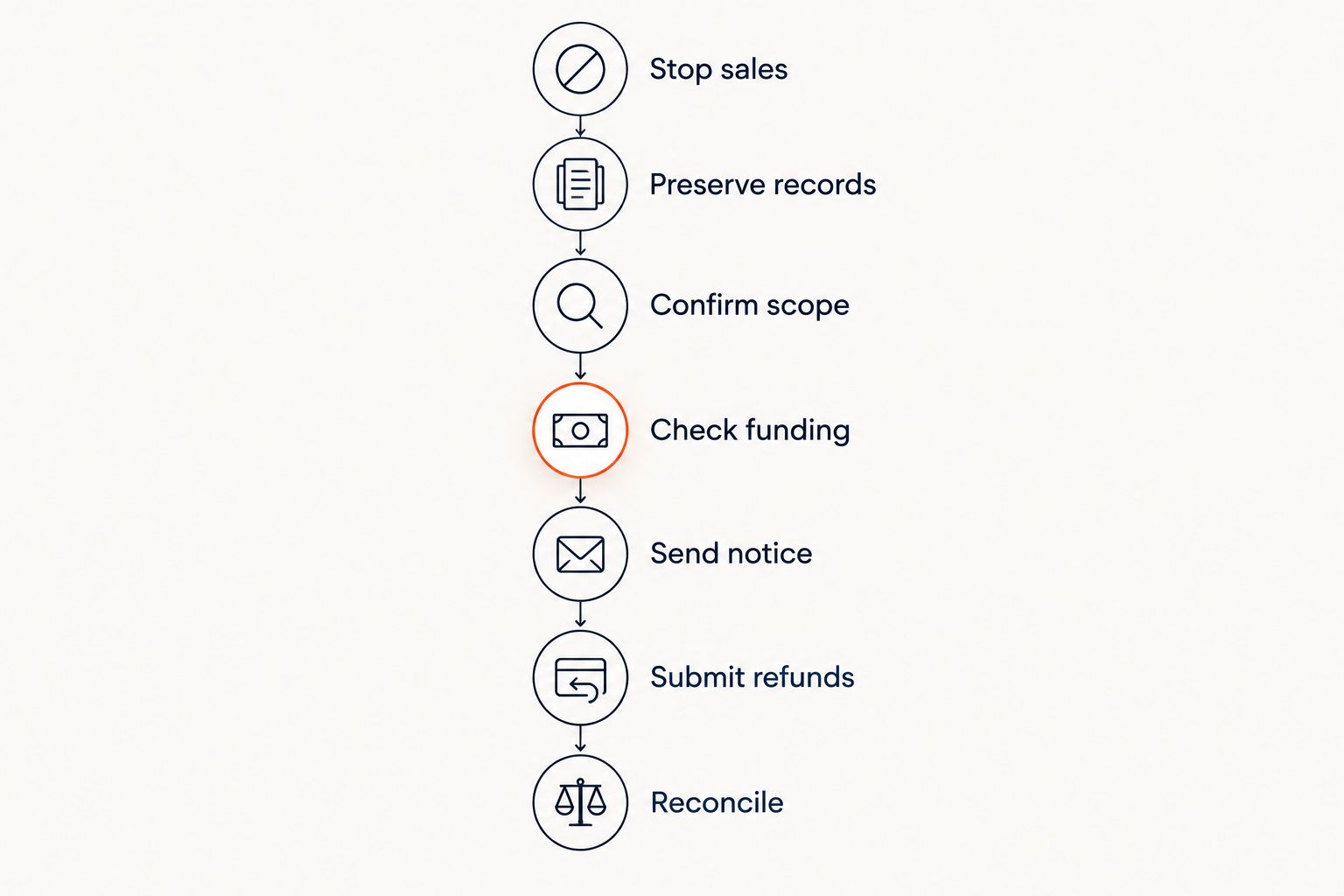
Use the following sequence for a cancelled performance, conference, club event or festival. The sequence is an operational checklist; the refund entitlement and any required deadline come from the applicable law, purchase terms and payment arrangements.
Stop sales and scheduled promotion
Mark the affected event or performance as cancelled wherever you control its presentation. Stop new sales through the storefront, box office and kiosk, and review scheduled reminders or promotional messages that still describe the event as happening.
Be precise about scope. Cancelling a performance is not the same as cancelling every performance in a production. For recurring events, identify the affected date and session before changing orders or messaging purchasers.
Give box-office staff the same cancellation information as your online support team. A purchaser should not receive conflicting answers depending on where they ask.
Preserve the order and payment records
Save an order export or equivalent record before processing changes. Include the event, order identifier, purchaser contact details, tickets, payment method, payment status, amount paid and any refund already recorded.
Keep a distinction between paid orders, unpaid reservations, complimentary tickets and previously refunded orders. An unpaid reservation requires cancellation handling, not a payment refund. A complimentary ticket still needs an event notification even though there is no ticket payment to return.
Restrict access to purchaser information to the staff handling the cancellation. Do not circulate complete payment or contact records in general team chats.
Confirm the refund scope
Check applicable consumer requirements and the terms presented at purchase. Do not assume a no-refund clause resolves organiser-led cancellation, and do not apply a policy written for purchaser changes of mind without checking its relevance.
Separate the ticket payment from booking charges, payment charges, donations and other order components. Establish which amounts must be returned and which party can return them before publishing a promise.
For a multi-event purchase, record which part of the order is affected. Do not refund an entire order merely because a cancelled performance appears within it. Confirm the entitlement and the appropriate allocation.
Check funding and processing access
Identify the account and payment service responsible for the original transaction. Check the refund controls, available balance requirements and any restrictions directly with the provider handling that payment.
Ticket revenue already paid out to the organiser does not establish that a refund has been funded. Keep payout status and refund status separate. Your finance lead needs to know what money has moved and what remains to be returned.
For your 2026 operating checklist, record who can authorise a refund and who can submit it. Give each exception a named owner rather than leaving it in a shared inbox.
Send a clear cancellation notice
Tell purchasers which event and date have been cancelled, what action you are taking, and whether they need to do anything. Explain the treatment of ticket payments and booking fees separately.
Use the contact details held against the purchase and publish consistent information on the event page. Where you communicate in Arabic and English, keep the refund conditions equivalent in both languages.
The notice should distinguish these statuses:
- Approved: the organiser has confirmed the refund entitlement.
- Submitted: the payment service has accepted the refund instruction.
- Settled: the return of funds has been confirmed through the relevant payment records.
State the next update point using a date your team can meet. If the provider supplies a processing estimate, identify it as the provider's estimate rather than your guarantee.
Submit refunds and record exceptions
Use the original transaction's refund route wherever the payment service supports it. Verify the amount and order identifier before submission, then store the refund reference and result against the order.
Check whether a refund or payment dispute is already active. Do not send an additional payment without investigating the existing case and the provider's instructions.
Separate successful submissions from failed, pending or unsupported transactions. Cash payments and other payment methods need their own documented handling; do not assume an online bulk action covers them.
Reconcile and close the cancellation
Compare the approved refund list with the submitted refunds and confirmed outcomes. Investigate unmatched orders, incorrect amounts and unresolved purchaser enquiries before calling the cancellation complete.
Cancel or invalidate the affected ticket credentials through the controls your system provides. A refund record and a ticket's admission status are different records; check both.
Keep a final cancellation record containing the decision, messages, refund references and unresolved cases. Record the changes needed in your next event's terms and internal procedure while the problems are still clear.
Which cancellation outcome should you use?
A refund, transfer and credit are different outcomes. Present them clearly, confirm which choices are lawful and applicable, and do not describe credit as money returned.
| Outcome | Best for | Practical benefit | Limitation to explain |
|---|---|---|---|
| Refund | Closing an eligible payment for a cancelled event | Returns the approved amount through the supported payment route | Requires payment processing and reconciliation |
| Transfer | Purchasers who agree to an available replacement event | Preserves a booking for another performance | Requires consent, booking changes and a clear treatment of any difference |
| Credit | Purchasers who voluntarily choose future use | Keeps an agreed value available for a later booking | Is not a cash refund and needs clear conditions |
Refunds for a cancelled event
Best for: returning eligible payments when the event will not take place. Confirm the amount due and process it through the appropriate payment route. Do not require purchasers to accept an alternative where their applicable rights require a refund.
The administrative downside is that each unresolved payment remains your responsibility to track. A bulk submission does not remove the need to review its results.
Transfers to a replacement event
Best for: purchasers who explicitly choose another performance. State the replacement date, venue, ticket allocation and any relevant difference before recording agreement.
A transfer creates another booking decision. Do not move a reserved seat to a different performance without explaining what the purchaser is receiving and confirming the change.
Credits for a future booking
Best for: purchasers who choose credit under clearly stated terms. Explain the credit's permitted use and any conditions before acceptance.
Credit keeps an obligation open rather than closing it with a returned payment. Maintain a record of the purchaser's choice and do not use credit to conceal an outstanding refund.
Why cancellation refund handling varies
The event's circumstances and payment records determine the workflow. Build these checks into your 2026 cancellation plan:
- Applicable obligations: Check the rules governing the purchase and organiser-led cancellation before selecting an outcome.
- Payment method: Identify which service handled each transaction and which refund route it supports.
- Order contents: Separate the cancelled ticket from unaffected performances, donations and other items.
- Previous activity: Investigate refunds, transfers or payment disputes already attached to the order.
- Funds and permissions: Confirm the funding requirements and the staff authorised to act.
- Purchaser communication: Match the announcement, support response and payment status so they describe the same outcome.
Do not copy a refund timetable from another organiser. Use the requirements and processing information that apply to your own event and transactions.
Do I have to refund booking fees when an event is cancelled?
Booking-fee treatment depends on the applicable obligations, purchase terms and arrangements with the party collecting the fee. Check it separately from the ticket payment before telling purchasers what they will receive.
Record who charged each fee and who can return it. Your 2026 cancellation message should itemise the approved refund components without suggesting that every payment charge is automatically returned.
What if ticket revenue has already been paid out?
Ticket revenue already paid out still needs to be accounted for in the refund plan. Check the funding requirements with the payment service and assign finance responsibility before submitting the affected refunds.
For background on the movement of funds, see getting paid after selling tickets. Do not confuse receipt of sales revenue with completion of the cancellation's payment obligations.
Can I offer another date instead of a refund?
Offer another date as a clearly described choice, subject to the purchaser's rights and the terms that apply. Do not silently treat a cancelled event as a rescheduled booking.
Confirm the new date and ticket allocation, then record acceptance. Keep purchasers who choose the replacement separate from those awaiting refunds so neither group receives the wrong update.
What to check in your ticketing platform
ZunaroSpace event ticketing suits independent organisers who want a branded storefront, box office and kiosk connected to one live inventory. Reserved seating and door check-in are part of the platform. The practical benefit is a shared inventory across those sales and admission channels; that does not establish how cancellation refunds are processed.
For cancellation planning, ask ZunaroSpace to demonstrate refund permissions, payment references, ticket invalidation and exception handling against your intended workflow. Shared inventory alone is not evidence of automatic refunds, booking-fee refunds or a particular settlement speed.
The platform's ownership line is direct: You keep the fees, the funds and the customers. Organisers pay nothing per ticket; buyers cover a booking fee of AED 3.99, or AED 1.99 under AED 20, and free events carry none. Those sales economics do not establish the cancellation treatment of the booking fee.
ZunaroSpace's tagline is “AI that sells your tickets.” Its WhatsApp agent answers buyers, holds seats and hands over a checkout link. Events can be discovered and booked inside ChatGPT and Claude, including selecting a seat on the real map; checkout completes on the organiser's own site, never in chat. These selling mechanisms are not a stated refund service.
Ask Zunaro Pro is AED 179/mo with a 14-day trial and no card. Based at DTEC, Dubai Silicon Oasis. Built for the Gulf - the UAE and Saudi Arabia. Confirm payment arrangements for your business rather than assuming a Saudi payout capability.
FAQ
What's the best way to handle ticket refunds when an event is cancelled?
Stop sales, confirm the applicable refund obligations, verify paid orders, submit eligible refunds and reconcile the results. Keep purchaser updates consistent with the actual payment status.
Should I automatically refund every order for a cancelled event?
Verify the affected orders before submitting refunds. Unpaid reservations, complimentary tickets, previously refunded purchases and orders containing unaffected events need separate handling.
How long do cancelled-event refunds take?
Use the processing information supplied by the payment provider for the relevant transactions. Distinguish refund submission from bank settlement and do not promise an unverified completion date.
Do I need to return booking fees as well as ticket payments?
Check booking-fee treatment against applicable obligations, purchase terms and the fee collector's arrangements. Explain the approved components separately in the cancellation notice.
Can I give event credit instead of returning money?
Offer credit as a clearly explained choice where permitted, not as an assumed replacement for a required refund. Record the purchaser's acceptance and the credit conditions.
What should I do if a purchaser has already disputed the payment?
Investigate the existing dispute before issuing another payment. Follow the payment provider's instructions and record the outcome against the original order.
Does ZunaroSpace automatically refund cancelled events?
Automatic cancellation refunds are not established by the platform details stated here. Ask for a demonstration of refund controls, fee treatment, funding requirements and exception handling before depending on automation.
One last thing
A cancelled ticket and a refunded payment are not the same thing. The ticket belongs to your admission workflow; the refund belongs to your payment workflow. Closing either record does not prove the other is complete.
Put both checks in your 2026 sign-off: affected tickets cannot be used for admission, and every approved refund has a recorded outcome. Keep unresolved cases open with a named owner and a clear next action.


