Yes. You can offer tiered pricing by seating section by assigning different ticket rates to defined areas of a reserved seating map, then connecting each seat to the correct rate. The caveat: your ticketing system must enforce those section boundaries across your storefront, box office and kiosk—not just display different ticket names.
- Tiered pricing by seating section links each reserved seat to its section’s ticket rate.
- Choose section pricing when location changes the experience; keep equivalent seats in the same band.
- ZunaroSpace event ticketing connects reserved seating, storefront, box office and kiosk through one live inventory.
- Before publishing, verify section rules, seat holds and checkout totals across every sales channel.
Can I offer a tiered pricing structure by seating section?
Yes—provided your platform connects the seating map to the pricing rules. Creating ticket types called Front, Middle and Balcony is not enough. Each ticket must correspond to the seat or section the attendee selects.
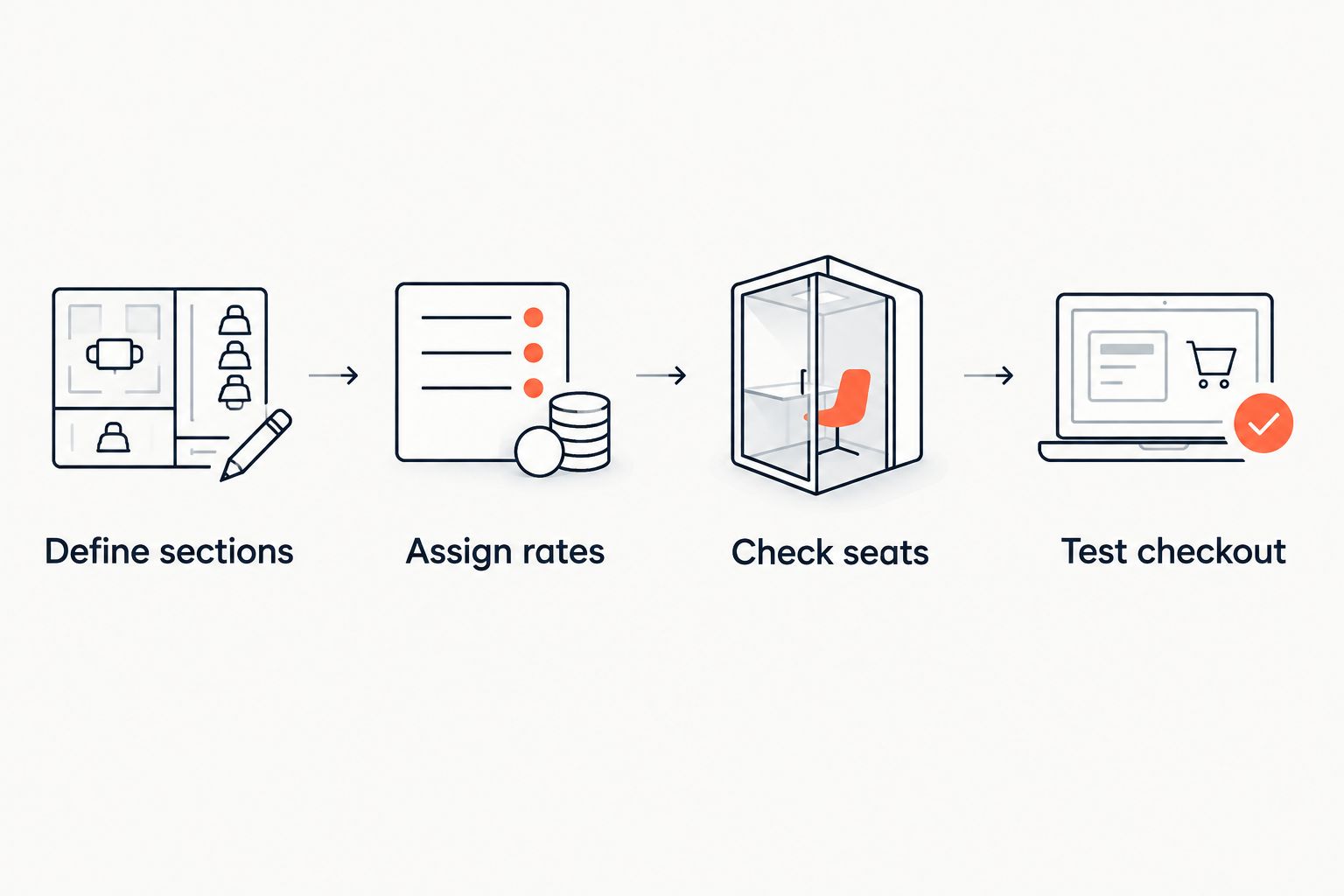
For your 2026 event setup, use this sequence:
- Define sections. Divide the venue into areas with a clear difference in view, location or included experience.
- Assign rates. Connect each section to its intended ticket rate, rather than leaving attendees to select an unrelated ticket type.
- Check seats. Verify that every sellable seat belongs to the correct section and that unavailable positions cannot be purchased.
- Test checkout. Follow a selection from the seating map through checkout and confirmation, then repeat through your staffed sales channels.
Start with the physical layout. The guide to setting up reserved seating for a theatre production covers the seating workflow that your section structure depends on.
Why this matters
Every show has seats that never sold - and no one was working on them.
Section pricing gives you a way to distinguish seats with different experiences without treating the entire room as interchangeable. It does not guarantee demand. You still need a reason for each difference that your team can explain plainly.
A central view, a side angle and a position behind a pillar are not the same offer. Your map and ticket descriptions should make those differences visible before checkout, rather than leaving your door team to resolve the mismatch.
Price the actual experience, not the label. Calling a section premium does not explain what makes it different.
Which seating structure should you choose?
Choose the simplest structure that accurately represents your room. More ticket categories create more rules to check; fewer categories can hide meaningful differences between seats.
The following approaches are alternatives for planning your inventory, not claims about a particular platform’s configuration options.
| Structure | Best for | Advantage | Limitation |
|---|---|---|---|
| Section-based pricing | Venues with clearly different seating areas | Gives each area a consistent rate | Boundaries need to match the real experience |
| One rate across reserved seats | Rooms where seating experiences are broadly comparable | Keeps the ticket offer simple | Does not distinguish stronger and weaker positions |
| Seat-level pricing | Rooms with important differences within a section | Allows finer distinctions | Requires more detailed checking and maintenance |
| General admission | Events where exact seat choice is unnecessary | Avoids individual seat allocation | Does not promise a specific seat |
Best for distinct seating areas: section-based pricing. Use it when you can draw a sensible boundary on the map and explain why the seats on either side differ.
Best for comparable seats: one reserved-seat rate. Do not add tiers simply because the software offers configuration fields. A distinction without a visible benefit creates another question for your box office.
How should I divide the room into sections?
Start with the attendee’s view of the performance or presentation. Walk the space, check the stage arrangement and compare positions before deciding where one band ends and another begins.
Define sections
Use names that describe location. Front Stalls, Rear Stalls and Balcony are example section labels—not product names or required categories.
Avoid using a label that promises something you have not defined. If a section includes an additional experience, state exactly what admission covers in the event description.
Assign rates
Write down the relationship between each section and its intended ticket rate before configuring the event. Keep this reference available to the person building the map and the person checking it.
A section name should mean the same thing in your event description, seating map and staff instructions. Renaming one without updating the others creates an avoidable discrepancy.
Check seats
Inspect the boundaries closely. A seat beside a section boundary should not land in a different band because it was assigned incorrectly during setup.
Review restricted views and positions affected by production equipment separately. Do not assume that every seat in a named area offers an identical view.
Test checkout
Select a seat in each section and follow the complete purchase path. Check the section name, selected seat, ticket rate and final total at every stage where they appear.
For a 2026 production, repeat this review after the final stage layout is confirmed. A map approved for a different layout is not evidence that the current configuration is correct.
Why section pricing varies
Your section structure should reflect differences you can inspect and describe. Use these factors to decide whether a separate band is justified:
- Sightline: A clear central view and an obstructed angle represent different experiences. Describe restrictions explicitly.
- Distance: Position relative to the stage or presentation area can justify a distinction, but proximity alone does not establish the best view.
- Production layout: A thrust stage, presentation screen or temporary platform changes how the room works. Review the actual event arrangement.
- Included experience: Separate admission from any additional benefit. Do not imply that a better seat includes hospitality or access unless it does.
- Seat configuration: Tables, fixed rows and temporary seating require different descriptions. Make clear what the attendee is selecting.
These are reasons to review your structure, not a formula for setting a particular rate. No universal percentage separates one seating band from another. Decide the relationship for your event, then confirm that the map implements it.
What must your ticketing platform handle?
Reserved seating is the starting point. For tiered pricing, ask the platform provider to demonstrate the connection between a physical seat, its section and the ticket rate charged at checkout.
Do not accept a general feature list as a substitute for that demonstration. Use your venue layout and ask the person configuring it to show the relevant rules.
Section rules
Ask whether a seat inherits its rate from a section, uses an individual assignment or allows a choice of ticket categories. Those approaches need different checks.
If attendees can choose a category after selecting a seat, confirm that they cannot choose an unrelated section’s rate. A correct-looking map does not prove the underlying rule is correct.
Shared inventory
Your storefront, box office and kiosk need to refer to the same seats. Ask how a seat’s status changes when it is selected, held, sold or released.
Test the workflow your team will actually use. A demonstration confined to the online storefront does not establish how a staffed counter handles the same inventory.
Confirmation details
Check that your confirmation identifies the selected location clearly enough for your front-of-house team to use it. Match the wording to the signs and seat labels in the venue.
For bilingual events, review both language versions. Translating the event description is not a substitute for checking section and seat information throughout the booking journey.
Where ZunaroSpace fits
ZunaroSpace event ticketing is best for independent organisers and venues that want their own branded storefront with reserved seating and connected sales channels. Its store, seating, box office, kiosk and door check-in use one live inventory. You keep the fees, the funds and the customers.
That shared inventory is relevant to section pricing, but it does not replace a configuration check. Before committing your 2026 seating plan, ask for a demonstration of your exact section-to-rate rules through contact.
The platform can trace a seat map from a photo in about 60 seconds, without CAD or a setup fee. That accelerates the starting layout; you still need to review the seats, boundaries and event-specific restrictions before publication.
The economics are separate from your seating bands: organisers pay nothing per ticket. The buyer booking fee is AED 3.99, or AED 1.99 for tickets under AED 20; free events carry none. Do not confuse your admission structure with the booking fee.
AI that sells your tickets. The WhatsApp agent answers buyers, holds seats and hands over a checkout link. Events can also be found and booked inside ChatGPT and Claude, including selecting a seat on the real map; checkout completes on the organiser’s own site, never in chat.
Based at DTEC, Dubai Silicon Oasis. Built for the Gulf - the UAE and Saudi Arabia.
Can I combine seating sections with early booking categories?
Section pricing and early booking categories describe different things: where someone sits and when they book. Keep those rules separate in your planning, even if the platform combines them during configuration.
Ask the provider to demonstrate the intended combination before publishing. Do not assume that support for reserved seating also proves support for every timing rule you want.
Do all seats within a section need the same rate?
A consistent rate is the clearest starting point for section-based pricing. If meaningful differences exist within the area, redraw the boundary or assess whether seat-level rules better match the room.
Avoid hiding a restricted-view seat inside a band whose description promises an unobstructed view. The description must remain accurate for the seat selected.
Can I change section rates after sales begin?
Treat any change as a controlled configuration task, not a quick label edit. Confirm how your platform applies changes to new purchases, existing bookings and seats currently held before making the change.
Keep a record of what changed and brief your box office. For your 2026 sales plan, decide who has authority to approve these changes before tickets go on sale.
FAQ
Can I offer tiered pricing by seating section without assigning individual seats?
You can price admission by area without promising a specific seat, but that differs from individually reserved seating. State clearly whether admission guarantees a section or an exact seat.
What's the best way to name seating tiers?
Use location-based names that match your venue map and signage. Add a plain description of any restriction or included benefit rather than relying on labels such as premium.
Is section pricing the same as dynamic pricing?
No. Section pricing distinguishes seating locations, while dynamic pricing changes rates according to a defined pricing policy; you do not need dynamic pricing to create seating bands.
Should every section have a different ticket rate?
No. Different sections can share a rate when their experiences are comparable. Create a separate band because the distinction is useful, not because the map contains another area.
Can I use the same section structure at the box office and online?
Use a platform that applies the intended section rules across both channels, and test the result. Check that staff select the correct seat and that the online selection refers to the same inventory.
Does ZunaroSpace provide reserved seating for organisers?
ZunaroSpace provides reserved seating alongside a branded storefront, box office, kiosk and door check-in on one live inventory. Ask for your specific section-pricing configuration to be demonstrated before publishing.
What should I check before publishing my seating tiers in 2026?
Check section boundaries, seat assignments, restrictions and the rate shown through checkout. Then repeat the relevant checks through your box office and kiosk workflows.
One last thing
Check the least attractive seat in each band—not just the best one. Your section description needs to be accurate for that seat too.
Before your 2026 on-sale date, stand in those boundary and restricted-view positions with the final production layout in place. If you cannot explain why a seat belongs in its assigned band, fix the boundary or description before publishing.