


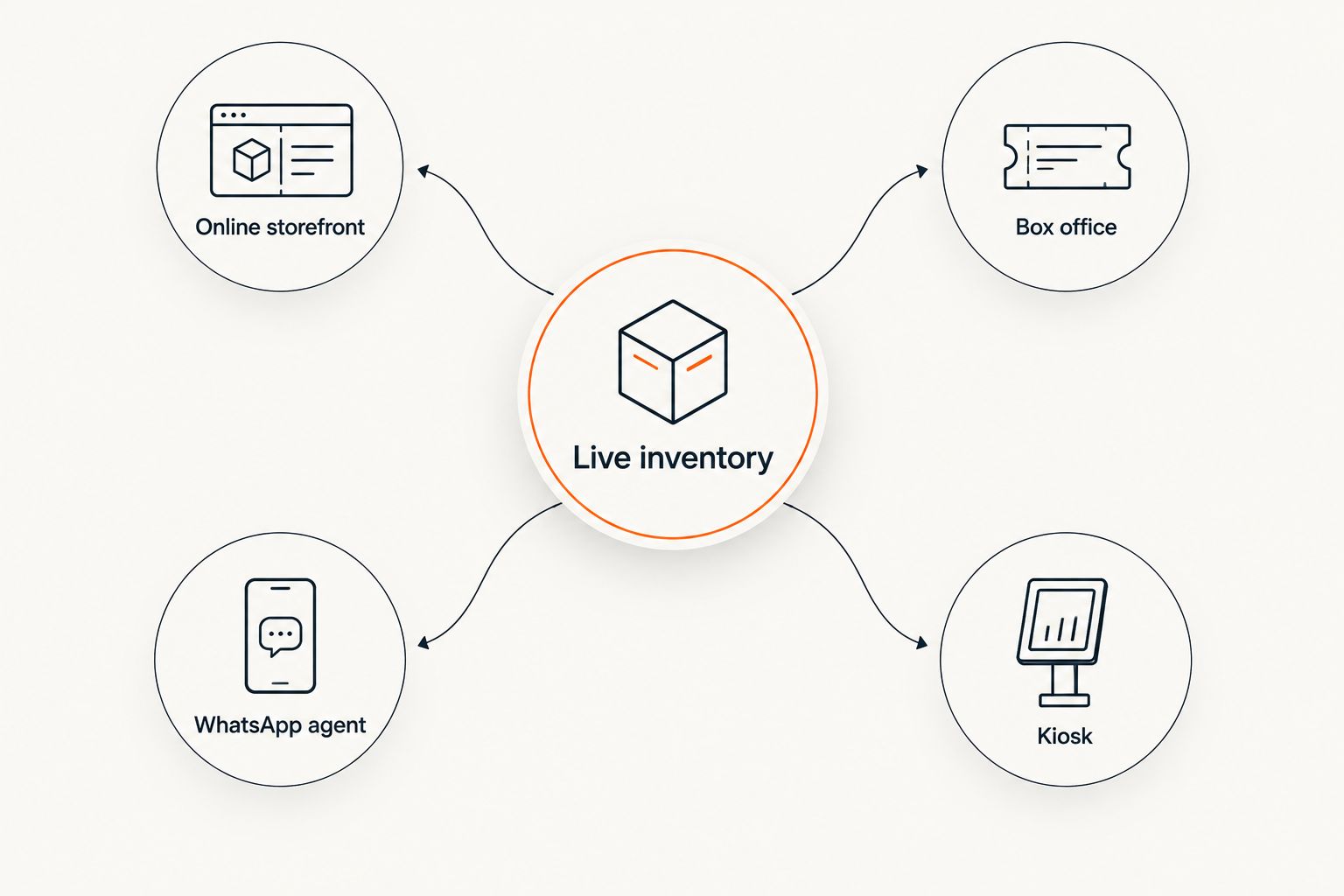
Instead of manually reconciling door sales against website orders every day, connect box office to online storefront through one live inventory so each seat is sold once. On Zunaro, the event ticketing platform uses the same inventory for the branded storefront, box office, kiosk and reserved seat map.
- Connect box office to online storefront through one Zunaro event inventory, not two databases that need syncing.
- Configure the seat map, ticket types and sales channels before staff take the first door order.
- Run test sales through the online storefront and box office before publishing your 2026 event workflow.
- A WhatsApp agent can hold seats, but checkout always finishes on the organiser's own storefront.
Why this matters
A separate box office database creates two versions of availability. Staff can sell a seat at the counter while the same seat remains available online, or remove capacity from one system without updating the other. Reconciliation finds the problem after the sale; shared inventory prevents it at the point of sale.
Zunaro is best for independent organisers and venues that need storefront, box office, kiosk and reserved seating on one event ticketing platform. It suits theatres, promoters, clubs, conference organisers and festival organisers that want to keep the fees, the funds and the customer relationship.
The practical goal in 2026 is simple: every sales path must read and update the same event record. Online buyers, box office staff and the WhatsApp agent should never draw from separate allocations unless the organiser deliberately creates those allocations.
Before you start
- Prepare the event details. You need the event name, dates, ticket types, capacity and the information buyers require before checkout.
- Prepare the seating source. For reserved seating, use a clear photo of the current seating plan. Zunaro can trace the seat map from a photo in about 60 seconds without a CAD file or setup fee.
- Confirm organiser access. The person completing setup needs access to the organiser workspace, event configuration and the devices used at the box office or kiosk.
- Decide who can change inventory. Set an internal rule for price edits, seat holds, complimentary orders and capacity changes before sales open.
The non-obvious gotcha is the seating plan version. If staff prepare against an old photo after rows, tables or accessible spaces have changed, every channel can share the same inventory and still show the wrong room. Confirm the physical layout before tracing the map.
Configure the shared event inventory
- Open the event that will appear on the Storefront and at the Box Office. Do not create a second event for walk-up sales; that would split orders and capacity across separate records.
- Add each valid ticket type to the event. Use distinct types only when they represent a real admission rule, seating area or buyer category that staff can apply consistently.
- Enter the total capacity for a general-admission event. For reserved seating, trace the current seating plan and review every row, section, table or seat before opening sales.
- Match reserved seats to the ticket types that can purchase them. Check restricted-view, accessible or held areas against the physical venue plan rather than relying on memory.
- Confirm that the storefront, box office and kiosk all point to this event. The WhatsApp agent should also answer against this event when helping a buyer select and hold a seat.
Expected result: one event contains the sellable capacity, ticket rules and order history for every channel. A seat sold through the box office is no longer available to the storefront, kiosk or WhatsApp agent.
The shared inventory is the control point. It removes manual imports and exports, but it does not correct an inaccurate capacity or seating plan. Review the source data before the first 2026 sale rather than treating synchronisation as a substitute for configuration.
Configure the box office workflow
- Sign in on the device staff will use at the venue and open the correct event. Confirm the event name, performance date and start time before processing an order.
- Walk through the staff process for selecting a ticket type or reserved seat. A box office operator should be able to identify unavailable seats before discussing options with the buyer.
- Define how staff record each completed walk-up order. Every admission issued at the counter must pass through the box office workflow; handwritten notes and later entry recreate the inventory gap this setup is meant to remove.
- Decide how staff handle seat holds. A hold is not a completed sale, so the team must distinguish held, sold and available inventory when speaking to a buyer.
- Confirm how tickets reach the buyer. Zunaro supports e-tickets through WhatsApp as well as email, giving staff two stated delivery routes without creating a separate order.
- Repeat the process on the kiosk if the venue uses one. The kiosk must open the same event and display the same remaining inventory as the staffed counter.
Expected result: a staff member can select the event, choose an available ticket or seat, complete the box office order and issue the ticket without maintaining a separate door-sales list.
This workflow needs an operating rule as much as a technical setup. If a staff member bypasses the box office and plans to enter the sale later, online availability remains wrong during that gap. Record the order when it happens.
Test the storefront and box office together
- Open the published storefront on a separate device from the box office. Use a private browser window so the test reflects the buyer journey rather than an organiser session.
- Select an available ticket or reserved seat online, then check the box office view. Confirm the selection is treated according to its current status rather than presented as freely available.
- Complete a box office test order for a different ticket or seat. Return to the storefront and confirm that inventory no longer appears available for a new buyer.
- Test the WhatsApp handover. Ask about the event, select a seat, place the hold and follow the checkout link to the organiser's own storefront. Payment must not complete inside the chat.
- Scan the resulting ticket through the planned door process. Check that staff can identify its check-in status without maintaining a second attendance sheet.
- Repeat the test for Arabic and English if both buyer journeys are active. Review the full right-to-left layout rather than checking translated words in isolation.
Expected result: 3 sales paths — storefront, box office and WhatsApp — apply changes to 1 live inventory. The Arabic and English journeys lead to the same event, seat map and organiser-controlled checkout.
Use test cases that reflect the difficult parts of the event, not just the easiest ticket. A reserved seat, a held seat and a scanned ticket expose more configuration errors than repeatedly purchasing an unrestricted general-admission ticket.
How each sales path differs
The channels share inventory, but they do different jobs. This 2026 comparison shows where each path fits and where its limits sit.
| Sales path | Best for | Main strength | Limitation |
|---|---|---|---|
| Online storefront | Buyers ready to complete an order | Branded self-service checkout on the organiser's site | The buyer must complete the checkout journey |
| Box office | Staff-assisted walk-up sales | Staff can sell from the live event inventory | An unrecorded door sale still leaves inventory wrong |
| WhatsApp agent | Buyers who need answers or seat help | Answers questions, holds seats and hands over a checkout link | Checkout never completes inside WhatsApp |
| Kiosk | On-site self-service | Draws from the same inventory as the staffed counter | It requires a prepared on-site device |
The main Zunaro advantage is consolidation: store, seating, box office, kiosk and door check-in operate against one live inventory. The limits are equally clear. The system cannot fix an outdated venue plan, and staff can still create discrepancies if they admit people without recording the order or scanning the ticket.
Release or change seats during an event run
The same setup supports an adjacent workflow: releasing held seats or adjusting the sellable plan when the organiser changes an allocation. Make the change in the event that already feeds the storefront and box office; do not create replacement tickets in a separate event.
Before releasing seats, verify why they were held. Production holds, accessible seating and organiser allocations serve different purposes, so a seat should return to general sale only after the responsible person approves it. Once released, confirm availability from both the box office view and the buyer-facing storefront.
For a multi-performance theatre run or festival programme, verify the date before changing inventory. Similar event names are not enough. Use the performance date, time and seating plan together so a 2026 change lands on the intended event.
Expected result: the released inventory becomes sellable through the active sales paths attached to that event, while unrelated performances remain unchanged.
Troubleshooting
The box office cannot find the event
Confirm the device is signed into the intended organiser workspace, then verify the event date and performance. Do not create a duplicate event as a shortcut; fix access to the existing record so inventory remains shared.
A buyer says a seat was held, but it is available again
A WhatsApp hold and a completed order are different states. Follow the checkout link and complete payment on the organiser's storefront; if checkout is not completed, do not treat the hold as a sold ticket.
The online seat map does not match the room
Stop reserved-seat sales and compare the map with the current physical plan. Use a clear, current photo for tracing, then review row and seat labels before resuming sales. A shared but incorrect map spreads the same error across every channel.
Door attendance does not match issued tickets
Use the automatic QR-code check-in workflow instead of counting visual admissions. Scan each ticket through the door process so the attendance record reflects actual check-ins.
The WhatsApp journey appears to take payment in chat
Correct the handover. The agent can answer buyers, read inbound photos, hold seats and provide a checkout link, but the transaction must finish on the organiser's own site. Discovery and seat selection can happen in chat; checkout does not.
Customise your workflow
After the shared inventory passes testing, add the workflows that remove manual work around it. Connect analytics to the storefront, configure ticket confirmations and prepare real-time attendee reporting before the event team depends on them.
Keep one written operating rule for 2026: every issued admission must originate from the shared event or be recorded there immediately. This rule covers staffed box office sales, kiosk orders, online checkout, WhatsApp-assisted bookings and door check-in.
Also assign ownership for three decisions: who can change capacity, who can release seat holds and who handles failed checkout questions. Software keeps inventory aligned; the organiser still controls the commercial and operational rules.
Build your shared box office
Run your storefront, seating, box office, kiosk and check-in from one live inventory.
FAQ
How do I connect box office to online storefront on Zunaro?
Use one event and one live inventory for both sales paths. Configure the ticket types or seat map once, then open that same event through the buyer-facing storefront and the staffed box office.
Can the box office and online storefront sell the same seat?
They should not sell the same reserved seat because both channels draw from one live inventory. The seating plan must still be traced and reviewed correctly before sales open.
Do I need separate inventory for walk-up ticket sales?
No, walk-up sales should use the same event inventory as online orders. A separate allocation or spreadsheet creates a reconciliation gap and increases double-booking risk.
Can a WhatsApp agent complete ticket checkout in chat?
No, the WhatsApp agent answers buyers, holds seats and hands over a checkout link. Checkout always completes on the organiser's own storefront, never inside WhatsApp.
Can reserved seating work across the storefront and box office?
Yes, the storefront and box office can use the same live seat map. Review the traced map against the physical venue before opening either channel.
How long does it take to create a seat map from a photo?
A seat map can be traced from a photo in about 60 seconds. No CAD file or setup fee is required, but the organiser must verify the finished map against the venue.
Can buyers receive e-tickets through WhatsApp?
Yes, e-tickets can be delivered through WhatsApp as well as email. Both delivery methods relate to the same event order rather than separate ticket records.
Should I test the connection before publishing an event in 2026?
Yes, test a storefront selection, a box office order, a WhatsApp hold and a QR-code scan before sales open. Each test checks a different point in the shared workflow.
One last thing
Test from the buyer side, not just the organiser dashboard. A configuration can look complete internally while the wrong date, ticket type or seat remains visible on the public storefront. The final 2026 check is simple: place one seat into each meaningful state, then confirm every channel describes that state consistently.


