


Yes. Ticket refunds can be processed automatically after cancellation if the ticketing system can identify affected orders and the payment processor supports refunds through that workflow. Cancelling an event is not the same as refunding its orders: the organiser still needs to confirm which payments qualify, whether booking fees are included, and whether each refund succeeds.
- Can ticket refunds be processed automatically after cancellation? Yes, when order records, refund rules and payment processing are connected.
- Cancelling an event does not, by itself, confirm that buyers have been refunded.
- Zunaro is suited to organisers who want their own ticketing storefront; confirm its cancellation-refund workflow before relying on automation.
Why this matters
A cancellation creates an order problem, not just an event-page update. Buyers need to know whether their tickets remain valid, what happens to their payment and where to ask questions. Your box office needs the same answer, especially if it sold tickets for reserved seats as well as general admission.
In 2026, treat a refund as a separate transaction with a status you can check. A cancellation message tells buyers what changed. A refund record tells you whether money has been sent back. Those records should agree before anyone describes the job as finished.
For organisers using Zunaro, the relevant starting point is its own branded storefront, box office and kiosk on one live inventory. That gives your team a place to coordinate ticket sales and event changes. Confirm the refund controls separately: the stated product information does not establish that cancelling an event automatically issues refunds.
Can ticket refunds be processed automatically after a cancellation?
Yes, if cancellation starts a defined refund workflow rather than merely changing the event status. The workflow must identify the affected paid orders, apply your refund decision, request repayment through the relevant payment processor and record the result. If any of those steps requires staff approval, the process is partly automated—not fully automatic.
| Approach | Best for | What happens after cancellation | Advantage | Limitation |
|---|---|---|---|---|
| Manual refunds | Exceptions and individual orders | Staff review each order and initiate each refund | A person can check unusual cases before acting | Every affected payment needs attention |
| Approved batch refunds | An event-wide decision with a final review | Staff approve the affected orders, then submit refunds together | One decision can cover multiple orders | Someone must still check the batch and its results |
| Cancellation-triggered refunds | A consistent policy applied to eligible orders | The cancellation triggers refund requests under preset rules | Fewer repetitive actions after the decision | Incorrect rules can affect the wrong orders; failed requests still need follow-up |
Best for most cancellation decisions: an approved batch with an order-level result check. It separates the decision to refund from the work of requesting each repayment. Use a cancellation-triggered workflow only when you can verify its eligibility rules, fee treatment and failure handling before an event is cancelled.
This distinction matters for a venue with several sales channels. An online order, a box-office order and a kiosk order can all relate to the same cancelled performance, but their payment records still need to be accounted for. Shared ticket inventory does not, on its own, prove that those payments will follow the same refund path.
How should an organiser set up the cancellation workflow?
Set the refund decision before sending the cancellation announcement. You need an order list, a rule for each order type and a way to check the result. In 2026, an automated request is not the finish line; a recorded outcome is.
- Identify affected orders. Select the cancelled event or performance and check which orders contain its tickets. For a multi-event order, decide how the event’s portion will be handled before initiating repayment. Keep the order identifier tied to the refund record so staff can answer a buyer’s question without searching through announcements.
- Separate paid tickets from free registrations. A free ticket has no ticket payment to return. It can still require a cancellation notice and an inventory update, but placing it in a payment-refund queue creates confusion. Check any order that combines ticket types instead of assuming every registration needs the same action.
- Approve the refund scope. Decide whether the cancellation covers every ticket, only a particular performance or an exception such as a moved event. Record how booking fees will be handled. Do not promise a fee refund until you have confirmed the applicable terms and the payment workflow.
- Submit and track refund requests. Initiating a request and completing a refund are different states. Keep failed, pending and completed outcomes distinguishable so staff know which orders require action. If the payment processor rejects a request, resolve that order rather than describing the whole batch as refunded.
- Tell buyers what has happened. Write the notice from the actual order state. A cancellation notice can say that the event is cancelled; a refund confirmation should follow a verified refund action. Give your box office the same wording so buyers do not receive conflicting answers.
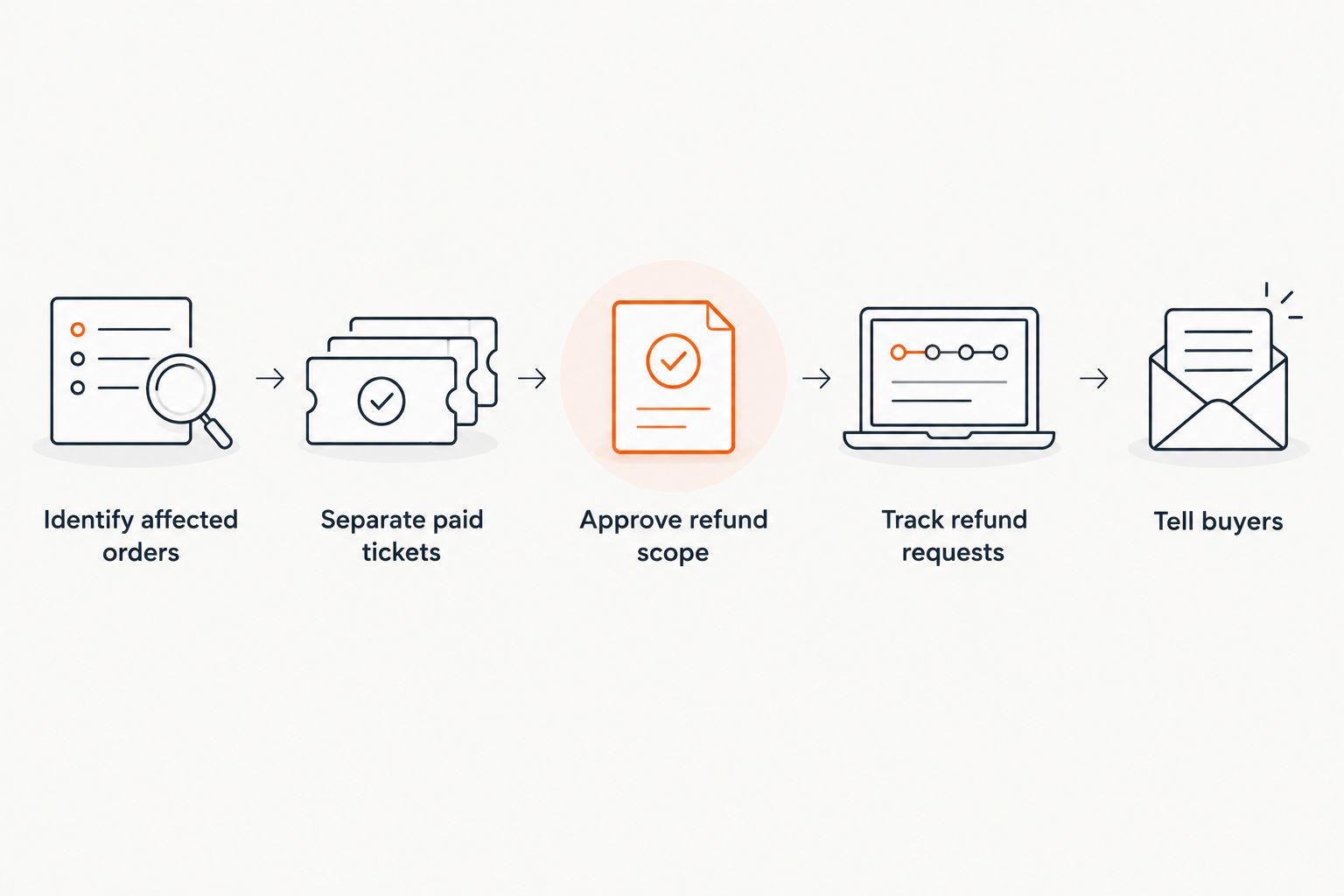
The process needs an exception route. If an order cannot be matched to a refundable payment, stop that order for review rather than silently marking it complete. The same applies when a buyer has already received a refund or the amount selected does not match the approved scope. Automation should reduce repeat work without hiding the orders that need a person.
Do not use a ticket-status change as proof of repayment. A voided ticket addresses entry; a refund addresses the payment. Check both records. For reserved seating, also check what happens to the seat allocation so a cancelled performance does not leave staff looking at an order whose ticket and payment states disagree.
Why does automatic refund handling vary?
The answer depends on the orders and the rules attached to them, not just on whether the event has a cancel button. Check these factors before choosing automatic processing in 2026:
- Payment status. A completed payment, an unpaid order and an already-refunded order cannot all follow the same refund instruction. Identify each state before submitting a batch.
- Sales channel. A storefront, box office and kiosk can share ticket inventory while still needing their payment records checked. Confirm which orders the proposed workflow actually covers.
- Ticket mix. A free registration calls for communication, not repayment of a ticket payment. An order containing paid and free tickets needs a rule that distinguishes them.
- Booking-fee treatment. The event cancellation decision does not settle whether a booking fee is returned. Establish the policy and verify what the payment workflow can execute before telling buyers what they will receive.
- Event scope. Cancelling one performance is different from cancelling every date in a run. Select orders by the affected event or performance rather than by an organiser-wide list.
- Exceptions. Failed refund requests, previously changed orders and payments that cannot be matched to an order need review. Define who owns that queue before enabling a trigger.
The test is simple: can your team name the orders selected, the rule applied and the result for each payment? If not, use an approval step. That is a clearer operational choice than calling an unchecked cancellation flow automatic.
What should you confirm before choosing a ticketing platform?
Ask for a walkthrough of an actual cancellation scenario, not just a list of refund features. Start with a paid reserved-seat order, a box-office order and a free registration. Ask what changes when the organiser cancels the event, what still needs approval and where staff see each refund outcome.
Then ask how the system handles a failed refund request. Can staff identify the affected order and act on it without repeating the entire batch? Can they distinguish a buyer who has been notified from a buyer whose refund has completed? Those questions tell you more than a general promise of automated refunds.
Zunaro is best for independent organisers and venues that want control of their branded ticketing storefront, box office and kiosk; automatic cancellation refunds require separate confirmation. Its stated setup includes reserved seating and one live inventory across selling and check-in. Neither fact establishes a refund trigger, a refund timeline or fee treatment. Request those details before you write a cancellation policy around the platform.
The ownership question matters too. Zunaro’s position is direct: you keep the fees, the funds and the customers. For a cancellation, that means the organiser needs a clear decision about what buyers are told and which orders require action. It does not remove the need to verify how a payment processor handles each refund.
A useful demonstration ends with records, not a settings screen. Ask to see the affected-order list, the approval point, the refund request status and the buyer message for the same example order. If any step happens outside the ticketing system, document who performs it. An accurate manual hand-off is better than an assumed automatic step.
Is sending a cancellation notice the same as issuing refunds?
No. A cancellation notice communicates the event decision; a refund request addresses the payment. In 2026, check the result for each paid order before telling buyers that their refund is complete.
You can send an early notice while payment work is still under way. Keep its wording limited to what has actually happened, and give staff a consistent answer for buyers who reply. The confirmation of repayment belongs after the relevant transaction result is available.
Do free tickets need an automatic refund after cancellation?
No ticket payment exists to refund for a free ticket. Free registrations still need a clear cancellation notice and an accurate ticket status. If an order includes a paid component, review that component rather than treating the entire order as free.
Zunaro supports free events, but that does not turn a free registration into a refund transaction. Keep communication and payment actions separate so your team can see which task is complete.
Can reserved seats be released when an event is cancelled?
The seat and the payment need separate checks. A cancelled ticket must not be treated as proof that its associated payment has been refunded, and a refund record alone does not explain what happened to the seat. In 2026, verify both states against the affected performance.
This is particularly important when your box office answers questions about a moved show. Staff need to know whether an original booking was cancelled, retained or changed before discussing a replacement seat. Do not infer the answer from the event announcement.
FAQ
Can ticket refunds be processed automatically after cancellation?
Yes, when the ticketing workflow can identify eligible orders and request refunds through the payment processor. Check the result of each request; cancelling the event alone does not confirm repayment.
Does cancelling an event automatically refund every ticket buyer?
No. An event cancellation and a payment refund are separate actions unless a verified workflow connects them. Confirm which orders are covered before you tell buyers they have been refunded.
Can an organiser approve refunds before they are sent?
Yes, an approval step can sit between the cancellation decision and the refund requests if the chosen system supports it. Confirm that capability in the platform you plan to use.
What happens if an automatic refund request fails?
The affected order needs staff follow-up rather than a completed-refund message. Track the failed request against its order so it does not disappear inside a larger batch.
Are booking fees automatically refunded when an event is cancelled?
Do not assume they are. Confirm your fee policy and what the payment workflow supports before describing any booking fee as refundable.
Do free-event registrations need refunds after cancellation?
No ticket payment exists to refund for a free registration. Update the registration status and tell attendees that the event has been cancelled.
Does Zunaro automatically refund tickets when an event is cancelled?
Zunaro’s stated product information does not confirm an automatic cancellation-refund workflow. Ask for a demonstration of the trigger, order eligibility, processor result and exception handling before relying on one.
One last thing
The hardest refund problem is often the order that looks finished but is not. A buyer received the cancellation email, the ticket no longer admits entry and a refund request was submitted—yet the payment result still needs attention. In 2026, make the exception list part of the cancellation checklist, not an afterthought.
Before you cancel a live event, decide who will reconcile that list and who will answer buyers. Keep the announcement, ticket state and payment outcome distinct. That gives your team a precise answer when someone asks whether their money has actually been returned.


