


Yes—you can start an event ticket waitlist when an event sells out, then invite people to book if tickets are released. Joining must not promise admission: publish your allocation rules, confirm sellable capacity before making an offer, and require a completed booking before issuing a ticket.
- An event ticket waitlist records demand; it does not reserve admission or create extra capacity.
- Publish allocation rules before collecting names, including how you handle groups and reserved seating.
- Release tickets against live inventory, not an assumed number of cancellations or no-shows.
- ZunaroSpace suits independent organisers wanting branded event ticketing, reserved seating and a connected box office.
Can I start a waitlist when an event sells out?
Yes. Treat the waitlist as a queue for a booking opportunity, not a second ticket inventory. You can manage that queue through a supported ticketing feature or a separate process, provided your team controls allocations and communicates the rules clearly.
For your 2026 event plan, use this sequence:
- Confirm the sell-out. Check the relevant performance, ticket category and sales channels before closing registration.
- Publish the rules. Explain who receives an offer, what happens if they decline, and whether groups must stay together.
- Collect requests. Record contact details, the requested performance, ticket quantity and relevant seating requirements.
- Verify released inventory. Confirm that a cancellation, expired hold or authorised release has actually returned tickets to sale.
- Offer the booking. Contact eligible people according to your published policy, then direct them to checkout.
- Reconcile the result. Remove fulfilled requests, record declined offers and check remaining inventory before continuing.
Your storefront and box office must agree about what can be sold. The guide to syncing ticket inventory between kiosk and storefront explains the connected-inventory principle behind that control.
Why this matters
Every show has seats that never sold - and no one was working on them.
A sold-out event needs a different response from an event with unsold tickets. You are recording demand beyond current capacity, then deciding what to do when a legitimate booking opportunity appears.
A waitlist gives interested people a defined next step without promising something you cannot deliver. It also gives your team a record to work from instead of scattered messages across inboxes and social channels.
Do not confuse a long queue with permission to admit more people. Your venue's approved capacity, event configuration and access arrangements still govern every release.
Choose how you will manage the queue
For a 2026 event, choose the process your team can operate accurately. Automation is useful only when its allocation rules match the policy you have published.
| Approach | Best for | Advantage | Limitation |
|---|---|---|---|
| Manually managed waitlist | Organisers reviewing each release individually | Staff can assess group requests and seating needs before contacting anyone | Staff must maintain the queue, contact people and reconcile bookings |
| Integrated waitlist workflow | Organisers whose platform supports the required allocation rules | Requests and booking activity can stay within a connected workflow | You must check how offers, holds and expiry actually work |
Neither approach excuses an unclear policy. A manually maintained queue with consistent rules is preferable to an automated release that invites more bookings than you can fulfil.
Before choosing an integrated workflow, ask for a demonstration of the whole sequence: joining, receiving an offer, completing checkout, declining and leaving the queue. Check what staff see when an offer expires or a group cannot fit.
Do not assume a notification also reserves a ticket. Those are separate actions, and your wording must reflect the workflow you actually use.
Set the allocation policy before collecting names
Publish the rule before you need to apply it. Changing the order after requests arrive creates avoidable disputes and leaves staff making inconsistent decisions.
Queue order
A timestamp-based queue is a clear operating choice when requests are interchangeable. If you use another method, explain it at registration rather than implying everyone will be contacted in joining order.
State whether an invitation goes to an individual request or to a wider group. A general announcement that booking has reopened is not the same as a reserved offer.
Group requests
Decide whether a group must fit in full before receiving an offer. Record whether the person submitting the request accepts fewer tickets or separated seats.
Do not silently split a group to fill isolated seats. Ask for that preference when collecting the request, or confirm it before offering a booking.
Seating requirements
For reserved seating, a released ticket is a particular seat, not simply another unit of capacity. A request for adjacent seats needs a different match from a request that accepts separate locations.
Use the reserved-seating setup guide when planning how sections, rows and seat selection affect your release process.
Offer expiry
If an invitation includes a temporary hold, explain when it ends and what happens afterwards. If it does not include a hold, say that the invitation is an opportunity to book rather than a reservation.
Use the event's local time and make the deadline readable. Do not make staff interpret an ambiguous message while several people are trying to complete checkout.
Why event ticket waitlist rules vary
Your 2026 waitlist policy should reflect the event's actual inventory and operating arrangements. These factors determine which requests you can fulfil:
- Performance: A request for a particular show or session does not automatically apply to another date.
- Seating format: General admission requires a capacity check; reserved seating also requires a suitable seat match.
- Group size: A release can fit an individual request without fitting a larger party.
- Release source: A confirmed cancellation differs from a hold that has not yet expired.
- Access requirements: An offered location must suit the requirements attached to the request.
- Time remaining: Your staff need a workable point at which advance offers stop and door procedures take over.
Keep these rules visible to the people operating the queue. A policy buried in a planning document will not help the box office make a consistent decision during a busy release.
Run each release against confirmed inventory
Verify the tickets, contact the eligible request, then reconcile the booking. Repeat that sequence rather than sending an unrestricted message to the entire queue.
Use these checkpoints for every release:
- Verify inventory: Confirm the exact performance, category and seats that can return to sale.
- Match requests: Apply your queue order, group policy and seating requirements.
- Send offer: Explain what is being offered and whether anything is held.
- Confirm booking: Treat the request as fulfilled after the booking is completed.
- Update queue: Record the outcome before considering another request.
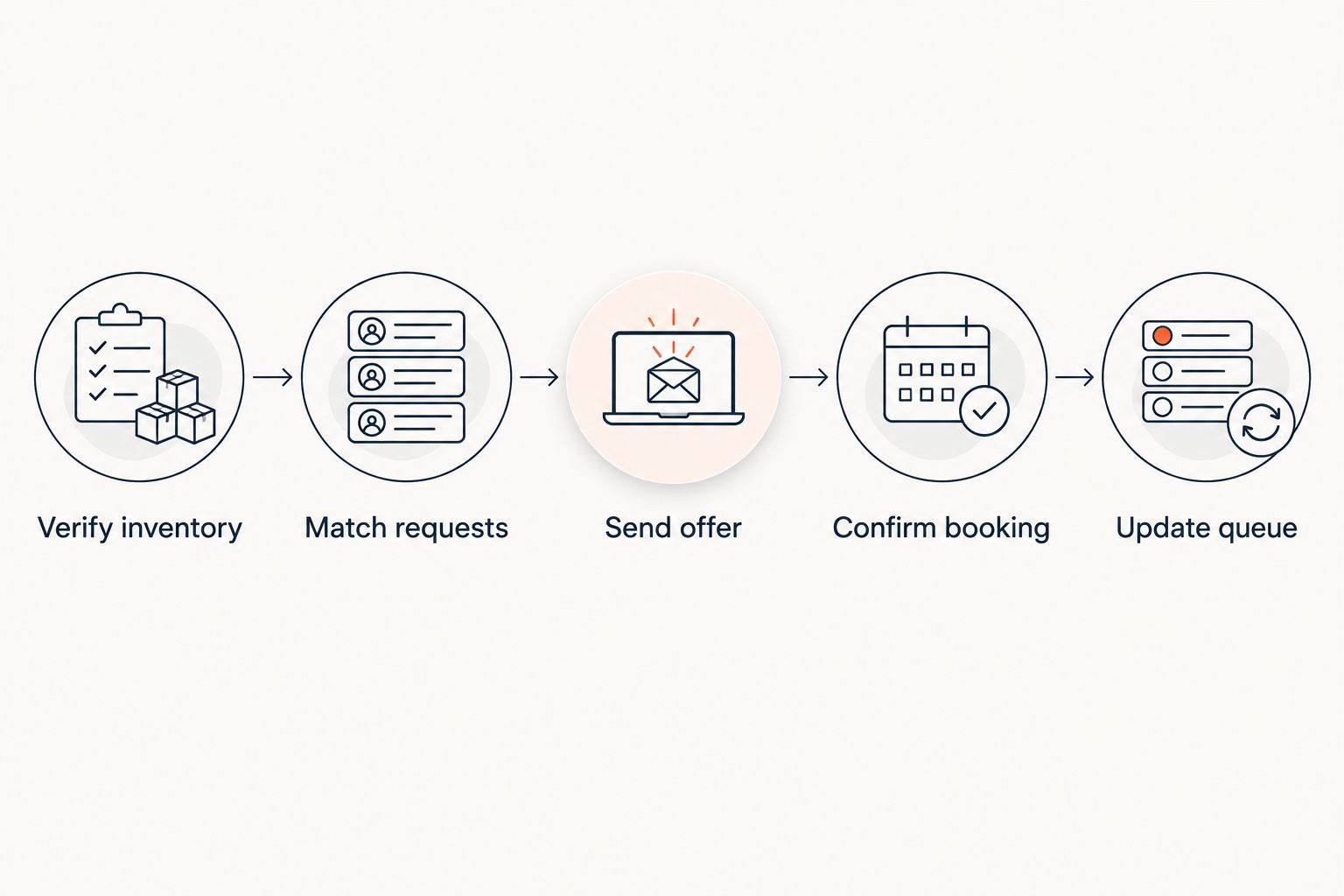
For your 2026 operating procedure, assign responsibility for every checkpoint. Staff should know who can release inventory, who contacts the queue and who resolves a disputed allocation.
A request marked as contacted is not necessarily fulfilled. Keep offer status separate from booking status so a sent message does not disappear into the same category as a completed order.
What should your waitlist form and messages say?
Collect information you will actually use to allocate tickets. Keep joining straightforward, but avoid a form so sparse that staff must chase every person for basic details.
Useful fields include:
- Contact name and the channel you will use for offers.
- Event date, performance or session requested.
- Ticket quantity and acceptable ticket categories.
- Whether a smaller allocation or separated seating is acceptable.
- Relevant seating or access requirements.
- An acknowledgement that joining does not guarantee a ticket.
Explain how someone can withdraw a request. Keep event-specific waitlist communication separate from consent to receive unrelated marketing.
Your joining confirmation should state that the request was recorded and explain the allocation method. Your offer should identify the performance, quantity, seating details and checkout action; include an expiry only when your process actually applies one.
Your closing message should make the outcome clear. Do not leave people expecting another invitation after your team has stopped operating the queue.
Where a connected ticketing platform fits
ZunaroSpace is an event ticketing platform for independent organisers who want branded selling, reserved seating and a connected box office. Storefront, seating, box office, kiosk and door check-in use one live inventory.
That connected setup is relevant to waitlist operations because staff need a consistent record of what can be sold. It is not a substitute for defining queue order, group handling or offer expiry before using a waitlist workflow.
ZunaroSpace also provides a WhatsApp agent that answers buyers, holds seats and hands over a checkout link. AI that sells your tickets. Keep that seat-holding mechanism distinct from a waitlist allocation policy; do not describe a conversation as a guaranteed ticket.
You keep the fees, the funds and the customers. Organisers pay nothing per ticket; the buyer booking fee is AED 3.99, or AED 1.99 under AED 20, and free events carry none. Ask Zunaro Pro is AED 179/mo, with a 14-day trial and no card required.
Based at DTEC, Dubai Silicon Oasis. Built for the Gulf - the UAE and Saudi Arabia.
Can I start a waitlist before every ticket category sells out?
Yes—scope the waitlist to the sold-out performance or category, while keeping other bookable categories clearly separate. Do not label an entire event sold out when your intention is to collect requests for a particular section.
Record the requested category so staff do not treat interest in one seating area as consent to book another.
Can I release waitlist tickets when someone does not arrive?
Do not release a ticket simply because its holder has not checked in. A late arrival still holds a booking unless your published terms and operating policy establish a valid release process.
Set the door procedure before the event. Staff need an explicit decision rule, not an assumption that an unscanned ticket means an empty seat is free to sell.
Should I offer a different performance instead?
Yes—offer another performance as a separate choice, not a silent substitution. Keep the original request active or close it according to the person's response and your published policy.
Demand for an alternative date is useful planning information. It does not establish that those people have booked or will attend.
FAQ
Can I add an event ticket waitlist after announcing a sell-out?
Yes—publish the waitlist and its allocation rules after confirming the relevant inventory is sold out. Make clear that joining records a request rather than guaranteeing admission.
Does joining a waitlist reserve a seat?
No—joining a waitlist does not itself reserve a seat. If your process later creates a temporary hold, explain its terms in the offer.
Should I contact everyone on the waitlist at once?
Use the communication method that matches your published allocation policy. An unrestricted announcement gives recipients a chance to book; it does not guarantee each recipient a ticket.
Can I keep groups together on a ticket waitlist?
Yes—record the requested group size and whether the group accepts a smaller allocation or separated seats. Offer seats according to those preferences and your published queue rules.
Can I use a spreadsheet instead of a ticketing waitlist feature?
Yes—you can maintain a manual queue, provided staff control allocations and reconcile completed bookings. A spreadsheet does not hold seats or update ticket inventory by itself.
Can ZunaroSpace support the ticketing operation around a waitlist?
ZunaroSpace connects storefront, seating, box office, kiosk and door check-in on one live inventory. Confirm the queue order, offer and expiry workflow you intend to use before publishing waitlist promises.
What should happen to unfulfilled requests after the event?
Close the event-specific queue and communicate that no further offers will be made. Do not treat a waitlist request as permission for unrelated marketing.
One last thing
Write the closing rule before you open the queue. In your 2026 event plan, specify when advance offers end, who takes responsibility at the door and how remaining requests are closed.
The hardest waitlist decision is not collecting another name. It is deciding what staff should do when a request, a seat release and an approaching start time do not line up.
Give the team that answer in advance. A clear stopping point protects the booking process from last-minute exceptions and leaves every request with a recorded outcome.


