


Every show has seats that never sold - and no one was working on them. To reduce no-shows at ticketed events, give booked attendees clear arrival instructions, make tickets easy to retrieve, provide a route for reporting changed plans, and reconcile attendance after the doors close. Treat unsold seats and booked-but-unused tickets as separate problems: selling another ticket does not resolve an existing attendee’s reason for missing the event.
- How to reduce no shows at ticketed events: clarify arrival, deliver accessible tickets, and reconcile check-in.
- ZunaroSpace suits independent organisers seeking event ticketing with shared store, box office and door inventory.
- Event reminders should explain attendance, not repeat the sales pitch.
- Separate cancellations, unused tickets and missed scans before changing your attendance process.
Why this matters
A ticket sale records a booking. It does not establish that someone reached the venue or entered the room. Your attendance process needs to connect those stages without treating every missing scan as a deliberate absence.
For your 2026 event operations, start with the event reminder guide, then check the entire journey from confirmation to admission. A reminder cannot fix an incorrect entrance, an inaccessible ticket or a cancellation request nobody reads.
Make attending straightforward before adding more messages. Your objective is a usable ticket, an understood arrival plan and an accurate attendance record—not a larger communications calendar.
How to reduce no shows at ticketed events
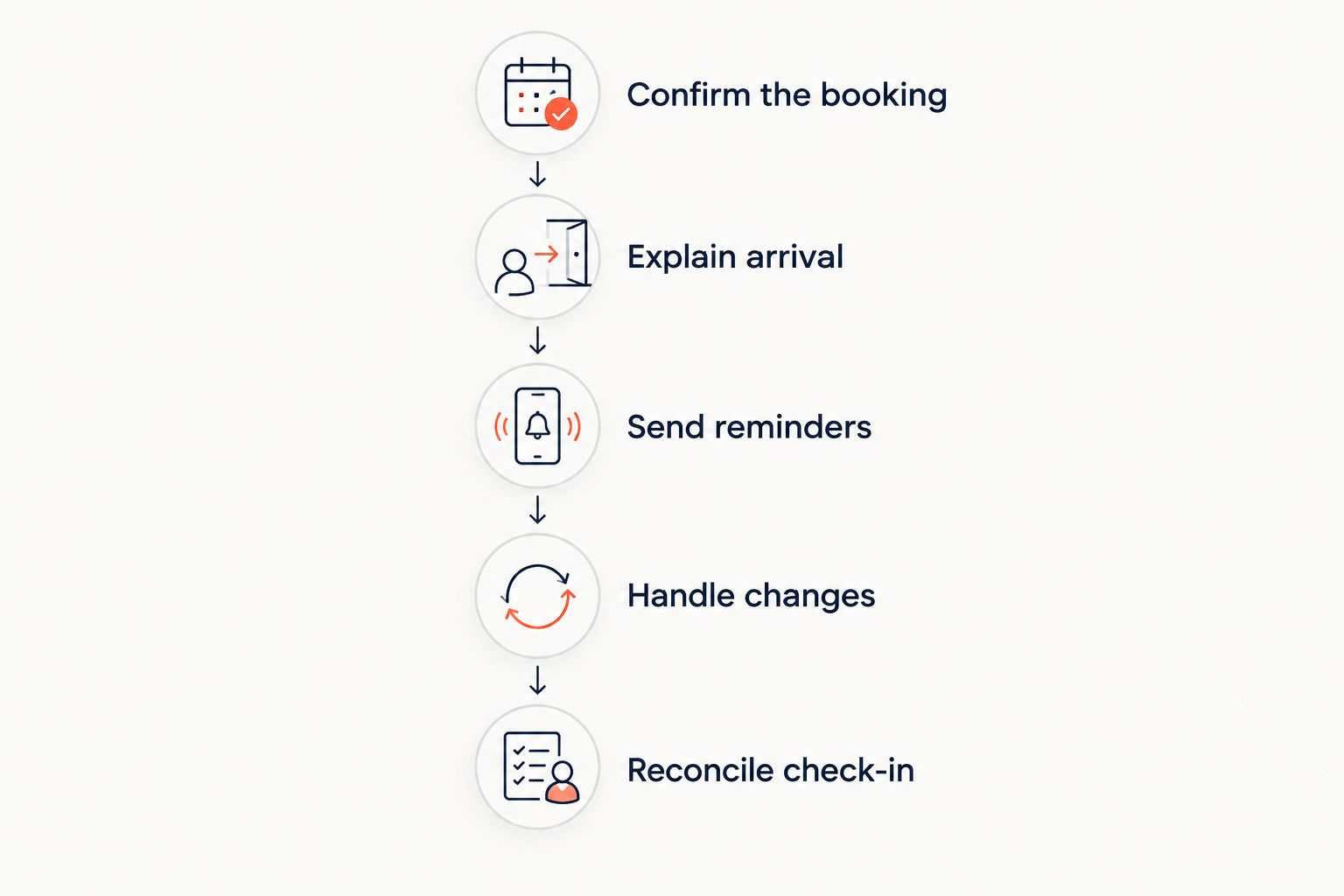
Use the following sequence as an operating checklist. These are process recommendations, not a promised reduction in your no-show rate.
Confirm the booking
Check that your confirmation identifies the correct event, performance, date and venue. For recurring events, the performance matters as much as the event name. An attendee holding a valid ticket for a different session needs a different response from someone who has not booked.
Make the ticket retrieval route obvious. Explain whether attendees should present a digital ticket or use your established collection process. Do not leave door staff to interpret instructions that contradict the confirmation.
For group bookings, tell the purchaser how the group should arrive under your actual admission rules. A purchaser’s contact details are not proof that every guest received the necessary information.
Explain arrival
Give attendees the entrance, doors-opening time, event start time and any admission restrictions that apply. Separate these details visibly. A start time alone does not explain where to queue or whether late admission is permitted.
Include practical information that your venue has verified, such as accessibility arrangements and the procedure for collecting tickets. Use the same instructions in your event page, confirmation and reminder. Conflicting messages create questions your door team must resolve during admission.
If the venue or entrance changes, identify the change explicitly. Repeating the full original message without highlighting the revised detail makes the correction harder to spot.
Send reminders
Build reminders around what attendees need to do next. Put the event date, arrival instructions and ticket retrieval route ahead of promotional copy. Someone who has already booked needs help attending, not another invitation to purchase.
Choose your sending schedule around the event’s actual logistics. An event involving travel requires a different communication plan from a local recurring performance. Assign an owner to review the audience and message before sending.
Exclude cancelled bookings where your records support that distinction. Also check that a changed performance or venue has not left an outdated scheduled message waiting to send.
Handle changes
Give attendees a clear route to report that they cannot attend. State your actual cancellation, refund and transfer rules before they need them. Do not imply that a message automatically cancels a ticket unless your workflow does that.
Decide who handles those requests and who updates the booking record. A cancellation sitting in an inbox is not the same as a released seat in inventory.
Where your policy permits returning a seat to sale, confirm the original booking’s status before offering it again. An expected absence is not permission to sell someone else’s valid seat.
Reconcile check-in
Record admission consistently across the entrances and sales channels you use. If staff admit someone without completing the normal check-in process, establish how that exception reaches the final attendance record.
After the event, compare valid tickets with completed admissions. Review cancellations, transfers and manual exceptions before classifying unused tickets as no-shows. Keep the original booking and attendance evidence connected.
A ticket-level report measures unused admissions. It does not necessarily measure absent purchasers: someone buying for a group can attend while another guest does not.
Which attendance intervention should you prioritise?
Choose the intervention that addresses the problem in your own records. More reminders are not the right response to every attendance issue, and a door-system change does not explain why someone decided not to travel.
| Intervention | Best for | Practical benefit | Limitation |
|---|---|---|---|
| Arrival reminder | Bookings with unclear attendance instructions | Gives attendees the information needed to reach admission | Does not resolve changed plans or cancel a booking |
| Ticket delivery | Attendees struggling to retrieve their tickets | Provides a defined route to the admission credential | Receiving a ticket does not confirm attendance |
| Cancellation route | Attendees who know they cannot attend | Gives your team a chance to resolve the booking before doors open | Requires a policy and someone responsible for acting on requests |
| Check-in reconciliation | Events with missing scans or manual admissions | Separates unused tickets from recording exceptions | Improves measurement; it does not itself persuade attendees to come |
For your 2026 checklist, select a specific failure point rather than deploying every intervention at once. Keep a record of the change so the next event review has something concrete to examine.
Fix contradictory instructions immediately. A later attendance comparison cannot justify leaving the wrong entrance or performance date in a scheduled message.
Why no-show results vary
Your booking and admission records need context. These factors change how you should interpret the attendance gap; investigate them rather than assuming they explain every absence.
- Booking unit: A single order can contain several tickets. Decide whether your report concerns orders, tickets or individual attendees.
- Performance selection: Recurring events and multi-session programmes require attendance to be matched to the correct occurrence.
- Ticket status: Cancelled, refunded or replaced tickets should not be treated as valid unused admissions.
- Group arrival: Guests arriving separately need an admission process consistent with your booking rules.
- Venue instructions: An entrance change or late-admission rule belongs in your communication review.
- Check-in exceptions: Manual admission and incomplete scanning need reconciliation before the final attendance total is accepted.
Build these distinctions into your 2026 reporting definitions. Apply the same definitions to comparable events; changing the denominator makes a trend difficult to interpret.
For example, excluding cancelled tickets in one report but leaving them in another changes what the reported attendance gap means. Keep the policy consistent and document corrections separately.
What should an event reminder actually say?
An event reminder should tell a booked attendee how to attend. Lead with the event and performance, then provide the arrival details and a clear route to retrieve the ticket. Include the contact route for questions or changed plans.
Use a short operational checklist:
- Confirm the event date and the booked performance.
- Distinguish doors opening from the programme’s start.
- Identify the correct entrance and relevant access instructions.
- Explain how to retrieve or present the ticket.
- State applicable late-arrival restrictions.
- Point to your actual cancellation or transfer procedure.
Keep commercial offers separate from essential admission information. If the message also contains promotional content, the arrival instructions must remain easy to find.
Preview the message as an attendee would receive it. Check the selected audience, event details and ticket instructions before scheduling. A test message checks the content; it does not establish that every intended attendee will receive or read the final send.
Should you release a seat when someone does not reply?
No: silence is not a cancellation. Keep a valid booking intact unless your disclosed terms and an authorised action establish otherwise. A reminder response and a ticket’s admission rights are different things.
If an attendee reports that they cannot come, follow your actual policy. Confirm whether the booking is cancelled, transferred or still valid, then update inventory through the appropriate workflow.
Do not overbook reserved seats based on an assumed absence. Filling empty seats and protecting existing bookings require separate decisions, especially when the attendee still holds a valid ticket.
Where the ticketing platform helps—and where it stops
An event ticketing platform gives your team the operational records and channels needed to run this process. It does not establish why an individual stayed away.
ZunaroSpace event ticketing is best for independent organisers and venues that want storefront, box office, kiosk and door check-in on one live inventory. The platform supplies that shared inventory, reserved seating and e-ticket delivery through WhatsApp as well as email. Those mechanisms support ticket access and admission; they are not evidence of a guaranteed attendance improvement.
ZunaroSpace also provides a WhatsApp agent that answers buyers, holds seats and hands over a checkout link. Its campaign agent creates a blast, previews the audience and rendered email, sends a test, schedules and reports attributed revenue. Use those supported mechanisms without confusing sales attribution with attendance reporting.
Events can be discovered and booked inside ChatGPT and Claude, including choosing a seat on the real map. Checkout completes on the organiser’s own site, never in chat. Discovery and booking address ticket sales; they do not replace your post-booking attendance plan.
You keep the fees, the funds and the customers.
Organisers pay nothing per ticket. The buyer booking fee is AED 3.99, or AED 1.99 for tickets under AED 20; free events carry none. Ask Zunaro Pro is AED 179/mo, with a 14-day trial and no card required. These are platform economics, not a claim that charging attendees prevents no-shows.
AI that sells your tickets.
Based at DTEC, Dubai Silicon Oasis. Built for the Gulf - the UAE and Saudi Arabia.
How to review your next event
For your next 2026 event, name an owner for confirmation accuracy, attendee messages, booking changes and door reconciliation. The same person can cover several responsibilities, but none should be left implicit.
Before doors open, check the scheduled messages against the live event details. At admission, make sure staff know how to record exceptions. After the event, resolve those exceptions before discussing attendance performance.
Keep the review focused:
- Which valid tickets remained unused after reconciliation?
- Which questions appeared repeatedly before admission?
- Which cancellation requests needed manual follow-up?
- Which admission exceptions affected the attendance record?
- What specific process will change for the next comparable event?
Ask absent attendees for feedback where your communication permissions allow it. Separate their stated reasons from your team’s assumptions. Feedback explains the responses you receive, not every unused ticket.
FAQ
What’s the best way to reduce no-shows at ticketed events?
Start with clear arrival instructions, accessible tickets, a defined cancellation route and accurate check-in. Choose additional actions from the problems in your own booking and attendance records rather than assuming every absence needs another reminder.
Do event reminders guarantee better attendance?
No, event reminders do not guarantee attendance. They communicate the date, arrival details and ticket retrieval route, but they do not resolve every changed plan or personal reason for missing an event.
Should I use WhatsApp or email for event tickets?
Use the supported delivery channels that fit your attendee communication process. ZunaroSpace event ticketing delivers e-tickets through WhatsApp as well as email; delivery through either channel does not establish that the recipient attended.
Can I resell a seat if the attendee ignores my reminder?
No, an unanswered reminder does not cancel a valid ticket. Release a seat only after the booking status and your disclosed policy establish that it can return to sale.
How do I calculate ticket no-shows accurately?
Compare valid tickets for the specific performance with reconciled admissions, excluding cancelled or replaced tickets as appropriate. Resolve manual admissions and missing scans before classifying remaining unused tickets as no-shows.
Is an unused ticket always an absent attendee?
No, an unused ticket record can reflect a check-in exception rather than an absence. Reconcile door records and manual admissions before making that classification.
What should I change in my 2026 attendance process?
Choose a specific failure point in your 2026 booking-to-admission process, such as contradictory arrival instructions or unprocessed cancellation requests. Record the change and review the next comparable event using the same attendance definitions.
One last thing
A missing scan is a recording status, not a reason for absence. Before sending a message asking why someone missed the event, check whether the door team admitted them manually.
That final reconciliation protects the usefulness of your report and avoids questioning someone who was already in the room. Then tackle the genuine unused bookings with clearer instructions and a better change-handling process.


