

Yes, ticketing platforms can send automatic event reminders when they include a scheduled messaging feature or an event-based reminder workflow. You need to distinguish a message scheduled for a fixed date from a reminder that follows each attendee’s booked performance. Ticket delivery, promotional campaigns and pre-event reminders are different functions; confirm the exact workflow before choosing your platform.
- Can ticketing platforms send automatic event reminders? Yes, but scheduled campaigns and booking-triggered reminders work differently.
- WhatsApp ticket delivery does not establish that a platform supports automatic pre-event reminders.
- Choose reminders tied to the booked performance, with audience checks and a preview before sending.
- Verify event changes, cancelled bookings and time zones before enabling an unattended reminder workflow.
Can ticketing platforms send automatic event reminders?
Yes. The deciding question is what starts the reminder and which bookings it includes. A scheduled campaign sends at a time you choose. A booking-triggered reminder uses a rule linked to the attendee’s event or performance.
For a 2026 platform evaluation, ask the supplier to demonstrate the complete journey: select an event, identify eligible recipients, preview the message and show what happens when a booking changes. A messaging feature on a feature list is not enough.
ZunaroSpace is an event ticketing platform with a campaign agent that previews audiences and rendered emails, sends tests and schedules campaigns. That establishes scheduled campaign capability, not a separate claim that every booking automatically receives a pre-event reminder.
Ticket confirmations deserve their own check. The guide to sending WhatsApp ticket confirmations covers a different point in the attendee journey from a message sent before doors open.
| Message option | Best for | Main benefit | Main limitation |
|---|---|---|---|
| Scheduled campaign | A defined event audience receiving a planned message | You control the send time and review the content | Verify whether the audience updates after scheduling |
| Booking-triggered reminder | Programmes with separate performances or entry sessions | The rule can follow the attendee’s booked occurrence | Verify how changes, cancellations and late bookings affect the rule |
| Ticket confirmation | Delivering booking details after a purchase | Gives the recipient a booking record | Does not replace a later arrival reminder |
| Manual event update | An organiser reviewing a changed event before sending | Gives staff direct control over the message | Requires staff action rather than an unattended workflow |
None of these options is a substitute for checking the others. A platform can deliver tickets and schedule campaigns without offering a performance-relative reminder rule.
Why this matters
A reminder should explain the next action, not repeat the sales pitch. Someone who has already booked needs the correct date, venue, arrival instructions and ticket access. They do not need another message asking them to purchase the same event.
Your operational risk is a mismatch between the message and the booking. A correct email sent to the wrong performance audience is still wrong. The same applies to an old venue address or an arrival instruction that no longer matches the event.
When comparing platforms in 2026, assess reminders alongside orders, seating and check-in. Those systems contain the information your message needs. Ask how the reminder uses that information rather than assuming every part of the platform stays connected automatically.
Scheduled campaigns: best for planned event messages
A scheduled campaign is useful when you want to prepare an event message, inspect its audience and approve its content before it goes out. The defining action is your chosen send time. It is not necessarily a rule attached to every individual booking.
Ask whether the recipient list is fixed when you schedule the campaign or refreshed when it sends. That distinction matters if tickets continue selling between preparation and delivery. Do not treat a previewed audience as proof that later bookings will be included.
The strength of scheduled campaigns is editorial control. You can review the event details, send a test and make the wording specific to the venue or performance. The trade-off is the need to confirm audience handling and maintain the schedule when circumstances change.
Choose a scheduled campaign when approval matters more than unattended repetition. For your 2026 event calendar, document who checks the audience, who approves the message and who revisits it after an event change.
Booking-triggered reminders: best for performance-specific messages
A booking-triggered reminder follows a rule associated with the booked event occurrence. When evaluating this option, ask the supplier to show the event date, performance identifier and recipient source used by the rule.
This approach suits an organiser who needs messages to follow different performances rather than a shared campaign date. Its strength is the relationship between the booking and the reminder. Its limitation is that the rule must handle exceptions correctly.
Ask what happens when a buyer changes performances, when an order is cancelled and when a booking arrives after the normal reminder point. These are demonstration questions, not features to assume. A supplier should show the resulting audience and message behaviour.
Choose booking-triggered reminders only after testing the exceptions. A rule that works for an unchanged booking does not establish that it works for your whole programme.
Why automatic event reminder workflows vary
The word automatic describes several different operations. Keep these factors separate when assessing a platform:
- Sales channel: Establish whether bookings from the storefront, box office and kiosk enter the same reminder audience. Do not assume a reminder configured for online sales covers every order source.
- Event structure: Check whether a reminder identifies the particular performance or session, not just the event’s general title. Reserved seating makes the connection to the correct booking especially important.
- Delivery channel: Email ticket delivery, WhatsApp ticket delivery and reminder messaging are separate capabilities. Verify the channel used by the reminder itself.
- Language: For Arabic and English communications, inspect the actual message and its right-to-left rendering. Storefront language support does not prove reminder layout quality.
- Organiser control: Confirm who approves content, chooses recipients and edits the schedule. Your branded storefront should not be confused with control over every outgoing message.
These factors give you a practical comparison framework without relying on a broad automation label. Ask for observable behaviour and record the result.
How do you check whether reminders work before an event?
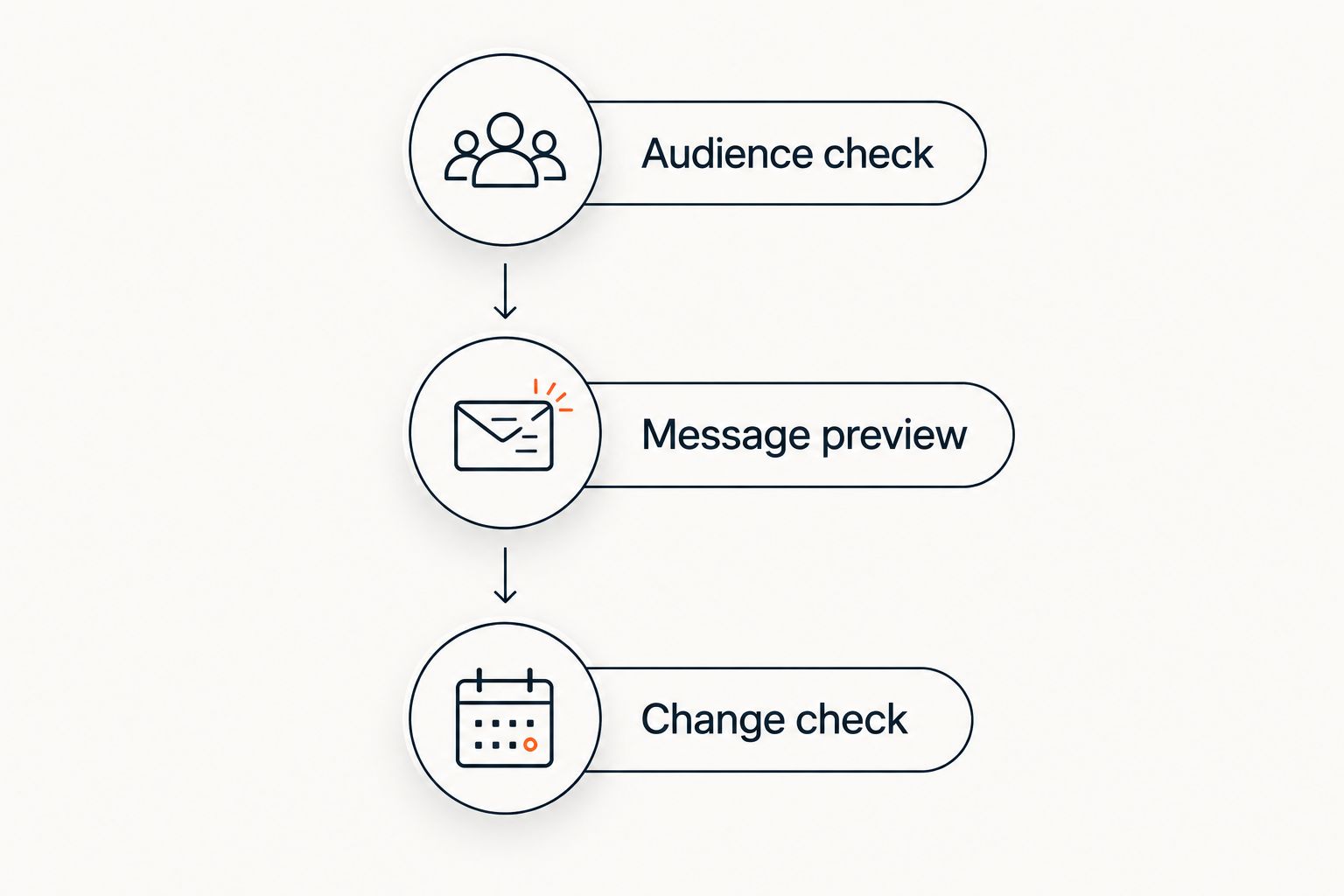
Test the audience, the message and the booking changes before enabling reminders. Use a controlled event and staff-owned recipient details. You are checking behaviour, not estimating attendance improvements.
Audience check
Start with a booking for the intended performance. Inspect the audience and confirm that the recipient belongs there. Then use a booking for a different performance to check that the workflow keeps the audiences separate.
Repeat the check with the order sources you actually use. An organiser selling through a storefront and a box office needs to understand both paths. Record exclusions as clearly as inclusions.
Message preview
Check the event title, performance date, local time, venue and ticket access instructions. Separate doors opening from the event starting. If the message contains booking-specific details, compare them with the order record.
Send a test to an inbox or messaging account your team controls. Inspect the rendered message rather than relying on the editor. For bilingual events, review both language versions and any right-to-left content.
Change check
Change a relevant event detail in the test setup and inspect the reminder again. Ask whether a scheduled message retains its original content or reads the updated event information when it sends.
Next, test the booking exceptions your operation needs to handle. Include a cancellation, a performance change and a booking made after scheduling. Do not approve the workflow until your team understands the outcome of each case.
Keep the test result with your event setup instructions. In a 2026 operations handover, another staff member should be able to see which workflow was approved and which exceptions still require manual handling.
What should an automatic event reminder include?
A useful event reminder answers the practical questions an attendee needs resolved before arriving. Keep promotional content separate from essential event instructions. Give each detail a clear purpose.
- Event identity: Name the event and the booked performance or session. Avoid a general title that leaves the date ambiguous.
- Arrival information: State the venue and distinguish doors opening from the start time. Include entrance instructions when your event requires them.
- Ticket access: Explain where the recipient can retrieve the ticket. Use the delivery method your booking workflow actually provides.
- Booking-specific instructions: Include reserved-seat or collection information when it applies and the platform supports inserting it correctly.
- Help route: Give the recipient a way to resolve an event question. Confirm that someone is responsible for that channel.
Put the information needed at the door ahead of the information used to sell the event. A reminder is an operational message. Its value comes from accuracy and clarity, not from how much copy you fit into it.
Treat a sample reminder as an editable template, not a promise that the platform supplies every field. Ask which details come from the event record, which come from the booking and which staff must enter manually.
Can WhatsApp ticket delivery replace an event reminder?
No. WhatsApp ticket delivery and a pre-event reminder serve different moments. Delivery provides the ticket; a reminder brings the upcoming event and arrival instructions back to the recipient’s attention.
A platform that sends e-tickets on WhatsApp does not automatically establish support for scheduled WhatsApp reminders. Ask to see the reminder configuration, recipient selection and send behaviour rather than accepting a ticket-delivery demonstration.
Keep your 2026 channel assessment specific. Record email reminders, WhatsApp reminders and ticket delivery separately, with the demonstrated capabilities beside each. That prevents a broad messaging claim from becoming an operational assumption.
Do automatic reminders prove that more people attend?
No. Sending a reminder does not establish an attendance improvement. Delivery, attendance and ticket sales are separate outcomes. Measure the outcome you care about rather than treating a sent message as the result.
For an arrival reminder, compare message activity with the event’s check-in records where your reporting permits it. For a sales campaign, use attributed sales reporting. Do not use campaign revenue as proof that existing ticket holders attended.
A comparison also needs context. Different venues, performances and event formats are not interchangeable. Describe what was measured before making a claim about what reminders achieved.
Where the ticketing platform fits
ZunaroSpace is best for independent organisers and venues that want ticketing on their own branded storefront, box office and kiosk. The event ticketing platform brings store, seating, box office, kiosk and door check-in onto one live inventory. It supports Arabic and English with full right-to-left rendering.
For messaging, ZunaroSpace provides a campaign agent that creates a blast, previews the audience and rendered email, sends a test, schedules delivery and reports attributed revenue. It also delivers e-tickets through WhatsApp and email. These are concrete capabilities; they should not be stretched into an unsupported promise of automatic reminders tied to every performance.
The benefit is a ticketing and scheduled campaign workflow built around organiser control. The boundary is equally clear: if unattended pre-event reminders are essential, request a demonstration of that exact rule. Evaluate ZunaroSpace on the workflow you need, not on a broader messaging label.
FAQ
Can ticketing platforms send automatic event reminders?
Yes, ticketing platforms can send automatic event reminders through scheduled messages or event-based reminder workflows. Verify which trigger the platform uses and how it selects eligible bookings.
What is the difference between a ticket confirmation and an event reminder?
A ticket confirmation provides booking details after purchase; an event reminder communicates before the event. Support for confirmations does not establish support for pre-event reminders.
Can I send reminders for a specific performance rather than the whole event?
You need a reminder audience or rule tied to the specific performance. Ask the supplier to demonstrate separate performances and show that recipients do not receive instructions for the wrong booking.
Will people who book after I schedule a reminder receive it?
That depends on whether the recipient list refreshes before sending or remains fixed when scheduled. Test a late booking and inspect the final audience before relying on the workflow.
Can automatic reminders go out through WhatsApp?
WhatsApp reminders require a demonstrated WhatsApp reminder workflow. A platform’s ability to deliver e-tickets through WhatsApp does not prove that it can schedule pre-event messages through the same channel.
What happens to reminders when an event changes?
You must verify whether the platform updates, pauses or retains an existing reminder after an event change. Test changes to the performance date, venue and booking status before approving unattended sending.
Can I preview and test a reminder before sending it?
Choose a workflow that lets you inspect recipients and rendered content before delivery. A test message should confirm the event details, ticket access instructions and language layout your audience will receive.
One last thing
The most revealing test is a changed booking, not a successful send. A message arriving in your inbox proves delivery. It does not prove that the right person receives the right performance details after a change.
Before approving your 2026 reminder workflow, ask the supplier to change a test booking and show the resulting message and audience. That demonstration answers more than a feature checkbox.


