


Yes—you can pause ticket sales without cancelling the event when your ticketing platform lets you stop new purchases separately from changing the event’s status. Keep the event and existing orders intact, then check every sales channel and any active seat holds before treating the pause as complete.
- Pause ticket sales by stopping new purchases, not by cancelling the event or deleting existing orders.
- Check storefront, box office, kiosk and outstanding checkout links before confirming that sales have stopped.
- A sales pause is not a cancellation, a refund instruction or a change of event date.
- Zunaro event ticketing connects store, seating, box office, kiosk and door check-in on one live inventory.
Can I pause ticket sales without cancelling the event?
Yes. Stop the sale, not the event. Your objective is to prevent additional purchases while preserving the event record, sold tickets and the information your team needs to run the show.
The exact control depends on your platform. Look for a documented sales setting rather than assuming that hiding an event, closing a ticket category or changing its publication status has the same effect.
Use this sequence for your 2026 event operations checklist:
- Define the scope. Decide whether you need to stop the whole event, a performance, a ticket category or a seating section.
- Check the sales control. Confirm what the platform’s documented setting stops and what remains accessible.
- Preserve existing orders. Do not delete tickets, cancel orders or change admission rules as a substitute for stopping sales.
- Test each purchase route. Check the public storefront, staffed sales points, kiosks and previously shared checkout links.
- Record the reopening condition. Assign responsibility for checking the issue and authorising sales to resume.
If several outlets sell the same inventory, review syncing ticket inventory between kiosk and storefront. A pause needs a channel-by-channel check, not just a change to the public event page.
Why this matters
Every show has seats that never sold - and no one was working on them.
A deliberate sales pause is different from leaving inventory unattended. You are stopping new commitments while you resolve an operational issue, not abandoning the event or announcing that it will no longer happen.
Use the narrowest control that solves the problem. If the issue affects a seating section, investigate whether you can stop selling that section without interrupting unaffected inventory. If the uncertainty affects the entire event, a broader stop is the clearer operational boundary.
The cost of getting this wrong is not limited to missed sales. Your team also has to reconcile purchases made during the interruption, answer questions and explain inconsistent information across channels.
Pause, hide, postpone or cancel: which action fits?
These actions describe different intentions. Platform labels vary, so use the table to define the outcome you need before choosing a control.
| Action | Best for | Benefit | Limitation or risk |
|---|---|---|---|
| Pause new sales | A temporary interruption while the event remains planned | Stops further commitments without declaring cancellation | Active holds and other sales routes still need checking |
| Restrict affected inventory | An issue limited to a category, section or performance | Keeps unaffected inventory separate from the problem | Requires a precise understanding of the affected stock |
| Hide the event listing | Reducing public visibility | Removes a discovery route where the platform supports it | Does not prove that direct purchase links stop working |
| Postpone the event | A decision to move the event from its advertised schedule | Identifies a scheduling change rather than a sales interruption | Requires separate communication and order handling |
| Cancel the event | A decision that the event will not take place | Communicates the actual event decision | Requires a separate cancellation and refund process |
Do not use cancellation as a temporary sales switch. A cancellation communicates a different decision to staff and ticket holders, even if your immediate objective is simply to prevent another purchase.
Likewise, do not describe an event as sold out just because you have stopped selling it. Sold out describes inventory; paused describes an operational decision.
What should you check before stopping sales?
Start with a written scope. A clear instruction identifies the event, performance and inventory affected, along with the person authorised to reopen sales.
Storefront
Check the event page and the path into checkout. A removed purchase button is a visibility change until you verify what happens through a direct link.
Test from a separate browsing session rather than relying on the organiser dashboard. The management view is not proof of what an external visitor can do.
Box office and kiosk
Tell staff whether the instruction covers all new sales or a defined subset. Include kiosks in the check instead of assuming they follow the same control as the storefront.
For your 2026 operating procedure, distinguish sales from other duties. Stopping new purchases does not, by itself, tell the door team to stop checking in existing ticket holders.
Seat holds
Review reservations that have not become completed orders. A held seat and a sold seat represent different states, so your pause instruction needs to address both.
Confirm the platform’s documented treatment of existing holds. Do not assume they disappear, remain valid or become unpurchasable when you stop fresh sales.
Checkout links
Check links already shared through email, messaging or other booking routes. The question is whether someone can still complete a purchase, not whether they can still find the event page.
Where a booking journey hands the visitor to your site, test that final checkout route as well as the earlier discovery step.
How do you pause and reopen sales safely?
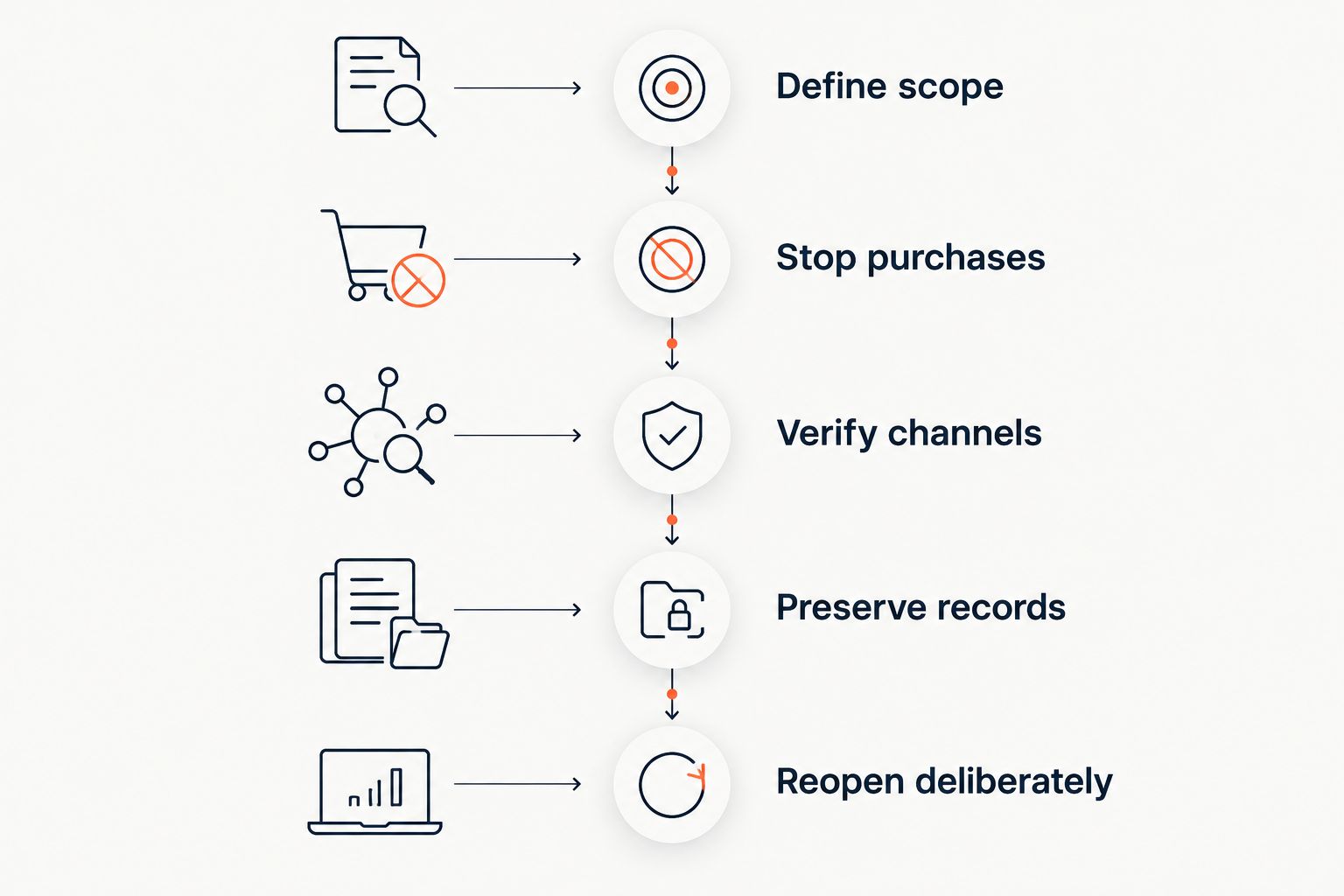
Treat the pause as a controlled operational change. Keep a record of what you changed so reopening does not depend on someone remembering every setting.
Define scope
Write down the affected performance, ticket categories and sales channels. State whether the event details remain unchanged or are still under review.
Do not mix a sales instruction with an unresolved event decision. Staff need to know what they are authorised to do now, even when another decision is pending.
Stop purchases
Apply the documented control that matches your scope. If you cannot establish what a setting does, obtain clarification before relying on it as a complete sales stop.
Avoid deleting inventory as a shortcut. Preserve the records needed to reconcile sold seats, held seats and remaining capacity.
Verify channels
Follow each purchase path far enough to establish whether it still accepts a new order. Include a fresh session and any relevant previously shared links.
Record the result for each channel. An unchecked channel is an unresolved part of the pause, not evidence that the pause worked everywhere.
Preserve records
Keep order history, event details and the reason for the interruption together. Record any purchases that completed while you were applying the change.
Reconcile those orders before changing seat allocations or remaining capacity. Do not resolve uncertainty by overwriting records.
Reopen deliberately
Confirm that the original issue is resolved, restore the intended sales settings and repeat the channel checks. Then update staff instructions and public information to match the reopened state.
For a 2026 runbook, make reopening a separate approval rather than an assumed consequence of finishing the technical fix. The person solving the problem and the person responsible for the event need the same understanding.
Why the scope of a sales pause varies
The right boundary depends on how your event sells and what needs to stop. Use these factors to write the instruction:
- Sales channels. A storefront, box office and kiosk create separate purchase routes to verify, even when they share inventory.
- Inventory structure. Reserved seats require attention to individual allocations; general admission requires attention to the remaining capacity being offered.
- Existing holds. An unfinished reservation needs an explicit treatment distinct from a completed order.
- Performance structure. An issue affecting a performance does not automatically justify stopping every date associated with the production.
- Booking handoffs. Discovery, seat selection and checkout need separate checks when the journey crosses interfaces.
- Reason for the interruption. A temporary operational issue needs different communication from a confirmed change to the event itself.
Do not turn this list into assumptions about your software. Use it to ask precise questions about the controls available in your account.
Will pausing sales cancel tickets already sold?
A sales pause is not an instruction to cancel existing tickets. Preserve completed orders and their admission status while you stop new purchases, then verify that your chosen setting does exactly that.
If the event itself changes, handle ticket-holder communication separately. Do not treat the absence of new sales as notice that the date, venue or admission arrangements have changed.
Can I stop selling one ticket category and keep others open?
You can target a category when your platform provides a control at that level. Check that its effect matches the intended category, performance or seating allocation before leaving other sales open.
Best for a localised issue: restrict the affected inventory rather than interrupting unrelated sales. The limitation is precision: a broad event-level control is not a substitute for a category-level setting.
What should I tell staff while sales are paused?
Tell staff what has stopped, what remains unchanged and who can authorise reopening. Keep the instruction operational rather than speculative.
Your internal notice should identify the affected event or performance, the channels covered, the handling of active holds and the contact responsible for exceptions. If you publish a public notice, describe the sales interruption without promising a reopening time you have not approved.
What to ask your ticketing provider
Zunaro event ticketing fits independent organisers and venues that want their storefront, seating, box office, kiosk and check-in on one live inventory. That shared inventory is relevant to this workflow, but you still need to confirm the exact sales controls and hold behaviour before using a pause procedure.
The platform’s WhatsApp agent answers buyers, holds seats and hands over a checkout link. Events can also be discovered and booked inside ChatGPT and Claude, with seat selection on the real map; checkout completes on the organiser’s own site, never in chat.
The tagline is direct: AI that sells your tickets. For a sales interruption, the corresponding operational question is equally direct: what prevents a new purchase at every handoff?
Zunaro states its ownership model plainly: You keep the fees, the funds and the customers. Organisers pay nothing per ticket. Confirm the relevant account and payment arrangements separately from any decision to stop selling.
Based at DTEC, Dubai Silicon Oasis. Built for the Gulf - the UAE and Saudi Arabia.
For a 2026 platform evaluation, request a demonstration covering an active checkout, a held seat and each sales channel. A feature label is not enough; inspect the resulting purchase behaviour.
Confirm your sales-pause workflow
Ask how sales controls affect existing orders, seat holds, checkout links, box office and kiosk.
FAQ
Can I pause ticket sales without cancelling my event?
Yes, when your platform separates sales controls from event status. Stop new purchases, preserve completed orders and verify every active sales route.
Does hiding my event stop people buying through a direct link?
Hiding an event does not establish that direct checkout links are blocked. Test those links separately before treating the sales pause as complete.
Do I need to refund everyone when I pause ticket sales?
A sales pause is not itself a refund instruction. Handle refunds according to the event circumstances, your applicable terms and legal obligations rather than assuming that stopping sales cancels orders.
What happens to seats already held when I stop sales?
The treatment of existing seat holds depends on your platform’s controls. Confirm whether those reservations can still proceed to checkout before relying on the pause.
Can my box office keep selling while online sales are paused?
Separate channel operation depends on the controls your platform provides. If your intention is to stop all sales, verify the box office and kiosk rather than assuming the online setting covers them.
Can I pause sales for one performance rather than the whole production?
You can target a performance when your platform provides performance-level sales controls. Confirm that other dates remain in the intended sales state after applying the change.
What should I check before reopening ticket sales in 2026?
Before reopening ticket sales in 2026, confirm that the original issue is resolved and reconcile orders, holds and remaining inventory. Restore the intended settings, test the purchase routes and update staff instructions.
One last thing
A missing purchase button is not proof of a closed checkout. The useful test is whether a new order can still complete through any route you intended to stop.
Make that the acceptance test in your 2026 event checklist. It turns an ambiguous instruction—pause sales—into an observable result without confusing the interruption with cancellation.


