


Every show has seats that never sold - and no one was working on them. Instead of manually answering seat enquiries and sending payment links, use Zunaro event ticketing with a WhatsApp ticket sales agent that answers buyers, holds seats and hands over checkout on your own site.
- Zunaro event ticketing suits independent organisers who need a WhatsApp ticket sales agent connected to reserved seating.
- Connect the business number through your account’s approved process; verify the event, seat hold and checkout handover.
- The WhatsApp agent answers buyers, holds seats and supplies a checkout link; payment completes on your own site.
- Test shared seat inventory across WhatsApp, your storefront and the box office before promoting the number.
Why this matters
A conversation is not a booking. Your sales workflow needs to connect the buyer’s question to the correct performance, a seat hold and checkout—not leave staff copying details between chat and the box office.
Zunaro event ticketing is best for independent organisers and venues that want WhatsApp seat holds with checkout on their own site. The agent answers questions, reads inbound photos and hands over a checkout link. It does not complete payment inside the conversation.
For your 2026 setup, start with the Zunaro event ticketing platform as the inventory foundation, rather than treating messaging as a separate seat list.
You keep the fees, the funds and the customers.
Before you start
- Account access: Have access to your organiser account and authority to manage the business number. Confirm the number-linking procedure for your account before changing an existing WhatsApp setup.
- Event materials: Prepare the performance details, your seating plan and the organiser-owned checkout destination. A seat map can be traced from a photo in about 60 seconds, without CAD or a setup fee; check the result against the venue.
- The gotcha: A seat hold is not a paid order. Decide how staff will distinguish an enquiry, a held seat and a completed order before accepting live conversations.
Do not disconnect your current messaging arrangement just to try a guessed setup sequence. Establish the connection requirements and the effect on your existing number before making changes.
Business number connection
Treat connection and sales verification as separate tasks. Linking a number establishes the messaging route; testing proves that the route reaches the right event and checkout.
- Choose the business number. Use a number your organisation controls. Identify who can receive any verification request required during the connection process.
- Confirm the connection procedure. Follow the instructions provided for your account. Establish whether your intended number can be used in its current configuration before altering another service.
- Complete the required authorisation. Have the authorised account owner carry out the connection. Keep access credentials and verification codes out of shared event-production chats.
- Send an inbound test enquiry. Use a separate phone to ask about a named performance. Check that the conversation reaches the intended business number and receives an event-relevant response.
- Check the reply’s substance. Compare the performance name, date and venue against your event record. A reply alone does not prove the sales workflow is ready.
Expected result: An inbound enquiry reaches the intended WhatsApp number and produces a response about the correct event. Seat holding and checkout still need their own checks.
For a 2026 launch, record who controls the number and who owns the connection process. That gives your team a clear route for resolving access problems without changing the public contact number during an event campaign.
Event and seating configuration
The WhatsApp agent needs the same event reality your box office uses. Prepare that foundation before asking the agent to hold a seat.
- Verify the performance. Check the event title, performance date, venue and seating arrangement. Pay particular attention to productions with several performances under the same name.
- Prepare the seat map. Use the venue’s actual layout. If you trace a map from a photo, inspect row labels, seat positions and sections before relying on it for sales.
- Check seat identity. Make sure staff can match a seat described in conversation to the seat shown on the map. Resolve ambiguous labels before testing the hold.
- Review event information. Keep answers grounded in confirmed event details. Do not ask the agent to make promises about access, admission or venue arrangements that your team has not established.
- Test a precise request. From your test phone, name the performance and request a particular seat. Check that the response identifies the intended performance and seat rather than a similarly named alternative.
Expected result: The conversation refers to the correct performance and a recognisable seat on the real map. Your team can trace the request back to the underlying event record.
Do not use a successful greeting as your acceptance test. The useful test is whether the agent understands the event and seating request accurately enough to progress towards checkout.
Seat hold and checkout verification
Zunaro connects the storefront, seating, box office, kiosk and door check-in through one live inventory. Your verification should follow the seat across the sales journey, not stop at the chat response.
- Start with an enquiry. Ask a realistic question about the selected performance. Confirm that the answer matches the event details your team has approved.
- Request a seat hold. Ask the agent to hold a specific seat. Verify the hold in the ticketing workflow rather than relying solely on conversational wording.
- Inspect shared inventory. Check the same seat through your storefront and box-office view. Investigate any disagreement before inviting live enquiries.
- Open the checkout link. Confirm that the handover leads to your organiser-owned site and the intended booking. Check the performance and seat again at this boundary.
- Verify order status. When you carry out an authorised end-to-end transaction, confirm the order in the ticketing system. Do not treat a sent link or a buyer’s message as payment confirmation.
Expected result: The enquiry leads to the intended seat hold, followed by checkout on your own site. Staff can distinguish the conversation from the completed order.
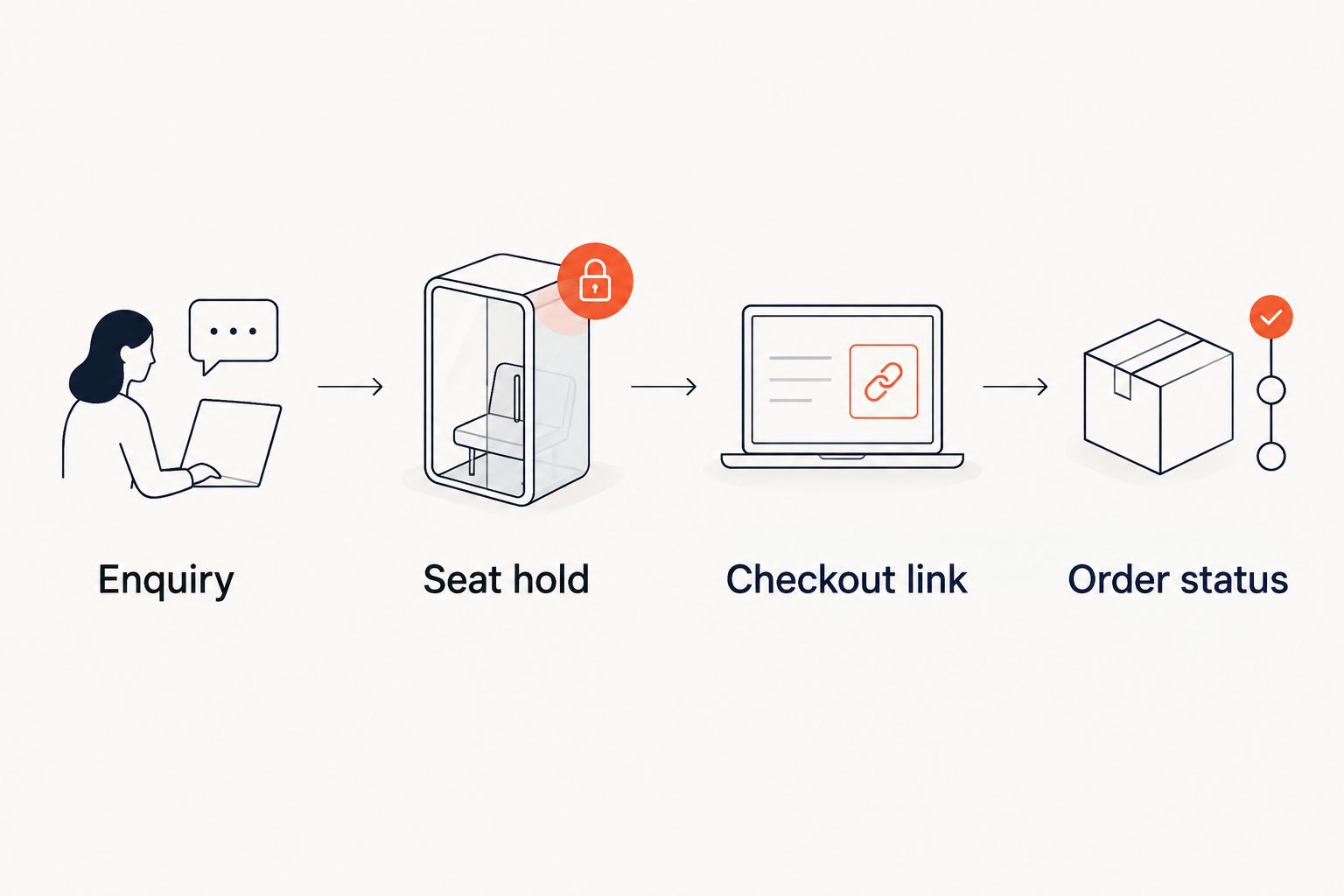
For your 2026 acceptance record, write down what passed and what needs correction. Include event identity, seat identity, checkout destination and order status; this is more useful than a screenshot showing that the agent replied.
Second workflow: send tickets after checkout
Seat-holding conversations and ticket delivery serve different stages. Zunaro supports e-tickets through WhatsApp as well as email, so your post-purchase checks should be separate from your pre-purchase sales test.
| Workflow | Best for | Benefit | Limitation |
|---|---|---|---|
| WhatsApp seat-holding agent | Organisers handling questions before purchase | Answers buyers, holds seats and supplies a checkout link | Payment still requires checkout on the organiser’s site |
| WhatsApp e-ticket delivery | Organisers checking post-purchase communication | Sends the ticket through a messaging channel | Ticket delivery does not test the earlier seat-holding conversation |
- Complete the sales-path checks. Establish that the agent reaches the intended performance and checkout before testing delivery.
- Check the completed order. Verify the performance and attendee details in the ticketing system.
- Test ticket receipt. Check the WhatsApp e-ticket and email delivery paths your team intends to use. Inspect the event and performance information on the received ticket.
- Separate the records. Keep enquiry messages, checkout handover and ticket delivery distinct in your operational review.
Expected result: Your team knows whether a problem belongs to the conversation, checkout or ticket-delivery stage. A missing ticket message does not automatically mean the seat-holding agent failed.
Troubleshooting
The number receives no test response
Check the destination number and confirm that the connection process was completed for the intended account. Repeat the inbound test from a separate phone, then raise the connection issue through your account’s support route if it remains unresolved.
Do not start rebuilding events to fix a messaging connection problem. Establish whether the enquiry reaches the account before examining seating.
The agent identifies the wrong performance
Compare the event title, date and venue in the reply with the event record. Repeat the test using an explicit performance date, then correct confusing or inaccurate event information before another test.
For recurring shows, test a question that deliberately distinguishes adjacent performances. Your team needs to know that the conversation follows the requested date.
The chat says a seat is held, but inventory disagrees
Compare the exact performance, section, row and seat across the conversation and ticketing views. Stop promoting the workflow until you can verify the hold consistently.
Do not create a second spreadsheet of WhatsApp reservations as a workaround. That would replace shared inventory with another manual reconciliation task.
Checkout opens for the wrong booking
Inspect the event, performance and seat associated with the checkout handover. Repeat the test with a fresh conversation after correcting the underlying event or connection issue.
A working link is not enough. The destination must represent the booking the buyer actually requested.
A ticket message is mistaken for payment confirmation
Check the order status in the ticketing system. Train staff to separate chat messages, checkout links and completed orders when answering booking questions.
Use the same distinction in your 2026 operating checklist. It prevents a conversational acknowledgement from becoming an unofficial payment record.
Customise your workflow
Expand only after the basic path passes. Start with one clearly defined performance, then repeat the checks for recurring dates, different seating arrangements and the languages your audience uses.
Arabic and English, including full RTL, are supported. Test the event names, seating descriptions and checkout handover in each language you intend to use rather than assuming that an English test covers both.
Keep the economics explicit in your 2026 briefing: organisers pay nothing per ticket. The buyer booking fee is AED 3.99, or AED 1.99 for tickets under AED 20; free events carry none. Ask Zunaro Pro is AED 179 per month, with a 14-day trial and no card required.
AI that sells your tickets.
Based at DTEC, Dubai Silicon Oasis. Built for the Gulf - the UAE and Saudi Arabia.
FAQ
What does a WhatsApp ticket sales agent do for an organiser?
A WhatsApp ticket sales agent answers event questions, holds seats and hands over a checkout link. Zunaro keeps checkout on the organiser’s own site rather than completing payment in chat.
Can I connect my existing WhatsApp business number?
Confirm the connection requirements for your intended number before changing its current setup. Follow the account-specific connection procedure and verify the result with an inbound test.
Does a seat hold mean the ticket has been paid for?
No. A seat hold and a completed order are different stages; verify payment through the order status in your ticketing system.
Can the agent read photos sent on WhatsApp?
Yes, the WhatsApp agent can read inbound photos. Test that capability against your actual event workflow without treating an image as proof of payment or a confirmed order.
Do organisers need CAD drawings to prepare a seat map?
No. A seat map can be traced from a photo in about 60 seconds without CAD or a setup fee; check the traced layout against the venue before using it.
Can our team use Arabic and English?
Yes. Arabic and English are supported, including full RTL; test event details and the checkout handover in both languages if your team intends to use both.
Can we send the ticket through WhatsApp after purchase?
Yes. E-tickets can be delivered through WhatsApp as well as email; test delivery separately from the agent’s pre-purchase seat-holding workflow.
One last thing
Test the handover, not just the answer. Ask for a named performance and seat, inspect the hold, then follow the checkout link and verify the booking details. That sequence tests the part your staff would otherwise have to manage manually.


