

Every show has seats that never sold - and no one was working on them. To reduce ticket buyer drop-off at checkout, show the full charge before payment, remove unnecessary form fields, make seat selection clear and test the journey through to ticket delivery. Separate an unfinished purchase from a failed payment before deciding what to fix.
- How to reduce ticket buyer drop off at checkout: make charges, seat selection and payment status clear.
- ZunaroSpace event ticketing suits independent organisers wanting their own storefront, shared inventory and WhatsApp buyer assistance.
- Measure completed orders, not checkout visits, when assessing a change.
- ChatGPT and Claude support event discovery and booking; checkout completes on the organiser’s own site.
How to reduce ticket buyer drop-off at checkout
Fix the broken purchase path before buying more traffic. Your checkout review in 2026 should follow an order from the event page to the delivered ticket, not stop when the payment screen loads.
- Confirm the event details. Check the performance, date, ticket type, quantity and selected seats throughout the journey.
- Show the full charge. Present the booking fee and final total before the buyer commits to payment.
- Challenge each field. Keep information needed for fulfilment or event requirements; question everything else.
- Test interruptions. Check what happens after a payment error, a back-button tap or an interrupted connection.
- Verify the outcome. Confirm that a successful payment creates the correct order and that the ticket reaches the buyer.
ZunaroSpace is an event ticketing platform for independent organisers and venues, with a branded storefront, seating, box office, kiosk and door check-in on one live inventory. That gives you a concrete workflow to assess: the seat selected online and the seat sold at the box office belong to the same inventory.
Why this matters
A checkout visit is not a sale. An unpaid order is not automatically evidence that the buyer disliked the event, either. Your job is to identify where the purchase stopped and whether the buyer had a clear way to continue.
Treat checkout as part of running your venue, not just a marketing page. The event information, seat inventory, payment outcome and ticket delivery all need to agree.
For your 2026 review, keep two questions separate: did the buyer decide not to purchase, or did the purchase process fail? The actions differ. Changing promotional copy does not repair a payment error, and changing a payment screen does not resolve an unanswered question about the performance.
Trace the purchase before changing the page
Start with a complete purchase journey. Record what the buyer sees at each stage, including the transition between pages and the final confirmation.
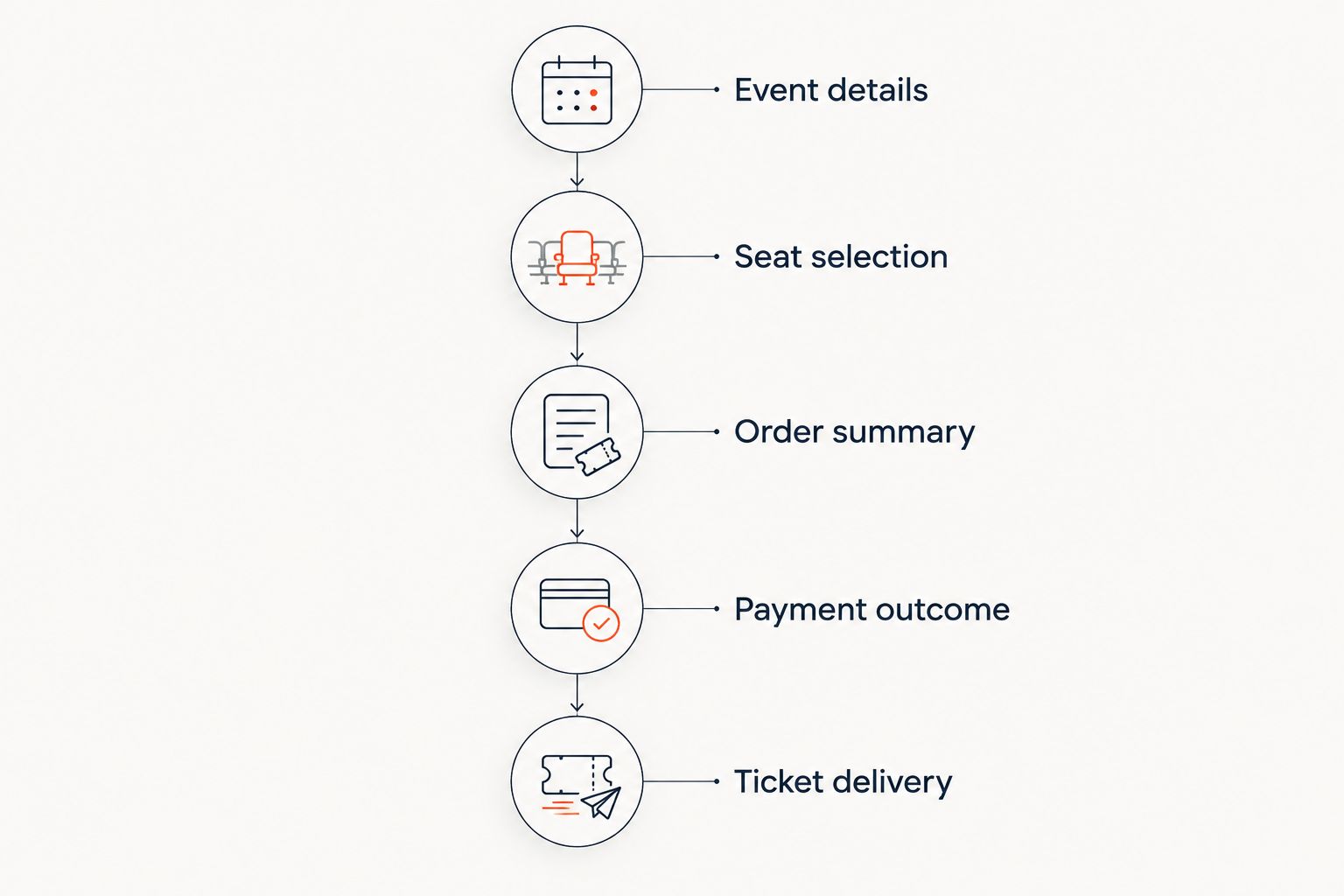
Use this sequence as your review checklist:
- Event details: the buyer can identify the correct performance and ticket type.
- Seat selection: the selected seats remain clear before payment.
- Order summary: quantity, charges and event details match the selection.
- Payment outcome: success, failure and pending status are distinguishable.
- Ticket delivery: the confirmation identifies the order and explains where the ticket arrives.
Do not label every exit as abandonment. A buyer who receives an error needs a different response from someone who leaves before choosing a seat. Keep those cases separate in your reporting.
Write down the expected result at each stage before testing. That turns an impression such as confusing checkout into a specific defect: the order summary shows the wrong performance, the selected seat disappears, or the confirmation does not explain ticket delivery.
Make the total clear before payment
Show the charge before asking the buyer to commit. Use the same ticket quantity and fee information in the selection view and the order summary. If the total changes, explain the change where it happens.
Check the wording as carefully as the arithmetic. A booking fee should be labelled as a booking fee, not hidden behind a vague line item. Do not describe an event as carrying no fees when a buyer charge applies.
For ZunaroSpace event ticketing in 2026, organisers pay nothing per ticket. The buyer booking fee is AED 3.99, or AED 1.99 for tickets under AED 20; free events carry none.
The distinction matters: no organiser per-ticket charge does not mean no buyer booking fee. Keep both statements visible in your own explanation of the purchase process.
Review any discount or access-code journey you use. Confirm that an accepted code updates the summary and that a rejected code produces an understandable message. Do not ask the buyer to infer whether the amount changed.
Ask for information you actually need
Give every checkout field a purpose. Required attendee information, ticket delivery details and optional marketing information should not be treated as the same task.
For each field, ask:
- Is this information necessary to complete this order?
- Is it necessary before payment, or can it be collected afterwards?
- Does the label explain what the buyer should enter?
- Does an error message identify the correction needed?
- Is optional information clearly marked as optional?
Do not remove a field merely to make the form shorter. Conferences, private events and different admission arrangements have different information requirements. Remove unnecessary work, not information your event genuinely needs.
Test the form with your actual event configuration. A checkout that works for a single general-admission ticket still needs a separate check when your order requires attendee details or reserved seats.
Keep seat selection and sales channels consistent
For reserved seating, review the relationship between the map and the order summary. The buyer should be able to confirm which performance and seats the order contains before paying.
Test interrupted seat selection as well. Establish what your system does when the buyer leaves, returns or follows a checkout link after a conversation. Explain hold expiry wherever your actual configuration requires it; do not invent a deadline in your copy.
ZunaroSpace connects the storefront, box office, kiosk and door check-in to one live inventory. Its WhatsApp agent answers buyer questions, holds seats and hands over a checkout link.
That assistance has a boundary. A seat hold is not a completed sale. Test the handover to checkout and confirm the order outcome before treating the conversation as revenue.
Keep the same discipline across walk-up sales and online sales. The inventory review should include the channels your venue actually uses, rather than assuming the storefront operates on its own.
Choose the fix that matches the failure
Do not apply every checkout tactic at once. Match the intervention to an observed problem, then test the affected journey again.
| Intervention | Best for | Benefit | Limitation |
|---|---|---|---|
| Earlier charge disclosure | Orders with unclear fee presentation | Makes the amount payable explicit | Does not repair payment failures |
| Field review | Forms containing unnecessary questions | Removes tasks you cannot justify | Required event information must remain |
| Seat and inventory review | Reserved seating and multiple sales channels | Checks that selection and order agree | Does not answer unrelated event questions |
| Buyer assistance | Unanswered questions before payment | Gives the buyer a route to clarification | A conversation still needs a completed checkout |
| Payment and delivery testing | Errors or unclear order outcomes | Checks whether the purchase completes correctly | Requires investigation beyond page wording |
A shorter form is not automatically the right answer. If the order summary has the wrong seats, fix the selection workflow. If payment succeeds but delivery is unclear, fix the confirmation and ticket-delivery explanation.
Use this table as your 2026 prioritisation checklist. Choose the intervention with evidence behind it, not the one that sounds easiest to announce.
Why checkout drop-off varies
Review these factors against your own event and order records. They are diagnostic categories, not a claim about what caused every unfinished purchase.
- Charge presentation: whether the final total is explained before payment.
- Information requirements: which details the event requires and when you request them.
- Seat selection: whether performance, seat and quantity remain clear.
- Payment status: whether the buyer can distinguish an error from a completed order.
- Language: whether labels and instructions work in the languages you offer.
- Ticket delivery: whether the buyer knows how the ticket will arrive.
Arabic and English support needs a practical review, not just a language selector. Check labels, validation messages and order summaries in both languages. For right-to-left layouts, review the full purchase sequence rather than only the event page.
The platform supports Arabic and English with full RTL, and sends e-tickets through WhatsApp as well as email. Confirm that your event instructions explain the delivery route you use.
Measure completed orders, not just checkout activity
Define the reporting stages before comparing changes. Keep event-page visits, seat selections, checkout starts, completed orders and delivered tickets distinct wherever your reporting supports them.
Use the ticket sales data and Google Analytics guide when planning measurement. Confirm what your implementation records instead of assuming every page view represents purchase intent.
For a 2026 checkout change, record the event, the affected journey and the change itself. Compare equivalent journeys where possible, and flag differences in performances, ticket types or traffic sources rather than blending them into one result.
Do not claim a conversion improvement from a cleaner-looking page. The purchase outcome is the test. Check whether orders complete correctly and whether the specific error or ambiguity you identified has been removed.
Can WhatsApp help reduce checkout drop-off?
WhatsApp assistance addresses unanswered questions and the handover to payment; it does not replace checkout. Use it where an organiser needs to explain an event or help a buyer continue with selected seats.
The supported agent answers buyers, holds seats and provides a checkout link. Review those actions as a connected workflow, including what happens when the buyer opens the link.
Avoid a recovery message that merely repeats the event advertisement. Address the actual question or interruption, and do not imply that a seat hold proves payment has completed.
Does booking inside ChatGPT replace checkout?
Booking inside ChatGPT does not replace checkout on the organiser’s site. ChatGPT and Claude support event discovery and booking, including seat selection on the real map and a hold; payment completes on the organiser’s own site.
Test that transition as part of your checkout review. The event, seat selection and next action should remain understandable when the buyer leaves the conversation to pay.
Should you change ticketing platforms to fix drop-off?
Change platforms only after identifying a requirement your current purchase workflow cannot meet. A missing label or unnecessary question is a different problem from disconnected inventory or an unsuitable booking workflow.
ZunaroSpace is best for independent organisers and venues wanting their own storefront, shared ticket inventory and WhatsApp buyer assistance. The trade-off is that assisted booking still ends in website checkout; an agent conversation does not remove the need to test payment and fulfilment.
Ask Zunaro Pro is AED 179 per month, with a 14-day trial and no card required. Assess it against your operating tasks rather than treating the subscription as evidence of higher conversion.
Review your ticketing workflow
Assess your storefront, reserved seating, box office and WhatsApp checkout handover.
FAQ
What should I fix first when buyers leave ticket checkout?
Fix the observed purchase failure first: unclear charges, unnecessary fields, incorrect seat details or an unresolved payment error. Trace an order through to ticket delivery before changing unrelated parts of the page.
Should I remove every checkout field?
Keep fields needed for the order or your event requirements. Review optional information separately and explain any required information clearly.
Does no organiser fee mean buyers pay no booking fee?
No organiser per-ticket charge does not mean buyers pay no booking fee. The buyer booking fee is AED 3.99, or AED 1.99 for tickets under AED 20; free events carry none.
Can a WhatsApp agent complete the ticket payment?
The WhatsApp agent answers questions, holds seats and provides a checkout link. Payment completes through the organiser’s checkout, not in the conversation.
Can buyers pay for an event inside ChatGPT or Claude?
Payment completes on the organiser’s own site, not inside ChatGPT or Claude. The conversation supports event discovery, seat selection on the real map and booking holds.
How do I know whether a checkout change worked?
Check completed orders and the specific problem the change addressed. Do not treat checkout visits or a tidier page as proof of more sales.
One last thing
Test what happens after the buyer leaves the page. A successful payment, a visible confirmation and a delivered ticket are separate checkpoints; your review is unfinished until they agree.
AI that sells your tickets. That means an agent answering questions, holding seats and handing over checkout—not a promise that every conversation becomes a sale.
You keep the fees, the funds and the customers.
Based at DTEC, Dubai Silicon Oasis. Built for the Gulf - the UAE and Saudi Arabia.


