


Every show has seats that never sold - and no one was working on them. Instead of manually moving reservations between your website and box office, build your event ticketing API integration around the ticketing platform’s inventory, seat holds and checkout, with payment completed on your own site.
- Event ticketing API integration needs authoritative inventory, server-side validation and confirmed payment before ticket fulfilment.
- Zunaro is best for independent organisers who want branded event ticketing across storefront, box office and kiosk.
- Confirm supported API operations before building a custom checkout; never infer endpoints from storefront features.
- Keep credentials on your server and reconcile orders against the ticketing platform, not the browser return page.
Why this matters
A checkout button is not a ticketing integration. The work is keeping your website, reservations, payments and door list in agreement when someone leaves midway through a purchase or retries a request.
Zunaro is an event ticketing platform with a branded storefront, reserved seating, box office, kiosk and door check-in on one live inventory. Zunaro is best for independent organisers and venues that want branded event ticketing across online and in-person sales.
AI that sells your tickets.
A WhatsApp agent answers buyers, holds seats and hands over a checkout link. Events are also discoverable and bookable inside ChatGPT and Claude, including seat selection on the real map; checkout completes on the organiser’s own site, never in chat.
You keep the fees, the funds and the customers.
Organisers pay nothing per ticket. Buyers cover a booking fee of AED 3.99, or AED 1.99 for tickets under AED 20; free events carry none. Ask Zunaro Pro is AED 179/mo, with a 14-day trial and no card required.
Based at DTEC, Dubai Silicon Oasis. Built for the Gulf - the UAE and Saudi Arabia.
Before you start
- Get access: You need your website’s server-side code, deployment settings, ticketing account and the current API documentation for the operations you intend to use. Confirm integration access and permissions before scheduling development.
- Prepare the event: Have the performance details, ticket categories, capacity and seating configuration ready. Identify the platform’s event and performance identifiers rather than matching records by title.
- Check the payment boundary: Confirm where checkout runs, how payment completion is verified and whether the supported API can create reservations. A storefront feature does not establish that the same operation is exposed through an API.
Treat this as an implementation blueprint, not a substitute for the platform’s API contract. Use documented operation names, authentication methods and response fields. Do not turn the descriptive terms below into guessed endpoints or dashboard labels.
For your 2026 build, choose the route before writing the connector:
| Route | Best for | Advantage | Trade-off |
|---|---|---|---|
| Branded storefront hand-off | Organisers who mainly need their existing website to lead into ticket sales | Keeps ticket selection and checkout within the platform’s supported storefront | Less control over the purchase interface than a custom build |
| Custom API integration | Organisers with a specific website experience and developer support | Lets your website coordinate documented ticketing operations | Requires confirmed API access, error handling and ongoing maintenance |
Choose the custom route for a defined requirement, not simply to avoid linking to a storefront.
Website and server connection
Establish the integration boundary
- Write down what your website must do: display events, request current ticket information, reserve a selection, start checkout and show order status. Separate essential operations from later additions.
- Match each requirement to a documented API operation. Where no supported operation meets the requirement, change the design or use the storefront hand-off.
- Put privileged requests on your server. Keep secret credentials out of browser scripts, page source, analytics events and public repositories.
- Store configuration separately from application code. Use the authentication method specified by the platform; do not assume it uses bearer tokens or an API key.
- Make a permitted read request against a known event. Check that the response belongs to the intended account and performance before building the purchase flow.
Expected result: Your server can retrieve authorised event information without exposing credentials, and every planned write operation has a documented implementation path.
Keep logs useful but restrained. Record request references, operation outcomes and timestamps; exclude payment credentials and unnecessary personal data.
A developer should be able to trace a failed purchase attempt without copying a buyer’s full record into an error report. Set that logging rule before opening the integration to real traffic.
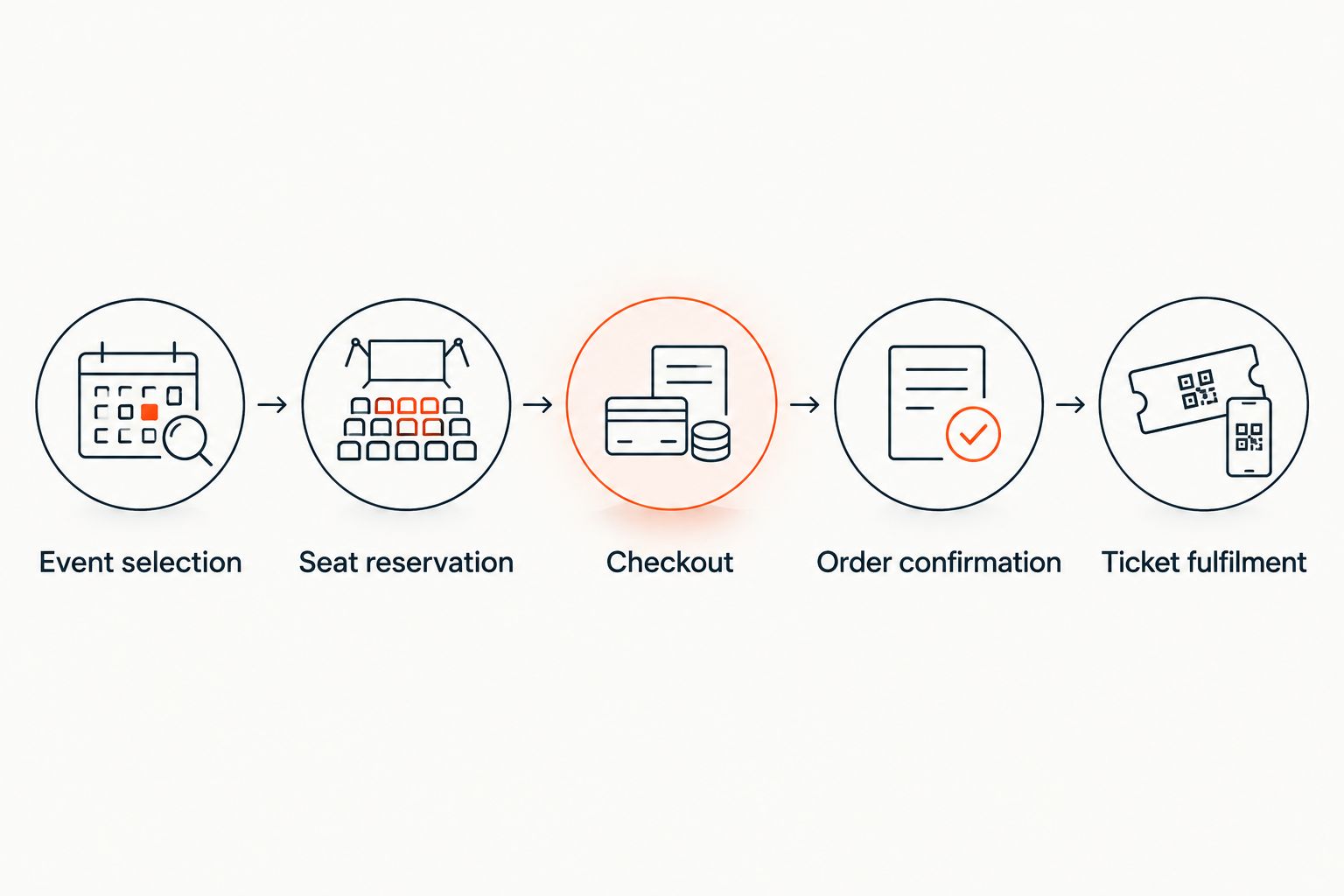
Event selection and seat reservations
Map the event catalogue
- Link each website event page to the platform’s stable event identifier. Map individual performances separately when an event has several dates.
- Retrieve the relevant ticket categories and seating information through supported operations. Do not make the website’s content editor the source of truth for inventory.
- Separate descriptive content from transactional information. Your website can retain its editorial introduction while requesting current ticketing information at selection time.
- Validate the selected performance, ticket category and quantity on your server before requesting a reservation or checkout.
Expected result: A selection on your website points to the correct performance and ticket category, rather than a similarly named event.
For a reserved-seating event, prepare the seating layout before testing checkout. The platform can trace a seat map from a photo in about 60 seconds, without CAD or a setup fee; that feature does not establish an API operation for generating maps.
Handle the reservation boundary
- Confirm whether the documented integration supports seat holds and how it represents their expiry. Follow the returned rules rather than inventing a local countdown.
- Request a reservation through the supported operation before treating a selected seat as secured. A seat highlighted in the browser is not itself a reservation.
- Keep the reservation reference attached to the checkout attempt. Revalidate the selection when the reservation is no longer valid.
- Handle a rejected selection by refreshing the relevant ticket information and asking for a new selection. Do not silently substitute a seat.
Expected result: The website distinguishes a requested selection from a confirmed reservation and handles an expired hold without issuing a ticket.
For 2026 launch testing, include simultaneous selection attempts against the same reserved seat. A successful integration rejects conflicting reservations; a visually correct seat map is not enough.
Checkout and order confirmation
Connect the payment hand-off
- Start checkout using the documented operation and the validated event or reservation reference. Use the platform’s authoritative transaction details, not values accepted directly from the browser.
- Send the buyer to the supported checkout destination. Keep checkout on the organiser’s own site for the branded workflow described here.
- Retain a reference that connects the website attempt, platform order and payment outcome. Use the platform’s supported references rather than relying on an email address as a unique key.
- Verify completion through the documented server-side mechanism. If signed notifications are supported, validate them according to the provider’s instructions; otherwise use the supported status-check method.
- Trigger fulfilment after the authoritative order state confirms completion. A browser visit to a success page is not proof of payment.
Expected result: Returning from checkout shows the verified order state, and an interrupted browser session does not decide whether a ticket exists.
The flow should remain clear even when the browser closes after payment. Your back end must be able to determine the order outcome without requiring the buyer to revisit the confirmation page.
Make retries safe
- Use documented idempotency support where it exists. Retain the same supported request reference when retrying the same intended operation.
- Prevent repeated button presses from creating parallel checkout attempts in your own application.
- Treat an interrupted response as an unknown outcome, not an automatic failure. Check the existing operation or order before creating another.
- Make confirmation processing safe to repeat. Track completed fulfilment work so that another notification does not trigger duplicate actions.
Expected result: A refresh, retry or repeated notification does not become an additional order or repeated fulfilment action.
Before your 2026 launch, test a completed purchase, an abandoned checkout and an interrupted response. Inspect the ticketing record after each scenario rather than judging success by the website message alone.
Variant: update your website when an event changes
The adjacent workflow is catalogue maintenance: reflect a changed event on your website without recreating its ticketing record.
Use a documented event-change notification if the API provides one. Otherwise, use permitted reads on a schedule that respects the platform’s published limits. Neither approach justifies assuming webhook support or inventing a refresh interval.
- Keep the existing identifier mapping when descriptive event details change.
- Refresh the website fields you deliberately mirror, such as the performance date or event description.
- Invalidate stale website content after confirming the updated platform record.
- Keep transactional validation at selection and checkout time, even when the event page has recently refreshed.
Expected result: Your website reflects the event record without replacing live inventory checks with a cached page.
This variant is best for organisers maintaining a separate editorial website. Its advantage is less repeated content entry; its cost is another synchronisation path to monitor.
For your 2026 maintenance plan, assign ownership of failed updates and expired credentials. An integration without a named maintainer becomes a launch dependency nobody owns.
Troubleshooting
The website shows a seat that cannot be reserved
Refresh transactional information at selection time and handle reservation rejection explicitly. Check that the website is using the intended performance identifier, not a cached response from another date.
Do not solve a conflict by increasing capacity or creating a separate allocation without an operational reason. That changes the ticketing model rather than fixing the integration.
Payment finishes but the website still shows pending
Check the authoritative order status and the confirmation-processing logs. Verify notification signatures where applicable, then inspect whether processing failed after the notification arrived.
Make the recovery action safe to repeat. Do not ask someone to pay again until the existing transaction outcome is established.
A retry creates another checkout attempt
Inspect request references and your application’s retry logic. Reuse the documented idempotency mechanism where supported, and check the existing attempt after an uncertain response.
Disabling the purchase button helps the interface. It does not replace server-side protection.
Arabic text breaks the purchase layout
Test the full selection, error and confirmation journey in Arabic, not just the event heading. Zunaro supports Arabic and English with full RTL; custom website components still need their own layout checks.
Keep event identifiers unchanged across languages. Translated titles are presentation, not record keys.
Customize your workflow
Expand after order confirmation works reliably. Add another sales channel or reporting destination without creating another inventory authority.
Start with the website API connection guide when defining the integration boundary. Then document who owns event edits, checkout incidents and reconciliation.
Keep campaign reporting separate from payment confirmation. A marketing attribution event explains a journey; it must not authorise ticket issuance.
For a 2026 release review, require evidence from the order record, reservation handling and fulfilment path. A working demonstration on an uninterrupted connection is not the whole acceptance test.
FAQ
What does an event ticketing API integration connect?
An event ticketing API integration connects your website to documented ticketing operations, such as retrieving event details or checking order status. Reservation and checkout capabilities depend on the platform’s actual API contract.
Should I build a custom ticket checkout or use a branded storefront?
Use a branded storefront when your main requirement is selling through your own branded journey. Choose a custom integration when a specific website requirement justifies developer work and the necessary API operations are supported.
Can I put ticketing API credentials in my website code?
Keep secret ticketing credentials on your server, not in browser-delivered code. Follow the platform’s documented authentication model and restrict access to the operations your integration needs.
Does a successful checkout redirect prove that payment completed?
No, a browser redirect does not prove payment completion. Verify the authoritative order state through the platform’s documented server-side confirmation mechanism before fulfilment.
What happens when a seat hold expires during checkout?
An expired hold requires revalidation under the platform’s reservation rules. Refresh the selection and obtain a valid reservation rather than assuming the original seat remains secured.
Can buyers complete payment inside ChatGPT or Claude?
No, payment in the described workflow completes on the organiser’s own site. ChatGPT and Claude support event discovery and booking, including selecting a seat on the real map and holding it.
How do I prevent duplicate orders after a connection failure?
Check the existing attempt before retrying an operation with an uncertain outcome. Use documented idempotency support where available and make your own confirmation processing safe to repeat.
One last thing
Test the purchase journey without the return page. Close the browser after payment and inspect the authoritative order and fulfilment outcome. That exposes a dependency a polished success screen can hide.


