


Every show has seats that never sold - and no one was working on them. To sell out a small venue event, define your sellable capacity, give the right audience a clear reason to attend, connect every sales channel to the same inventory, and follow up on questions before they become abandoned bookings. Treat a sell-out as the result of a working sales process, not a promise that more promotion will fill the room.
- How to sell out a small venue event: connect promotion, reserved seating, buyer follow-up and checkout.
- ZunaroSpace suits independent organisers who want branded ticketing and connected box office operations.
- Measure completed orders, not attention; a seat hold is not a sale.
- Keep the storefront, box office and kiosk on the same live inventory.
How to sell out a small venue event
Start with the seats you can actually sell, then work backwards to the audience and booking journey. Your event ticketing platform should support that process rather than leave staff reconciling separate sales records. ZunaroSpace provides a branded storefront, reserved seating, box office, kiosk and door check-in on one live inventory.
Why this matters
A full room requires both demand and completed bookings. Promotion addresses the former; clear information, useful answers and a working checkout address the latter. Neither replaces the other.
For your 2026 event plan, separate the work into audience outreach, booking support and inventory control. Give each task an owner. Otherwise, posting about the event can become the default activity while unanswered questions and blocked seats receive no attention.
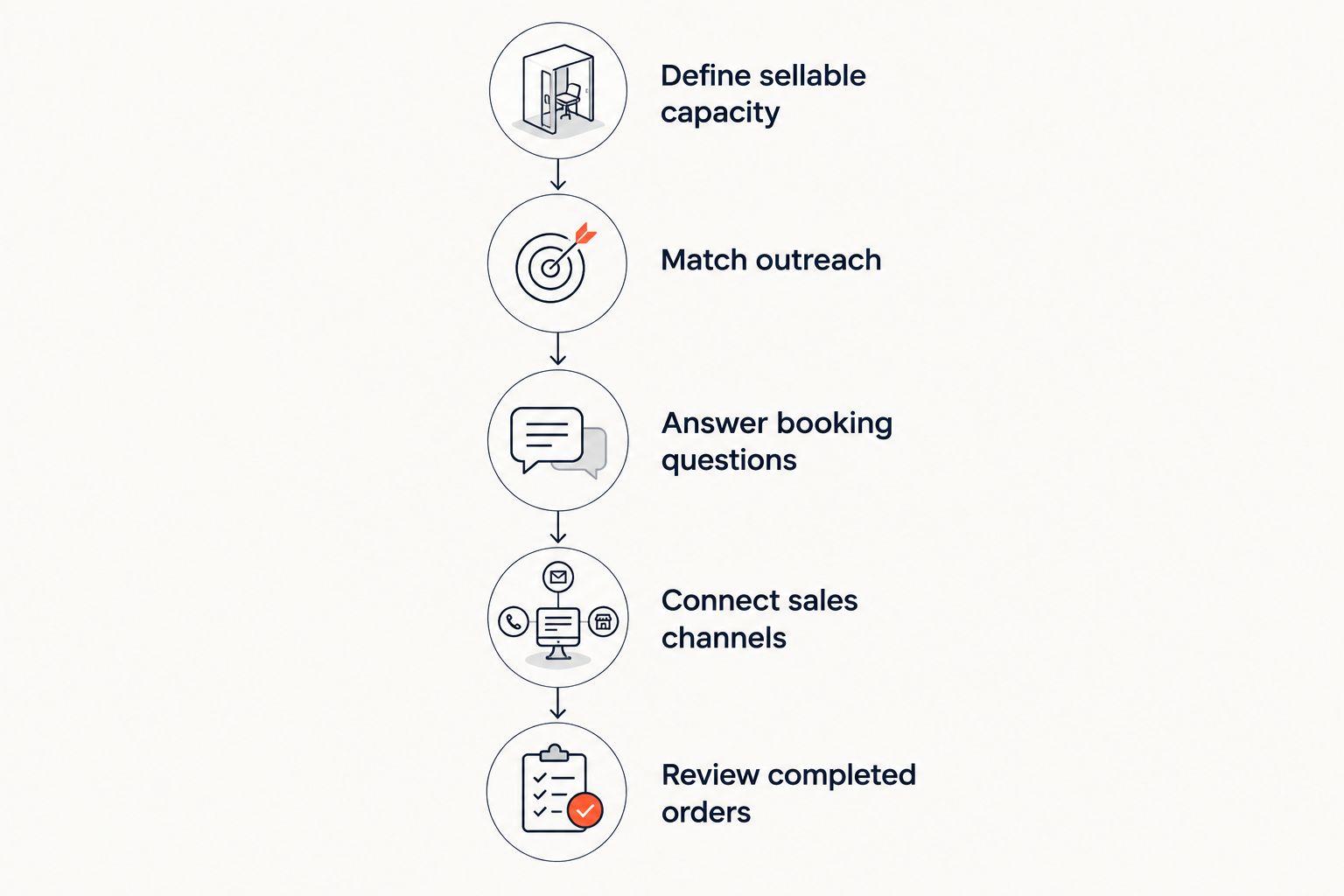
Define sellable capacity
Establish which seats or admissions are available to sell before announcing the event. Account for production requirements, restricted areas, guest allocations and any seats you intend to hold back. Confirm the room layout with the venue rather than treating its headline capacity as your sales target.
For reserved seating, inspect the actual map. Check that seat labels, sections and restricted-view information match the room. For general admission, confirm the permitted event capacity and how staff will control entry.
Define sold out against sellable inventory, not total room capacity. Keep internal allocations visible to the people managing sales so a blocked seat does not look like an unexplained booking problem.
Make the event page answer the decision
Write the page for someone deciding whether to attend, not someone who already understands the programme. State what happens, where it happens, when doors open, when the event begins and what the admission includes. Use confirmed information throughout.
Explain details that require a decision before booking: seating arrangements, age restrictions, accessibility information supplied by the venue and whether admission covers the whole programme. Avoid making staff answer the same basic question in every conversation.
Review the page on a phone before promoting it. Follow the route from event information to seat selection and checkout. Check the details yourself; do not assume that a published page is a finished booking journey.
Match outreach to the audience
Identify who the programme is for and why that person would make time for it. A returning theatre audience needs a different explanation from someone attending an unfamiliar performance. A conference audience needs programme relevance, while a club audience needs a clear account of the night.
Write outreach around that reason to attend. Give performers, speakers or participating organisations accurate event details and an approved booking destination. Ask them to explain their involvement rather than repeat a generic announcement.
For your 2026 schedule, keep a record of what each message says and which audience receives it. That record gives you something concrete to review when orders do not follow outreach.
Answer booking questions
Treat enquiries as sales work. Assign responsibility for questions about seating, the programme, admission and checkout. Use the event page as the reference so staff do not give conflicting answers.
When someone asks about a seat, answer the seat question. When someone asks what admission includes, answer that before sending a booking link. Repeating the event announcement is not a response to a specific obstacle.
Make the next action explicit: select a seat, review the order or complete checkout. A useful conversation should leave the buyer knowing what to do, without promising a reservation that your inventory does not support.
Connect sales channels
Use the same live inventory for online sales and venue sales. Staff should see which seats are sold, held or available before taking an order at the box office or kiosk.
Agree how the team handles an enquiry that moves between channels. Someone who starts online and arrives at the box office should not encounter a different event description or an unexplained seating discrepancy.
Do not solve a slow-selling event by creating separate ticket allocations that nobody reconciles. Keep channel ownership clear while preserving a single view of the room.
Review completed orders
Check whether outreach produces purchases, not just replies or page visits. Where your reporting supports attribution, connect the message or channel to completed orders and revenue. Keep seat holds separate from paid bookings.
Review your marketing channel ticket sales before deciding what to repeat. Use that review to identify the audience, message and booking route associated with sales.
If enquiries arrive without purchases, inspect the questions and checkout journey. If outreach produces little response, revisit the audience and event explanation. Those are different problems; they need different actions.
Prepare the door
Before the event, confirm which staff handle walk-up sales, ticket queries and check-in. Give them the same event information used online. Recheck the room layout and any allocations that remain unavailable for sale.
Keep selling and admitting distinct. A ticket sale changes inventory; check-in records attendance. Staff need to understand both tasks, particularly when people arrive while the box office is still handling orders.
For the final review of your 2026 event, follow a booking from seat selection through confirmation and entry. Resolve confusing handovers before the audience reaches the door.
The sequence is straightforward: define the room, explain the event, reach the audience, support booking, then review orders. Repeat the review as the event approaches rather than replacing the whole plan with another announcement.
Which sales channels should a small venue use?
Choose channels according to the job they need to do. A storefront gives outreach a booking destination; a staffed box office handles conversations at the venue; a kiosk supports self-service venue sales. They are complementary options, not evidence that every event needs every channel.
| Channel | Best for | Advantage | Limitation |
|---|---|---|---|
| Branded storefront | Advance sales from your event promotion | Gives you a consistent booking destination | Requires a clear event page and a checked checkout journey |
| Staffed box office | Venue enquiries and assisted bookings | Lets staff explain the event and seating | Requires staff attention and accurate inventory |
| Ticketing kiosk | Self-service walk-up sales | Provides a venue sales point without a separate staffed conversation | Does not replace help for detailed questions |
| WhatsApp booking support | Buyers asking questions before committing | Connects answers, seat holds and a checkout link | A conversation or hold does not complete payment |
Choose the channels your team can operate properly. Adding a sales point creates another journey to check, even when the underlying inventory is shared.
For a small team, document when a conversation needs a staff handover. Keep programme details and venue policies available to whoever handles that handover. Do not rely on a channel to answer information you have not supplied.
Why small-venue sell-outs vary
The work changes with the event and the room. Build your 2026 plan around these operational factors rather than copying another organiser's promotion schedule:
- Sellable capacity: Production space, restricted areas and guest allocations change what you can sell.
- Seating format: Reserved seating requires an accurate map; general admission requires a clear capacity limit.
- Programme clarity: An unfamiliar event needs enough explanation for someone to decide whether it is relevant.
- Audience access: Your outreach plan depends on the audiences you and participating organisations can legitimately reach.
- Booking questions: Unanswered seating or admission questions require support, not another generic announcement.
- Sales channels: Storefront, box office and kiosk operations need consistent information and inventory.
Use these factors to choose your next task. If the page leaves the programme unclear, improve the explanation before widening outreach. If people ask about seating, inspect the map and support process before changing the promotional message.
Should I use reserved seating for a small venue event?
Use reserved seating when a specific seat is part of the booking decision. Publish a map that reflects the room and explains any relevant restrictions. Do not introduce seat selection merely to make a simple general-admission event look more elaborate.
Reserved seating also creates setup work. Check the map, allocations and staff understanding before sales open; the map is operational information, not decoration.
Should I keep promoting after people start holding seats?
Keep promoting according to completed sales, not seat holds. A hold reserves inventory during the booking process; it does not establish that payment has completed. Review held and sold seats separately before deciding how much inventory remains to sell.
Check that your public messages match the inventory customers can actually book. Do not describe held seats as completed purchases.
Can software guarantee a small venue sell-out?
No ticketing platform guarantees a sell-out. Software can support seat selection, booking conversations, checkout and inventory control. Your programme, audience outreach and event information still require decisions from you.
Assess the platform against those operational jobs. Do not treat a feature list as a forecast of ticket sales.
Put the ticketing platform behind the sales process
ZunaroSpace is best for independent organisers and venues that want branded event ticketing with connected sales channels. The platform brings the storefront, seating, box office, kiosk and door check-in onto one live inventory. That is the category; the selling mechanisms sit within it.
A WhatsApp agent answers buyers, holds seats and hands over a checkout link. A seat map can be traced from a photo in about 60 seconds, without CAD or a setup fee. Events can be found and booked inside ChatGPT and Claude, including selecting a seat on the real map, but checkout always completes on the organiser's own site, never in chat.
AI that sells your tickets.
You keep the fees, the funds and the customers.
The economics are explicit: organisers pay nothing per ticket; the buyer covers a booking fee of AED 3.99, or AED 1.99 for tickets under AED 20. Free events carry no booking fee. Ask Zunaro Pro is AED 179/mo with a 14-day trial and no card required.
The campaign agent creates a blast, previews the audience and rendered email, sends a test, schedules the campaign and reports attributed revenue. Use that review process to check what you are sending rather than assuming the message writes itself.
The advantage is connected ticketing and concrete booking support. The boundary is equally clear: these mechanisms do not establish demand or guarantee attendance. You still supply accurate event information, review outreach and manage the room.
Arabic and English support includes full RTL, with AED and SAR pricing. Based at DTEC, Dubai Silicon Oasis. Built for the Gulf - the UAE and Saudi Arabia.
FAQ
What's the best way to sell out a small venue event?
The best way to sell out a small venue event is to connect audience outreach with a clear event page, booking support and accurate inventory. Review completed orders and address the specific obstacles appearing in enquiries.
Should I sell through my own website or the box office?
Use your storefront for advance bookings and the box office when customers need venue-based assistance. Connect both to the same inventory so staff and online customers see consistent seating information.
Is reserved seating better than general admission for a small event?
Reserved seating is better when choosing a particular seat matters to the event experience. General admission avoids that selection step when specific seat assignments are unnecessary.
Can ZunaroSpace help a small venue manage ticket sales?
ZunaroSpace supports small-venue event ticketing through a branded storefront, reserved seating, box office, kiosk and door check-in on one live inventory. Its WhatsApp agent answers buyers, holds seats and provides a checkout link.
Can customers pay for the event inside ChatGPT or Claude?
Customers complete checkout on the organiser's own site, not inside ChatGPT or Claude. Event discovery, seat selection and holds can happen in chat.
Does a held seat count as a ticket sale?
A held seat does not count as a completed ticket sale. Track holds separately from paid orders when reviewing the room's remaining sellable inventory.
What should I check before promoting my event in 2026?
Before promoting your event in 2026, check sellable capacity, programme details, the seating map and the checkout journey. Confirm who answers booking questions and who manages box office and door operations.
One last thing
Read your unanswered enquiries before writing another announcement. They identify the information people are asking you to clarify: the seat, the programme, admission or the next booking step.
Answer the individual question, then improve the event page where the answer belongs. This gives your next outreach a clearer destination without inventing urgency or making unsupported claims about demand.


