


Switching event ticketing platforms takes as long as you need to prepare the new storefront, resolve existing bookings and test sales through to door check-in. Publishing an event is not the same as completing the switch: your deadline must include seat allocation, payment setup, ticket delivery and staff readiness. Set the launch date from those dependencies, not from an account-creation promise.
- How long does it take to switch event ticketing platforms? Storefront readiness, existing bookings and check-in determine the schedule.
- ZunaroSpace suits independent organisers seeking branded ticketing, reserved seating and shared box-office inventory.
- Launching future events separately avoids making existing ticket transfers a condition of the new launch.
- Do not retire the old system until its outstanding tickets, refunds and financial records have a clear owner.
How long does it take to switch event ticketing platforms?
Your switching schedule ends when the new platform can support the event, not when you can log in. For a 2026 launch, separate the work into event setup, existing-booking decisions and operational testing. Each has a different completion condition.
An event without existing sales does not require you to reconcile previously issued tickets. A live reserved-seating event does: every sold seat needs a documented treatment before you release inventory elsewhere. Start by choosing which situation you are actually moving.
ZunaroSpace is an event ticketing platform with a branded storefront, reserved seating, box office, kiosk and door check-in on one live inventory. Those features define what you can evaluate during a switch; they do not establish a migration deadline.
| Switching approach | Best for | Main advantage | Main limitation | Launch condition |
|---|---|---|---|---|
| Publish an unsold event on the new platform | Organisers launching a new event | No previously sold tickets need reconciliation | Storefront, payments and check-in still need testing | The complete event workflow passes testing |
| Keep current events on the old platform; publish future events on the new one | Organisers with active bookings | Existing tickets stay with their issuing system | Staff must manage separate event workflows | Staff know which system owns each event |
| Move an event that already has bookings | Organisers who need the live event transferred | The event can operate under a single destination workflow | Orders, seats and ticket validity need explicit treatment | Existing bookings and remaining inventory reconcile |
Choose the approach before choosing the date. Otherwise, a straightforward new-event launch becomes entangled with historical orders that do not need to move.
Why this matters
Every show has seats that never sold - and no one was working on them. A platform switch should improve how you sell and operate events, not create uncertainty about which tickets work at the door.
For your 2026 switch, define the operational improvement you want. That might be a branded storefront, connected box-office inventory or reserved seating. Use that requirement to decide what must work at launch and what can wait.
A published event page proves that a page exists. It does not prove that a buyer receives a usable ticket, that staff can find the booking or that a sold seat disappears from the remaining inventory. Test those outcomes separately.
Choose your switching approach
Start with an event that has no existing bookings
Best for: organisers who can launch a new event independently of current sales. This approach keeps the setup focused on the new platform rather than ticket replacement.
Prepare the event details, ticket types, capacity, sales settings and attendee instructions. For reserved seating, check the map against the venue rather than treating a recognisable layout as an approved seating plan.
The advantage is a clear boundary: every booking for that event belongs to the new workflow. The limitation is that you still need to verify checkout, delivery, reporting and admission before sending traffic to it.
Keep current events where they are
Best for: organisers with live events whose existing ticket workflow should remain unchanged. Publish future events on the destination platform while current events finish on their original system.
This approach avoids requiring every historical ticket to become usable elsewhere before the new launch. Its trade-off is operational separation. Staff need to know where to sell, amend, refund and check in tickets for each event.
Write that distinction into your event handover. Do not rely on staff remembering which platform was introduced most recently. Keep the original system accessible for the records and obligations that remain there.
Transfer an event that already has sales
Best for: organisers with a specific operational reason to move the live event. Treat this as a booking-reconciliation project, not simply an event-page rebuild.
Document what happens to existing tickets, occupied seats, refunds and attendee communications. Confirm the destination platform's actual transfer capabilities before promising buyers that their bookings will appear there.
The benefit is a single destination workflow if the transfer is completed correctly. The limitation is the additional reconciliation work. Do not reopen previously sold seats because the new event starts with an empty inventory.
Build the switching schedule around completion checks
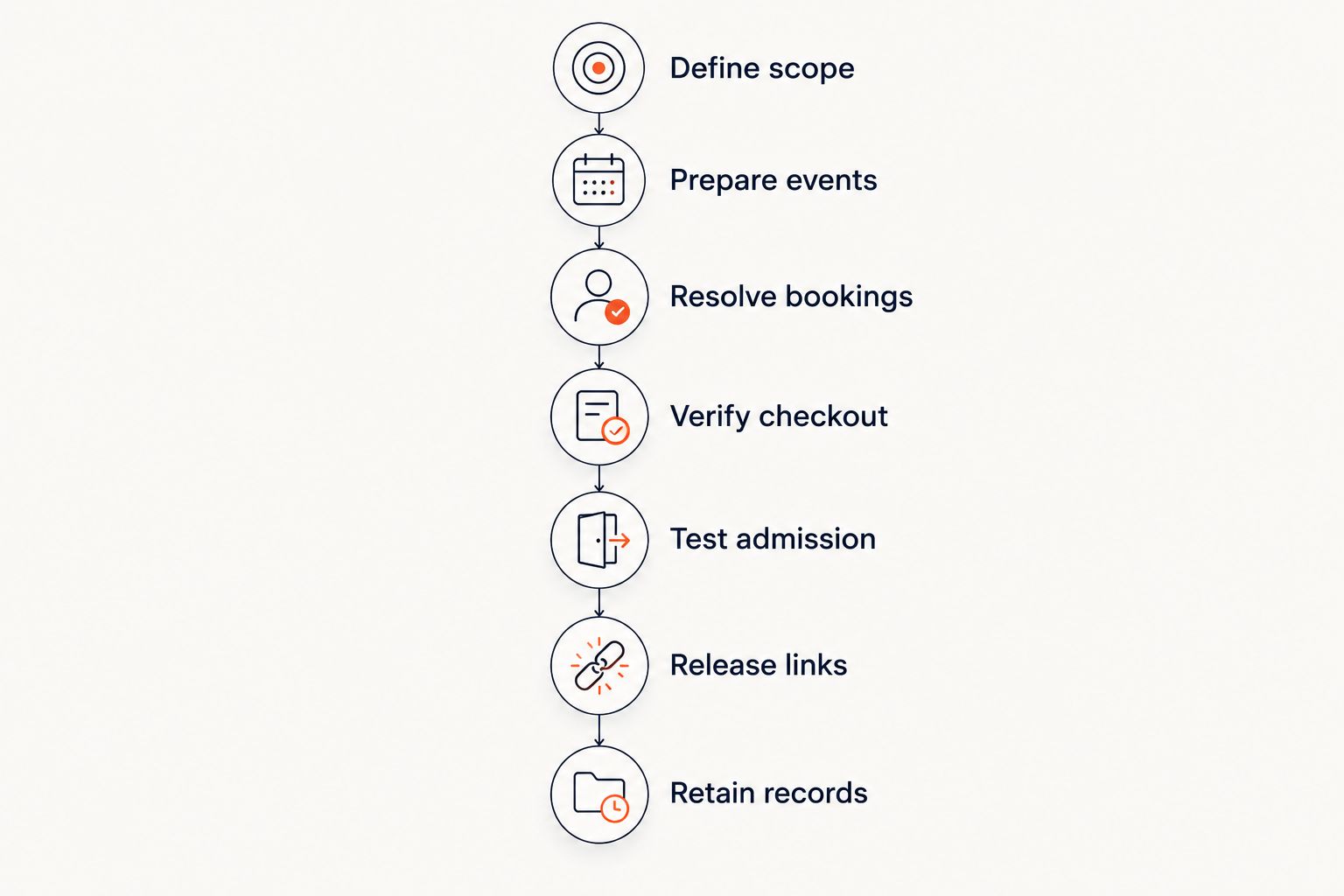
Use these steps as your launch gates. Assign an owner to each gate and record what counts as complete. For a 2026 migration, a checklist tied to observable outcomes is more useful than an unsupported duration estimate.
Define scope
List the events, sales channels and records included in the switch. Distinguish between publishing new events, transferring active bookings and retaining historical records.
Decide whether your launch includes the storefront alone or also the box office, kiosk and door check-in. Keep optional improvements outside the critical path unless the event genuinely depends on them.
Prepare events
Check titles, dates, performance times, admission rules and capacity. Rebuild ticket types deliberately; do not assume that similarly named fields behave identically across platforms.
For a seating plan, verify row labels, seat labels and unavailable areas against the venue. A map that looks correct still needs an inventory check before sales begin.
Resolve bookings
List the existing orders that affect the event you are moving. Give every booking a clear destination: remain on the original platform, transfer through a confirmed process or receive another documented treatment.
Include cancellations and refunded bookings in the reconciliation. The goal is not merely to preserve a list of names; it is to establish who is entitled to attend and which seats remain available.
Verify checkout
Confirm the payment account requirements for your organisation and country with the relevant provider. Do not treat support for a currency as confirmation that your organisation can receive payouts through a particular arrangement.
Test the checkout route and inspect the resulting order record. Verify how staff will identify the transaction and handle support requests. Keep payment setup separate from assumptions about when funds arrive.
Test admission
Follow the ticket from purchase to delivery and then to check-in. Confirm that staff can locate the booking, recognise its event and handle a ticket that has already been admitted.
Include the devices and sales channels you will actually use. A successful storefront purchase does not, by itself, confirm that the box office or door workflow is ready.
Release links
Update the public sales links only after the relevant launch gates pass. Check your website, event listings, scheduled communications and printed materials for references to the old sales destination.
If you use your own domain, make its setup a separate task. The guide to connecting your own domain to a Zunaro storefront is relevant to that part of the switch, rather than to historical booking transfer.
Retain records
Decide who can access the old platform after the new launch. Preserve the records needed for outstanding orders, refunds and financial reconciliation according to your obligations.
Do not equate stopping new sales with closing the old account. Those are different decisions, and the people responsible for finance and attendee support need to approve the latter.
Why switching time varies
The schedule follows the work you include. These factors change the scope of an event ticketing switch without establishing a universal number of days:
- Existing bookings: unsold events have no previously issued tickets to reconcile; live events do.
- Reserved seating: seat labels, occupied seats and remaining capacity need to agree with the venue and booking records.
- Sales channels: storefront, box office and kiosk workflows each need a clear inventory source and staff procedure.
- Payment setup: account requirements and checkout readiness must be confirmed for your organisation.
- Ticket delivery and admission: the issued ticket must reach the attendee and work in the intended check-in workflow.
- Public sales links: domain setup, event listings and scheduled messages need to point to the intended destination.
Remove unnecessary work from the launch, not necessary checks. Moving historical records that do not support the upcoming event is a different decision from making sure every valid ticket can be admitted.
Where ZunaroSpace fits in the switch
ZunaroSpace is best for independent organisers and venues seeking branded ticketing with reserved seating and shared sales inventory. Its storefront, box office, kiosk and door check-in use one live inventory, making those channels relevant to your destination-platform evaluation.
ZunaroSpace also supports Arabic and English, including full right-to-left presentation. If your event serves both languages, inspect the event information and ticket journey in each language as part of the launch review.
The trade-off is not a stated migration duration: you still have to resolve your old tickets, records and payment requirements. Features on the destination platform do not decide how an existing booking from another system should be treated.
The ownership principle is clear: you keep the fees, the funds and the customers. Organisers pay nothing per ticket; buyers cover a booking fee, while free events carry none. Keep those economics separate from your migration plan and confirm the applicable payment arrangement before launch.
Check your next event workflow
Review branded ticketing, reserved seating and shared storefront, box-office and kiosk inventory.
Can I switch while tickets are already on sale?
You can plan a switch while tickets are on sale, but existing bookings need an explicit treatment before the event moves. Keeping current events on their original platform and launching future events elsewhere separates the new launch from ticket-transfer work.
For a live transfer, confirm how existing tickets will be recognised and how sold seats will stay unavailable. Do not announce a completed move while those decisions remain unresolved.
Does reserved seating change the switching schedule?
Reserved seating adds seat-level reconciliation to the switch. You need agreement between the physical layout, the new seating map and the bookings already issued.
Check seat labels as well as total capacity. Matching the overall seat count does not establish that each attendee retains the correct seat.
When should I turn off the old ticketing platform?
Stop new sales on the old platform when the chosen event's sales destination changes and the replacement workflow is ready. Close the old account only after outstanding orders, support needs and record-retention obligations have been addressed.
For your 2026 handover, name the person who approves each decision. Sales closure and account closure should not happen accidentally through the same action.
FAQ
How long does it take to switch event ticketing platforms in 2026?
Switching event ticketing platforms takes as long as the event setup, existing-booking decisions and operational tests require. Set the launch date after checkout, ticket delivery, inventory and admission are ready rather than using an unsupported standard duration.
What's the simplest way to switch without moving existing tickets?
Keep current events on their original platform and publish future events on the new platform. Staff still need clear instructions about which system handles each event's sales, support and admission.
Can I keep tickets sold through my old platform?
Keeping an event on its original platform avoids making a ticket transfer part of the new launch. If you move that event, confirm how previously issued tickets will be recognised before directing sales to the destination platform.
Do I need to rebuild my reserved-seating map?
Check the destination platform's supported seating setup before deciding whether to rebuild or transfer the map. In either case, verify seat labels, occupied seats and remaining capacity against the venue and existing bookings.
What should I test before changing my ticket sales links?
Test checkout, the resulting order record, ticket delivery, inventory and door check-in before changing sales links. Include the box office and kiosk if those channels are part of your launch.
Does supporting SAR mean my payout account is ready?
SAR pricing does not establish payout eligibility. Confirm the payment provider's onboarding requirements and the available arrangement for your organisation before launch.
Should I cancel my old ticketing account as soon as the new store opens?
Do not close the old account solely because the new store opens. First resolve outstanding bookings, refunds, support access and the records your organisation needs to retain.
One last thing
The last migration task is not necessarily opening the new storefront. It is often deciding what still belongs to the old workflow.
Before your 2026 launch, write a short handover that names the sales destination, the valid ticket source and the person responsible for refunds for each active event. If staff cannot tell which system owns an event, the switch is not operationally complete.


