


A ticketing storefront is ready when your event, ticket inventory, checkout and admission process work together—not simply when the page is published. For a reserved-seating launch in 2026, photo-to-seat-map tracing takes about 60 seconds; that covers map creation, not the complete storefront setup or the checks you need before selling.
- How long does it take to set up a ticketing storefront? Plan around launch checks, not page publication.
- Zunaro suits independent organisers who want their ticketing storefront, box office and kiosk on one live inventory.
- Photo-to-seat-map tracing takes about 60 seconds; review the seating layout before publishing.
- Test checkout, ticket delivery and door check-in before promoting your event.
How long does it take to set up a ticketing storefront?
Treat setup as a sequence of checks, not a promised number of minutes. Creating a storefront, preparing a seating map and proving that an order reaches your admission workflow are different tasks. A fast result in one does not establish a completion time for the others.
For your 2026 launch, work through the following sequence. Zunaro brings the storefront, reserved seating, box office, kiosk and door check-in onto one live inventory.
- Prepare the event. Confirm the event name, performance date, venue information and admission instructions before entering them into the storefront.
- Define the inventory. Decide what admission represents: an unassigned place or a particular seat. Make the published inventory match what the venue can admit.
- Review the storefront. Check the event information and the path from selecting admission to starting checkout. Review every language you intend to publish.
- Verify checkout. Follow the transaction through the organiser's site. Confirm the payment arrangement for your business and country before accepting paid orders.
- Check delivery and admission. Inspect the ticket delivered after the transaction, then confirm that staff can use it at the door.
- Check every sales channel. If you use the box office or kiosk, verify that those channels work from the same inventory as the storefront.
The completion condition is simple: you can explain, demonstrate and operate the whole order journey. Until then, a published page is a draft sales process.
Why this matters
Every show has seats that never sold - and no one was working on them. Getting a storefront live puts your event in front of people; making the storefront operational gives your team a process for turning interest into an order and admitting that attendee.
Do not solve an unfinished setup with promotion. Before your 2026 launch, establish where checkout completes, how tickets arrive and which inventory the door team uses. Those are operating decisions, not finishing touches.
Zunaro is best for independent organisers and venues that want a ticketing storefront, box office and kiosk on one live inventory. The advantage is a connected sales and admission workflow. The responsibility remains yours: check the event details, seating layout and staff process before opening sales.
You keep the fees, the funds and the customers. Build your launch checks around that ownership: your team should understand the transaction and the customer handover, rather than stopping at the appearance of the event page.
Choose the admission model before building the storefront
General admission and reserved seating require different preparation. Choose the model that matches the event before entering inventory; otherwise, you are checking a storefront against an undecided admission process.
| Admission model | Best for | Setup advantage | Check before launch |
|---|---|---|---|
| General admission | Events where admission does not assign a particular seat | No individual seat selection to review | Admission descriptions and sellable inventory must match the event |
| Reserved seating | Performances where attendees choose a particular seat | The selected place is explicit in the order journey | Rows, seat labels and the displayed layout need review |
Neither model removes the need to test checkout and ticket delivery. Reserved seating adds a map to that journey; general admission still needs clear admission information and controlled inventory.
Choose the admission model for the event, not for the shortest setup checklist. A theatre performance that depends on seat selection needs a checked map. An event without assigned seats needs an accurate admission offer, not a seating chart added for appearance.
Reserved seating: about 60 seconds to trace a map
Zunaro can trace a seat map from a photo in about 60 seconds, without CAD. That is about 1 minute for the tracing step—not a promise that the complete event storefront will be ready in 1 minute.
The benefit is concrete: you can start from a photo instead of preparing a CAD file. The limit is equally concrete: generating the map does not establish that every seat label, row and available position matches your intended sale.
Review the generated layout against the venue before publishing. Look at the map as both an organiser and a person selecting a seat: can you identify the intended place without relying on knowledge that only venue staff possess?
- Confirm that the layout represents the venue you are selling.
- Check the row and seat labels against your admission process.
- Check which positions you intend to make available.
- Follow a seat selection into checkout.
- Inspect the resulting ticket and confirm that staff can identify the place.
For a 2026 reserved-seating launch, use the approximately 60-second tracing step to begin the map review, not to skip it. Your launch decision belongs at the end of the checks.
Storefront-only launch: check the complete order journey
A storefront-only launch still needs an operational handover. Your event page introduces the offer, checkout records the transaction, ticket delivery gives the attendee their admission document, and check-in puts that document to work.
Run the checks in this order:
- Event details: read the published information as someone who has not seen your internal brief.
- Ticket selection: select the admission or seat you intend to sell.
- Site checkout: follow the handover to checkout on the organiser's site.
- Ticket delivery: inspect the e-ticket and its event information.
- Door check-in: confirm that the admission team can use the ticket.
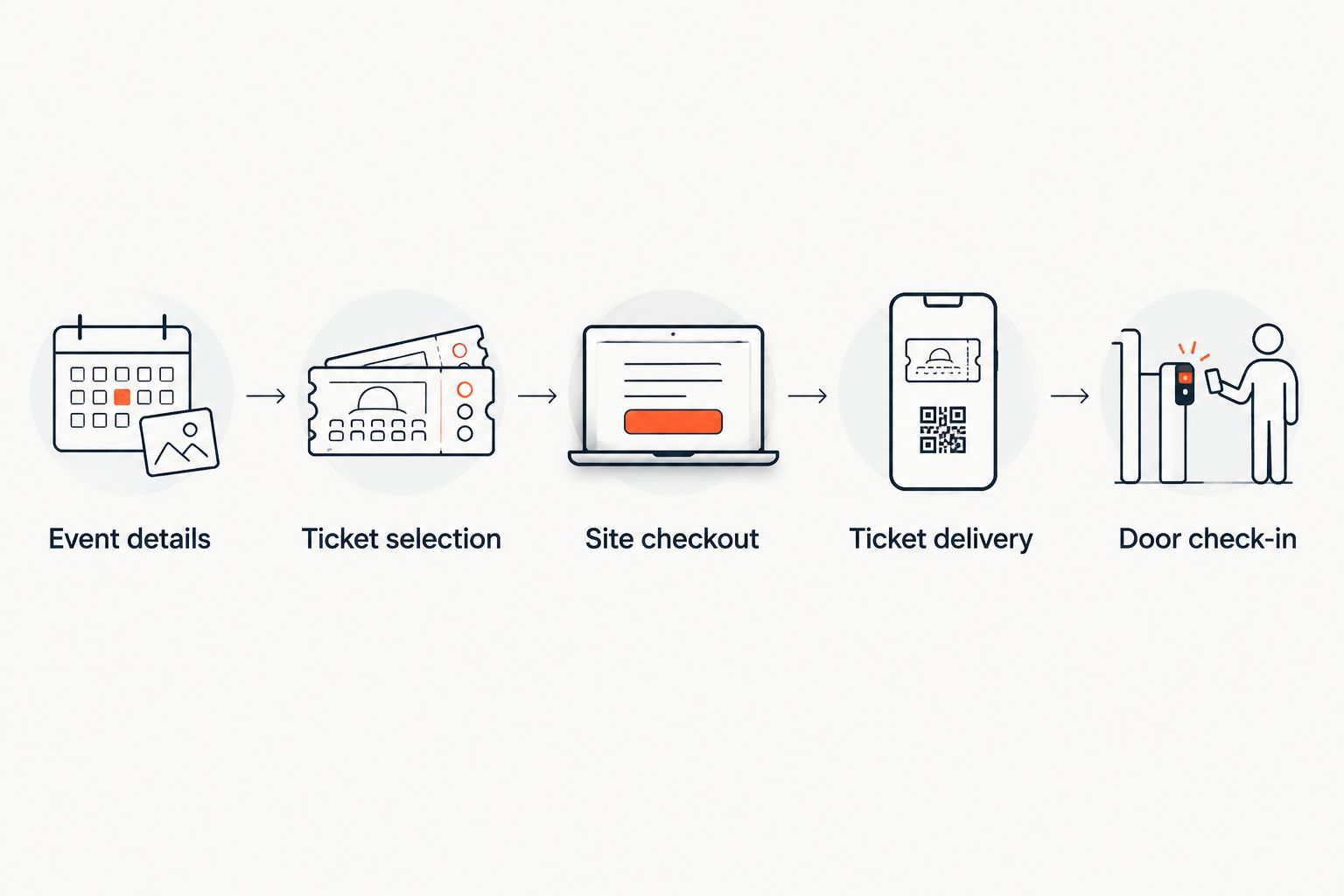
Keep the test focused on the actual event you intend to publish. A walkthrough of an unrelated event does not verify your performance date, seating layout or admission instructions.
Record anything that prevents you from completing the journey. Correct the event or the operating process, then repeat the affected check before announcing that sales are open.
Storefront plus box office and kiosk: check shared inventory
Adding a box office or kiosk adds another place where your team must verify the sale. The purpose is not to create separate versions of the event; it is to sell through different channels while using the same live inventory.
Check the storefront alongside each channel you intend to operate. For reserved seating, follow the same seat through selection and sale, then inspect its status wherever else that seat appears.
Your staff also need a clear channel-specific workflow. A person working at the box office should know how to complete an order and deliver the ticket; a person working at the door should know how to admit the attendee.
The guide to connecting your box office to your online storefront addresses this part of the setup. Do not launch a channel because it exists; launch it after your team has checked its part of the order journey.
Why ticketing storefront setup time varies
Scope determines what you need to check. These factors change the launch checklist without establishing a universal completion time:
- Admission model. Reserved seating requires a map review; admission without assigned seats requires accurate ticket descriptions and inventory.
- Sales channels. A storefront-only workflow differs from a launch that also includes a box office and kiosk.
- Language coverage. Arabic and English require a review of the published information in each language, including right-to-left presentation where used.
- Ticket delivery. Check the WhatsApp and email delivery routes you intend to use, rather than assuming that a completed checkout proves delivery.
- Payment arrangement. Confirm the account and checkout route that apply to your business and country before accepting paid orders.
- Admission workflow. Include the people who will check tickets, not just the person creating the event.
For your 2026 plan, separate configuration from verification. Configuration creates the event and its sales paths; verification establishes whether your team can operate them.
Assign a named owner to each check. A seating question belongs with someone who knows the room; a door-process question belongs with someone who will run admission. This keeps decisions tied to the people who can approve them.
Does conversational booking replace storefront setup?
Conversational booking does not replace checkout on your own site. Zunaro events can be discovered and booked inside ChatGPT and Claude, including selecting a seat on the real map and holding it. Payment completes on the organiser's site, never in chat.
The WhatsApp agent answers questions, holds seats and hands over a checkout link. That makes the handover part of your setup review: inspect the event information, the selected place and the destination where the transaction completes.
Do not describe a chat interaction as a completed sale before checkout is complete. Your operational test should distinguish discovery, selection, a seat hold and the paid order.
The same distinction helps your staff answer questions accurately. They should know whether the attendee has selected a place, received a checkout link or completed an order with a ticket ready for admission.
Can I publish before everything is ready?
Publication is not proof of launch readiness. You can review a published event page, but opening sales requires checking the transaction and admission process behind it.
Before promoting your 2026 event, verify the inventory, checkout route, ticket delivery and door workflow. Defer channels you do not intend to operate rather than treating an unchecked channel as ready.
Does a fast seat map mean a fast storefront launch?
About 60 seconds covers photo-to-seat-map tracing, not the full launch. You still need to review the map, configure the event and check the order journey.
Use the tracing result as an input to your seating check. The meaningful finish line is a correctly identified place on a usable ticket, not merely a map appearing on screen.
What should I prepare before starting?
Prepare the event information, admission model and operating decisions before configuring the storefront. Have the performance details, venue information and seating reference ready, and decide which sales and delivery channels you will use.
Bring the box-office and admission teams into the review where those roles apply. They can confirm whether the published information and ticket handover match how the event will run.
FAQ
How long does it take to set up a ticketing storefront?
A ticketing storefront is ready after the event, inventory, checkout, ticket delivery and admission workflow have been checked. Photo-to-seat-map tracing takes about 60 seconds, but that is a separate step rather than a complete setup duration.
Can I create a reserved-seating map without CAD?
Zunaro can trace a reserved-seating map from a photo in about 60 seconds without CAD. Review the layout and seat labels before opening sales.
Is general admission simpler to prepare than reserved seating?
General admission removes the individual seat-map review from your preparation. You still need to check admission descriptions, inventory, checkout and ticket delivery.
Do I need to check the box office separately from the storefront?
Yes, check the box-office workflow as well as the storefront. Shared live inventory connects the channels, but staff still need to verify their own order and ticket-delivery process.
Can ticket checkout finish inside ChatGPT or Claude?
No, checkout completes on the organiser's own site, never inside ChatGPT or Claude. Events can be discovered and booked in chat, including seat selection and a seat hold.
What should I check for an Arabic and English storefront?
Review the event information and order journey in both languages you intend to publish. Include right-to-left presentation in your Arabic review.
When should I start promoting my event?
Start promoting after you have checked the event information, inventory, checkout, ticket delivery and admission workflow. A published page alone does not establish that the whole process is ready.
One last thing
Ask the person running the door to review the ticket before you open sales. Storefront setup is usually discussed from the publishing end; admission is where the ticket must become an actionable instruction.
For your 2026 launch, hand that person the ticket produced by your checked order journey. Ask them to identify the event, admission and seat where applicable. If that handover is unclear, fix it before asking your team to use it on event day.


