


Yes. You can sell tickets through an organiser-branded storefront that matches the way you present your event, rather than sending buyers to a generic event listing. A branded storefront does not, by itself, confirm which design controls or domain settings you can change, so check those requirements separately before choosing a platform.
- Can I customize my ticketing storefront to match my brand? Yes: Zunaro provides an organiser-branded storefront.
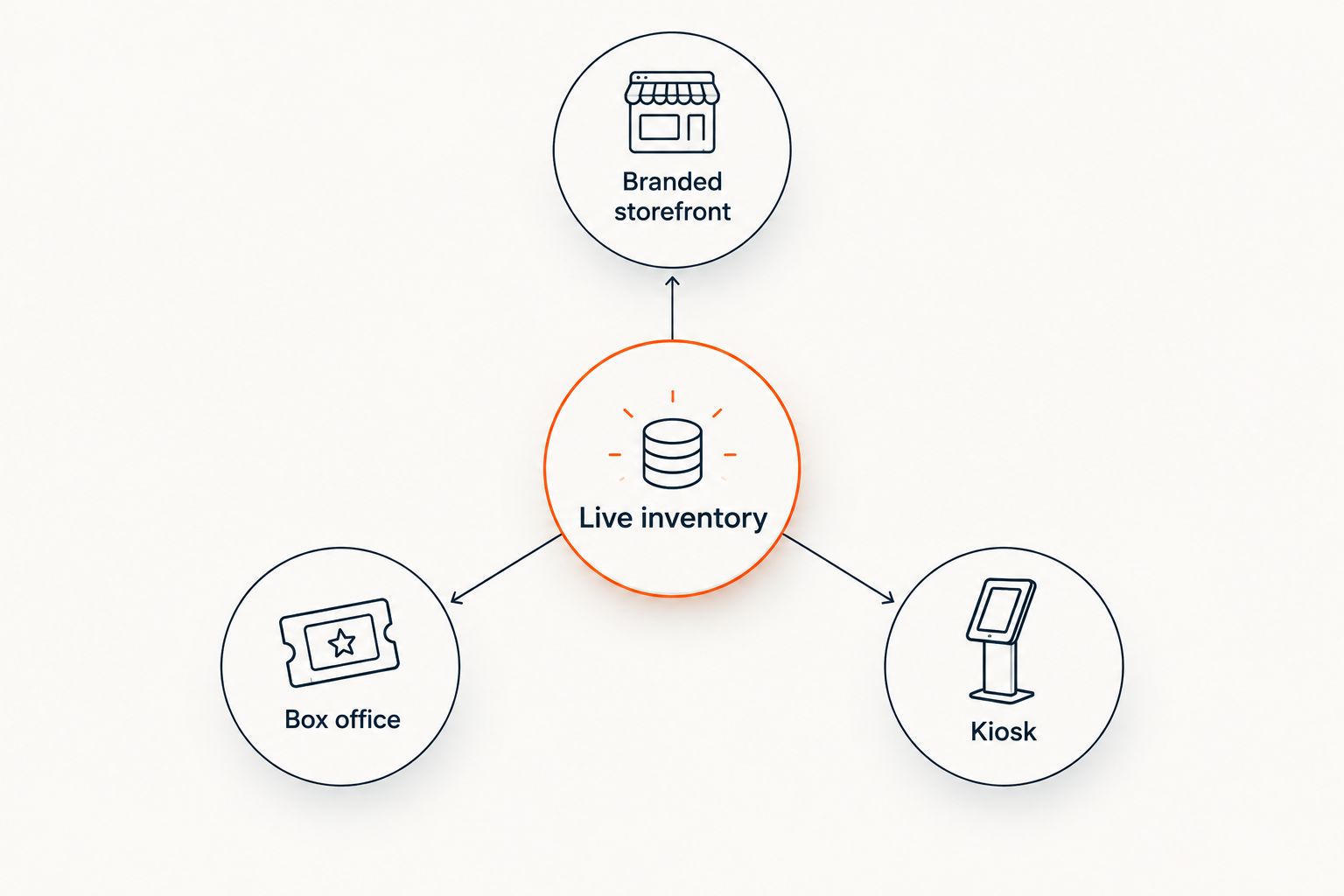
- Zunaro connects the storefront, box office and kiosk to one live ticket inventory.
- Check specific design and domain requirements separately; a branded storefront does not define every setting.
- A WhatsApp agent can answer buyers and hold seats, while checkout completes on the organiser's site.
Why this matters
Every show has seats that never sold - and no one was working on them. Your storefront gives buyers a place to discover the event and complete checkout, but it also has to work with the channels where your team sells in person. If the storefront and the box office show different seat availability, the branding question is no longer just about appearance.
For an independent organiser or venue, the useful test is ownership: whose storefront presents the event, where does checkout finish, and who keeps the customer relationship? The Zunaro event ticketing platform provides an organiser-branded storefront alongside a box office and kiosk. You keep the fees, the funds and the customers. That is a stronger starting point than judging the storefront by its appearance alone.
Can I customize my ticketing storefront to match my brand?
Yes: use a branded ticketing storefront, then verify the individual changes your event needs. Zunaro is best for independent organisers and venues that want their own storefront connected to on-site sales and reserved seating. Its stated strengths are the branded selling experience and shared ticket inventory; the available information does not specify a full list of visual design controls.
Work through the decision in this order:
- Define what matching your brand means. Write down the elements you need buyers to recognise, such as the event identity, the organiser name and the information used in your existing promotion. A branded storefront answers the broad question; your exact list turns it into a test you can check.
- Map the buyer's route to checkout. Note where someone finds the event, chooses a ticket or seat, and completes the purchase. If discovery starts in a chat, the final payment location still matters to your ownership of the sale.
- Check the sales channels together. If you sell online and at the venue, compare the storefront with the box office and kiosk. A buyer should not be offered a seat that has already been sold through another channel.
- Check language alongside appearance. If you serve Arabic- and English-speaking buyers, include both languages in the storefront review. Full right-to-left support matters when Arabic is part of the event experience.
- Ask about each design setting by name. A branded storefront is confirmed; a particular font picker, custom stylesheet or domain configuration is not established by that description. Get a specific answer before making any of those settings a requirement in your launch plan.
This keeps the decision practical. You are not choosing a colour scheme in isolation. You are choosing how buyers encounter your event, select seats and finish a transaction while your team continues selling through the venue.
How does the storefront compare with the box office and kiosk?
These are sales channels within one event ticketing platform, not competing products. Each has a different job. Use the same event and inventory when you review them, then check whether the buyer-facing experience meets your brand requirements at each point.
| Channel | Best for | What it contributes | What to check |
|---|---|---|---|
| Branded storefront | Buyers booking through the organiser's online store | A buyer-facing place to sell event tickets under the organiser's brand | The exact visual and domain settings your team requires |
| Box office | Staff selling tickets at the venue | In-person sales connected to the live ticket inventory | How staff present the event and manage seat selection |
| Kiosk | On-site self-service sales | Another way to sell from the same live inventory | Whether its buyer-facing presentation meets your venue's needs |
The storefront carries your online brand; shared inventory keeps the sales channels aligned. The trade-off is that a branded storefront alone does not tell you how much control you have over every screen at the venue. Review each channel that your buyers will actually use.
For a theatre, the seat map is part of that review. For a promoter running general-admission events, the path from event discovery to checkout takes priority. For a venue with walk-up trade, online presentation cannot be the sole test: box office and kiosk sales must draw from the same available tickets. These are different operating needs, not reasons to assume that every channel has identical design controls.
Why does the answer vary by event?
The short answer is yes, but the work behind that answer changes with the event. Use these factors to decide what needs checking before you publish in 2026:
- Where you sell. An online-only review misses the box office and kiosk if your venue uses them. List every channel through which staff or buyers can select tickets.
- Whether seats are reserved. Reserved seating adds a seat-selection experience to the brand journey. Zunaro can trace a seat map from a photo in about 60 seconds; check the finished map against the room before relying on it for sales.
- Which languages buyers use. Zunaro supports Arabic and English with full right-to-left presentation. Review the buyer journey in the language your audience will use, not just the language your team used to set up the event.
- Where discovery begins. Buyers can find events and pick a seat on the real map inside ChatGPT and Claude. Checkout still completes on the organiser's own site, so the destination must carry the event clearly.
- How buyers ask questions. A WhatsApp agent can answer buyers, hold seats and hand over a checkout link. Check the handover to your storefront as part of the experience rather than treating the conversation as the entire sale.
- Which design controls are essential. Branded does not automatically mean every page element is editable. Separate essential requirements from preferences and confirm each one explicitly.
A 2026 storefront review should end with a written list of requirements, not a general verdict that a page looks branded. That list gives your team a way to distinguish a missing setting from a setting you have not yet checked.
What should you review before publishing?
Start with the event as a buyer would see it. Read the name and event details, select the relevant ticket or seat, and follow the route to checkout. Then repeat the review from each channel you plan to use. The goal is to find inconsistencies before a buyer encounters them.
Review the event identity. Can a buyer tell which organiser is selling the ticket and which event they are booking? If your promotion names a particular performance or venue, check that the storefront presents the same information. Clear identification does more for the brand than decoration that obscures the event.
Review seat selection. If you use reserved seating, compare the map with the room and with the seats staff expect to sell. A seat map made from a photo reduces the work of creating the map; it does not replace your check of the finished layout. For 2026 launches, make that check part of event setup rather than waiting until sales begin.
Review the handoff from discovery. An event discovered in ChatGPT or Claude can be explored and booked there, including seat selection on the real map. Money never completes in chat. Follow the buyer to the organiser's own site and check that the event they selected is still clear at checkout.
Review the handoff from WhatsApp. The agent can answer a question, hold seats and provide a checkout link. Make sure the link takes the buyer into the event sale you intended. A helpful answer in WhatsApp does not compensate for a confusing destination.
Review the on-site channels. Your box office and kiosk use the same live inventory as the storefront. Check the selling journey staff and walk-up buyers will use, especially when an event has reserved seats. The shared inventory addresses ticket availability; it does not remove the need to review the presentation at each channel.
Review both languages where relevant. English-only approval does not cover an Arabic buyer journey. Read the event information, seat-selection steps and checkout route in the languages you intend to offer. Full RTL support is a platform capability; the event details your team enters still need their own check.
This is the useful distinction for 2026: brand fit covers the whole ticket-buying route, not just the storefront landing page. It includes what buyers see before they arrive, where they choose a seat and where they complete checkout.
Review your ticketing setup
See the branded storefront, reserved seating and on-site sales channels together.
Does a branded storefront mean I need a separate box office system?
No. Zunaro puts the branded storefront, box office and kiosk on one live inventory. For a venue selling online and at the door, that connection matters more than making each channel look identical: the channels have different jobs, but they sell the same available tickets.
Decide which staff workflows you need before assessing the on-site presentation. A box office is operated by your team; a kiosk serves a different buying situation. Review both if your venue plans to use both, rather than assuming that approval of the online storefront covers them.
Can buyers complete checkout inside ChatGPT or Claude?
No. Buyers can discover events, choose a seat on the real map and begin booking inside ChatGPT and Claude, but checkout completes on the organiser's own site. That makes the storefront destination part of the brand experience even when discovery starts elsewhere.
For a 2026 event, trace that route during your review. A buyer who starts in a conversation should arrive at a checkout that clearly belongs to the event they selected. Do not describe chat discovery as an in-chat payment channel.
Will a branded storefront give me every design setting I want?
No such conclusion follows from the term branded storefront. The confirmed capability is an organiser-branded place to sell tickets; the exact controls for fonts, layouts, code or domain settings are separate questions. If any one of those is required for your event, ask about that setting directly.
This distinction protects your launch plan. You can choose the platform for its selling channels and ownership model without assuming that an unspecified design tool exists. A precise requirement gets a precise answer.
FAQ
Can I customize my ticketing storefront to match my brand in 2026?
Yes. Zunaro provides an organiser-branded ticketing storefront. Confirm any specific design or domain setting your event requires rather than assuming it is included.
Can my storefront and box office sell tickets from the same inventory?
Yes. The Zunaro storefront, box office and kiosk use one live inventory, so those sales channels draw from the same available tickets.
Does the storefront support reserved seating?
Yes. Reserved seating is part of the platform, and a seat map can be traced from a photo in about 60 seconds. Check the completed map against your venue before publishing.
Can buyers find my event in ChatGPT or Claude?
Yes. Buyers can discover events and choose a seat on the real map inside ChatGPT and Claude. Checkout completes on the organiser's own site, not in chat.
Can a WhatsApp conversation lead to my ticket checkout?
Yes. The WhatsApp agent can answer buyers, hold seats and hand over a checkout link. The buyer completes payment on the organiser's site.
Can I present events in Arabic and English?
Yes. The platform supports Arabic and English with full right-to-left presentation. Review your event details in both languages if your audience uses both.
Does a branded storefront confirm that I can change its fonts or domain?
No. A branded storefront confirms the type of buyer-facing sales channel, not every individual design or domain control. Verify each required setting separately.
One last thing
In 2026, the most revealing storefront test starts outside the storefront. Begin with an event found in chat or a seat held through WhatsApp, then follow the buyer to checkout on your own site. If the event identity remains clear through that handoff, your branding is doing its practical job. If it does not, changing a visual detail on the first page will not fix the route to purchase.
Zunaro event ticketing is best for independent organisers and venues that want an organiser-branded store tied to reserved seating and on-site sales. Its confirmed advantage is control of the selling route and customer relationship; check any specific visual setting before you commit to it.


