


Every show has seats that never sold - and no one was working on them. Event registration software manages who attends and what information you need about them; ticketing software manages admission inventory, sales and entry. Choose registration-led software when attendee information drives the event, ticketing-led software when selling and controlling admission drives it, and a combined workflow when both are essential.
- Event registration software vs ticketing software is a workflow choice: attendee information versus admission inventory.
- Registration-led software suits events where applications, attendee details and participation requirements drive the workflow.
- Ticketing-led software suits venues that need seat allocation, box office sales and door check-in.
- ZunaroSpace is best for independent organisers and venues that need branded ticketing across online and physical sales channels.
How is event registration software different from ticketing software?
The difference is the job you need the system to perform. Registration starts with the participant record; ticketing starts with the right to attend. Both categories overlap, so judge the demonstrated workflow rather than the product label.
For an example of the ticketing-led approach, ZunaroSpace brings a branded storefront, reserved seating, box office, kiosk and door check-in onto one live inventory. That answers an admission-management requirement, not every possible conference-registration requirement.
| Approach | Best for | Main strength | Main limitation to check |
|---|---|---|---|
| Registration-led software | Events where attendee information determines participation | Collecting and managing the information required to register | Whether it supports the seat inventory and sales channels your venue needs |
| Ticketing-led software | Venues and organisers selling controlled admission | Managing tickets, seats, sales and entry | Whether it collects the attendee information your event requires |
| Combined workflow | Events requiring both detailed registration and admission control | Connecting participant records with admission rights | Whether changes remain consistent across forms, orders and check-in |
A paid event does not automatically need ticketing-led software, and a free event does not automatically need registration-led software. The deciding factor is the operational work, not whether money changes hands.
Why this matters
Choosing event software in 2026 means choosing the record your team will trust. Is it the attendee application, the ticket order, the assigned seat or the check-in status? Those records answer different questions.
A theatre needs to know which seats remain available. A conference might need to know which delegates selected a session or supplied required information. An event that needs both should test both before committing.
The wrong emphasis creates extra work. A detailed registration form does not prove that a box office can sell from the same inventory as your website; an attractive seat map does not prove that you can collect and manage the participant information you need.
Write down the work before comparing feature lists. Your event format should determine the software category, not the other way round.
Registration-led software: best for attendee information
Choose a registration-led approach when the information someone submits determines how you organise their participation. That includes workflows involving applications, delegate details, attendance preferences or information needed before the event.
Start with the questions your team must answer. Who is attending? What information must they provide? What must happen before you confirm their participation? Then ask the supplier to demonstrate that exact sequence.
What to test
- Required information: Can you collect the fields your event actually needs?
- Participant records: Can staff find and correct an attendee's details without losing the connection to their registration?
- Participation rules: Can the system represent your approval or eligibility process?
- Event-day use: Does the information reach the staff who need it at check-in?
The strength of this approach is its focus on people and their participation requirements. Its limitation is that registration functionality alone tells you nothing about reserved seating, walk-up sales or shared admission inventory.
For your 2026 shortlist, request a demonstration using your own registration questions. A generic form demonstration is not enough if your event has a more demanding workflow.
Verdict: choose registration-led software when a complete participant record matters more than allocating a seat or selling admission across channels.
Ticketing-led software: best for admission inventory
Choose a ticketing-led approach when the central task is to allocate, sell and validate admission. This fits theatres, promoters, clubs, festivals and venues that need a clear connection between tickets issued and places available.
Start with inventory. General admission needs a capacity limit; reserved seating needs a connection between the ticket and the chosen seat. Where you sell also matters: online, at the box office and at a kiosk should not become unrelated stock records.
What to test
- Admission inventory: Can staff see the relevant capacity or seat allocation?
- Sales channels: Does a sale change the inventory used by the other channels?
- Ticket delivery: Can attendees receive the admission credential through the channels you require?
- Door check-in: Can staff validate the credential against the correct event record?
The strength is control over admission from sale to arrival. The limitation is that ticketing functionality does not establish support for complex applications, accreditation or specialist delegate administration.
Do not infer a capability from the word ticketing. Ask to see the full journey, including a change to an existing order and the resulting check-in record.
Verdict: choose ticketing-led software when seats, admission capacity, sales channels and entry are the operational priority.
Combined workflows: best when both records matter
A combined workflow is appropriate when you need detailed participant information and controlled admission. A conference with allocated seats is an example: knowing who registered and knowing which seat they hold are separate requirements.
Combined does not necessarily mean separate products. One platform can cover both jobs, but the demonstration must prove that it handles your specific requirements rather than merely displaying both labels.
The benefit is a connected record of participation and admission. The drawback is added coordination when different systems hold different parts of that record.
Ask what happens when an attendee changes their details, a staff member changes their admission entitlement, or an order is cancelled. Your team needs to know which record changes and which staff see the result.
Verdict: choose a combined workflow only when both jobs are necessary, and test the connection between them before adding another system.
Why the right software choice varies
Your event's operating model changes the balance between registration and ticketing. Use these factors to decide what deserves the most attention in a supplier demonstration:
- Attendee information: The more your process depends on submitted details, the more important registration management becomes.
- Seating: Assigned seats require a seat allocation workflow, not just a list of names.
- Sales channels: A storefront, box office and kiosk need a clear inventory relationship.
- Entry process: Staff need admission records they can use at the door.
- Language requirements: Arabic and English workflows require testing beyond an English-only form.
- Ownership: Establish whose storefront hosts the sale and who controls the customer relationship.
These are requirements, not reasons to buy more features. If a function does not support a real task, it should not decide your shortlist.
For Gulf events in 2026, test Arabic screens and right-to-left presentation as part of the workflow. A language claim on a feature page is not a substitute for seeing the relevant screens in use.
How do you test the difference before choosing?
Use a representative event, not an empty demonstration account. Give the supplier the admission rules, information requirements and sales channels your team actually uses.
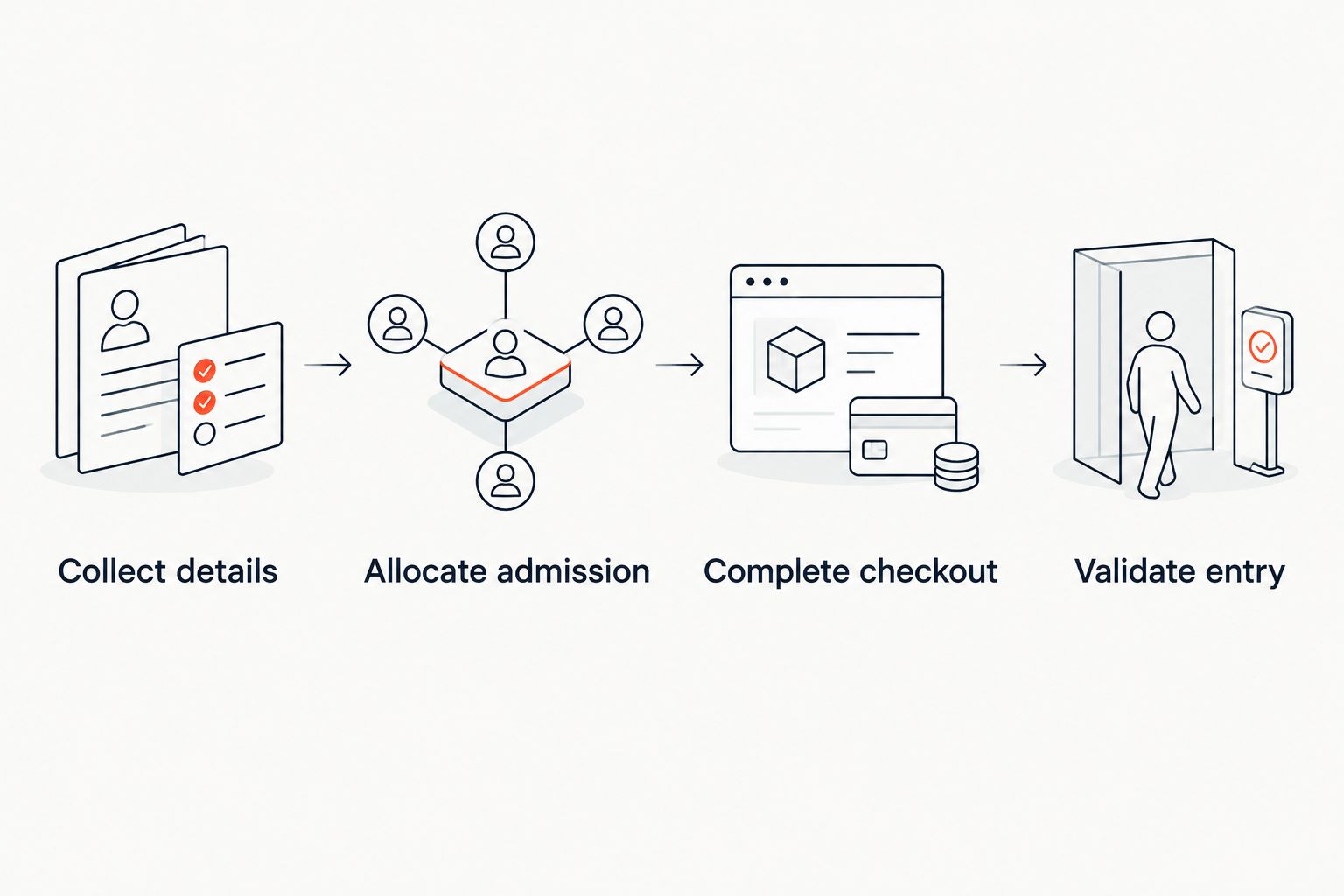
Follow the event journey
- Collect details. Enter the information you require from a participant and inspect the resulting record.
- Allocate admission. Select the relevant ticket or seat and check how the system represents that entitlement.
- Complete checkout. Confirm where payment happens and how the order connects to the participant and ticket.
- Validate entry. Find the admission record at check-in and test the staff workflow.
This sequence exposes the difference between collecting a response and managing attendance. It also gives registration-led and ticketing-led suppliers the same practical test.
After the demonstration, ask staff to identify any point where they had to copy information manually. Then decide whether that handoff is acceptable for your event.
For a 2026 purchasing decision, keep the test tied to real tasks. You are choosing an operating workflow, not awarding points for the longest feature list.
Where does ZunaroSpace fit?
ZunaroSpace is best for independent organisers and venues that need branded ticketing across online and physical sales channels. Its event ticketing platform includes the store, seating, box office, kiosk and door check-in on one live inventory.
The differentiator is a selling workflow attached to that platform. A WhatsApp agent answers buyers, holds seats and hands over a checkout link; a seat map can be traced from a photo in about 60 seconds, without CAD or a setup fee.
Events can also be discovered and booked inside ChatGPT and Claude, including selecting a seat on the real map and holding it. Checkout always completes on the organiser's own site, never in chat.
AI that sells your tickets.
You keep the fees, the funds and the customers.
The economics are explicit: organisers pay nothing per ticket. The buyer booking fee is AED 3.99, or AED 1.99 for tickets under AED 20; free events carry no booking fee. Ask Zunaro Pro is AED 179/mo, with a 14-day trial and no card required.
The platform supports Arabic and English with full RTL, AED and SAR pricing, and e-tickets delivered through WhatsApp as well as email. Those are relevant checks for a Gulf organiser comparing event software in 2026.
Its fit is ticketing-led. If your event requires specialist registration administration, verify those requirements separately rather than assuming that a ticketing platform covers them.
Based at DTEC, Dubai Silicon Oasis. Built for the Gulf - the UAE and Saudi Arabia.
Evaluate your ticketing workflow
Check branded sales, reserved seating, box office, kiosk and door check-in against your event requirements.
Can registration software sell tickets too?
Registration software can include ticket sales, but the category name does not establish how those sales work. Ask the supplier to demonstrate the admission workflow you need, including seat allocation and physical sales channels where relevant.
Payment collection is not the whole test. Confirm what the system issues after payment and how door staff validate it.
Do free events need ticketing software?
Free events need ticketing software when you need controlled admission, seat allocation or a ticket-based entry process. A simple registration workflow is sufficient when your main requirement is collecting names and details.
Choose by admission requirements, not by ticket price. Free admission still requires a clear capacity and entry process where places are limited.
Is ticketing software enough for a conference?
Ticketing software is enough when your conference requirements are admission sales and entry control, and the platform supports the attendee information you need. More demanding delegate workflows require a separate check.
List the information and participation rules before evaluating the seat map or checkout. That keeps the decision tied to conference operations.
FAQ
What's the main difference between event registration software and ticketing software?
Event registration software focuses on participant information and participation workflows; ticketing software focuses on admission inventory, sales and entry. Products overlap, so test your event's actual requirements rather than relying on the category name.
Is event registration software better than ticketing software?
Event registration software is better suited to information-led participation workflows, while ticketing software is better suited to admission-led operations. Neither category is automatically better for every event.
Do I need both registration and ticketing software?
You need both sets of capabilities when participant information and controlled admission are essential. A single platform can cover both, but you should verify the complete workflow before adding separate systems.
Can I use ticketing software for a free event?
Yes, ticketing software can support a free event when you need admission control or seat allocation. Whether a particular platform supports your process must be checked directly.
What should a venue test before choosing event software?
A venue should test seat or capacity allocation, connected sales channels, ticket delivery and door check-in. Include the attendee information staff need so the demonstration covers the full event journey.
Does booking an event in ChatGPT mean payment happens in chat?
No, ZunaroSpace supports event discovery, seat selection and holds inside ChatGPT and Claude, but checkout completes on the organiser's own site. Booking in chat and completing payment are separate stages.
One last thing
The useful distinction is not the form versus the ticket. It is which record your team relies on when something changes.
Ask the supplier to change a participant's details and then change their admission entitlement during the demonstration. Inspect what registration staff, sales staff and door staff see afterwards. That practical check tells you more about fit than a category label.


