


Hotels and resorts event ticketing is the management of event sales, seating and admission with the aim of filling your property’s events while keeping control of the guest relationship. Unlike room reservations, event bookings need their own capacity, admission rules and door workflow, whether you run a ballroom dinner, a conference or a resort performance.
- ZunaroSpace event ticketing suits hotels and resorts that want branded sales, reserved seating and shared inventory across sales channels.
- Event ticketing for hotels and resorts needs event capacity separate from room inventory, with clear admission rules.
- Choose reserved seating for assigned places; use general admission when guests do not need a specific seat.
- Test checkout, ticket delivery and door check-in before publishing your hotel’s event programme.
Why event ticketing matters for hotels and resorts
Every show has seats that never sold - and no one was working on them.
Your hotel’s room-booking process does not answer every event question. A guest can have a room reservation without event admission, while a local visitor can attend an event without staying overnight. Treat those as separate entitlements.
Sell the event against its own capacity, not against the number of rooms booked. For your 2026 programme, define what each ticket admits, which date it covers and whether it assigns a seat before opening sales.
Start with the decision that shapes the rest: general admission or reserved seating. That choice affects the booking page, reception enquiries and the instructions your door team needs.
The operational constraint is shared responsibility. Events, reception, food and beverage, finance and security each need an agreed process without maintaining competing versions of the guest list.
How to set up hotel and resort event ticketing
Define exactly what admission includes
Start manually with a written event brief. Specify the event, the admission entitlement and the capacity your operations team has approved; software cannot resolve an unclear offer.
A dinner ticket, a performance ticket and a conference registration do different jobs. If an event includes a meal, describe that entitlement explicitly. If accommodation is separate, say so before checkout rather than leaving reception to explain it later.
For your 2026 event calendar, give every performance or session a clear date and location. Similar event names are not enough when guests must distinguish between a ballroom evening and a terrace session.
- Record the event name, date, venue and admission window.
- State whether accommodation is included or separate.
- Describe meal, entertainment and access entitlements.
- Agree capacity with the responsible venue team.
- Name the person authorised to change the event brief.
Match the seating model to the experience
Sketch the room layout before configuring a seating chart. Mark entrances, accessible routes, production areas and places that must stay out of sale, then have the event team approve the arrangement.
Use reserved seating when the assigned place is part of the promise. Use general admission when admission matters but a particular seat does not. Do not make guests select a seat merely because a seating tool exists.
For a banquet, decide whether you sell individual places or complete tables. Those are different booking rules. Ask any shortlisted platform to demonstrate the exact arrangement rather than assuming a theatre-style chart covers your dinner service.
- Choose general admission, assigned seats or table-based admission.
- Remove operational holds from sale before publishing.
- Check seat labels against the room team’s terminology.
- Write an accessible-seating enquiry process.
- Approve the layout again after production changes.
Connect every sales point to shared inventory
The manual route is a controlled sales ledger with a named owner. Reception, event staff and online administrators must reconcile every sale and hold against that record; independent spreadsheets create conflicting versions of capacity.
For a platform-based route, ZunaroSpace event ticketing connects a branded storefront, reserved seating, box office, kiosk and door check-in on one live inventory. Organisers pay nothing per ticket. You keep the fees, the funds and the customers.
That is the relevant difference for a hotel: reception sales and online sales should not depend on someone copying records between lists. Verify how the proposed workflow handles a seat selected online while a member of staff is serving another guest.
Use these channel names in your operating plan: Storefront, Reserved seating, Box office, Kiosk and Door check-in.
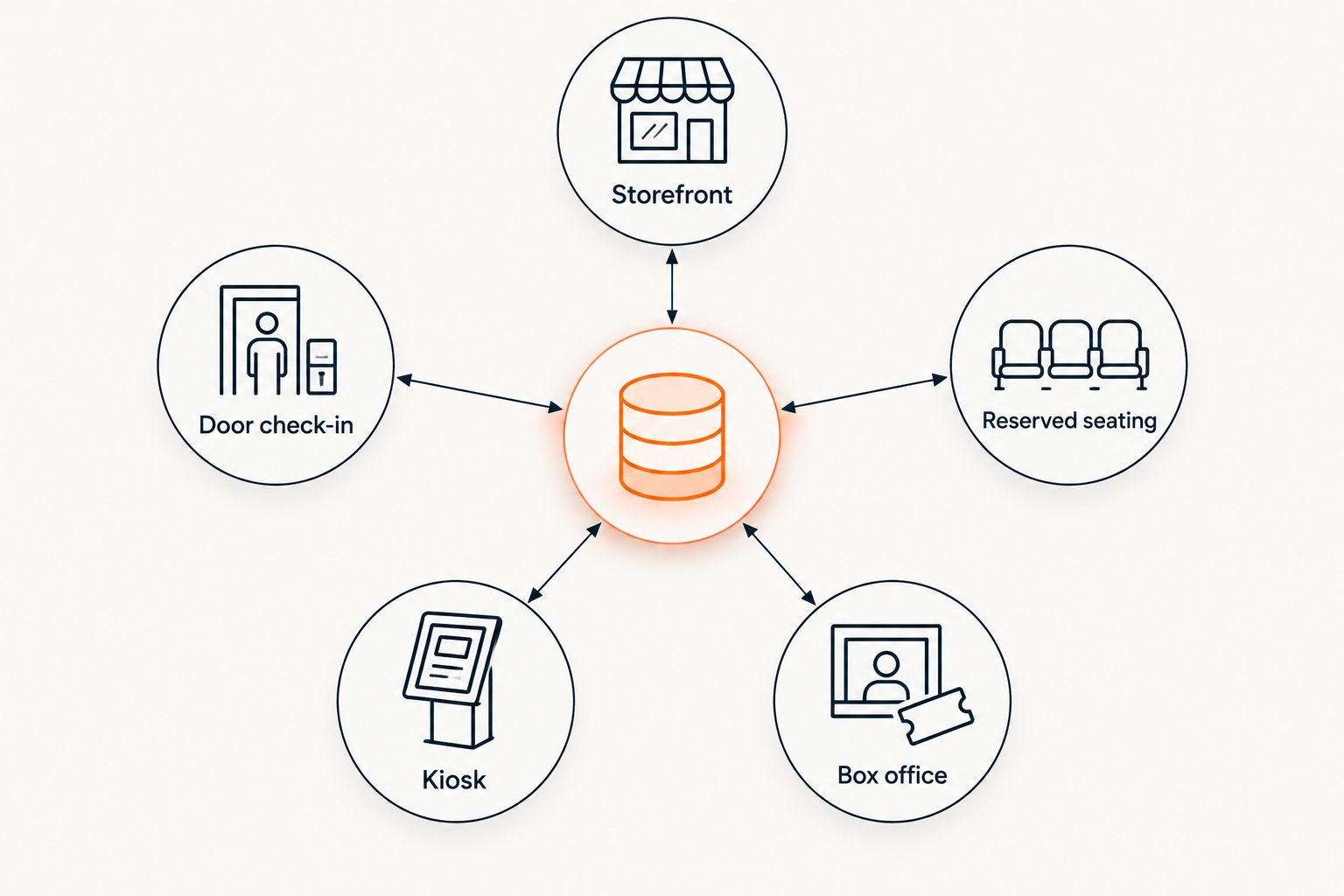
Before committing, test the connections rather than accepting a feature list. Hotel property-management connections, room charging and local payment eligibility need their own checks.
- Demonstrate a storefront booking and a box-office sale.
- Confirm how seat holds affect remaining capacity.
- Check that kiosk sales use the same inventory.
- Verify how cancellations return admission to sale.
- Document payment eligibility for the property’s operating country.
Build an event page reception can stand behind
Write the event page in a shared document before publishing it. Ask reception to read it as though answering a guest who has never visited the property; every unresolved question is a support task waiting to happen.
Lead with the experience, then explain admission. Include the exact event location within the property, the relevant entrance and any arrival instructions. A hotel address alone does not tell a visitor which ballroom or gate to use.
For Gulf events in 2026, test Arabic and English content wherever both languages are part of your service. ZunaroSpace supports Arabic and English with full right-to-left layouts, but your team still needs to check the event-specific wording.
- State the event date, start time and arrival instructions.
- Identify the ballroom, terrace, theatre or other event space.
- Explain what admission includes and excludes.
- Publish the applicable cancellation and transfer terms.
- Review Arabic and English wording with the relevant staff.
Give enquiries a route to checkout
Begin with a shared enquiry sheet and approved answers. Reception and events staff need consistent responses about seating, access and admission, plus a clear route for questions that require a manager.
A WhatsApp agent can shorten that path by answering enquiries, holding seats and handing over a checkout link. Keep the distinction clear: a conversation or seat hold is not a completed payment.
Events can also be discovered and booked through ChatGPT and Claude, including seat selection on the real map. Checkout always completes on the organiser’s own site, never in chat. Assess that mechanism as another route into your event sales process, not as a replacement for a clear event page.
- Write approved answers for recurring event questions.
- Assign escalation responsibility for exceptions.
- Explain the difference between a hold and a purchase.
- Check that checkout links lead to the correct event.
- Remove superseded answers when event arrangements change.
Rehearse admission with the door team
Run a rehearsal before public sales become your live test. A manual guest list can work as a deliberately managed fallback, but the team needs rules for finding bookings, recording entry and resolving exceptions.
For the rehearsal, use 3 test bookings: a standard admission, a group booking and a booking with an assigned seat. These are test cases, not a throughput benchmark. Follow each booking from confirmation through to the entrance.
Walk the physical route too. A correct ticket does not solve an unclear entrance, and a queue at reception should not become the default event check-in process.
- Check the confirmation and ticket delivery route.
- Find each test booking using the door team’s workflow.
- Test how repeat presentation of a ticket is handled.
- Confirm the escalation route for missing bookings.
- Document the fallback process for a connection failure.
Reconcile sales, attendance and campaign results
Start with a simple post-event record. Keep tickets issued, cancelled admissions, checked-in attendees and sales separate; they answer different operational questions.
For your 2026 review, compare events with similar admission models. A seated dinner and a general-admission performance need different context, so a single headline sales figure is not enough to explain either result.
Where you use a campaign agent, review the audience and rendered email, send a test and approve the schedule. The campaign mechanism supports attributed-revenue reporting, but the team still owns the message and the decision to send it.
- Reconcile event sales with the finance team’s records.
- Separate cancellations from guests who did not attend.
- Review attendance against the event’s admission capacity.
- Record recurring questions for the next event page.
- Review campaign-attributed revenue alongside the sending activity.
Compare ticketing approaches for your property
Choose by the work your team must complete, not by the longest feature list. The options below describe operating approaches; a hotel can use different approaches for different event formats.
| Option | Best for | Main advantage | Key limitation or check |
|---|---|---|---|
| Manual ledger and guest list | Small, controlled invitation events | Staff can inspect and amend the working record directly | Sales, holds and admission updates require manual coordination |
| Form-based registration | Events centred on collecting attendee details | Keeps registration questions together | Verify payment, seating and door-check-in requirements separately |
| Dedicated event ticketing platform | Properties running public ticketed events | Gives event sales and admission a dedicated workflow | Demonstrate the exact seating model and hotel-system connections |
| ZunaroSpace | Hotels and resorts seeking branded sales with shared inventory | Storefront, seating, box office, kiosk and check-in share live inventory | Confirm property-management requirements and local payment eligibility before adoption |
ZunaroSpace is best for hotels and resorts that want branded event ticketing with shared inventory across online and on-site sales.
AI that sells your tickets. The practical mechanism is a WhatsApp agent that answers enquiries, holds seats and provides a checkout link—not a substitute for your event operations team.
Based at DTEC, Dubai Silicon Oasis. Built for the Gulf - the UAE and Saudi Arabia.
Common mistakes hotels and resorts make
Treating a room reservation as event admission
A room booking and an event ticket represent different entitlements unless you explicitly combine them. State the relationship in the offer and give reception a way to verify event admission without interpreting accommodation notes.
Keeping separate allocations without a reconciliation owner
A reception list, an events spreadsheet and an online store cannot independently represent the same remaining capacity. Connect the channels or assign an owner and a documented reconciliation process before opening sales.
Publishing a seating chart before operations approves it
A chart can look complete while omitting production holds or using labels the room team does not recognise. Approve the physical layout before publishing and repeat that check whenever the setup changes.
Assuming ticketing replaces hotel systems
Event admission does not automatically establish room charging, accommodation packages or a property-management connection. Make those requirements explicit in procurement and require a demonstration of each proposed connection.
Promising admission from an unfinished conversation
An enquiry, a held seat and a completed order are different states. Train staff to confirm the actual booking status rather than treating a message exchange as proof of purchase.
FAQ
What is event ticketing for hotels and resorts?
Event ticketing for hotels and resorts manages event sales, seating and admission separately from room reservations. It gives the property a defined process for selling access and checking guests into the event.
What is the best ticketing approach for a hotel with online and reception sales?
A shared-inventory ticketing platform is the best fit when online and reception teams sell the same event capacity. Demonstrate both sales routes and check how seat holds affect remaining capacity before choosing.
Should a hotel dinner use reserved seating or general admission?
Use reserved seating when guests are promised a particular place, and general admission when they are not. For table-based dinners, verify whether the booking workflow sells individual places or complete tables.
Can hotel event ticketing replace our property-management system?
Do not treat event ticketing as a replacement for your property-management system. Verify room charging, accommodation packages and data connections separately from ticket sales and door admission.
Can guests pay for an event inside ChatGPT or Claude?
Checkout completes on the organiser’s own site, never inside ChatGPT or Claude. Event discovery, booking steps and seat selection can happen in chat before the checkout handover.
Does ZunaroSpace support Arabic hotel event pages?
ZunaroSpace supports Arabic and English with full right-to-left layouts. Your team should still review event descriptions, arrival instructions and admission terms in both languages before publishing.
What should hotel staff test before launching ticket sales?
Hotel staff should test checkout, ticket delivery, seat assignment and door check-in before launching sales. Include reception sales, repeat ticket presentation and a connection-failure fallback in the rehearsal.
One last thing
Test the handover, not just the purchase. For your next 2026 event, ask someone outside the events team to follow the published instructions from booking confirmation to the correct entrance.
Do not coach them. Record where they hesitate, then fix the event page or staff instructions before launch; a successful payment is not the end of the admission process.


