


Every show has seats that never sold - and no one was working on them. Government event ticketing is the process of issuing and managing admission to public-sector events so organisers can control attendance, seating and entry without losing ownership of event operations.
- Event ticketing for government events starts with admission rules, accountable ownership and a tested door process.
- ZunaroSpace event ticketing suits organisers needing a branded storefront, reserved seating and a connected box office.
- Separate ticket validity from security clearance; an admission system is not an accreditation decision.
- Approve data handling, accessibility and financial workflows before publishing your 2026 event.
Why event ticketing matters for government events
A government event needs clear answers to operational questions: who can attend, who can change the guest list and who decides an exception at the door. A public cultural programme and an invitation-only policy briefing need different admission rules, even when they use the same venue.
Choose the admission model before choosing the platform. For your 2026 procurement brief, separate essential controls from useful conveniences. A seat map helps allocate places; it does not establish eligibility, authorise a refund or approve the handling of personal information.
Start with your policy for restricting admission to a private guest list. Define whether an invitation grants entry, permits registration or simply starts an approval process. Do not leave that distinction to reception staff.
The practical objective is a consistent record from registration through admission. Your communications team, finance team, venue operator and security lead should agree what that record means before invitations leave the organisation.
How to set up government event ticketing
Define your admission rules
Start with a written event brief and a manually maintained approval list. This gives you a baseline without buying software, and exposes disagreements before they become configuration problems.
Identify whether the event is open to the public, invitation-only or subject to approval. Then decide whether attendees receive a named seat, a place within a zone or general admission. Keep security clearance separate from the ticket: possession of an admission credential should not override your event's security procedure.
For a ministerial session, a cultural performance or a public workshop, write the actual entry conditions rather than copying a previous event's settings. Record the person authorised to change them.
- Document the event owner and admission decision-maker.
- Define public, invited and approved attendee categories.
- Specify whether tickets are named or transferable.
- Record companion and accessibility arrangements.
- Write the exception process for unlisted arrivals.
Approve the data and procurement requirements
Build a requirements document using a shared file and an approval checklist. Ask your procurement, privacy, information security and accessibility teams to review it before a supplier demonstration.
For your 2026 event, request written answers about hosting, retention, deletion, access controls and incident handling. A supplier's ability to issue tickets does not establish that the supplier meets your organisation's requirements. Treat each requirement as an evidence request, not a marketing question.
Collect only the information needed for your approved purpose. If identity checks happen separately, decide whether the ticketing record needs to contain any identity-document information at all. Avoid placing sensitive details on tickets or in confirmation messages.
- List each attendee field and its operational purpose.
- Define who can view, amend and export records.
- Request evidence for mandatory security requirements.
- Agree retention and deletion responsibilities.
- Test the registration journey with accessibility reviewers.
- Record approval owners and outstanding conditions.
Choose a workflow that matches the event
Sketch the workflow manually: invitation, registration, approval, ticket issue, entry and reconciliation. For a small controlled briefing, a managed list can be sufficient when your organisation accepts the manual workload. The limitation is the work required to reconcile changes across staff and entry points.
For assigned seating and connected sales channels, evaluate an event ticketing platform against that workflow. ZunaroSpace event ticketing is best for organisers who need a branded storefront, reserved seating and a connected box office. Its store, seating, box office, kiosk and door check-in use one live inventory.
That operational fit is not a government procurement approval. Verify the evidence your organisation requires rather than assuming public-sector suitability from the feature list. You keep the fees, the funds and the customers. Translate that ownership principle into an approved financial and data-handling workflow.
- Map each handover between event teams.
- Identify where manual updates create duplicate work.
- Demonstrate the complete registration-to-entry journey.
- Test changes made through different operating channels.
- Confirm the financial workflow for the contracting entity.
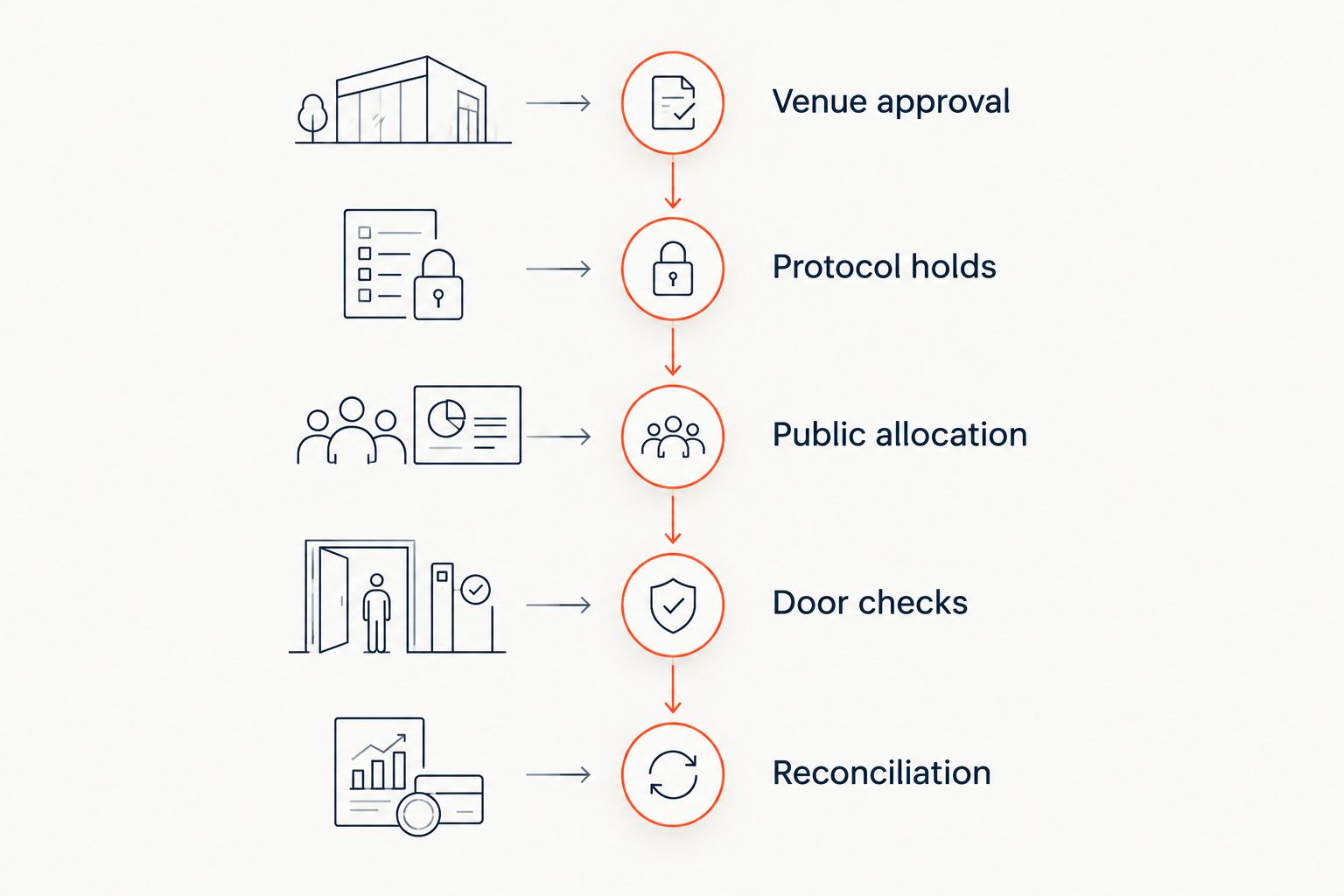
Build the seating and inventory plan
Begin with an approved venue plan and a manually checked allocation sheet. Mark public seats, delegation areas, accessible positions and operational holds before configuring admission.
ZunaroSpace can trace a seat map from a photo without CAD. Use the result as a working map, then check it against the venue's approved layout; a generated map does not approve capacity, circulation routes or accessibility arrangements.
For your 2026 programme, make the distinction between a seat held for protocol and a seat issued to an attendee explicit. Assign ownership of releases so that an unused allocation does not remain blocked simply because nobody knows who can change it.
- Venue approval: confirm the layout with the venue lead.
- Protocol holds: record who owns each reserved allocation.
- Public allocation: identify places approved for release.
- Door checks: match seat labels to staff instructions.
- Reconciliation: record allocation changes and their owners.
Prepare bilingual communications and support
Draft invitation, confirmation and entry instructions manually before configuring message delivery. Have the relevant communications owner approve both language versions, including venue names, entrances and assistance instructions.
ZunaroSpace supports Arabic and English with full right-to-left presentation, and sends e-tickets through WhatsApp as well as email. Its WhatsApp agent answers buyers, holds seats and hands over a checkout link. AI that sells your tickets. That mechanism supports event operations; your team still owns approved wording and escalation decisions.
For government events, distinguish admission enquiries from requests that need an official response. Do not let an automated answer become a substitute for a protocol decision. Check whether the event's invitation and discovery settings match its intended audience.
- Approve Arabic and English event instructions together.
- Explain which entrance each attendee should use.
- Provide a route for accessibility and assistance requests.
- Define questions that require staff escalation.
- Test ticket delivery and message readability.
Rehearse the door and exception process
Start with a paper runbook and a staff walkthrough. Assign responsibility for scanning, guest-list questions, seating changes and security decisions, then rehearse how staff hand cases between those roles.
Use test registrations to check a valid admission, a repeated scan, an incorrect session and a missing confirmation. These are rehearsal scenarios, not claims about any platform's behaviour. Observe the actual result and write down the response your staff must follow.
For your 2026 event, test connectivity at the intended entrance using the intended equipment. Do not assume offline operation, device compatibility or recovery behaviour. Ask the supplier to demonstrate each capability you require, and agree the fallback procedure with the event owner.
- Assign a named lead for each entry function.
- Rehearse valid and exception admission scenarios.
- Test devices and connectivity at the entrance.
- Document the approved connectivity fallback.
- Separate seating exceptions from security decisions.
- Give staff a clear escalation route.
Reconcile attendance and close the records
Create a closeout worksheet before the event so each team knows what it must return. Keep registrations, issued tickets, cancellations and recorded admissions as separate measures; they describe different stages of participation.
For paid events, have finance approve how orders, payment records and refunds will be reconciled. Verify settlement arrangements for the actual legal entity and payment provider. Do not assume that the same arrangement applies across the UAE and Saudi Arabia.
Finish the 2026 event with a documented closeout rather than an indefinite shared folder. Assign ownership of outstanding enquiries, required exports and record deletion under your approved policy. The event lead should know which records remain and why.
- Separate registration totals from recorded attendance.
- Reconcile paid orders through the approved finance process.
- Assign unresolved refunds and attendee enquiries.
- Store approved reports in the designated location.
- Apply the agreed retention and deletion schedule.
Compare government event ticketing options
Compare operating models, not feature counts. Each option below serves a different admission problem. Ask suppliers to demonstrate the requirements that matter to your event rather than assuming a category label guarantees them.
| Option | Best for | Practical advantage | Key limitation |
|---|---|---|---|
| Managed guest list and manual check-in | A controlled briefing with straightforward admission | Keeps decisions visible to the staff maintaining the list | Staff must reconcile edits, attendance and exceptions manually |
| Registration-focused workflow | Sessions centred on attendee details and approval decisions | Organises registration and approval as the main process | Assigned seating and box-office operation need separate verification |
| ZunaroSpace event ticketing | Organisers needing branded sales, reserved seating and connected entry operations | Connects storefront, seating, box office, kiosk and check-in through live inventory | Government security, procurement and data-handling requirements still require evidence and approval |
For an invitation-only event, prioritise eligibility and approval handling. For a public performance, prioritise seating, inventory and entry. If the programme combines both, demonstrate both journeys before committing to the operating model.
Common mistakes government event organisers make
Treating a ticket as security clearance
A ticket establishes admission under your event rules; it should not silently replace identity checks or accreditation. Write separate instructions for ticket validation and security approval, including who resolves a disagreement.
Publishing before protocol allocations are approved
Releasing seats while delegation and protocol requirements remain unsettled creates avoidable reallocation work. Secure approval of the seating plan and identify the person authorised to release held places.
Collecting sensitive information without a defined purpose
Adding identity fields because they might be useful expands the information your team must manage. Give every field an approved purpose, and keep security-sensitive handling within the process your organisation has authorised.
Assuming free admission means simple operations
A free public event still needs capacity rules, clear confirmations and a working entry process. Decide how your team handles cancellations, unclaimed places and unexpected arrivals instead of treating registration as the entire job.
FAQ
What's the best event ticketing setup for a government event?
The best setup matches the event's admission rules and approved operating requirements. Use a managed list for a straightforward controlled briefing, or evaluate connected ticketing when you need seating, sales channels and door check-in.
Can a government event use ticketing without selling admission?
Yes, ticketing can manage admission to a free event. Define capacity, eligibility, confirmation and entry rules even when no payment is collected.
Does an event ticket count as security clearance?
An event ticket should not replace security clearance unless your organisation has explicitly approved that process. Document ticket validation and accreditation as separate responsibilities.
Can we use Arabic and English for government event ticketing?
ZunaroSpace supports Arabic and English with full right-to-left presentation. Have your communications team approve both versions and test the complete attendee journey.
Should an invitation-only government event appear in public discovery?
Public discovery should follow the event owner's approved audience policy. Verify invitation, visibility and registration settings before publishing; do not assume a private invitation makes an event private.
What should we test before opening the doors?
Test admission, repeated scans, incorrect sessions, missing confirmations and connectivity recovery. Record the demonstrated behaviour and give staff an approved response for each scenario.
How should government organisers assess ticketing charges?
Assess the complete financial arrangement against your organisation's procurement and finance rules. Confirm who pays each charge, how refunds work and how settlement applies to the contracting entity before approval.
One last thing
Make one person responsible for releasing held seats. A perfectly functioning ticketing system cannot resolve an allocation that nobody is authorised to change. Put that responsibility beside the seating plan, and give the door team the same instruction.
Based at DTEC, Dubai Silicon Oasis. Built for the Gulf - the UAE and Saudi Arabia. Evaluate the platform against your event's actual requirements, including the approvals that software cannot make for you.


