


Every show has seats that never sold - and no one was working on them. Event ticketing for first-time organisers is the process of setting up admission, sales and entry so you can run an event without losing control of inventory or customer relationships.
- For event ticketing for first-time organizers, define capacity and admission rules before choosing software.
- ZunaroSpace event ticketing is best for independent organisers who want a branded storefront and connected box office.
- Keep reserved seating, walk-up sales and door check-in connected to the same inventory.
- Test checkout, ticket delivery and admission before publishing your event.
Why event ticketing matters for first-time organisers
Your event needs a sales process and an admission process. A registration form collects names; a ticketing operation must also account for capacity, payments, ticket delivery and entry. Choose around the event you need to run, not the feature list you want to buy.
For a new organiser, the difficult decisions arrive together. You need to define what admission includes, who handles questions, how cancellations work and what happens when someone arrives without their confirmation. Leaving those decisions until doors open turns policy questions into queue problems.
For your 2026 launch, start with the admission model. The guide to choosing between general admission and reserved seating addresses the decision that shapes your inventory, checkout and door procedure.
The aim is not to build an elaborate operation. It is to make every ticket mean the same thing online, at the box office and at the entrance.
How to set up your ticketing operation
Define what each ticket admits
Write the admission rules in a shared document before opening a platform. This manual step gives your team a reference that does not depend on remembering a conversation with the venue.
Confirm the event date, start time, door time and exact location with the venue. Separate public admission from staff, performers and other people who occupy space but do not purchase an ordinary ticket. Do not treat a draft room layout as permission to sell every space on it.
Keep ticket types tied to genuine differences in access. A complicated naming scheme creates more questions if several tickets admit people to exactly the same experience.
- Confirm the venue-approved sellable capacity.
- Describe what each ticket includes and excludes.
- Separate public inventory from operational holds.
- Record age restrictions and access conditions where relevant.
- Name the person authorised to approve changes.
Choose the simplest workable admission model
Sketch the room on paper or use the venue's existing plan. Decide whether attendees choose a specific seat or enter an unassigned area. Use reserved seating when the seat itself is part of what you sell.
General admission removes the need to assign individual seats, but it still needs a capacity limit. Reserved seating requires a checked map: row names, seat labels, sightlines and unavailable spaces must reflect the venue rather than a tidy drawing.
For a 2026 event, assess the real room before configuring software. A fast setup is useful only when the underlying layout is correct. Ask the venue to approve the version you intend to sell.
- Choose general admission or assigned seats deliberately.
- Mark unavailable seats before publishing the map.
- Confirm accessible spaces and companion arrangements.
- Match seat labels to the physical venue.
- Document how staff should handle seating disputes.
Connect your storefront and sales channels
Start by drawing your sales workflow: where an order begins, where inventory changes and where staff find the resulting booking. A shared spreadsheet can document that workflow, but separate manual lists require someone to reconcile changes whenever another channel sells.
ZunaroSpace is an event ticketing platform connecting a branded storefront, seating, box office, kiosk and door check-in on one live inventory. Organisers pay nothing per ticket; a buyer booking fee applies to paid events, while free events carry none. You keep the fees, the funds and the customers.
ZunaroSpace event ticketing is best for independent organisers who want their own storefront and connected box office. Its seat-map tool traces a map from a photo; your job is still to check the result against the venue. For Saudi Arabia, confirm payment onboarding before committing to a financial workflow; do not assume payout availability.
- Map every channel that will issue tickets.
- Keep online and walk-up inventory connected.
- Assign responsibility for manual adjustments.
- Review the storefront on a phone.
- Check the seat map against the venue plan.
Write your checkout and support rules
Draft the essential answers in a document before adding them to the event page. Explain admission, timing, accessibility arrangements and cancellation handling in plain language. Have someone unfamiliar with the event read them and tell you what remains unclear.
ZunaroSpace has a WhatsApp agent that answers buyers, holds seats and hands over a checkout link. Events can also be discovered and booked inside ChatGPT and Claude, including seat selection on the real map. Checkout completes on the organiser's own site, never in chat.
That is the mechanism behind the tagline: AI that sells your tickets. It does not remove your responsibility to define accurate event information or resolve exceptions. For your 2026 launch, make the handover from an automated answer to a responsible person explicit.
- Publish door time separately from the event start.
- Explain exactly what admission covers.
- State your cancellation and refund terms clearly.
- Give staff an approved answer for common questions.
- Define who handles unresolved buyer enquiries.
Rehearse the complete order journey
Use a written checklist and record the outcome of each check manually. Follow the available test process for your chosen platform, then inspect the order as the organiser rather than stopping when the checkout page looks correct.
Check ticket delivery as well as payment status. An order in your dashboard does not tell you whether the attendee can retrieve the admission document. If you use WhatsApp and email delivery, inspect both paths rather than assuming they behave identically.
Make language checks part of the rehearsal for a Gulf audience. Review Arabic and English wording, right-to-left presentation where used, and the currency displayed throughout checkout. ZunaroSpace supports Arabic and English, full RTL, and AED and SAR pricing; currency support is not a promise of local payout onboarding.
- Check the event details on mobile and desktop.
- Confirm an order appears in the organiser view.
- Inspect the ticket and its delivery message.
- Verify the selected seat or admission category.
- Review the cancellation procedure with the responsible person.
Prepare the door before promoting the event
Write a short door procedure that staff can read without a training session. Specify where attendees queue, who checks tickets and who takes over when a booking needs investigation. Keep routine admission separate from exceptions wherever the venue layout allows.
Then rehearse the physical handover. A ticket that looks clear on a laptop must still be usable at the entrance, under the lighting and connectivity available there. Do not assume offline operation unless the platform explicitly documents it and your team has tested the relevant procedure.
Use the same basic sequence for every arrival: find the ticket, validate admission, resolve exceptions and record entry. Your 2026 door plan should explain what happens when any part of that sequence fails.
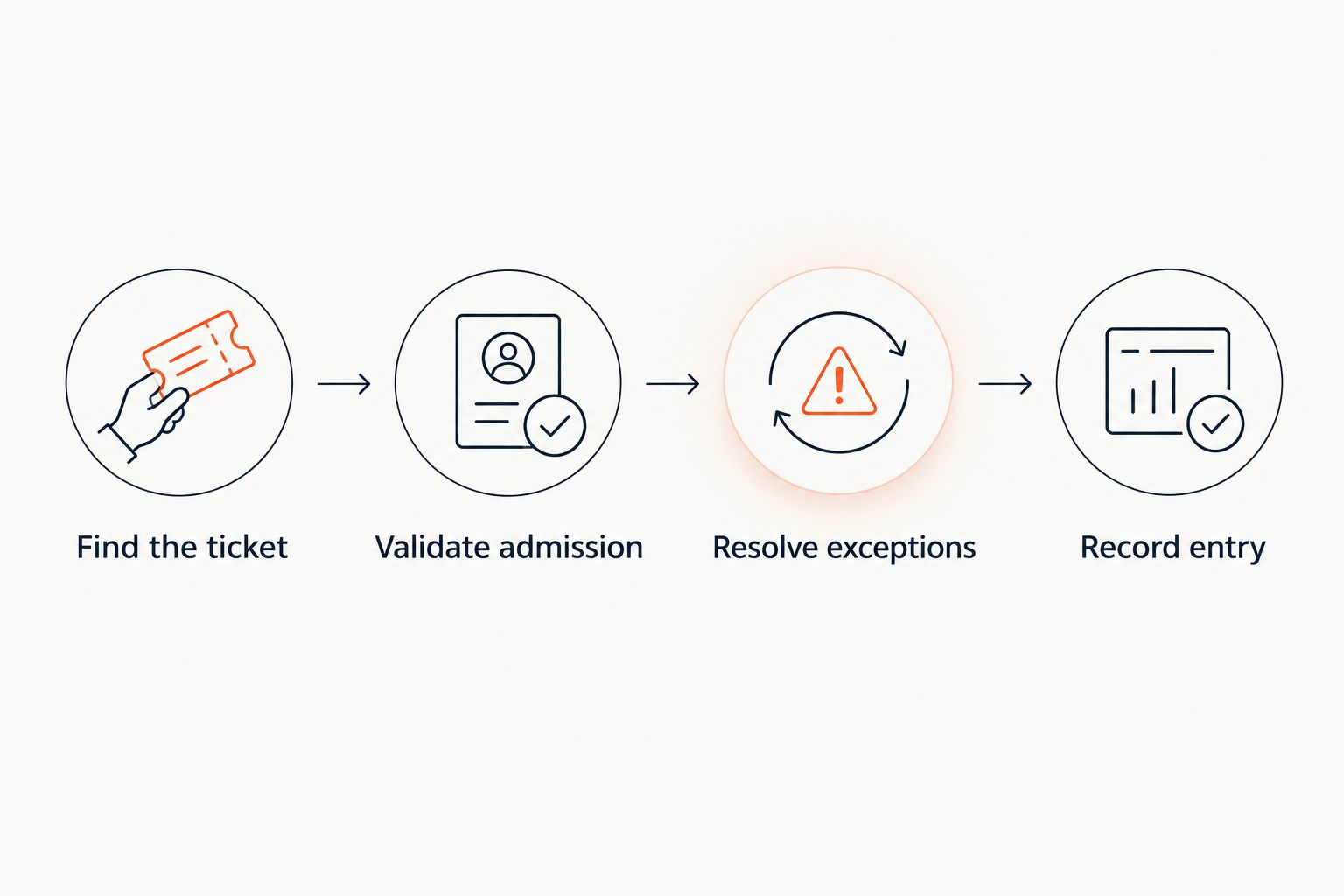
A rehearsal should expose unanswered operational questions before attendees arrive. Walk through an unreadable ticket, a missing confirmation and a seat query, then update the written procedure with the agreed response.
- Check connectivity at the actual entrance.
- Charge devices and identify charging access.
- Assign an exception-handling staff member.
- Prepare an authorised fallback admission procedure.
- Confirm how walk-up sales affect remaining capacity.
Review sales and close the event records
Create a simple review sheet before launch so you know what to record. Separate orders, issued tickets, cancellations and admissions. These describe different parts of the operation and should not be treated as interchangeable totals.
During sales, check whether questions reveal missing event information. Repeated requests about door time or seating are a reason to revise the page, not just answer the same message again. Record which change you made so the next event starts with better information.
After the event, reconcile the admission record with orders and financial records. For a 2026 event review, focus on decisions you can change: ticket structure, support wording, sales channels and door staffing.
- Record issued tickets separately from admitted attendees.
- Log cancellations and other order adjustments.
- Reconcile sales records with payment records.
- List recurring support questions.
- Carry agreed changes into your next event checklist.
Compare your setup options
Choose the least complicated option that still controls your actual operation. A manual list is not a substitute for connected inventory when several channels sell the same admission. Equally, a basic invitation event does not automatically need a reserved-seating workflow.
| Option | Best for | Main advantage | Key limitation |
|---|---|---|---|
| Manual registration list | A simple guest list managed by an organiser | You can document names and rules without configuring a ticketing system | Changes, payment matching and admission records need manual handling |
| Registration form with a separate payment process | Events where collecting attendee information is the main requirement | Keeps the information-gathering step straightforward | You must reconcile registrations with payment and admission status |
| Connected event ticketing platform | Events selling through a storefront and box office | Can keep sales and admission tied to shared inventory | You must verify seating, payment, delivery and door behaviour for the specific platform |
| ZunaroSpace | Independent organisers and venues wanting a branded storefront with connected sales channels | Storefront, seating, box office, kiosk and check-in share live inventory | You still need venue validation and payment-onboarding checks, particularly for Saudi Arabia |
The platform decision should follow your workflow, not replace it. Ask a provider to demonstrate the exact journey you intend to run, including an exception at the door. A polished sales screen does not answer an operational question.
Common mistakes first-time organisers make
Publishing before the venue confirms capacity
A room's apparent size is not your sellable inventory. Confirm capacity and operational holds with the venue before opening admission, then control who can change those figures.
Creating ticket types without distinct access
Different names are not a useful ticket strategy when they create identical admission rights and confuse staff. Start with the access differences you actually need and make those differences visible on the ticket.
Treating a successful payment as a finished order journey
Payment, ticket delivery and admission are separate checks. Rehearse the complete journey, including how staff locate a booking when the attendee cannot find the confirmation.
Assuming every payment feature works in every country
A supported currency does not establish merchant onboarding or payout eligibility. Confirm the arrangement for your organising business before relying on ticket proceeds to meet event commitments.
Leaving cancellation decisions to door staff
Door staff need an agreed policy, not responsibility for inventing one under pressure. Define who can approve a refund, move a seat or resolve a disputed booking before the event opens.
FAQ
What's the best ticketing setup for a new event organiser?
The best setup is the simplest one that controls your capacity, orders and admission across every sales channel you use. Choose reserved seating only when specific seats matter, and test the complete order journey before launch.
Do I need reserved seating for my event?
You need reserved seating when admission includes a particular seat. General admission suits unassigned access, but you still need a venue-approved capacity and a clear entry procedure.
Can I sell through a box office and my own storefront?
Yes, a connected ticketing platform can support a storefront and box office using shared inventory. Confirm that a sale in either channel changes the inventory seen by the other before publishing your event.
What should I check before publishing an event?
Check venue capacity, admission rules, checkout, ticket delivery and door validation before publishing. Assign responsibility for refunds, seating queries and other exceptions so staff know who can make decisions.
Can attendees complete payment inside ChatGPT or Claude?
Payment for the platform described in this guide completes on the organiser's own site, not inside ChatGPT or Claude. Chat can support event discovery, seat selection and booking before handing over to website checkout.
Does SAR pricing mean a Saudi organiser can receive payouts?
No, SAR pricing does not establish payout eligibility for a Saudi organising business. Confirm merchant onboarding and the payment arrangement directly before relying on the platform for event funds.
Can I use a spreadsheet instead of ticketing software?
A spreadsheet can hold a manually managed guest list and an operational checklist. It requires manual reconciliation when you add payments, seating, cancellations or several sales channels, so assess those responsibilities before choosing it.
One last thing
The most useful rehearsal starts with something going wrong. Ask a colleague to arrive without a confirmation and another to question a seat assignment. If your team cannot resolve those situations from the written procedure, fix the procedure before adding more sales channels.
For your 2026 launch, buy operational clarity before adding complexity. Based at DTEC, Dubai Silicon Oasis. Built for the Gulf - the UAE and Saudi Arabia.


