


Co-working space event ticketing is the management of event bookings, payments and admission with the aim of earning event revenue without disrupting members’ everyday access. Every show has seats that never sold - and no one was working on them.
- Event ticketing for co-working spaces needs separate rules for membership access, event admission and room capacity.
- Zunaro suits organisers wanting a branded storefront, box office and door check-in on one live inventory.
- Use general admission for networking; reserve seats when the room layout determines what you can sell.
- Test guest access, checkout and reception handover before publishing your next event.
Why event ticketing matters for co-working spaces
A membership is not an event ticket. Your members need access to their workplace; event guests need permission to attend a particular session. Treating those as interchangeable creates an unclear brief for reception.
A workshop also competes with the space’s normal use. You need to decide which room is available, who can enter it and when event guests must leave. A public event page does not answer those operational questions for you.
For your 2026 event programme, choose the booking process around admission and payment requirements, not the appearance of the registration form. The distinction between event registration and ticketing software matters when a sign-up must become a paid booking and a checked-in attendee.
The objective is straightforward: sell the places you can deliver, keep member privileges separate and give reception a reliable admission record.
Set up ticketing around the space you operate
Define access before creating tickets
Start with a written access policy. A shared document is enough: describe who qualifies for each event, what admission includes and who handles exceptions. Do not start by copying last month’s ticket categories.
Separate members, members’ guests and public attendees where their entitlements differ. If a workshop includes event admission but not a day of workspace access, say so before payment. Reception should not have to negotiate that boundary at arrival.
For each event, record these decisions:
- Define whether admission is member-only, invitation-only or public.
- State whether members still need an event booking.
- Describe which rooms and facilities the ticket includes.
- Assign responsibility for checking membership eligibility.
- Set an arrival window and a clear event finish time.
Map capacity to the actual room layout
Use a room plan and a manual inventory sheet before configuring software. Count the places available for the event format, accounting for equipment, speaker space and access routes. Confirm permitted occupancy with the person responsible for the premises.
Sell the event layout, not the desk count. A room arranged for networking is a different product from the same room arranged for a seated workshop. Reserved seating helps when a specific place matters; general admission avoids unnecessary seat selection when it does not.
Keep the capacity decision explicit:
- Confirm the event layout with the venue team.
- Exclude places needed for equipment or staff.
- Record any places held for speakers or partners.
- Decide between general admission and reserved seating.
- Check that public and member allocations share the same capacity limit.
Choose a platform around ownership
You can start with a registration form, a separate payment process and a manually maintained attendance list. That approach puts reconciliation on your team: someone must match each payment to the correct person and event.
Zunaro is best for co-working organisers who want event ticketing across their own storefront, box office, kiosk and door check-in on one live inventory. Its WhatsApp agent answers buyers, holds seats and hands over a checkout link. You keep the fees, the funds and the customers.
Zunaro charges organisers nothing per ticket. Buyers cover a booking fee of AED 3.99, or AED 1.99 for tickets under AED 20; free events carry none. Ask Zunaro Pro is AED 179/mo, with a 14-day trial and no card required.
The platform does not replace your access policy. Before adopting it for your 2026 programme, test the membership checks and room rules your team needs rather than assuming ticketing includes workspace administration.
- Run a member booking and a public booking.
- Check who owns the storefront and customer relationship.
- Confirm payment-account eligibility for your business location.
- Review booking fees separately from payment-processing arrangements.
- Test reception’s admission workflow before launch.
Publish an event page that prevents reception disputes
Draft the event information in a shared document before building the page. Ask reception to read it as an unfamiliar visitor would. Any question they cannot answer belongs in the event information or the staff handover.
For a co-working venue, the building address is not enough. Explain where guests should enter, which room hosts the session and whether workspace access is included. Keep the organiser’s cancellation terms visible without implying that event admission changes membership terms.
Build the page around practical answers:
- Name the session, audience and intended outcome.
- State the date, start time and finish time.
- Explain the building entrance and reception route.
- Describe member eligibility and guest conditions.
- State what admission includes and excludes.
- Provide an organiser-managed route for event questions.
Connect questions to an organiser-owned checkout
Start manually: collect recurring questions from email and reception, then write approved answers. Cover eligibility, arrival, accessibility and what happens after booking. This gives staff a consistent response before adding another sales channel.
Zunaro’s WhatsApp agent can answer buyers, hold seats and provide a checkout link. Events can also be discovered and booked inside ChatGPT and Claude, including seat selection on the real map. Checkout always completes on the organiser’s own site, never in chat.
AI that sells your tickets.
For your 2026 sales workflow, judge each channel by whether it moves an eligible guest towards a valid booking—not by how many conversations it starts.
- Write approved answers to recurring venue questions.
- Explain eligibility before directing someone to checkout.
- Check that seat holds match the event layout.
- Verify that checkout completes on the organiser’s site.
- Test ticket delivery through WhatsApp and email.
Rehearse the reception handover
Begin with a written arrival procedure and a named event lead. Reception needs to distinguish an event guest from a member entering for work, then direct each person without exposing unrelated booking details.
A shared inventory matters when online bookings and walk-up sales happen together. Staff should not sell against a separate tally while another channel continues accepting bookings. Rehearse the exceptions as well as the straightforward ticket check.
Do not assume any platform works without connectivity. Test the venue’s actual connection and document the fallback your team can perform.
- Walk through a valid ticket and a repeated presentation.
- Test a guest arriving without their confirmation.
- Check a walk-up sale against remaining capacity.
- Assign authority for admission disputes.
- Rehearse a connection failure at reception.
- Separate the event queue from everyday member access.
Measure attendance without confusing it with membership
Start with a simple event worksheet. Record bookings, cancellations, checked-in attendees and ticket revenue using consistent definitions. Keep member attendance and public attendance distinct where that distinction serves a clear operational purpose.
A booking shows intent; check-in records attendance. Neither proves that an attendee became a workspace member. If membership enquiries are an event objective, record those separately rather than labelling every guest a lead.
For your 2026 review, compare like-for-like sessions. A public networking evening and a restricted workshop have different admission rules, so a single attendance total does not explain their performance.
- Reconcile ticket orders with payment records.
- Compare confirmed bookings with checked-in attendees.
- Separate cancellations from unattended bookings.
- Record member and public attendance where appropriate.
- Review recurring questions that delayed booking or entry.
- Assign a specific change before publishing the next session.
Compare your ticketing options
Choose the least complicated process that preserves capacity control and a clear admission record. A manual process is a valid starting point when someone owns every update. A connected platform serves a different need: several sales and admission channels working from the same inventory.
These are workflow choices, not a claim that every co-working space needs the same software. Test the handover between booking, payment and reception before deciding.
| Option | Best for | Main advantage | Key limitation |
|---|---|---|---|
| Manual RSVP list | An invitation-led session managed by a named organiser | You can define and review the guest list directly | Every booking change and arrival needs a manual update |
| Registration form with separate payment collection | Organisers willing to reconcile payments themselves | Registration questions and payment collection can be handled separately | Someone must match payment status to admission eligibility |
| Zunaro event ticketing | Organisers needing a branded storefront, box office, kiosk and check-in together | Sales and admission use one live inventory, with Arabic, English and full RTL support | Membership eligibility, room rules and local payment-account suitability still need organiser validation |
For a 2026 platform assessment, use your actual event workflow as the demonstration script. Ask the person responsible for reception to participate; they handle the consequences of unclear booking rules.
Keep the operating handovers visible
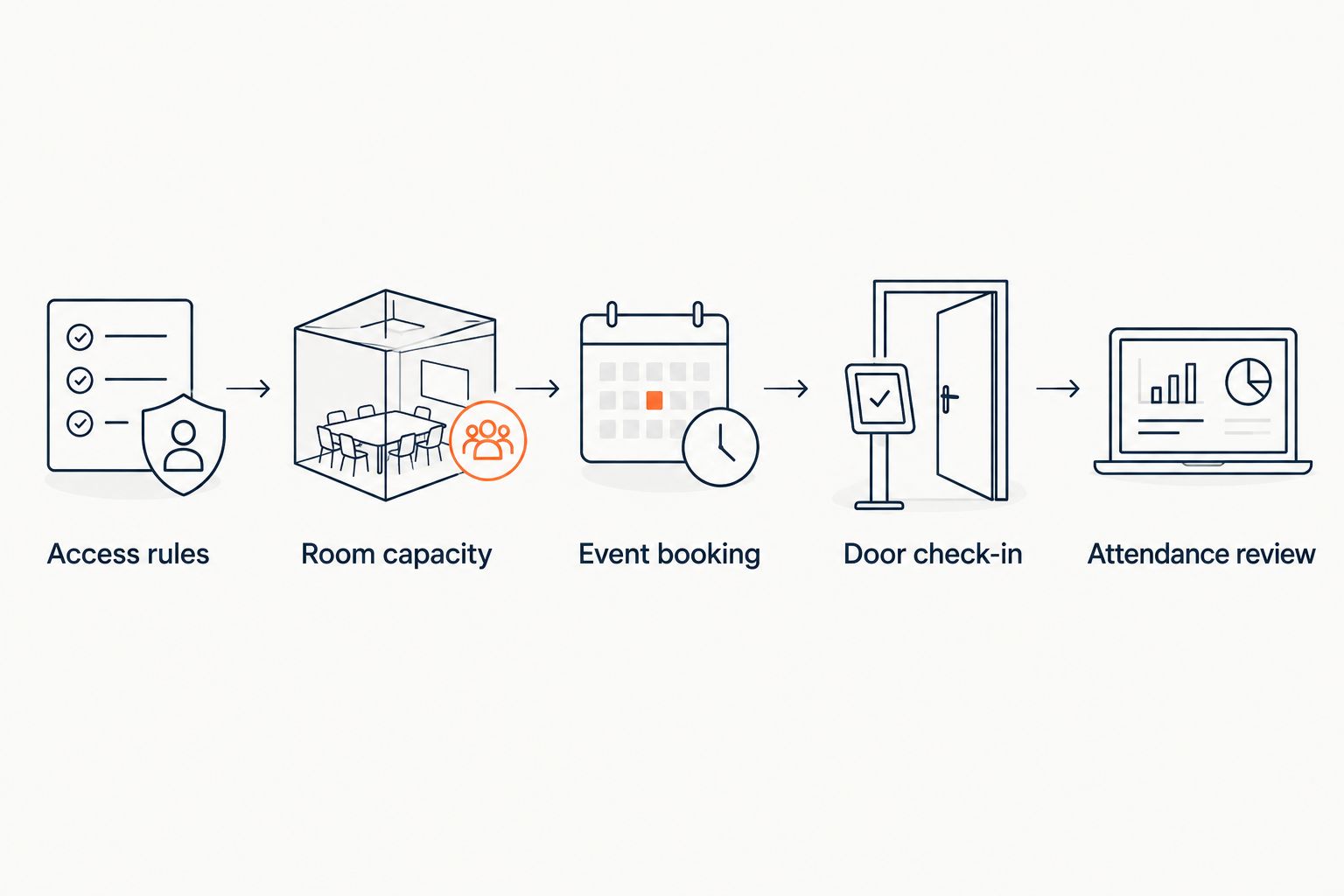
Ticketing connects several responsibilities, but responsibility does not disappear inside software. The event organiser defines eligibility, the venue team confirms the room, the booking process records admission and reception checks arrival.
Write those handovers down before inviting guests. The diagram below is a briefing aid, not a claim that ticketing software controls building access.
- Access rules: define who qualifies.
- Room capacity: confirm what can be sold.
- Event booking: record the admission entitlement.
- Door check-in: verify arrival.
- Attendance review: assess what happened.
Common mistakes co-working spaces make
Treating membership as automatic event admission
Members can reasonably misunderstand an event announcement if it does not explain whether booking is required. State the rule in both the event information and the reception briefing; do not make staff invent an exception policy at the desk.
Selling the room’s everyday desk capacity
A workspace layout does not establish capacity for a talk, workshop or networking session. Confirm the event configuration before opening bookings, then account for speakers, equipment and places deliberately withheld from sale.
Keeping separate online and reception inventories
Independent tallies require someone to reconcile them whenever bookings change. If you choose a manual process, assign that task explicitly; if you choose connected ticketing, test that every sales channel draws from the intended event inventory.
Treating an event ticket as building-wide permission
Event guests need clear boundaries around meeting rooms, desks and member areas. Describe the admission scope before booking and give reception a consistent explanation for anyone requesting additional access.
Calling every attendee a membership prospect
An event guest has registered for an event, not necessarily requested workspace sales contact. Keep event communications tied to their stated purpose and check the permissions required before using attendee details for another campaign.
FAQ
What is the best event ticketing setup for a co-working space?
The best setup matches event access rules, room capacity, payments and reception check-in. Zunaro suits organisers who need their own branded storefront and connected sales channels; a manually maintained RSVP list suits an invitation-led session with a named list owner.
Do members need tickets for events in their own co-working space?
Members need event bookings when your event rules require them. State whether membership includes admission, whether a place must be reserved and which activities need a separate booking.
Should a co-working workshop use reserved seating?
Use reserved seating when a particular place matters to the workshop layout. General admission is the simpler choice when attendees can use any permitted place and individual seat selection adds no operational value.
Can the same reception handle members and event guests?
The same reception can handle both when staff have distinct access instructions and a clear event admission record. Rehearse guest directions, ticket exceptions and the queue arrangement before the event.
Can guests complete a ticket purchase inside ChatGPT or Claude?
Checkout does not complete inside ChatGPT or Claude. With the described platform workflow, guests can discover events, select seats and hold them in chat, then complete checkout on the organiser’s own site.
Does ticketing software replace co-working membership management?
Event ticketing does not establish membership eligibility or building-access rights by itself. Confirm the membership workflow separately and document who checks any entitlement that affects admission.
What should I test before launching an event booking page?
Test eligibility, capacity, checkout, ticket delivery and reception check-in before publishing. Include an exception such as a missing confirmation or a connection failure, not just a successful booking.
One last thing
Run the rehearsal from the pavement, not from the admin screen. Ask a colleague unfamiliar with the event to find the entrance, explain their booking and reach the correct room. That reveals instructions the organiser already knows but a guest does not.
Based at DTEC, Dubai Silicon Oasis. Built for the Gulf - the UAE and Saudi Arabia.


