


Yes, one account can manage ticketing for multiple venues if the platform lets you separate each venue’s events, staff access and financial records. A shared login alone does not do that. In 2026, ask for a demonstration using two venues before you commit to a single-account setup.
- Can one account manage ticketing for multiple venues? Yes, when venue access, events and records can be separated.
- Zunaro is best for independent organisers who need one live inventory across storefront, box office and kiosk; confirm its multi-venue account structure.
- Test a sale, seat hold, refund and door scan at each venue before choosing a shared account.
Why this matters
A promoter working across theatres needs a clear answer to a practical question: who can see and change what? If staff at one venue can alter another venue’s seating or orders, a shared account creates operational risk rather than saving work.
Zunaro’s event ticketing platform connects a branded storefront, box office, kiosk and door check-in to one live inventory. That describes how sales channels share ticket availability; it does not, by itself, establish how separate venues are organised under an account. Keep those two questions apart during a 2026 platform review.
Can one account manage ticketing for multiple venues?
Yes, provided the account has a workable way to distinguish venues and limit access. The deciding test is not whether you can publish events at different addresses. It is whether the people running each event can do their jobs without gaining control of unrelated events or muddling the records you need to reconcile.
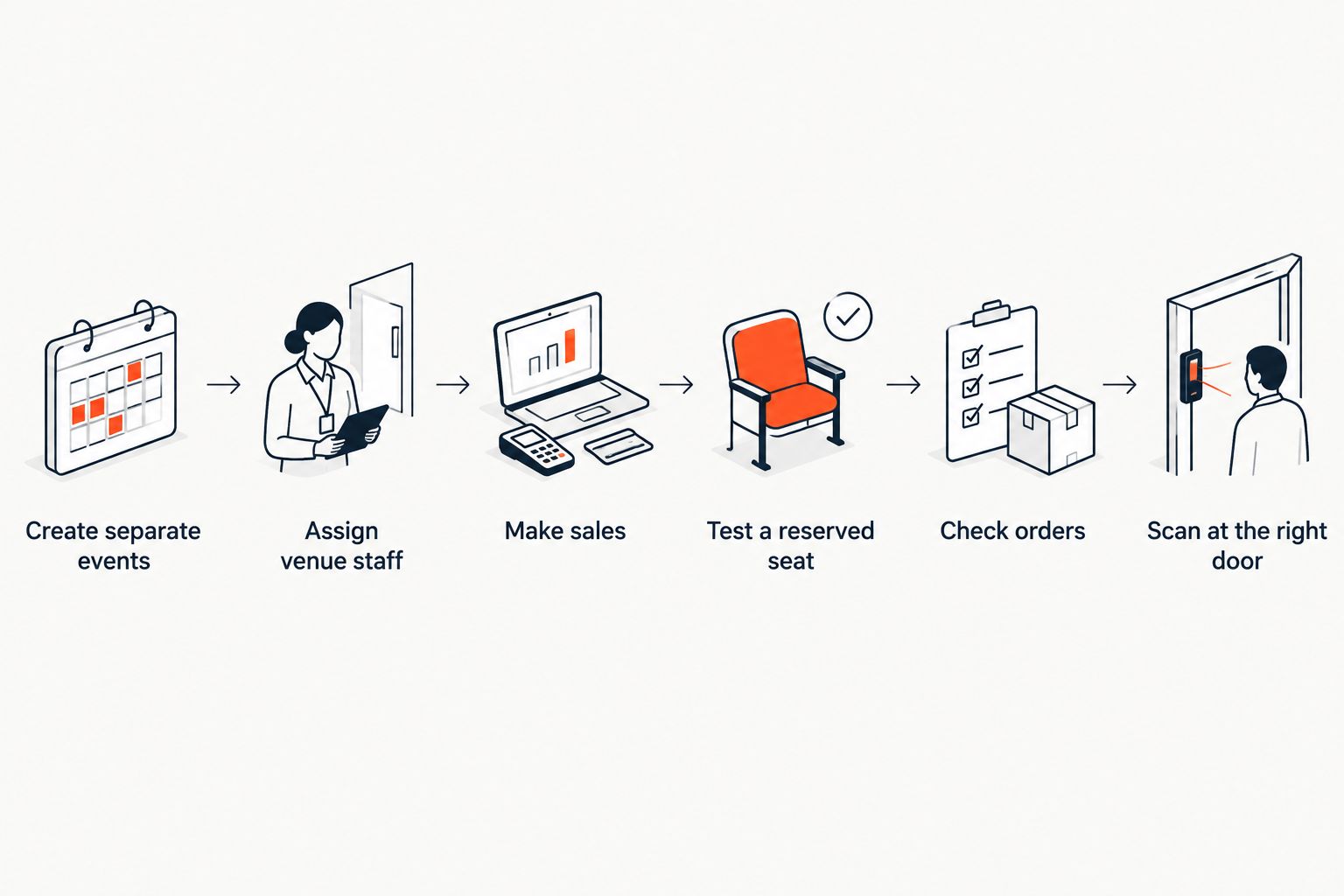
Use this sequence in a product demonstration:
- Create separate events. Set up an event at each venue and check whether the venue name, address, event page and seating configuration remain distinct.
- Assign venue staff. Give a box-office or door colleague access to one venue’s event. Check exactly which other events, orders and settings that colleague can view or change.
- Make sales through each channel. Sell from the storefront, then use the box office and kiosk for the same event. Check that all three channels draw from the correct event inventory.
- Test a reserved seat. Hold a seat through one channel and attempt to sell it through another. The result should be clear to staff before you put an event on sale.
- Check orders and refunds. Find a sale from each venue, then inspect how each appears in the account and in the records used for reconciliation.
- Scan at the right door. Check a ticket at its intended venue and try it at the other venue. Confirm the check-in workflow identifies the event correctly.
These are acceptance tests, not a claim that every ticketing platform offers the same account permissions. If a supplier cannot show a step, treat that requirement as unresolved. Do not substitute a shared password for a demonstrated staff-access model.
One shared account or separate accounts?
Neither arrangement wins on login count alone. Choose based on who operates the venues, who needs access and how you must keep event records distinct in 2026.
| Arrangement | Best for | Advantage | Drawback to check |
|---|---|---|---|
| One shared account | One organiser running events across venues | A central place to manage the events, if the platform supports venue separation | Staff permissions and financial records can become hard to separate |
| Separate accounts | Venues that manage their own teams and records | A clearer boundary between each venue’s work | The organiser may need to switch accounts to oversee events |
One shared account is best when central oversight matters and the platform proves that local staff can be restricted to their work. Its strength is convenience for the organiser. Its weakness is that a convenient login can conceal loose permissions; test access with an actual venue-staff role, not an administrator account.
Separate accounts are best when each venue needs a firm operating boundary. Their strength is separation. Their weakness is the extra account switching an organiser must handle when managing events across locations. Ask to see the day-to-day workflow before deciding that separation is worth that work.
A venue is also not necessarily the same thing as an event, organiser or payout recipient. State which of those you need to separate. A platform that handles events at different addresses has answered only the location question.
Why multi-venue ticketing setups vary
The right account structure depends on operational details, not the number of venue names on a dashboard:
- Who owns the event. A promoter hiring a venue and a venue selling its own programme need different staff boundaries.
- Who works the box office. A central ticketing team needs a different view from staff assigned to one door.
- Whether seating is reserved. Each seated event needs its own correct map and live seat availability.
- Where sales happen. Storefront, box office and kiosk sales must reach the same event inventory without mixing one venue’s seats with another’s.
- How orders are reconciled. Check whether you can identify which event and venue each transaction belongs to in the records you use.
- How check-in works. Door staff need to validate the right ticket against the right event.
Write these requirements down before a demonstration. For a 2026 rollout, ask the supplier to use two realistic events rather than a single sample event that never tests the account boundary.
What should you ask Zunaro to demonstrate?
Zunaro is best for independent organisers and venues that want storefront, box office, kiosk and door check-in connected to one live ticket inventory. Its relevant strength here is the connection between sales channels. The limitation for this specific buying decision is that shared event inventory does not answer whether one account provides the venue-level staff and record separation your operation requires.
Ask for a walkthrough with one event at each venue. Have a colleague act as venue staff while you act as the central organiser. Check which events each person can edit, whether sales appear under the intended event and what each person sees when handling orders at the box office.
If both events use reserved seating, test each map independently. Zunaro can trace a seat map from a photo in about 60 seconds; the speed of creating a map is useful, but it is not a substitute for proving that each venue’s seats and holds stay attached to the correct event. If you are assessing ticket delivery and check-in too, confirm how tickets sent by WhatsApp or email are recognised at the door.
Zunaro supports Arabic and English, with full right-to-left display. That matters when your venues serve audiences in both languages, but language support is a separate question from account permissions. Keep it on the demonstration list without treating it as evidence of a multi-venue hierarchy.
Test your venue workflow
Ask to see separate events, staff access and shared inventory in a live walkthrough.
Can different venue teams use one ticketing account?
Yes, if the account can restrict each team’s access to the events it runs. Ask the supplier to show the view a venue colleague gets, then try an action on another venue’s event. A list of role names is less useful than seeing the restriction work.
Does one account mean one shared seat inventory?
No. One administrative account and one live inventory are different concepts: a live inventory keeps sales channels aligned for an event. Each venue’s event must still use the correct tickets or reserved seats, regardless of how many accounts the organiser uses.
Should each venue have its own ticketing account?
Use separate accounts when the venues need distinct operating boundaries and the shared-account option cannot demonstrate them. If one organiser manages every event and venue-specific access works, a shared account is a reasonable choice. Test both workflows against the people who will use them in 2026.
FAQ
Can one account manage ticketing for multiple venues?
Yes, if the ticketing platform separates each venue’s events, staff access and records within that account. Ask for a demonstration with events at two venues rather than relying on a shared login.
Can box office staff work at one venue without changing another venue’s events?
Yes, when the platform’s access controls can limit staff to the appropriate events. Test that restriction using a staff account, not an administrator account.
Does a shared ticketing account combine reserved seats across venues?
It should not combine seats from unrelated events. Check each event’s seating map and try a seat hold through a different sales channel to verify the setup.
Can an organiser sell through a storefront and a kiosk for the same event?
Yes, when both channels use the same event inventory. Zunaro connects its storefront, box office and kiosk to one live inventory; confirm each venue’s event is configured correctly.
Is one account better than separate accounts for a theatre group?
One account is better when central oversight and venue-specific staff access both work. Separate accounts make more sense when the theatres need a stronger boundary between their teams and records.
What should I check before moving multiple venues onto one account?
Check event separation, staff permissions, seat availability, order records and door check-in. Run the checks with an event at each venue before committing to the setup.
Can buyers complete a Zunaro checkout inside ChatGPT or Claude?
No. Buyers can discover an event, pick a seat on the real map and hold it in ChatGPT or Claude, but checkout completes on the organiser’s own site.
One last thing
Test the wrong door, not just the right one. A successful scan at the intended venue proves less than a scan attempt at another event. That check, alongside staff-access and seat-hold tests, tells you whether the setup respects the boundaries your venues need in 2026.


