


Every show has seats that never sold - and no one was working on them. You can define different check-in rules by ticket type, but your ticketing system must support each rule before scanners can enforce it automatically. Separate admission time, permitted areas, re-entry and eligibility checks, then test the actual door workflow before publishing those conditions.
- Check-in rules by ticket type need explicit admission conditions, not just different ticket names.
- Separate ticket validity, access permissions and staff checks before configuring your event.
- ZunaroSpace connects ticketing and door check-in; confirm ticket-type restrictions in a demonstration before relying on them.
- Test rejected tickets and repeat scans, not just successful admission.
Can I set different check-in rules for different ticket types?
Define separate rules, then verify which ones your platform enforces. A ticket labelled VIP does not establish what happens when someone presents it at the general entrance, arrives early or returns after leaving.
Use this sequence for your 2026 event setup:
- Write the admission entitlement for each ticket type.
- Identify the checks your scanner must perform.
- Separate automatic decisions from staff decisions.
- Configure the supported restrictions.
- Test accepted, rejected and exception cases before doors open.
The distinction matters: checking in attendees with a ticket QR code and enforcing different access rights are separate requirements. A successful scan needs a clear meaning for the person operating the entrance.
Why this matters
Your door team needs a decision, not a ticket description. If your event sells different entitlements, staff need to know which entrance, session or area each entitlement covers.
A valid ticket is not automatically valid everywhere. Equally, a rejected scan does not tell staff whether to redirect the attendee, check identification or refer the case to a supervisor.
Write the rule around the admission decision. For your 2026 operating plan, replace vague instructions such as special access with a clear condition and an action staff can follow.
Which check-in policy fits each admission arrangement?
The following table is a planning framework, not a list of confirmed software features. Use it to decide what your event requires and what to ask a platform to demonstrate.
| Admission arrangement | Best for | Rule to define | Benefit | Limitation |
|---|---|---|---|---|
| Shared admission | Events where ticket types receive the same entry entitlement | Whether every valid ticket enters through the same process | Keeps instructions simple | Does not distinguish additional access rights |
| Timed admission | Events with separate arrival windows | The permitted arrival window and late-arrival action | Makes the intended arrival period explicit | Needs a clear exception policy |
| Restricted-area admission | Events with separately controlled spaces | Which ticket types enter each controlled area | Separates access entitlements | Requires checks at the relevant boundary |
| Session admission | Events with separately ticketed sessions | Which session each ticket covers | Connects admission to the booked session | A venue-entry scan does not itself establish session access |
| Staff-verified admission | Events requiring an eligibility check | What staff must inspect before admission | Allows a human decision where needed | Depends on clear instructions and escalation |
Choose the simplest policy that matches what you sold. Additional restrictions are justified when they protect a real entitlement, not because a settings screen offers them.
Do not treat this table as a recommendation to create more ticket types. If several types receive identical access, document the shared rule rather than inventing differences at the entrance.
Separate ticket validity, access permissions and staff checks
These are different decisions. Keeping them separate makes your requirements easier to configure, explain and test.
- Ticket validity: Does this ticket belong to the event or performance being checked?
- Access permissions: Does the ticket cover this entrance, session, time window or controlled area?
- Staff checks: Does admission require an additional human decision under your event policy?
- Exception handling: Who decides what happens when the normal rule does not resolve the case?
Write these headings into your 2026 door briefing. Under each heading, state what the scanner decides and what the operator must do.
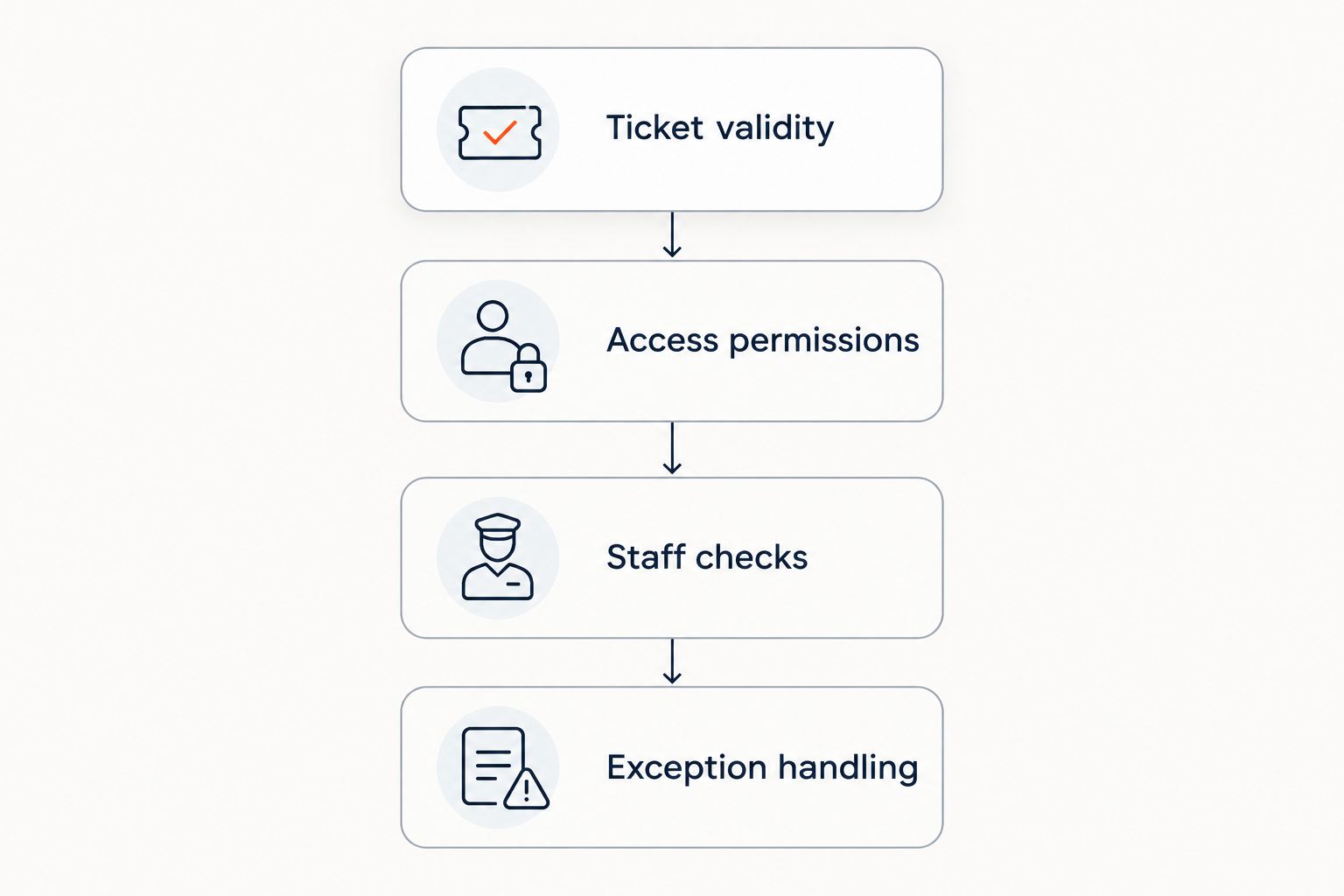
Keep the boundary clear. If a required eligibility check is manual, do not describe it to staff as an automatic scanner restriction.
How should you write each ticket-type rule?
Use a short policy record for every distinct admission entitlement. Keep the wording consistent between your event description, ticket instructions and door briefing.
State the entitlement
Describe what admission includes in plain language. Specify the relevant event, performance, session or area without relying on a premium-sounding ticket name.
If the ticket includes a seat, distinguish that seat allocation from permission to enter another space. Reserved seating and additional-area access are separate requirements to verify.
State the admission conditions
Write down any arrival restriction, required entrance or eligibility condition. If no special restriction applies, say so in your internal policy rather than leaving the team to infer it.
Avoid instructions that require staff to guess what reasonable means. Define who can approve an exception and what information that person needs.
State the repeat-entry policy
Decide whether leaving ends admission or whether returning is permitted under your event policy. Then ask how the platform represents that decision during scanning.
A repeat scan needs an explanation staff can act on. Do not assume that a previously checked-in status means either automatic refusal or permission to re-enter.
State the exception action
Tell staff whether to redirect, pause admission or contact a supervisor. The action should match the reason the normal check failed.
Keep exceptions out of the standard queue where your entrance layout allows it. Your policy should resolve the attendee's issue without asking every scanner operator to improvise.
Why check-in rules vary
Different rules should reflect differences in admission rights. These factors determine what you need to specify and verify:
- Performance or session: A ticket can relate to a particular part of the programme rather than unrestricted event access.
- Arrival window: Your admission policy can distinguish the booked arrival period from the overall event opening period.
- Controlled area: A separate room or entrance needs its own access decision when entitlements differ.
- Repeat entry: Your policy must explain what happens after an attendee has already entered.
- Eligibility: Some admission decisions require staff to inspect something beyond the ticket itself.
- Connectivity: Ask how your intended checks behave when devices cannot exchange current admission information.
Do not confuse these requirements with confirmed platform capabilities. Your 2026 acceptance checklist should record the rule, the demonstrated behaviour and the person responsible for unresolved cases.
What should you test before doors open?
Test the refusal path as carefully as the admission path. A scanner that accepts an eligible ticket has demonstrated that case, not the whole policy.
Build a test sheet with the intended result written before each scan. Use these 5 test scans as a starting set, adding cases for each restriction your event actually uses:
- Correct entitlement: Present a ticket that meets the admission conditions. Confirm the operator can recognise the approval.
- Incorrect entitlement: Present a ticket that does not cover the controlled entrance or session. Confirm the result matches your written rule.
- Repeat presentation: Scan a ticket again after admission. Check the displayed status and the staff action it requires.
- Different device: Present the same ticket on another device. Verify the behaviour under the connection conditions you intend to use.
- Exception case: Rehearse a situation that requires supervisor approval. Confirm who handles it and how staff record the decision.
These are test instructions, not performance claims. If your event uses arrival windows, add tests around the boundary; if it uses controlled areas, test each relevant boundary.
Record the actual outcome, not simply pass or fail. A message can be technically correct yet too unclear for a busy entrance, so include the operator's next action in your acceptance criteria.
What should you ask ZunaroSpace to demonstrate?
ZunaroSpace is an event ticketing platform for independent organisers and venues that need storefront, box office, kiosk and door check-in on one live inventory. That shared inventory is relevant to admission operations, but it does not establish support for every ticket-type restriction described here.
Bring your written policy to the demonstration. Ask to see the required restriction applied to a ticket, the resulting scan decision and the exception workflow; do not accept a ticket label as evidence of enforcement.
The platform also includes a WhatsApp agent that answers buyers, holds seats and hands over a checkout link. AI that sells your tickets. Organisers pay nothing per ticket; buyers cover a booking fee, and free events carry none.
You keep the fees, the funds and the customers. Based at DTEC, Dubai Silicon Oasis. Built for the Gulf - the UAE and Saudi Arabia.
The relevant limitation is specific: shared inventory and door check-in do not answer whether your required time, area or re-entry restriction is available. Ask for the exact admission case to be demonstrated before you commit to that policy.
Check your admission requirements
Bring your ticket types, access conditions and exception cases to the discussion.
Can I use different rules for tickets with the same admission rights?
Use the same admission rule when the admission rights are the same. A different sales condition does not necessarily create a different entrance entitlement.
For example, distinguish how a ticket was obtained from what it permits. Add a door restriction when your published admission policy requires it, not merely because ticket names differ.
Does a VIP ticket automatically include re-entry?
A VIP label does not define re-entry permission. State the entitlement explicitly, then verify how the platform and door team apply it.
Keep additional-area access separate from permission to return after leaving. An attendee can hold one entitlement without the other under your event policy.
Should every entrance use the same check-in rules?
Every entrance should apply the policy relevant to that entrance. If entrances serve different admission rights, staff need explicit instructions and a demonstrated way to distinguish them.
Where all entrances admit the same audience, unnecessary differences make the operating plan harder to follow. Standardise the decision wherever the entitlement is identical.
FAQ
Can I set check-in rules by ticket type?
You can define separate check-in rules by ticket type, but automatic enforcement depends on the platform's supported controls. Verify each required restriction with an actual scan before publishing it.
Does naming a ticket VIP change what the scanner allows?
A VIP ticket name does not establish an access rule. Define the entitlement and demonstrate how the scanner applies it.
Can different ticket types have different arrival windows?
Different arrival windows require a platform control or an explicit staff-managed procedure. Define the window and late-arrival policy, then test how admission works at the boundary.
How do I handle a ticket that has already been scanned?
Apply your written repeat-entry policy and inspect the ticket's admission status. Give staff a clear escalation route instead of treating every repeat scan as the same situation.
Can a reserved seat also grant access to a separate area?
A seat allocation and separate-area access are distinct entitlements. Verify both requirements rather than assuming the seating assignment controls every admission boundary.
Does ZunaroSpace support every ticket-type restriction?
ZunaroSpace provides door check-in on the same live inventory as its storefront, box office and kiosk. Confirm your specific time, area, eligibility and re-entry requirements through a demonstration.
What should I include in my 2026 check-in briefing?
Your 2026 check-in briefing should state each ticket entitlement, the scanner decision, any manual check and the exception owner. Match those instructions to the admission conditions you publish.
One last thing
A ticket-type name is not a door instruction. Before your next event, ask a staff member who did not configure the system to explain what each scan result means and what action follows.
If the answer depends on guessing, change the instruction or the workflow. Your final acceptance test is whether the team can apply the policy you sold.


