


Every show has seats that never sold - and no one was working on them. Yes, you can require a ticket waiver at checkout when your ticketing setup supports mandatory acceptance before payment. The distinction is between collecting an acknowledgement and obtaining a legally effective waiver: your organiser must verify the checkout behaviour, while qualified legal counsel should review the wording and who must accept it.
- A ticket waiver at checkout needs mandatory acceptance, not a notice beside the payment button.
- Separate the purchaser from each participant when deciding who must accept an event waiver.
- Test refusal, group bookings and alternate sales channels before publishing your checkout.
- Evaluate ZunaroSpace event ticketing against your waiver requirements before choosing your setup.
Why this matters
A completed payment is not a substitute for a recorded waiver acceptance. Your checkout needs to make the requirement clear, stop the purchase when acceptance is missing, and preserve the relevant record.
Start by separating a waiver from ordinary registration questions. A dietary preference, accessibility request or company name collects information; a waiver asks someone to accept specified terms. The guide to custom checkout questions for attendees covers that adjacent part of registration, but a required question alone does not establish legal effectiveness.
For your 2026 event setup, define the evidence you need before choosing the interface. A tidy checkbox is useful only when the workflow behind it matches your requirements.
Can I require attendees to agree to a waiver before checkout?
Yes, provided your checkout supports a required acceptance step and prevents payment without it. Specify the behaviour you need rather than asking whether a platform has a waiver feature. A document link, a required checkbox and a signature workflow are different implementations.
Use this comparison to brief your ticketing provider and legal adviser. These are workflow options to assess, not claims that every platform supports them.
| Approach | Best for | Practical advantage | Limitation to check |
|---|---|---|---|
| Required acknowledgement | Recording agreement to reviewed terms | Keeps acceptance within the purchase flow | Confirm the accepted wording and acceptance record are retained |
| Participant-specific acceptance | Events requiring each participant's agreement | Connects acceptance to the person taking part | Adds work when a purchaser books for a group |
| Separate signing workflow | Requirements needing more than a checkout checkbox | Allows a distinct document-signing process | Requires a reliable connection between signing status and admission |
| Notice without acceptance | Displaying information | Makes terms visible | Does not record an affirmative acceptance action |
Do not treat these options as interchangeable. Have your adviser define the required acceptance method, then ask the provider to demonstrate it using your event configuration.
Required acknowledgement: keep the action explicit
A required acknowledgement suits a workflow in which the purchaser must actively accept reviewed terms before payment. Present the terms where the purchaser can read them, and make the acceptance action distinct from optional marketing permissions.
The limitation is identity. If the purchaser books for other people, the purchaser's action does not establish that those other people accepted anything themselves. Decide whose agreement you need before choosing this approach.
Participant-specific acceptance: connect the person and the record
Participant-specific acceptance suits events where your reviewed process requires an agreement from each person taking part. Ask how the system associates the acceptance with the participant, event and relevant ticket.
Group bookings need particular attention. Decide what happens when the purchaser does not know every participant's details, and avoid collecting unnecessary personal information simply because additional fields are available.
Separate signing: define what happens before admission
A separate signing process suits requirements that extend beyond your checkout's acceptance controls. Define whether signing must happen before payment, after purchase but before attendance, or at another agreed point.
Those are different policies. If signing happens after payment, describe the requirement before purchase and give staff a clear procedure for an incomplete record. Do not describe that arrangement as mandatory acceptance before checkout.
How should I set up a ticket waiver at checkout?
Build the process in this order. These are acceptance criteria for your provider, not menu instructions for a particular platform.
- Review terms. Have qualified counsel review the document for the activity, participants and applicable jurisdiction. Keep waiver wording separate from your sales copy.
- Identify participants. Decide whether the purchaser, each participant or an authorised adult must act. Write down how group bookings and minors will be handled.
- Require acceptance. Specify that the purchaser must take an affirmative action and cannot complete the purchase without the required acceptance.
- Retain evidence. Ask for a retrievable record connecting the acceptance to the relevant person, event, order and document version, with the acceptance time.
- Test checkout. Attempt to complete payment without accepting. Then test an accepted purchase and retrieve the resulting record.
A successful test has two parts: the checkout enforces the requirement, and your team can find the evidence afterwards. Do not sign off on appearance alone.
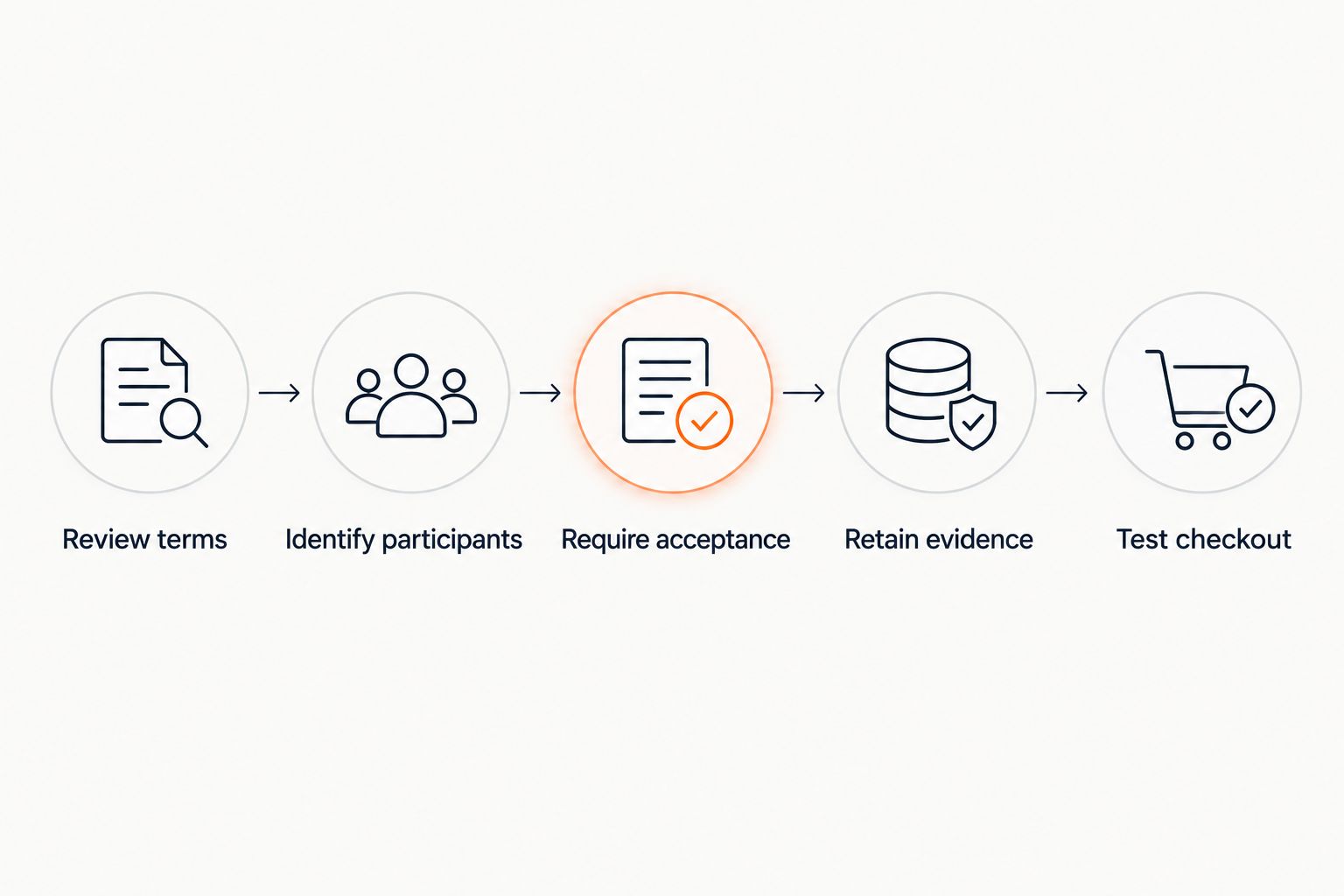
Keep this sequence in your 2026 event launch checklist. Repeat the relevant tests whenever you change the document, checkout configuration or sales route.
Why waiver requirements vary
Your waiver process should follow the event's requirements, not a generic form template. Review these factors with the people responsible for legal approval and event operations:
- Activity and participation. Explain what attendees will actually do so the reviewed document addresses the event rather than an unrelated template.
- Purchaser versus participant. A person paying for tickets is not necessarily the person attending. Define whose acceptance the process requires.
- Minors and authority. Ask counsel who must act and how that person's authority should be handled. Do not assume a generic age checkbox resolves it.
- Applicable jurisdiction. Get advice relevant to the event and agreement. Do not reuse wording across the UAE and Saudi Arabia without review.
- Sales channel. Online checkout, staffed box office and kiosk workflows need consistent rules, even when the screens differ.
- Language and document changes. Review each language version and retain the wording associated with each acceptance. Do not silently replace the historical document.
A waiver workflow is an operational control, not just a paragraph of legal text. Assign responsibility for the document, the checkout configuration and the admission procedure.
What should I ask a ticketing provider to demonstrate?
Ask for a live walkthrough using a test event. A feature description is not enough to establish that your specific requirement works.
Request demonstrations of these scenarios:
- A purchaser leaves acceptance incomplete and attempts payment.
- A purchaser accepts, pays and receives an order confirmation.
- A purchaser books for other participants.
- An authorised staff member retrieves the acceptance record.
- The organiser updates the waiver without losing the previous wording.
- A purchaser reaches checkout through another supported sales route.
Ask the provider to distinguish native functionality, configuration work and any separate signing service. Record who maintains each part and what your staff must do when a record is incomplete.
For a 2026 procurement review, make the acceptance tests part of the written requirements. That gives your team a concrete basis for approving the setup without relying on a broad feature label.
Where does ZunaroSpace fit?
ZunaroSpace is best for independent organisers and venues that want event ticketing on their own branded storefront. The platform brings store, reserved seating, box office, kiosk and door check-in onto one live inventory. That platform scope is relevant when your waiver policy must account for more than online sales.
You keep the fees, the funds and the customers. Organisers pay nothing per ticket; the buyer booking fee is AED 3.99, or AED 1.99 for tickets under AED 20, with no booking fee for free events.
For this requirement, ask ZunaroSpace to demonstrate the mandatory acceptance step, retained evidence and handling of group bookings before you commit to a waiver workflow. Ownership of the storefront does not, by itself, establish that a particular signing or legal requirement is satisfied.
AI that sells your tickets. A WhatsApp agent answers buyers, holds seats and hands over a checkout link; events are also discoverable and bookable inside ChatGPT and Claude, while checkout completes on the organiser's own site, never in chat. Test the waiver requirement at that final checkout regardless of where the booking started.
Based at DTEC, Dubai Silicon Oasis. Built for the Gulf - the UAE and Saudi Arabia.
Check your waiver requirements
Ask for a demonstration of required acceptance, retained records and group-booking handling.
Does the purchaser's acceptance cover everyone in a group?
The purchaser's acceptance records the purchaser's action, not a separate action by every attendee. Whether that agreement has the required legal effect for other participants is a question for counsel reviewing your event and document.
For group sales, specify how participants receive the document, who accepts it and what happens when the names change. Give your box office a procedure that matches those decisions rather than leaving staff to interpret a booking note.
Can I use the same waiver for Arabic and English checkout?
You can plan corresponding language versions, but have both reviewed for the intended use. A translated interface does not establish that the waiver wording has the same legal effect.
For your 2026 checkout review, test document access, acceptance controls and the retained language version. Include right-to-left presentation in the test where Arabic is offered, and ensure staff can identify which wording the person accepted.
What happens if an attendee refuses to accept?
If acceptance is required before payment, refusal must prevent completion of that purchase. State the requirement before the purchaser reaches the final payment action so it is not a surprise.
Decide separately how your team handles someone who already holds a ticket but has an incomplete participation agreement. Any admission, cancellation or refund decision should follow your reviewed terms and applicable obligations, not an improvised door policy.
FAQ
Can I make a ticket waiver at checkout mandatory?
Yes, when your checkout supports required acceptance and blocks payment without it. Test both the payment restriction and retrieval of the acceptance record before publishing.
Is linking to a waiver enough?
A link displays the document but does not itself record affirmative acceptance. Ask your legal adviser what acceptance method your event requires, then have your provider demonstrate that method.
Does a required checkbox make a waiver legally binding?
A required checkbox does not by itself establish legal enforceability. The wording, acceptance process, participants and applicable law need qualified legal review.
Can a purchaser accept a waiver for everyone in a group?
Do not assume that a purchaser can provide the required agreement for every participant. Have counsel define who must accept and configure your group-booking process accordingly.
Can I combine waiver acceptance with marketing consent?
Keep waiver acceptance separate from optional marketing permissions. Separate controls make the purpose of each action clear and allow your reviewed requirements to be implemented distinctly.
What evidence should I ask my ticketing provider to retain?
Ask for a retrievable record connecting the acceptance to the relevant person, order, event, document version and acceptance time. Have your adviser confirm the evidence and retention requirements for your event.
Should I test the waiver at the box office too?
Yes, test every sales route covered by your waiver policy, including the box office and kiosk where used. Staff need a defined process rather than an assumption that online acceptance covers walk-up sales.
One last thing
Test the refusal path before the happy path. An accepted purchase shows that someone can buy; a refused purchase shows whether the mandatory requirement is actually enforced.
Before your 2026 event goes live, have someone outside the setup team attempt a purchase without accepting. Then ask that person to locate the accepted document version from a completed test order. Those checks connect the checkout screen to the evidence your team needs afterwards.


