


Every show has seats that never sold - and no one was working on them. You can add custom checkout questions for attendees when your event ticketing platform supports configurable registration fields; before publishing, confirm whether answers attach to the order or to each attendee and whether your team can use them in reports.
- For custom checkout questions ticketing, confirm field support before promising attendee data collection.
- ZunaroSpace provides branded event ticketing; demonstrate your required question workflow before choosing a platform.
- Ask order questions once; collect individual requirements against the relevant attendee.
- Require operational essentials, and leave research questions optional or outside checkout.
Can I add custom checkout questions for attendees?
Yes, if your ticketing platform supports custom fields at the right level. A field attached to a booking is not the same as a field attached to every ticket. That distinction determines whether a group booking gives you useful attendee information or an answer that applies only to the person paying.
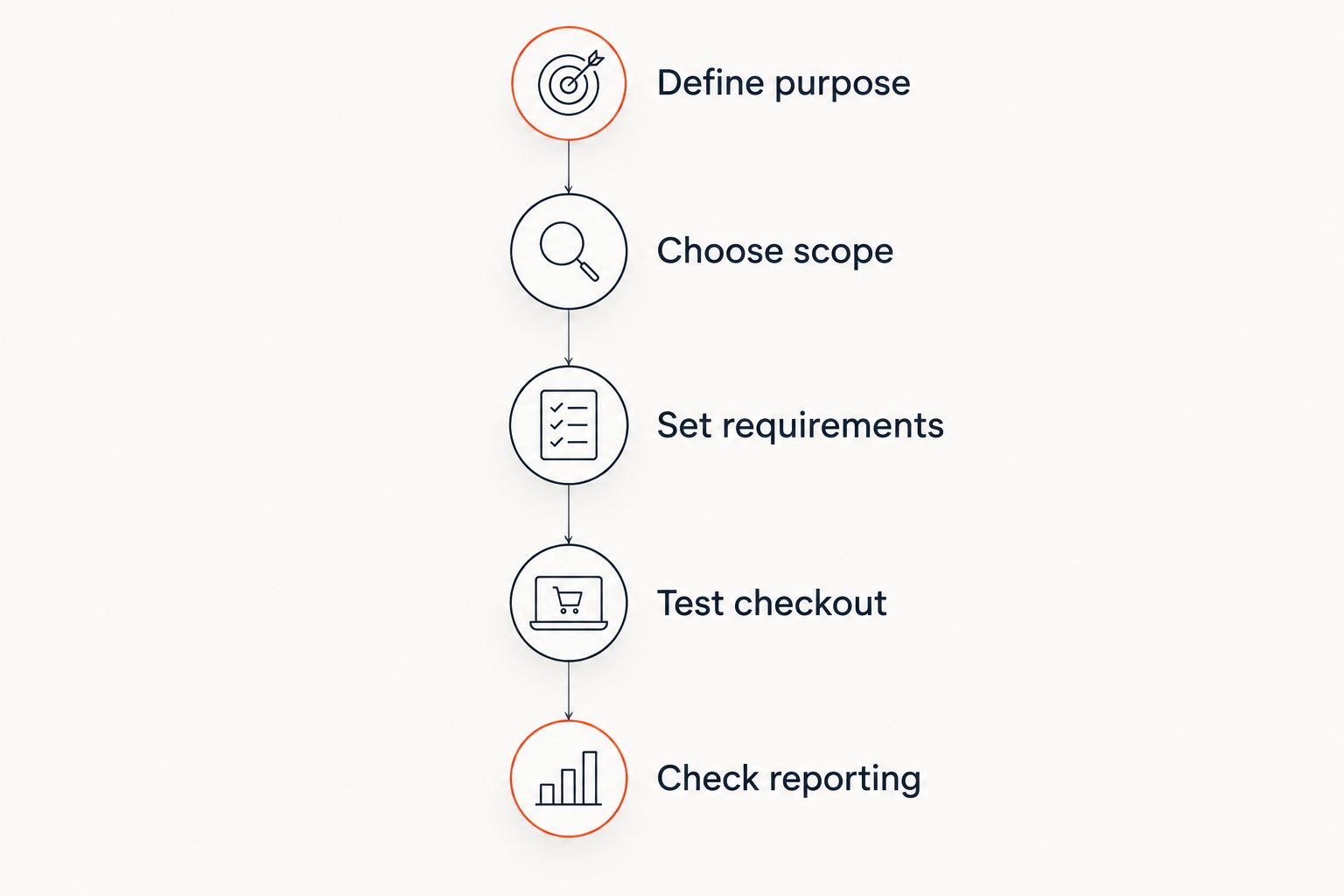
For a 2026 ticketing setup, evaluate the complete workflow rather than the appearance of the form. Start with the distinction between event registration software and ticketing software, then test these steps:
- Define purpose. Write down the operational decision each answer will support.
- Choose scope. Decide whether the answer belongs to the order or an individual attendee.
- Set requirements. Separate information needed to deliver the event from optional research.
- Test checkout. Check individual bookings, group bookings and unanswered optional fields.
- Check reporting. Confirm that authorised staff can find the answers against the correct booking or attendee.
A visible question is only the beginning. You also need an answer your team can identify, interpret and act on.
Why this matters
Custom questions turn a ticket purchase into part of your event preparation. A meal selection can inform catering; a company name can support conference registration. Neither helps if the answer sits against the wrong person or never reaches the team responsible.
Collect information because someone will use it, not because the form allows it. Before adding a required field, name the person who needs the answer and the action they will take. If neither is clear, remove the question or move it outside checkout.
Use this rule when reviewing your 2026 registration form: every required answer needs an operational purpose. Marketing curiosity is not the same as a condition of attendance.
Order questions: best for booking-wide information
Order-level questions suit information that applies to the whole purchase. An internal booking reference is an example: you generally need it attached to the transaction, not repeated against every ticket.
The benefit is less repetition. The limitation is that a booking-wide answer cannot reliably describe different people within a group. Do not treat the purchaser's preferences as everyone else's preferences.
Attendee questions: best for individual requirements
Attendee-level questions suit information that differs from person to person. Examples include a badge name, meal selection or session preference, where those details are relevant to your event.
The benefit is a clear connection between a person and an answer. The limitation is more information to enter during group bookings. Check how your proposed system handles attendees whose details the purchaser does not yet know.
Follow-up questions: best for non-essential information
A follow-up questionnaire suits information you do not need to accept the booking. Research interests and optional feedback belong here when they do not affect admission or event delivery.
The benefit is a shorter checkout. The limitation is that your team must manage unanswered requests and keep responses connected to the correct booking. Do not move essential operational information into a follow-up process without assigning responsibility for collecting it.
| Collection approach | Best for | Benefit | Limitation to check |
|---|---|---|---|
| Order questions | Booking-wide information | Avoids repeating shared details | Does not distinguish individual attendees |
| Attendee questions | Person-specific requirements | Connects answers to the relevant attendee | Adds work for group purchasers |
| Follow-up questions | Non-essential research | Keeps research outside payment | Requires a separate response workflow |
Why the right checkout questions vary
Your event determines the questions. Avoid copying another organiser's form without checking whether the same information serves your operation.
- Event format. A conference badge and a theatre admission have different information needs.
- Booking structure. Group purchases require a clear distinction between purchaser details and attendee details.
- Operational use. Collect answers in a form that the responsible team can interpret without guesswork.
- Sales channel. Test how your question workflow works across the storefront, box office and kiosk you intend to use.
- Language. Check question wording, answer choices and instructions in every language you publish.
- Information sensitivity. Ask for the minimum detail needed to arrange support, and decide who should see it.
These factors are selection criteria, not a promise that every platform supports the same controls. Bring your actual form to a demonstration.
Which questions should be required?
Require an answer only when you need it to complete the booking correctly or deliver the event. A required question should have a clear consequence if left unanswered. Explain that consequence in plain language beside the field.
For example, if you need a badge name before producing conference badges, say so. If a question simply helps you understand your audience, make it optional unless there is a separate, justified reason to require it.
Do not label a field optional and then block checkout when it is blank. Test that behaviour yourself, including on a phone. Your 2026 launch checklist should cover the unanswered path as carefully as the completed form.
Keep marketing permissions separate from operational questions. A meal preference, an access request and permission to receive promotions serve different purposes; do not combine them into a single compulsory response.
How should I write attendee questions?
Write the question around the answer your team needs. Use a specific instruction rather than a broad invitation to share information.
For badge printing, ask for the name to print on the badge. For an internal booking reference, explain whose reference you mean. A clear label prevents your staff from having to interpret vague answers later.
Use predefined choices when the available answers are genuinely fixed. Use free text when an attendee needs to explain something that your choices cannot capture. Neither format is automatically better: a fixed list is easier to organise, while free text allows detail but requires review.
Avoid asking for sensitive explanations when a practical request is enough. For accessibility arrangements, focus on the support required and provide a suitable way to discuss details privately. Decide who will receive those requests before collecting them.
How do I test custom checkout questions before launch?
Build a sample booking that resembles your real event, then follow the information through to the staff workflow. Do not stop when the payment page looks correct.
Test an individual booking
Enter a recognisable sample answer, complete the test through your approved testing process, and locate the resulting record. Confirm that the answer appears with the expected order or attendee.
Check long names, punctuation and blank optional fields. For a bilingual event, test Arabic as well as English, including the direction of text and the readability of answer choices.
Test a group booking
Use different sample answers for different attendees. Confirm that the system keeps those answers separate rather than repeating the purchaser's response across the booking.
Check what happens when a group purchaser lacks an attendee's details. Establish your process before launch; do not leave staff to improvise while registrations are open.
Test the staff handover
Ask the person handling registration, catering or access arrangements to find the information they need. If you plan to work from an export, inspect that export rather than assuming it contains every checkout field.
For your 2026 event, agree who reviews responses and when. A working form does not replace an operational handover.
Can attendees change their answers after booking?
Attendee editing depends on the platform's supported workflow. Ask for a demonstration of who can change an answer, how the booking is identified and whether the revised information appears in the records your team uses.
If changes require staff intervention, define a clear route for requests. Communicate any operational deadline that applies to your event, such as the point when you finalise catering or print badges.
Should I ask accessibility questions during checkout?
Ask for practical support requirements when you need them to prepare the event, and explain how attendees can discuss details privately. Avoid requesting a diagnosis when the operational need is an arrangement such as step-free access.
Restrict access to the people handling those arrangements. Before publishing the form, confirm how your chosen system stores responses and how your team will manage them.
Can I use checkout answers for marketing?
Do not treat an operational answer as permission to send promotions. Keep marketing choices distinct, explain their purpose and review the rules applicable to your organisation and audience.
If segmentation is part of your plan, demonstrate the actual transfer from the registration answer to the intended audience list. Do not assume a custom field automatically becomes an available campaign filter.
Where ZunaroSpace fits your ticketing shortlist
ZunaroSpace is best for independent organisers and venues that want event ticketing on their own branded storefront. Storefront, reserved seating, box office, kiosk and door check-in share one live inventory. That addresses the ticketing operation; your custom-question requirements still deserve their own demonstration.
The useful distinction is platform versus add-on. You are choosing where bookings happen and how your team runs admission, not simply adding a questionnaire. The trade-off is a broader evaluation: test the booking, attendee information and staff handover together.
AI that sells your tickets. A WhatsApp agent answers buyers, holds seats and hands over a checkout link. You keep the fees, the funds and the customers. Organisers pay nothing per ticket; the buyer covers a booking fee, while free events carry none.
Based at DTEC, Dubai Silicon Oasis. Built for the Gulf - the UAE and Saudi Arabia.
Bring your proposed fields to the contact team and request the complete workflow, including group bookings and reporting.
FAQ
Can I add custom checkout questions to an event booking?
Yes, when your ticketing platform supports configurable registration fields. Confirm whether each answer attaches to the whole order or an individual attendee before publishing the form.
What's the difference between buyer details and attendee details?
Buyer details identify the person making the purchase; attendee details describe the people attending. A group purchaser is not necessarily every ticket holder, so keep person-specific answers separate.
Should every checkout question be compulsory?
No. Require information needed to complete the booking correctly or deliver the event, and keep non-essential research optional or outside checkout.
Can I collect meal choices for each attendee?
Collect individual meal choices through attendee-level questions when your platform supports that workflow. Test a group booking with different answers and inspect the record your catering team will use.
Can I ask checkout questions in Arabic and English?
Use Arabic and English questions when your chosen form supports both languages. Test the actual question labels, answer choices and right-to-left presentation rather than relying on a general storefront language setting.
How do I know whether checkout answers appear in reports?
Complete a sample booking and inspect the exact report or export your staff will use. Check that each answer remains connected to the correct order or attendee.
Is ZunaroSpace suitable for independent event organisers?
ZunaroSpace provides event ticketing for independent organisers and venues through their own branded storefront, box office and kiosk. Request a demonstration of your custom-question workflow as part of the platform evaluation.
One last thing
An answer collected at checkout is not useful until someone can act on it. Before your 2026 launch, ask the person running registration to find a sample attendee's requirement without your help. If the handover fails, fix the workflow before adding more questions.


