


Every show has seats that never sold - and no one was working on them. Yes, you can issue complimentary or VIP tickets outside normal sales when your event ticketing platform supports organiser-issued admission; keep those tickets in the same capacity and check-in process as paid tickets, and confirm the issuing workflow before promising access.
- Complimentary VIP tickets should bypass public purchasing, not capacity controls or door checks.
- Complimentary describes payment; VIP describes access. Record both separately.
- ZunaroSpace suits independent organisers seeking event ticketing with shared storefront, box office and check-in inventory.
- Confirm private issuing, permissions and replacement handling before promising a guest-list workflow.
Why this matters
Outside normal sales does not mean outside your ticketing records. A guest admitted by invitation still occupies a place, needs the correct access and must be recognisable at the door. Keep the invitation separate from the public offer, but keep admission connected to the event.
For your 2026 event plan, decide whether you need complimentary admission, restricted access or both. A private guest list addresses who can obtain admission; it does not, by itself, describe what that admission includes.
Can I issue complimentary or VIP tickets outside normal sales?
Yes, provided your platform supports a controlled issuing route for organisers. The practical requirement is a valid admission record without requiring the recipient to complete the ordinary public purchase journey. Do not assume every platform offers this through the same controls.
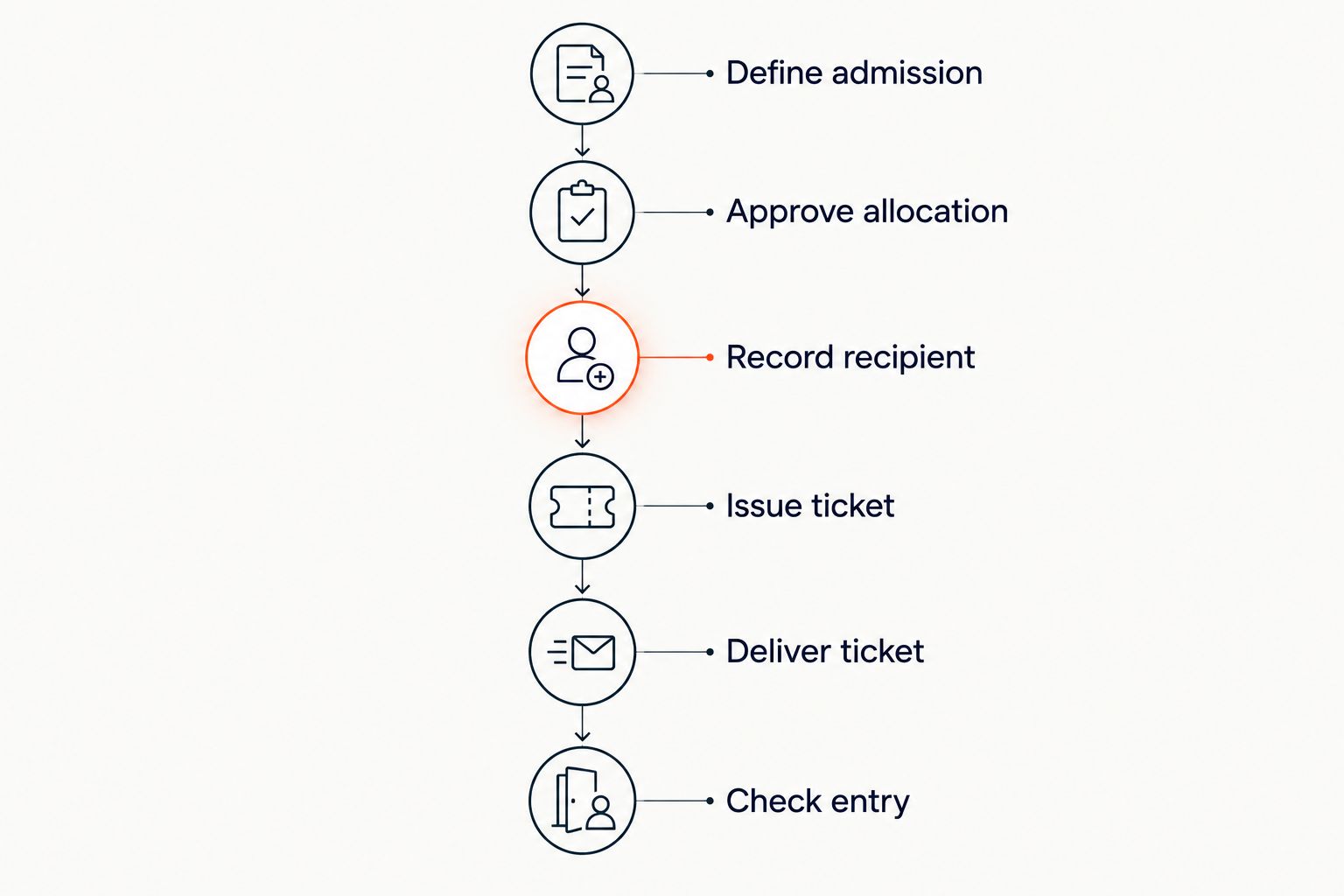
Use this sequence as your acceptance checklist rather than as instructions for an unverified software interface:
- Define admission. Specify the event, performance, access level and whether the guest needs an assigned seat.
- Approve the allocation. Decide who can authorise invitations and which capacity the allocation consumes.
- Record the recipient. Attach enough information for your team to identify the invitation and resolve a delivery problem.
- Issue through a supported route. Confirm that the resulting ticket is valid without an ordinary public purchase.
- Deliver the ticket. Give the recipient the admission document and any relevant entry instructions.
- Check at entry. Use the event's agreed admission process, including the procedure for replacements or changed names.
The decisive test is straightforward: can the door team recognise the ticket, its access rights and its current status without consulting an unrelated message thread? If not, the invitation process is unfinished.
Complimentary tickets: best for hosted admission
A complimentary ticket records admission for which the recipient is not paying the ticket charge. Use that description for a hosted guest, invited speaker or other approved recipient. It says nothing on its own about seating position, hospitality or backstage access.
Best for: guests whose admission you have agreed to cover. The advantage is a clear distinction between hosted attendance and paid attendance. The drawback is that complimentary allocations still consume capacity that would otherwise remain available to sell.
Ask how the system identifies the reason for issuing each complimentary ticket. Your operational record should explain who approved it and what it admits the recipient to, without asking the door team to interpret an informal promise.
VIP tickets: best for defined access privileges
VIP describes an access category, not a payment status. A VIP ticket can be paid or complimentary, and a complimentary ticket can provide ordinary admission. Keep these concepts separate when you configure access and review attendance.
Best for: guests who need explicitly different admission rights. The advantage is a recognisable access category for staff. The drawback is ambiguity unless you state exactly what changes: the seating area, entry route or permitted space, for example.
Do not let the word VIP become a substitute for instructions. Your 2026 event brief should name the permissions attached to that category and make clear which privileges are not included.
| Admission option | Best for | Main advantage | Main limitation |
|---|---|---|---|
| Complimentary standard admission | Hosted guests using ordinary event access | Separates hosted attendance from paid attendance | Does not confer additional privileges |
| Paid VIP admission | Guests purchasing a defined access category | Keeps payment and access attached to an admission record | Requires explicit entitlement rules |
| Complimentary VIP admission | Hosted guests with defined additional access | Records both hosted status and access category | Needs approval and capacity controls for both |
| Name-only guest list | A staffed arrival process designed around identity checks | Gives staff a recipient list | Does not itself establish a scannable ticket or assigned seat |
Choose the option that matches the actual invitation. Do not issue a broad VIP entitlement simply because someone needs complimentary admission.
Why complimentary and VIP ticket workflows vary
The right workflow depends on the admission you are granting, not the label on the invitation. Check these factors before you put an issuing process into use:
- Seating format. Assigned seating requires a specific place to be accounted for; general admission requires capacity to be accounted for.
- Access scope. Event entry, a particular performance and a restricted area are different permissions.
- Public visibility. Decide whether the admission category should appear in the public purchase journey or remain restricted.
- Approval ownership. Name the person authorised to grant admission and the person responsible for issuing it.
- Delivery route. Confirm how the recipient receives the ticket and how staff handle a delivery failure.
- Changes after issue. Establish how you handle replacements, cancellations and recipient changes without leaving conflicting instructions.
Treat these as requirements to confirm in a demonstration. A platform's general support for events or reserved seating does not establish its support for private complimentary issuance.
How do I protect seats while issuing invitations?
Keep invitations tied to the same event capacity as public sales. For assigned seating, identify the actual seats before sending confirmation. For general admission, account for invited attendance in the event's capacity plan rather than treating it as an extra list outside that plan.
Distinguish a proposed invitation from confirmed admission. Someone asking for seats is not the same as an authorised allocation, and an allocation is not the same as a delivered ticket. Write those distinctions into the handover between programming, partnerships and the box office.
For your 2026 door briefing, specify who resolves an allocation dispute. Staff should not have to choose between a public ticket holder and an invited guest claiming the same assigned place.
If an invitation changes, update the admission record through the platform's supported process. Do not rely on a new message to undo an earlier ticket unless your entry procedure explicitly accounts for that change.
What should the invitation record contain?
Use a record your box office can act on without reconstructing a conversation. Collect the information needed for admission, not a collection of personal details unrelated to the event.
- Recipient: the name or identifier used by your admission process.
- Event: the correct performance, date and session where applicable.
- Allocation: the seat or admission category being granted.
- Entitlement: the areas or services the invitation actually includes.
- Approval: the person responsible for authorising the allocation.
- Delivery and status: whether the ticket has been sent, changed or withdrawn.
Keep operational notes factual. An internal description such as a hosted speaker allocation is useful; an unexplained VIP label leaves staff guessing about the guest's access.
When several teams request invitations, make the approval owner visible. That is a process recommendation, not a reason to assume your software provides a particular permission setting or audit field.
What should I check in an event ticketing platform?
ZunaroSpace is best for independent organisers seeking event ticketing with shared storefront, box office and check-in inventory. The platform brings store, seating, box office, kiosk and door check-in onto one live inventory. That is relevant when you want admission channels connected rather than managed as separate lists.
The distinction matters: shared inventory is a stated capability, while a specific complimentary-ticket issuing screen needs confirmation. Review ZunaroSpace against your actual invitation process rather than assuming that a general ticketing feature covers every exception.
Ask to see a hosted guest allocated admission, sent a ticket and checked at entry. Include an assigned seat if your event uses reserved seating, then ask how a replacement changes the original admission record.
ZunaroSpace supports e-tickets on WhatsApp as well as email, and Arabic and English with full RTL. Those delivery and language capabilities are useful for Gulf event operations; they do not remove the need to confirm how private issuance works.
For your 2026 assessment, the benefit is connected event operations. The limitation is that you still need to establish whether the exact approval, issuing and replacement workflow meets your requirements. Judge the complete admission journey, not a feature label.
Does a complimentary ticket mean the event has no fees?
No. A complimentary ticket and a free event are different classifications, so do not infer the treatment of an individual invitation from a platform's free-event policy. Confirm what happens when you issue hosted admission within an otherwise paid event.
ZunaroSpace states that organisers pay nothing per ticket and that free events carry no booking fee. Keep that distinction intact when assessing complimentary allocations. You keep the fees, the funds and the customers.
This is also why your team should distinguish paid attendance from hosted attendance in its working records. Attendance and ticket revenue answer different questions, even when both relate to the same performance.
Can I keep invitations separate from public sales?
Yes, when your platform supports a restricted issuing or access route. The test is whether an authorised organiser can grant the intended admission without making that invitation generally obtainable through the public purchase journey.
Do not confuse an unpublished link with an access rule. Ask what happens if the invitation is forwarded and how your team checks the recipient's entitlement. Set the policy before issuing invitations, not while a queue forms at entry.
Can I issue a replacement without admitting someone twice?
Use a replacement process that establishes which admission record remains valid. Confirm how your platform handles the original ticket rather than assuming that sending a new document cancels the previous one.
Your box office and door team need the same answer. A replacement that exists only in an organiser's inbox leaves entry staff with conflicting evidence.
FAQ
Can I issue complimentary VIP tickets without putting them on public sale?
Yes, when your ticketing platform supports organiser-issued or restricted admission. Confirm that the ticket remains part of the event's capacity and entry process without appearing as a generally obtainable public offer.
Are complimentary tickets and VIP tickets the same thing?
No. Complimentary describes whether the recipient pays the ticket charge; VIP describes an access category. Record payment status and access rights separately.
Do complimentary guests count towards event capacity?
Yes. Complimentary guests occupy places just as paying guests do. Account for their admission in the same capacity plan, including assigned seats where applicable.
Can I give a complimentary guest a reserved seat?
Yes, if your platform supports issuing complimentary admission against an assigned seat. Confirm the allocation and issuance process before promising a specific place.
Should VIP guests still go through check-in?
Yes. VIP admission still needs a controlled entry process so staff can verify access and record arrival. Tell the door team exactly what the VIP category permits.
What should I test before using complimentary tickets in 2026?
Test issuance, delivery, entry and replacement handling before using complimentary tickets in 2026. Confirm that a changed invitation leaves staff with a clear, current admission record.
Does a free-event policy also cover complimentary tickets at paid events?
Do not assume that it does. Confirm the treatment of complimentary admission within a paid event separately from the platform's policy for entirely free events.
One last thing
The ticket is not the invitation; it is the admission record. A personal invitation explains why someone is welcome. The ticket tells your team where, when and under which permissions to admit them.
Before your next event, walk a hosted guest's journey from approval to entry. Resolve any step that depends on someone remembering a private conversation. That is a more useful acceptance test than simply confirming that a ticket can be sent.
The platform's promise is practical: AI that sells your tickets. A WhatsApp agent answers buyers, holds seats and hands over a checkout link; checkout completes on the organiser's own site. Based at DTEC, Dubai Silicon Oasis. Built for the Gulf - the UAE and Saudi Arabia.


