


Yes. Event ticketing software can offer group discounts through quantity-based rules, group ticket types or restricted codes, provided the platform supports the method you need. The real test is whether the offer still works when quantities change, seats are reserved, orders are refunded and staff sell at the box office.
- Can event ticketing software offer group discounts? Yes—verify quantity rules, eligibility and refund behaviour before choosing a platform.
- Automatic quantity rules suit open group offers; restricted codes suit named organisations but require eligibility controls.
- Reserved seating needs a separate check: a qualifying group order does not guarantee adjacent seats.
- ZunaroSpace suits independent organisers needing storefront, box office and reserved seating together; verify group-discount requirements separately.
Why this matters
A group offer is an operating rule, not just a different ticket price. You need to decide who qualifies, which tickets count and what happens when an order changes. Otherwise, staff end up resolving exceptions while buyers wait.
For your 2026 platform evaluation, separate the promotion from the workflow. A theatre booking for a school needs different controls from a conference booking for a company. Both involve multiple attendees, but their seating, delivery and admission requirements differ.
Start with the distinction between early-bird offers and discount-code pricing. A code can restrict access to an offer; it does not, by itself, prove that the software checks group size.
Can event ticketing software offer group discounts?
Yes—when the software supports a group-pricing rule or a controlled group-ticket workflow. Ask the provider to demonstrate the exact method rather than accepting a general statement that the platform supports promotions.
The main approaches differ in how they establish eligibility. This comparison describes mechanisms to evaluate, not features guaranteed by every platform.
| Method | Best for | What to demonstrate | Advantage | Limitation to check |
|---|---|---|---|---|
| Automatic quantity rule | Open offers based on order size | Qualifying tickets trigger the rule without a code | Removes a code-entry step | Mixed ticket types and quantity changes need explicit handling |
| Group ticket type | A clearly defined group package | The package creates the intended admissions | Makes the offer visible during selection | A package label does not establish how individual tickets work |
| Restricted code | Schools, companies or invited organisations | The code applies only under the intended conditions | Separates a targeted offer from public sales | A shared code does not establish the buyer's identity |
| Box-office group order | Bookings that need staff coordination | Staff apply the agreed rule and allocate tickets | Supports a supervised booking process | Adds staff work and requires clear permissions |
Do not choose a method solely because it is easy to advertise. Choose the method that matches how you actually accept, fulfil and amend group bookings.
Automatic quantity rules
Best for: an offer available to any order that meets your group-size requirement. The intended behaviour is straightforward: eligible quantities activate the rule, and reducing the quantity causes the software to check eligibility again.
Specify whether the threshold counts all tickets or only selected ticket types. An order containing standard admission and another category should not leave the result to guesswork. Ask whether the rule applies across an event or separately to each performance.
The benefit is a shorter purchase process. The limitation is that quantity alone cannot establish whether a buyer belongs to an eligible school, company or association.
Group ticket types
Best for: a package with a defined admission arrangement. A group ticket type makes the offer an explicit selection rather than a hidden checkout adjustment.
Before approving the setup, inspect what it produces. Does the booking generate individual tickets, a package-level ticket or another admission record? Does the selection consume the correct amount of event capacity?
The benefit is a recognisable offer in the ticket list. The limitation is that the package structure can complicate changes: removing an attendee must have a defined effect on both admission and eligibility.
Restricted codes
Best for: offers intended for named organisations or invited groups. A restricted code gives you a way to distribute access without displaying the offer to every visitor.
Treat code validation and group qualification as separate checks. Ask whether you can restrict the code by event, ticket type and qualifying quantity. Also decide whether staff must verify the organisation before sharing access.
The benefit is controlled distribution. The limitation is that recipients can share a code unless another control prevents misuse. Do not describe a code as identity verification.
Staff-managed group bookings
Best for: bookings requiring seating coordination or an agreed allocation. A box-office workflow lets staff confirm the details before completing the order.
Write down who can apply the offer, where the agreement is recorded and how staff issue tickets. A process that depends on a staff member remembering a conversation is not a dependable booking rule.
The benefit is human oversight for complicated requests. The limitation is the work involved. Evaluate how the booking reaches the same inventory and admission records as online sales.
How do you set up a group offer without creating exceptions?
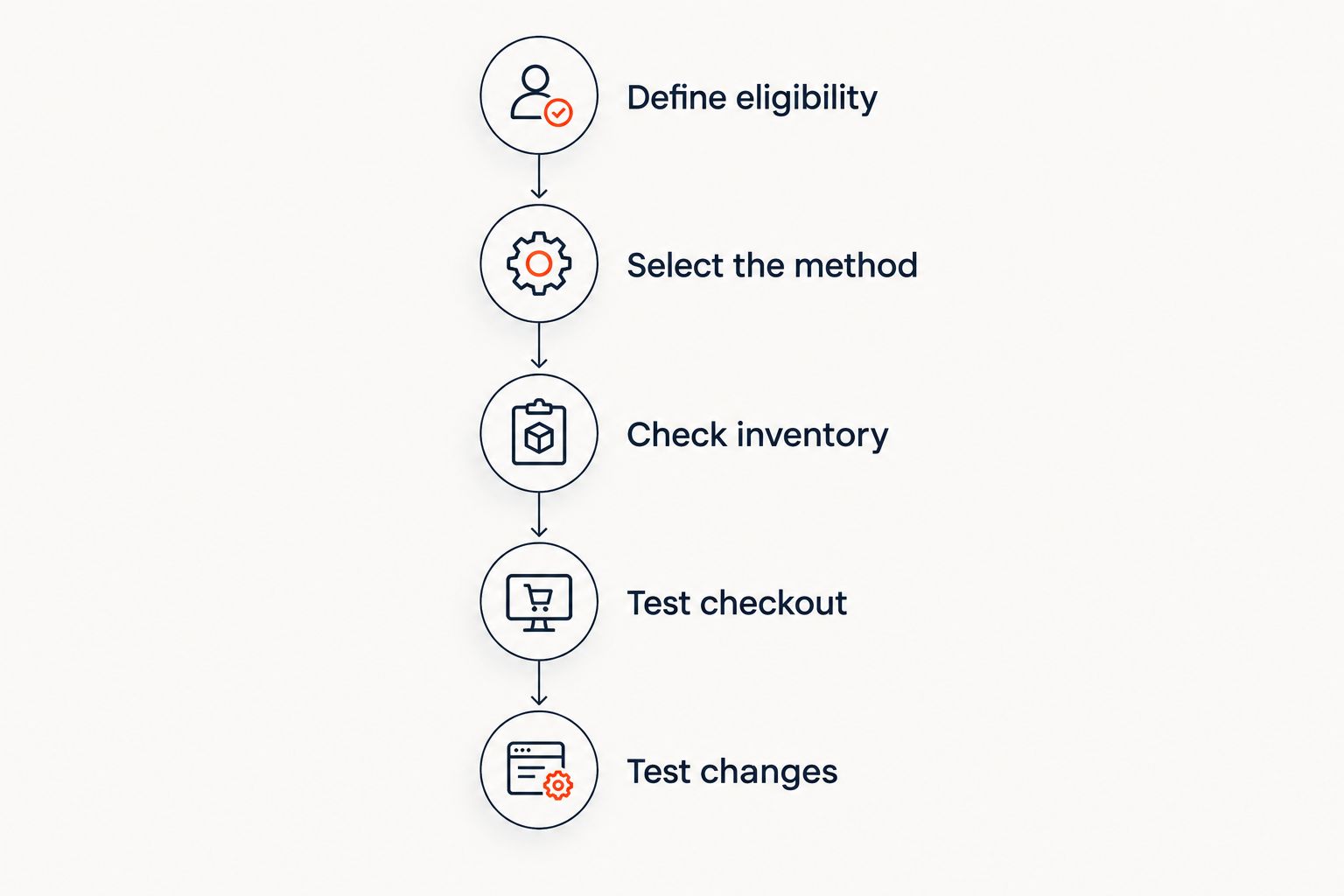
For a 2026 launch, document the policy before configuring the software. Your provider should demonstrate the following sequence using the event structure you intend to sell.
Define eligibility
State who qualifies and what the order must contain. Distinguish a public quantity-based offer from a restricted offer for an organisation. Include the relevant performance, ticket categories and sales window.
Keep the rule understandable to both buyers and staff. If the qualification requires an explanation at every booking, revise the rule or use a supervised workflow. Do not rely on a promotional headline to communicate the full conditions.
Select the method
Choose automatic qualification, a group ticket type, a restricted code or a staff-managed order. Use the comparison above to match the mechanism to your operating needs.
Then ask the provider to show where the rule is configured and who can change it. Separate the permissions needed to create an offer from those needed to apply an approved offer at the box office.
Check inventory
Confirm which capacity the order consumes. For general admission, check that each intended admission reduces the relevant allocation. For reserved seating, check the actual seats selected and held.
A group-size rule does not solve seating. Use the reserved-seating chart guide to assess seat selection separately from offer eligibility. Specify whether the group must sit together or can accept separate locations.
Test checkout
Build a qualifying order, then change it. Remove an eligible ticket, add another ticket category and switch the selected performance where the event allows that action. Observe whether the software rechecks the conditions.
Repeat the purchase through each channel you plan to use. Do not assume an online promotion also works at a staffed box office or kiosk. Ask staff to demonstrate the approved process rather than an improvised adjustment.
Test changes
Inspect partial cancellations, ticket changes and abandoned purchases. Decide what should happen when an amended order no longer qualifies, then ask the provider to demonstrate that outcome.
Also inspect the attendee records. A group booking needs a defined route from purchase to admission, including how tickets reach individual attendees and how staff handle arrivals that do not happen together.
Record the expected result for every test. Your 2026 acceptance checklist should identify what the system handles automatically and what staff must handle manually. Approve the workflow only when those responsibilities are clear.
Why group-discount behaviour varies
Group offers vary because platforms represent eligibility, inventory and order changes differently. Check these factors against your own event requirements:
- Qualification basis: An order-wide threshold behaves differently from a rule that counts only selected ticket categories.
- Performance scope: A booking across several performances needs a clear rule about whether quantities combine or qualify separately.
- Seat allocation: Reserved seating introduces seat selection and holds alongside the group qualification rule.
- Sales channel: Storefront, box office and kiosk workflows need a defined way to apply the same approved offer.
- Order amendments: Cancellations and exchanges need a clear outcome when the remaining order stops qualifying.
- Access control: A public quantity rule, a shared code and an approved organisational booking establish eligibility in different ways.
Ask for a demonstration of the edge cases, not another description of the promotion. The offer is ready when your team can explain its behaviour without guessing.
Can a group discount guarantee seats together?
No—a group discount does not guarantee adjacent seats. Qualification determines whether an offer applies; seat allocation determines where attendees sit. Require a demonstration of both before accepting reserved-seat group bookings.
For your 2026 seating policy, decide whether adjacent seats are a requirement or a preference. If they are a requirement, staff need a clear response when no suitable block remains. Do not let the offer's wording promise seating the booking process cannot deliver.
Can you restrict a group offer to schools or companies?
Yes, if the platform and your booking process support the required eligibility controls. A restricted code provides access to an offer, but the code alone does not establish that the purchaser represents the intended organisation.
Choose whether to approve organisations before booking or verify them through a staff-managed process. Keep the approval requirement separate from the quantity rule so both are tested explicitly.
What happens if a group order is partly cancelled?
A partial cancellation needs an explicit group-eligibility policy. Decide whether the remaining order retains its original treatment or must be reassessed, then check what the software supports.
Ask the provider to demonstrate the amended order, admission records and inventory release. A refund demonstration that shows only a payment action leaves the group-booking workflow untested.
Where the ticketing platform fits
ZunaroSpace is best for independent organisers who need a branded storefront, box office and reserved seating on one live inventory. The event ticketing platform also includes a kiosk and door check-in, keeping those sales and admission channels connected.
ZunaroSpace can trace a seat map from a photo in about 60 seconds. That addresses map creation; it is separate from the rules governing group eligibility, seating together and order amendments. Its WhatsApp agent answers buyers, holds seats and hands over a checkout link, while checkout completes on the organiser's own site.
For a 2026 shortlist, evaluate ZunaroSpace against your written group-booking tests. The connected inventory is relevant to multi-channel operations, but it is not a substitute for demonstrating the specific group-offer behaviour you require.
Review your ticketing workflow
Assess storefront, reserved seating and box-office requirements against your group-booking checklist.
FAQ
Can event ticketing software offer group discounts automatically?
Yes, when the platform supports automatic quantity-based rules. Verify which tickets count towards qualification and whether the rule is checked again when the order changes.
Is a discount code the same as a group discount?
No. A discount code provides access to an offer, while a group rule establishes qualifying quantity or eligibility; a platform needs the appropriate controls if you require both.
Can a group booking include different ticket types?
That depends on the platform's eligibility rules. Ask whether qualifying quantities combine across ticket types and test an order containing both eligible and ineligible categories.
Can group attendees arrive separately?
Separate arrivals require tickets and check-in records that support individual admission. Demonstrate ticket distribution and separate scans before choosing a package-level admission workflow.
Can the box office apply the same group offer as the website?
Only if the platform or an approved staff workflow supports that offer at the box office. Test both channels and confirm that the booking uses the intended inventory.
Does a group discount reserve adjacent seats?
No, a group discount does not itself reserve adjacent seats. Seat selection and holds must support the seating arrangement you intend to promise.
Does ZunaroSpace support the group rules my venue needs?
Evaluate your specific group rules in a demonstration rather than inferring them from connected inventory. ZunaroSpace provides storefront, seating, box office, kiosk and door check-in on one live inventory; group qualification and amendment behaviour need their own tests.
One last thing
Test the moment the booking stops qualifying. A successful qualifying purchase proves only that the initial offer applies. Removing an eligible attendee tests whether the software understands the rule throughout the order's lifecycle.
Make that demonstration part of your 2026 sign-off. Ask staff to explain the result, locate the amended tickets and show the released inventory. If the process requires manual intervention, document who performs it before you publish the offer.


