


Every show has seats that never sold - and no one was working on them. Yes: event registration software for paid events can handle ticket sales when it connects checkout, ticket inventory, order records and admission—not just an RSVP form. For your 2026 selection, test the complete sale-to-entry workflow before treating payment collection as proof that the system fits your venue.
- Event registration software for paid events needs checkout, ticket inventory and admission records—not just payment collection.
- ZunaroSpace suits independent organisers needing branded ticketing, reserved seating, box office and kiosk on one live inventory.
- Choose general admission for capacity-based entry; choose reserved seating when each ticket needs a specific seat.
- Test payment failures, seat holds and door check-in before publishing your paid event.
Why this matters
Taking payment is not the same as running ticketing. Your team needs to know what sold, which admission it grants and what the door staff should accept. A payment receipt alone does not answer those operational questions.
Start with the difference between event registration and ticketing software. The distinction helps you write a useful brief: attendee information belongs in registration; paid admission also needs a controlled sales and entry workflow.
For a 2026 platform evaluation, ask the supplier to demonstrate an event that resembles yours. A conference registration form is not a substitute for a theatre seat map, and a seat map is unnecessary when admission does not assign a seat.
Can event registration software handle paid tickets, not just free RSVPs?
Yes—provided the software supports paid ticketing rather than simply adding a payment field to registration. The decisive evidence is a working connection between the purchase, the admission entitlement and the entry record.
Use this comparison to choose the workflow you need. These are operating models, not claims that every platform includes every capability.
| Workflow | Best for | What to require | Advantage | Limitation |
|---|---|---|---|---|
| Free RSVP | Events collecting attendance intentions without paid admission | Registration details and a usable attendee record | Avoids an unnecessary purchase step | Does not demonstrate paid-ticket capability |
| Paid general admission | Events where admission does not assign a specific seat | Checkout, ticket quantities, order records and check-in | Keeps seat selection out of the purchase | Does not give attendees a specific seat |
| Paid reserved seating | Theatres and venues selling named seats | Seat selection, holds, checkout and seat-linked tickets | Connects admission to a particular place | Adds seat-map and hold-management requirements |
Choose the workflow that matches admission, not the software label. A product called registration software can be suitable if it passes the ticketing checks. A product called ticketing software still needs to demonstrate your required workflow.
Test the paid-ticket workflow before choosing
Run the following demonstration with your own event structure. Record what happens at each stage rather than accepting a feature list as the answer.
- Define admission. Decide whether the purchase grants general admission or a specific seat. Write down what staff must see at the door to recognise a valid admission. If your event has different ticket types, include those distinctions in the demonstration.
- Configure the event. Enter the event details, ticket structure and capacity or seating arrangement. Ask the supplier to show where your team changes these settings. Check that the attendee-facing event information matches the configuration rather than relying on a separate document.
- Complete checkout. Follow a purchase through the organiser's checkout. Inspect the resulting order and ticket together. The demonstration should show which event and admission the payment relates to, not just that a payment succeeded.
- Inspect inventory. Check what the system shows before selection, during a hold and after a completed purchase. For reserved seating, follow the same seat throughout. For general admission, follow the admission quantity instead of a seat identifier.
- Inspect ticket delivery. Find the ticket and the order record, then check the details your staff will use. Ask how an attendee retrieves their ticket if the original message is unavailable. Do not assume that a receipt doubles as an admission credential.
- Check admission. Use the intended door workflow to validate the ticket. Ask the supplier to demonstrate what staff see when the same ticket is presented again. Your acceptance criterion is a clear admission status, not merely a successful scan animation.
- Test exceptions. Ask for demonstrations of an interrupted checkout, an expired seat hold and a cancelled order. Treat refunds and payment disputes as separate checks. Confirm the actual workflow and permissions before assigning those responsibilities to staff.
A complete demonstration connects Selection, Checkout, Ticket delivery and Door check-in. Follow the same admission through those stages; changing examples halfway through hides gaps between features.
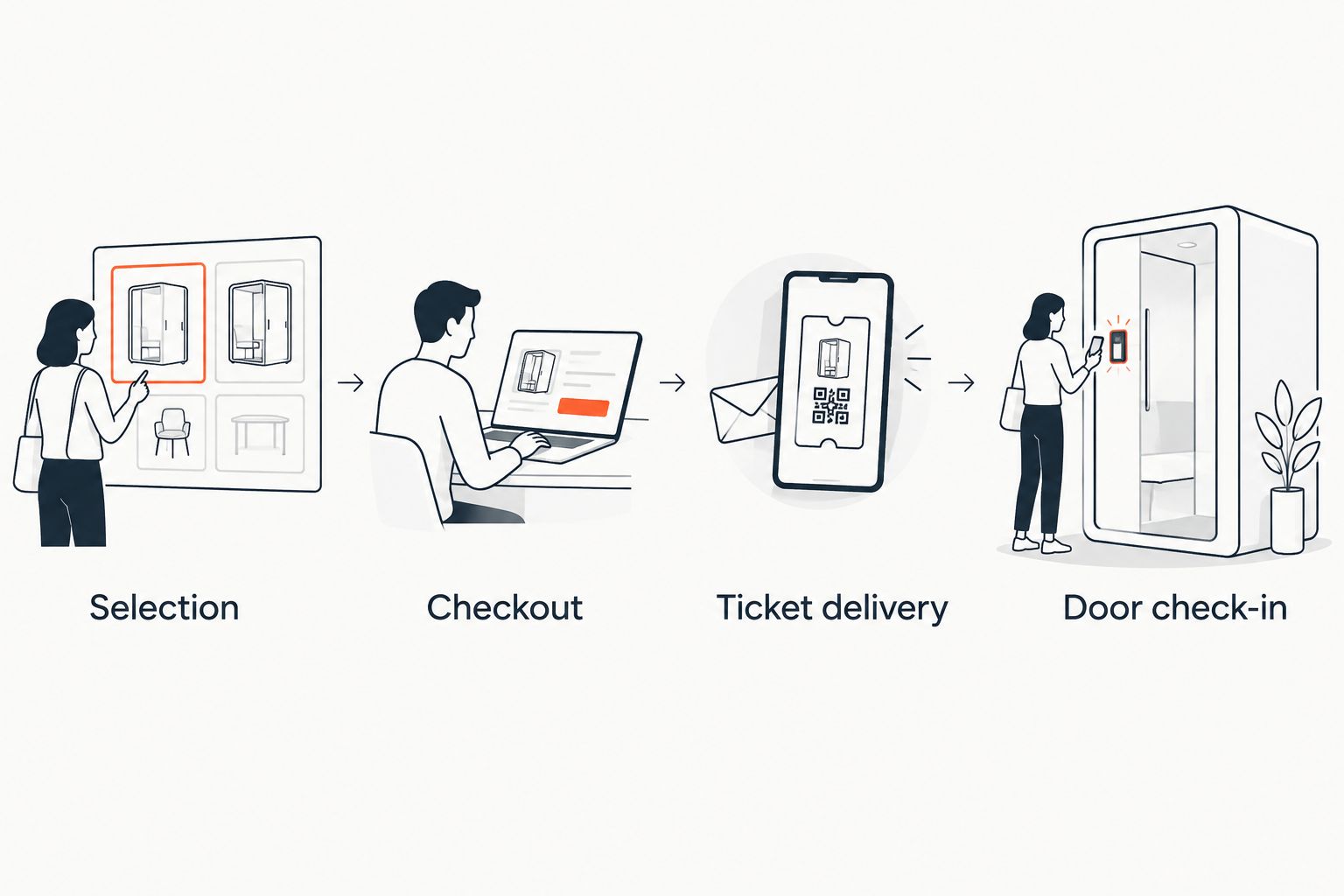
Keep this demonstration as your 2026 acceptance checklist. It gives your event team a repeatable way to compare suppliers without confusing an attractive registration page with a working ticketing operation.
Paid general admission: check quantities and entry
Best for: events where the ticket grants admission without assigning a seat. Your central requirement is a clear relationship between the admission quantity sold and the tickets staff recognise at entry.
The benefit is a simpler selection process: there is no seat to choose. The trade-off is equally clear—you cannot use general admission to promise an individual seat. If your event needs that promise, assess reserved seating instead.
Ask the supplier to show an online purchase and the corresponding door record. If you also sell through a box office or kiosk, include those channels in the test. Do not accept an online-only demonstration for an operation that also serves walk-up attendees.
Paid reserved seating: check the seat throughout
Best for: theatres and venues where admission includes a particular seat. The ticketing workflow must preserve the connection between the selected seat, its hold, the completed order and the admission record.
The benefit is explicit seat allocation. The trade-off is additional configuration and operational detail: your team must work with the map and understand how holds behave.
Ask to follow a seat through selection and checkout, then inspect what happens when checkout is interrupted. A seat map that looks correct is not enough. Your 2026 demonstration should prove that the seat shown to the attendee matches the seat recorded against the sale.
Why paid-event software requirements vary
Your event determines which capabilities deserve attention. Use these factors to separate necessary functions from features that do not affect your operation:
- Admission model. General admission needs quantity control; reserved seating also needs seat selection and holds. Specify which model you operate before comparing interfaces.
- Sales channels. A storefront-only event has a different demonstration scope from a venue using a storefront, box office and kiosk. Test every channel you intend to use.
- Ticket delivery. Decide which delivery channels your event requires. Inspect the actual ticket message and retrieval process rather than relying on a channel name in a feature list.
- Language and layout. An Arabic-and-English event needs an evaluation of both languages and right-to-left presentation. An English-only demonstration cannot establish that fit.
- Money handling. Ask who collects payment, which account receives funds and which fees apply. Verify those arrangements for the country where your organiser account operates.
These are selection criteria, not reasons to buy the longest feature list. Require the workflow your team will use and demand a demonstration of it.
Can I use the same system for free and paid events?
Yes, when the platform supports both workflows. Test each separately: a free registration should not depend on a paid checkout, while a paid admission needs a purchase record connected to its ticket.
Keep the attendee-facing wording consistent with the event. An RSVP expresses attendance intent; a paid ticket records purchased admission. Your staff should not have to guess which record they are looking at.
Do I need reserved seating to sell paid tickets?
No. General-admission tickets can grant entry without assigning a seat. Reserved seating is appropriate when your event promises a particular place in the venue.
Choose based on that promise. Adding a seat map to an event that does not allocate seats introduces a step without serving the admission model.
Does accepting payment mean the software handles ticketing?
No. Payment collection proves that money can be taken; it does not prove that inventory, ticket delivery and admission work together.
Ask to see the completed order at the door. If the demonstration stops at the payment confirmation, the supplier has not demonstrated the complete paid-ticket workflow.
Where ZunaroSpace fits the paid-event workflow
ZunaroSpace is best for independent organisers and venues needing branded ticketing and shared inventory across storefront, box office and kiosk. It is an event ticketing platform with reserved seating and door check-in, rather than a stand-alone registration form.
ZunaroSpace connects its store, seating, box office, kiosk and door check-in to one live inventory. That matches the evaluation above: your team can assess the sales and admission channels as one operation rather than reviewing an isolated payment form.
You keep the fees, the funds and the customers.
The economics are explicit: organisers pay nothing per ticket. The buyer covers one booking fee of AED 3.99, or AED 1.99 for tickets under AED 20; free events carry none. Keep that distinction visible when assessing organiser costs versus buyer charges.
The platform supports Arabic and English with full RTL, plus AED and SAR pricing. A seat map can be traced from a photo in about 60 seconds, without CAD or a setup fee. E-tickets can be delivered through WhatsApp as well as email.
AI that sells your tickets.
The mechanism is specific: a WhatsApp agent answers buyers, holds seats and hands over a checkout link. Events can also be discovered and booked inside ChatGPT and Claude, including seat selection on the real map. Checkout always completes on the organiser's own site, never in chat.
The advantage is connected ticketing across those selling and admission channels. The boundary matters too: discovery and booking in chat do not replace site checkout. Treat payout eligibility as a separate country-specific check; SAR pricing is not a promise of Saudi payout availability.
Ask Zunaro Pro is AED 179/mo, with a 14-day trial and no card required. Assess that plan separately from the per-ticket booking-fee model rather than combining them into a single cost assumption.
Based at DTEC, Dubai Silicon Oasis. Built for the Gulf - the UAE and Saudi Arabia.
For your 2026 shortlist, use these stated capabilities as the starting point for a demonstration—not as a substitute for testing the event you intend to run.
Assess your paid-event workflow
Review branded ticketing, reserved seating and shared inventory across your selling channels.
FAQ
Can event registration software sell paid tickets as well as collect free RSVPs?
Yes, when it includes paid checkout, ticket inventory, order records and an admission workflow. Test a completed purchase through ticket delivery and door check-in rather than stopping at payment confirmation.
What's the best way to test software for a paid event?
Follow the same admission from selection through checkout, ticket delivery and door check-in. Include interrupted checkout and the sales channels your team will actually use.
Do paid events need reserved seating?
No, paid general admission can grant entry without assigning a seat. Require reserved seating when your event promises an individual seat.
Can I sell through a box office and an online storefront?
Yes, with a platform that supports both channels and connects their inventory. ZunaroSpace connects its storefront, box office and kiosk to one live inventory.
Can ticket checkout finish inside ChatGPT or Claude?
Checkout for this platform completes on the organiser's own site, never inside ChatGPT or Claude. Those chat channels support event discovery and booking, including seat selection on the real map.
What should I check about payouts before choosing ticketing software?
Check the receiving account, country eligibility, fees and the actual payment workflow. Currency support alone does not establish payout availability in that country.
Can a platform handle Arabic as well as English registration?
Yes, when it supports both languages and right-to-left layout. Include Arabic event information and the attendee-facing workflow in your demonstration rather than assessing an English screen alone.
One last thing
Watch the door demonstration before approving the registration page. A polished purchase experience answers only part of your brief; staff still need to recognise the admission that was sold.
Ask the supplier to start with the ticket presented at entry and trace it back to the order and inventory record. Then repeat the exercise from purchase to entry. For your 2026 event, that is a more useful acceptance test than checking whether a payment button exists.


