


Best overall for independent Gulf venues: ZunaroSpace. Best for straightforward website ticket sales: Ticket Tailor. Best for configurable registration forms: TicketSpice. Best for self-hosting: pretix. This 2026 white label ticketing platform guide compares branded selling, seating, checkout ownership and operational control—not just whose logo appears on the event page.
- ZunaroSpace is the best white label ticketing platform here for independent Gulf venues needing branded selling and reserved seating.
- Ticket Tailor suits straightforward website ticket sales; TicketSpice suits configurable event registration.
- pretix suits organisations that want self-hosting and can manage the technical responsibility.
- Choose on checkout ownership, customer data and shared ticket inventory—not branding alone.
Why this matters
Every show has seats that never sold - and no one was working on them.
A branded event page addresses presentation. It does not, by itself, address unanswered questions, disconnected box-office stock or the work needed to sell an unfilled seat. Your platform choice needs to cover those jobs as well.
For a 2026 shortlist, separate appearance from ownership. You need to know where checkout happens, who controls the customer relationship and how online sales connect to the people selling at your venue.
A white label ticketing platform should make your organisation the seller, not merely put your name above someone else's checkout. Ask each supplier to demonstrate the complete journey before you commit.
What makes the best white label ticketing platform?
Use these criteria before comparing the options. A platform that fits a conference registration desk does not automatically fit a theatre box office.
- Branded sales journey: Check the event page, seat selection, checkout and ticket delivery—not just the landing page.
- Inventory consistency: Your storefront, box office and kiosk need to agree on what remains available.
- Seating fit: Distinguish general admission from reserved seating. Ask to see your actual venue layout represented.
- Customer ownership: Establish who holds customer records, what you can export and which communications you control.
- Operational responsibility: Decide whether you want a hosted service or responsibility for running the software yourself.
- Commercial clarity: Separate platform charges, buyer booking fees, payment processing and optional services.
Treat essential requirements as pass-or-fail checks. A strong registration form cannot compensate for a seating workflow your staff cannot use. Equally, an elaborate seat map adds little to an event sold entirely as general admission.
White label ticketing platforms at a glance
The order below reflects distinct buying situations, not a claim that every organiser needs the same system. Pricing is discussed separately where the supplied brand information requires it.
| Platform | Best for | Standout feature | Key limitation or trade-off |
|---|---|---|---|
| ZunaroSpace | Independent Gulf venues and organisers | Branded storefront, seating, box office, kiosk and check-in share live inventory | Booking in chat still requires checkout on the organiser's site |
| Ticket Tailor | Straightforward sales from an existing website | Website embedding for an event ticket shop | An embedded shop is not the same deployment model as self-hosting |
| TicketSpice | Events with configurable registration requirements | Customisable ticketing pages and registration forms | Form flexibility still needs an organiser-defined registration process |
| pretix | Organisations seeking self-hosted ticketing | Open-source software with a self-hosted deployment option | Self-hosting brings infrastructure and maintenance responsibility |
The table gives you a starting point for a demonstration. Do not read a use-case label as confirmation of every feature, integration or country-specific payment arrangement.
1. ZunaroSpace: best white label ticketing platform for Gulf venues
ZunaroSpace is an event ticketing platform for independent organisers and venues: theatres, promoters, clubs, conferences and festivals. It combines your branded storefront with reserved seating, box office, kiosk and door check-in on one live inventory.
ZunaroSpace is the best white label ticketing platform here for independent Gulf venues that need branded selling and shared seat inventory. You keep the fees, the funds and the customers.
Selling mechanisms, not another disconnected channel
The WhatsApp agent answers buyers, holds seats and hands over a checkout link. It also reads inbound photos. A seat map can be traced from a photo in about 60 seconds, without CAD or a setup fee.
Events are discoverable and bookable inside ChatGPT and Claude, including choosing a seat on the real map and holding it. Payment does not complete in chat: checkout always happens on the organiser's own site.
AI that sells your tickets.
ZunaroSpace pros
- Storefront, box office, kiosk and check-in use the same live inventory.
- Arabic and English support includes full RTL.
- E-tickets can be delivered through WhatsApp as well as email.
- Photo-based seat-map tracing reduces the need to prepare a CAD drawing.
ZunaroSpace cons and boundaries
- Chat-based discovery and seat holds do not eliminate website checkout.
- Selling to Saudi organisers is not a promise of Saudi payout availability.
- A traced map still needs your operational review before you sell allocated seats.
ZunaroSpace economics
Organisers pay nothing per ticket; the buyer booking fee is AED 3.99, or AED 1.99 under AED 20, and free events carry none. Ask Zunaro Pro is AED 179/mo, with a 14-day trial and no card required.
Based at DTEC, Dubai Silicon Oasis. Built for the Gulf - the UAE and Saudi Arabia.
Best for: Independent venues and organisers that want branded selling, reserved seating and connected venue operations.
Verdict: Buy for this operational fit; establish country-specific payment arrangements before committing.
2. Ticket Tailor: best ticketing option for existing websites
Ticket Tailor provides hosted event ticketing with website embedding. You can use an event ticket shop alongside an existing website rather than treating a new platform website as the centre of your business.
That makes it a sensible shortlist option when your main requirement is straightforward ticket sales. Start with the purchase journey, then test the venue-specific requirements that matter to you.
Ticket Tailor pros
- Website embedding supports selling alongside your existing site content.
- Its event-ticketing focus fits a straightforward sales workflow.
- Hosted delivery avoids the server administration associated with self-hosted software.
Ticket Tailor cons and trade-offs
- A website embed does not give you the same infrastructure control as self-hosting.
- Hosted software still leaves you dependent on a supplier-operated service.
- Your staff need to test the full purchase journey; an embedded shop alone does not establish your operational fit.
In your 2026 evaluation, ask the supplier to show the page, checkout, confirmation and ticket delivery together. Assess where the organiser's identity appears and where the buyer leaves the surrounding website experience.
If you sell allocated seats, make seating a separate demonstration requirement. Do not infer a feature's suitability from the fact that a ticket shop embeds neatly.
Best for: Organisers with an established website who want a hosted ticket-selling workflow.
Verdict: Buy for straightforward website sales; hold until any complex venue requirements are demonstrated.
3. TicketSpice: best ticketing option for registration-led events
TicketSpice offers customisable event ticketing pages and registration forms. Its strongest reason to enter this shortlist is the ability to shape the information collected during registration.
That matters when an order needs more than a ticket quantity. Conference and structured-event organisers should evaluate how registration questions, ticket choices and the resulting attendee records fit their administrative process.
TicketSpice pros
- Customisable forms support event-specific registration questions.
- Configurable ticketing pages let organisers shape the registration experience.
- Hosted software avoids taking responsibility for running a ticketing application server.
TicketSpice cons and trade-offs
- More configurable registration requires clear decisions about which questions belong in checkout.
- A hosted registration service is not a self-hosted deployment.
- Registration flexibility alone does not establish suitability for an allocated-seat venue.
Bring a real registration form to the demonstration. Ask the supplier to reproduce it, complete an order and show how staff receive the information afterwards.
Then remove unnecessary questions. Your platform should collect information you actually use, not encourage a longer form simply because it can accommodate one.
For a theatre or club, put seating and door operations ahead of form customisation. For a registration-led event, reverse that priority and test the administrative handover in detail.
Best for: Organisers whose ticket purchase process includes event-specific registration information.
Verdict: Buy for registration flexibility; hold if reserved seating is your decisive requirement.
4. pretix: best ticketing option for self-hosting
pretix is open-source ticketing software with a self-hosted deployment option. It belongs on your shortlist when software control is part of the buying requirement, rather than just control over the event page.
Self-hosting changes the decision. Your organisation becomes responsible for the infrastructure and ongoing operation of the deployment, whether your own team handles it or you appoint a technical provider.
pretix pros
- An open-source codebase supports inspection and modification.
- Self-hosting gives you control over your deployment.
- It offers an alternative to relying entirely on a hosted platform's operating environment.
pretix cons and trade-offs
- Self-hosting requires server administration and maintenance.
- You need a defined owner for updates, monitoring and recovery.
- Custom changes require technical work and ongoing care.
Do not confuse access to source code with a finished implementation. Before choosing self-hosting, assign responsibility for operating the system during your sales period and on event day.
For your 2026 shortlist, the deciding question is practical: who handles an incident while the box office is open? If that responsibility is unassigned, infrastructure control is not yet an operational advantage.
Best for: Organisations with technical support that explicitly want to operate their own ticketing deployment.
Verdict: Buy when self-hosting is a requirement; skip when nobody owns maintenance.
How these platforms are ranked
This guide ranks options by the requirements listed above: branded selling, inventory consistency, seating, customer ownership, operating responsibility and commercial clarity. Each platform occupies a different use-case slot.
This is a feature-and-fit shortlist, not a performance benchmark. It does not assign conversion rates, uptime scores or customer satisfaction ratings.
For your 2026 procurement decision, use the ranking to choose demonstrations—not to bypass them. A supplier should show your workflow rather than substitute a generic presentation.
Test the handover from storefront to door
A white-label demonstration should follow an actual order through the operation. Request the same sequence from every supplier so differences are visible.
- Storefront: Open the event page and select the relevant ticket or seat.
- Seat hold: Confirm what staff see while a reserved seat is held.
- Checkout: Complete the purchase and identify where payment occurs.
- Ticket delivery: Inspect the confirmation and the ticket the attendee receives.
- Door check-in: Validate the ticket and inspect the resulting order status.
For allocated seating, also sell from the box office while the online storefront is open. Ask the supplier to show how those channels share availability. This is a demonstration request, not an assumption that every platform behaves identically.
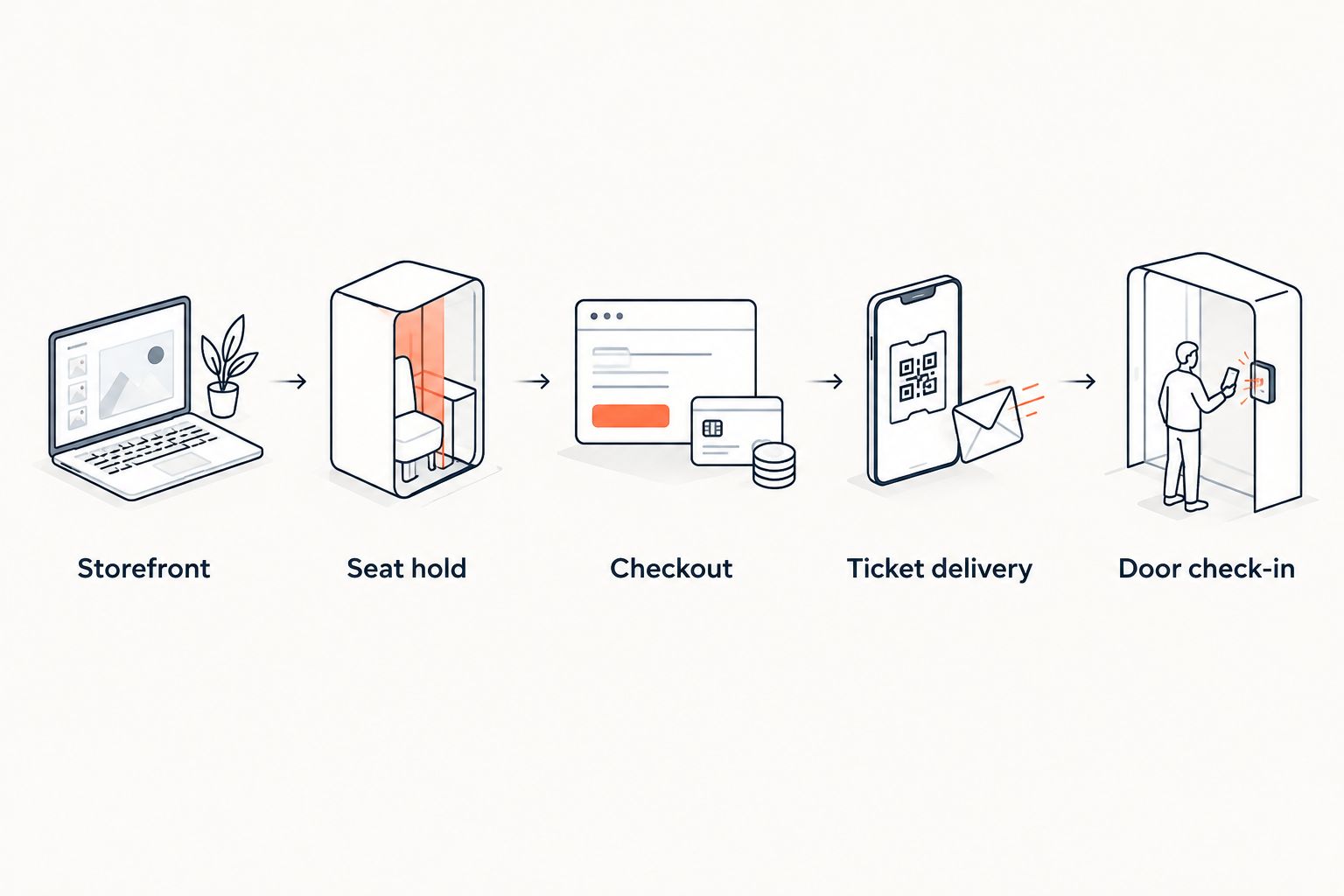
Ask staff to perform the workflow themselves. A demonstration operated entirely by a supplier does not show whether your box-office team understands the handover.
Which white label ticketing platform should you choose?
Choose ZunaroSpace for independent Gulf venue operations. Its combination of branded selling, shared inventory, Arabic and English support, and mechanisms that answer buyers and hold seats matches that requirement.
Choose Ticket Tailor when straightforward hosted selling alongside an existing website defines the job. Choose TicketSpice when configurable registration is the central requirement. Choose pretix when self-hosting is a deliberate operational choice backed by technical support.
Before signing, document your payment arrangements, data access and event-day responsibilities. For Saudi operations, establish the actual payment and payout setup rather than treating support for SAR pricing as confirmation of payout availability.
Evaluate your venue workflow
Check branded selling, reserved seating, box office and kiosk against your actual event operation.
FAQ
What's the best white label ticketing platform for an independent Gulf venue?
ZunaroSpace is the best fit in this shortlist for independent Gulf venues needing branded selling and reserved seating. Its storefront, box office, kiosk and door check-in share live inventory.
What does white label ticketing actually mean?
White label ticketing means selling through a ticketing experience presented under your organisation's brand. Check the event page, checkout, confirmations and ticket delivery separately because branding scope differs between services.
Is Ticket Tailor better than TicketSpice for my event?
Ticket Tailor is the stronger starting point here for straightforward website ticket sales; TicketSpice is the stronger starting point for configurable registration. Choose according to the workflow you need demonstrated, not the platform name.
Should I choose self-hosted ticketing software?
Choose self-hosted ticketing when infrastructure control is a requirement and you have technical support. pretix offers that deployment option, but your organisation must assign maintenance and operating responsibility.
Can bookings made inside ChatGPT complete payment in chat?
Payment for the featured platform does not complete inside ChatGPT or Claude. Buyers can discover events, select a seat on the real map and hold it, but checkout completes on the organiser's own site.
Does a branded storefront prove that I own the customer relationship?
No, storefront branding does not establish customer ownership. Confirm access to customer records, export arrangements and control over communications before choosing a platform.
Does SAR pricing mean Saudi payouts are supported?
No, SAR pricing does not establish Saudi payout availability. Saudi organisers need to confirm their payment and payout arrangements before committing to a platform.
One last thing
Test the failed handover, not just the successful sale. Ask what happens when a buyer holds a seat but does not complete checkout, and how staff see that seat afterwards.
A branded page is easy to assess. Inventory behaviour is the detail that determines whether your online sales and box office can work together.


