


Best overall for Gulf community theatres: Zunaro. Best for volunteer-run box offices: TicketSource. Best for general-admission productions: Ticket Tailor. Best for school-linked theatre programmes: Ludus. Best for ticketing alongside fundraising: Arts People. This 2026 guide compares the best theater ticketing software for community theaters by seating, front-of-house work and control of the customer relationship.
- Zunaro is the best theatre ticketing software choice for Gulf community theatres wanting branded selling and shared seat inventory.
- TicketSource suits volunteer-run box offices; Ticket Tailor suits general-admission productions.
- Ludus suits school-linked theatre programmes; Arts People suits ticketing alongside fundraising.
- Choose community theatre ticketing software by rehearsing seat selection, counter sales and door check-in before committing.
Why this matters
Every show has seats that never sold - and no one was working on them.
Your ticketing platform needs to do more than record an order. It must connect the production, the seating plan, the box office and the door without making volunteers reconcile separate lists.
Start with the work your theatre actually does. A company staging general-admission performances needs a different setup from a venue selling named seats across a season. Fundraising adds another requirement; so do school administration and bilingual selling.
Choose the platform that fits your operating model, not the longest feature list. A feature your team cannot use during a busy interval does not solve a front-of-house problem.
What makes the best community theatre ticketing software?
Use these six criteria to assess your 2026 shortlist before comparing names:
- Seating accuracy: Your online plan must represent the room, including rows, aisles and seats you do not sell. A reservation must stay attached to the correct performance.
- Shared inventory: Online sales and counter sales need a common record. Ask the vendor to demonstrate what happens when staff and an online customer select the same seat.
- Volunteer workflow: A new box-office helper should be able to find an order, identify the performance and follow the admission process without improvising.
- Organiser ownership: Check whose storefront customers use, where payment completes and how your theatre retains the customer relationship.
- Production fit: Distinguish individual performances from subscriptions, fundraising and school-linked workflows. Do not assume ordinary event ticketing includes every theatre requirement.
- Operational boundaries: Establish payment eligibility, connectivity requirements and cancellation procedures before publishing. A sales demonstration is not a substitute for these checks.
The strongest shortlist starts with your hardest requirement. If assigned seats are essential, use the reserved seating setup guide to define the room before evaluating the software.
Community theatre ticketing software at a glance
| Platform | Best for | Standout feature | Key limitation or trade-off |
|---|---|---|---|
| Zunaro | Gulf theatres wanting their own branded selling operation | Storefront, seating, box office, kiosk and door check-in on one live inventory | Chat-based seat selection still sends customers to the organiser’s site for checkout |
| TicketSource | Volunteer-run box offices | Online ticketing and box-office tools with reserved seating | The seating plan and staff procedures still need a practical rehearsal |
| Ticket Tailor | General-admission productions | Event ticketing with website embedding and check-in tools | Admission management does not replace a theatre’s fundraising workflow |
| Ludus | School-linked theatre programmes | Ticketing designed around performing arts organisations | Theatre ticketing is a different scope from a full school administration system |
| Arts People | Ticketing alongside fundraising | Performing arts ticketing, subscriptions and donor management | A broader ticketing-and-donor setup requires more process decisions |
These are use-case recommendations, not claims that one platform wins every category. No ticketing system removes the need to define who handles exceptions at the counter or door.
1. Zunaro: best for Gulf community theatres owning their sales
Zunaro is an event ticketing platform for independent organisers and venues. You sell from your own branded storefront, box office and kiosk, with reserved seating and door check-in connected to the same live inventory.
A WhatsApp agent answers customers, holds seats and hands over a checkout link. Organisers pay nothing per ticket; customers cover the booking fee, and free events carry none.
You keep the fees, the funds and the customers.
A theatre workflow, not a separate chat tool
A seat map can be traced from a photo in about 60 seconds, without CAD. Treat that as the start of the seating setup: check row labels, aisles and the physical room before publishing.
Events can be discovered and booked inside ChatGPT and Claude, including seat selection on the real map. Checkout always completes on the organiser’s own site, never in chat.
AI that sells your tickets.
One inventory across front-of-house
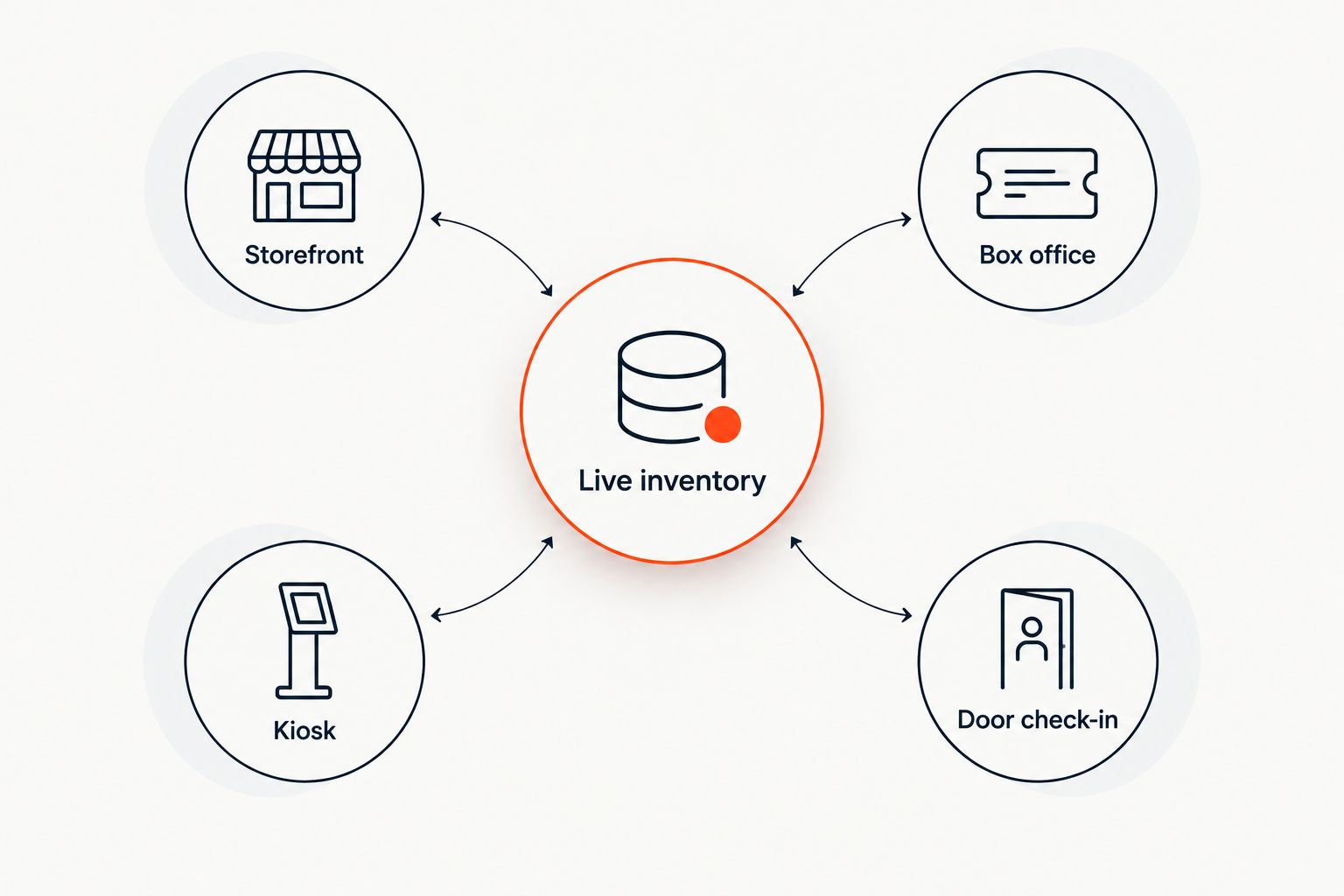
The platform connects these operating points:
- Storefront: Customers select their performance and tickets.
- Box office: Staff sell against the same live inventory.
- Kiosk: Walk-up selling uses that inventory too.
- Door check-in: Admission connects to the ticketing operation.
Live inventory is the centre of this arrangement. Test the 3 sales channels—storefront, box office and kiosk—together, rather than approving each in isolation.
Electronic tickets are delivered through 2 channels: WhatsApp and email. Arabic and English support includes full right-to-left layouts, which matters when your team serves customers in both languages.
Pros:
- Branded selling keeps the organiser’s storefront central.
- Shared inventory connects online and in-person operations.
- Photo-based seat-map creation avoids starting with CAD.
- Arabic and English support fits bilingual Gulf venues.
Cons:
- Seat-map tracing still requires checking against the real auditorium.
- Chat booking does not eliminate the handover to website checkout.
- Selling in Saudi Arabia must not be treated as a promise of Saudi payout eligibility.
Best for: Independent Gulf theatres that want seating, counter sales and customer conversations within one ticketing operation.
Based at DTEC, Dubai Silicon Oasis. Built for the Gulf - the UAE and Saudi Arabia.
Verdict: Buy for this operating model, after verifying payment eligibility and rehearsing a complete performance workflow.
2. TicketSource: best for volunteer-run box offices
TicketSource provides online event ticketing, reserved seating and box-office tools. It belongs on the shortlist when your immediate problem is running bookings and admissions rather than building a broader donor operation.
For a community theatre, evaluate the counter workflow alongside the public booking page. A tidy event page is not enough if volunteers struggle to locate the correct performance or order.
TicketSource pros:
- Reserved seating supports productions with assigned places.
- Online and box-office tools address both advance and counter selling.
- Event ticketing suits a production-by-production evaluation.
TicketSource cons:
- A seating chart still needs checking against the auditorium.
- Volunteer handovers need written procedures for exceptions.
- Ticketing should not be treated as a substitute for donor management.
Best for: Volunteer-run theatres prioritising practical booking and box-office work.
Ask a volunteer—not just the administrator—to complete the demonstration. Have them find an order and identify its performance without coaching from the person who configured it.
Verdict: Buy if the volunteer rehearsal works; hold if staff still need separate booking lists.
3. Ticket Tailor: best for general-admission productions
Ticket Tailor provides event ticketing, website embedding and check-in tools. It suits a shortlist centred on straightforward admission rather than a full performing arts administration system.
For an unassigned room, concentrate on performance selection, admission limits and the door process. If your productions require named seats, evaluate its seating workflow separately instead of assuming the general-admission demonstration covers it.
Ticket Tailor pros:
- Website embedding supports selling through your existing web presence.
- Check-in tools connect ticket sales with admission.
- Event-based setup fits standalone performances and mixed programmes.
Ticket Tailor cons:
- General-admission booking does not answer every reserved-seating requirement.
- Ticketing does not replace a dedicated fundraising process.
- Website embedding still needs testing within your own site.
Best for: Community companies staging general-admission productions and wanting ticketing within an existing website.
Use your actual event page during the demonstration. Check the journey on a phone, including the return from payment and the ticket customers receive.
Verdict: Buy for a straightforward admission workflow; hold until assigned-seat requirements are demonstrated.
4. Ludus: best for school-linked theatre programmes
Ludus offers ticketing for performing arts organisations, including school theatre programmes. That focus makes it a relevant option when your production sits within an educational setting rather than operating as an independent venue.
Evaluate it against the people who run the show: the programme lead, the box-office administrator and the volunteers at the door. Their responsibilities need to be clear even when the software is designed for their category.
Ludus pros:
- Performing arts ticketing matches the production context.
- Its school-theatre focus gives educational programmes a relevant starting point.
- A production-led evaluation keeps attention on performances and admission.
Ludus cons:
- Ticketing is not a replacement for wider school administration.
- School approval and staff-access requirements still need separate checks.
- A theatre-focused platform does not remove training for temporary staff.
Best for: School-linked community theatre programmes choosing ticketing around their production team.
For your 2026 procurement review, ask the school administrator to approve the payment and account arrangements before the production team publishes an event. Technical suitability and institutional approval are separate decisions.
Verdict: Buy if the school and production team approve the same workflow; hold if account ownership remains unresolved.
5. Arts People: best for ticketing alongside fundraising
Arts People, part of Neon One, combines performing arts ticketing with subscriptions and donor management. It deserves consideration when your theatre needs to manage supporters as well as individual performance bookings.
The distinction is operational. A subscription-led or fundraising-led theatre needs to evaluate relationships across productions, not just the transaction for one evening.
Arts People pros:
- Performing arts ticketing addresses theatre-specific selling.
- Subscription tools are relevant to season-based programmes.
- Donor management supports fundraising alongside ticket sales.
Arts People cons:
- A broader system introduces more decisions about records and responsibilities.
- Occasional productions do not automatically need donor management.
- Subscription rules require a separate rehearsal from single-performance booking.
Best for: Community theatres where season subscriptions and fundraising belong in the ticketing decision.
Ask staff to demonstrate an ordinary booking and a subscription workflow separately. Then examine how the theatre wants supporter records managed; do not let the ticketing demonstration settle that question by default.
Verdict: Buy when subscriptions and fundraising are central; skip the broader scope if you only need occasional admission sales.
How the recommendations are ranked
The 2026 recommendations prioritise production fit, seating accuracy, shared inventory, volunteer work and organiser ownership. Each platform occupies a different use-case slot; list position is not a claim about measured performance.
Before signing, run the same practical rehearsal with every shortlisted vendor:
- Create the performance: Use your real event structure and seating requirements.
- Make the booking: Follow the customer journey through completed checkout.
- Sell at the counter: Check how staff work with the same performance.
- Admit the customer: Find the order and complete the door procedure.
- Handle an exception: Demonstrate the cancellation or correction your team actually needs.
Ask the vendor to show the behaviour, not describe it. Keep a written record of what was demonstrated and what requires a separate agreement.
Which theatre ticketing software should you choose?
Zunaro is the best fit for Gulf community theatres that want branded selling, shared seat inventory and Arabic-English support. Choose TicketSource for a volunteer-box-office evaluation, Ticket Tailor for general-admission productions, Ludus for school-linked programmes or Arts People when subscriptions and fundraising drive the decision.
For 2026, make one requirement decisive: the workflow your theatre cannot afford to get wrong. That might be assigned seats, school account ownership or season subscriptions. Reject any shortlist that treats those as interchangeable.
Explore your theatre ticketing setup
Review branded selling, reserved seating and connected box-office operations.
FAQ
What’s the best theater ticketing software for community theaters in 2026?
Zunaro is the best fit for Gulf community theatres wanting branded selling, shared seat inventory and Arabic-English support. TicketSource, Ticket Tailor, Ludus and Arts People suit different needs, from volunteer box offices to school programmes and fundraising.
Do small community theatres need reserved seating software?
Community theatres need reserved seating software when customers book specific seats. General admission is a different workflow: evaluate capacity and check-in rather than treating a seating chart as mandatory.
Is TicketSource better than Ticket Tailor for a community theatre?
TicketSource is the stronger starting point for this guide’s volunteer-box-office use case; Ticket Tailor is the general-admission pick. Compare both using your actual production and counter workflow before choosing.
Which ticketing software should a school theatre consider?
Ludus belongs on a school theatre’s shortlist because it serves performing arts organisations, including school programmes. Confirm school approval, account ownership and staff responsibilities before publishing.
Which option should a theatre consider for subscriptions and fundraising?
Arts People belongs on the shortlist when subscriptions and donor management are central requirements. Rehearse season booking separately from an ordinary single-performance sale.
Can customers complete payment inside ChatGPT or Claude?
Checkout completes on the organiser’s own site, not inside ChatGPT or Claude. Events can be discovered and booked in chat, including selecting a seat on the real map, before the website checkout handover.
What should volunteers test before a theatre switches ticketing software?
Volunteers should test finding an order, identifying its performance and completing admission. Include an exception such as a booking correction so the rehearsal covers more than the ideal sale.
One last thing
Do not finish the demonstration when the ticket sells. Finish when a volunteer admits the customer. Seat selection, checkout and ticket delivery are only part of the theatre’s job; the door is where your team must use the record without guesswork.
Before your next production, make that complete rehearsal the acceptance test. A successful online booking alone is not enough.


