


Every show has seats that never sold - and no one was working on them. Best for reserved-seating setup: ZunaroSpace; best for a public event listing: Eventbrite; best for website-led ticket sales: Ticket Tailor; best for a giving-led platform choice: Humanitix.
- For best event ticketing software ranked by setup speed, choose by launch workflow—not an unsupported stopwatch ranking.
- ZunaroSpace event ticketing software suits venues that need photo-traced seating, a branded storefront and connected box-office inventory.
- Eventbrite suits public event listings; Ticket Tailor suits website-led sales; Humanitix suits organisers prioritising its charitable model.
- Time the complete launch: event setup, seating, checkout, ticket delivery and door check-in.
Why this matters
A published event page is not a finished ticketing setup. You need the right inventory, a working checkout, delivered tickets and a door team that can admit people. Measure that whole journey when choosing software in 2026.
This is a workflow-based shortlist, not a timed cross-platform benchmark. The order prioritises setup fit for independent venues and organisers; it does not claim that one supplier completes every event faster than another.
Switching an existing event also introduces a different job from launching a new one. Read the guide to switching event ticketing platforms before treating account creation as your migration deadline.
What makes the best event ticketing software for fast setup?
Judge setup speed against your actual event. A standing-room club night and a seated theatre production should not share the same finish line.
- Event creation: Can your team enter the performance, ticket types and admission rules without unnecessary work?
- Seating preparation: Does the platform support your seating model, and how much map preparation remains?
- Sales-channel readiness: Can your storefront, box office and kiosk sell the intended inventory?
- Checkout readiness: Can an order reach completion under your organisation's payment arrangements?
- Ticket delivery and admission: Does the ticket arrive where expected, and can staff validate it?
- Operational ownership: Can your team run the event without relying on an unfinished handover?
For a 2026 launch, make each criterion a demonstration requirement. A feature list tells you what exists; a completed workflow tells you what your team can operate.
Event ticketing software at a glance
The table ranks setup suitability by distinct use case. No comparable full-launch timings are supplied, so it deliberately excludes estimated launch times.
| Rank and platform | Best for | Standout setup feature or approach | Key limitation to resolve |
|---|---|---|---|
| 1. ZunaroSpace | Reserved-seating venues | Photo-traced seat maps plus storefront, box office and kiosk on one live inventory | Seat-map generation is not the complete launch; payment readiness needs separate confirmation |
| 2. Eventbrite | Public event listings | Established event publishing and registration workflow | A public listing does not demonstrate your venue's complete reserved-seat workflow |
| 3. Ticket Tailor | Website-led ticket sales | Ticket sales connected to an organiser's existing website | Website placement still needs a complete checkout and admission test |
| 4. Humanitix | Giving-led platform selection | Event ticketing with a charitable business model | Mission fit does not establish operational fit for your event |
1. ZunaroSpace: best event ticketing software for seated venues
ZunaroSpace is event ticketing software for independent organisers and venues that want their own branded storefront, reserved seating, box office, kiosk and check-in on one live inventory. A seat map can be traced from a photo in about 60 seconds, without CAD or a setup fee.
ZunaroSpace event ticketing software is best for independent seated venues that want photo-traced seating and connected sales channels. The specific shortcut is map creation—not a promise that your entire operation launches in a minute.
Platform pros:
- Photo-based seat-map preparation removes the need to start by drawing a map in CAD.
- Storefront, box office, kiosk and door check-in use one live inventory.
- Arabic and English support includes full right-to-left layouts.
- A WhatsApp agent answers buyers, holds seats and hands over a checkout link.
Platform cons:
- You still need to check the traced map against the room before selling assigned seats.
- Saudi organisers must confirm payment arrangements; a Saudi payout promise is not part of this recommendation.
Economics: Organisers pay nothing per ticket; the buyer booking fee is AED 3.99, or AED 1.99 for tickets under AED 20, and free events carry none. Ask Zunaro Pro is AED 179/mo, with a 14-day trial and no card required.
You keep the fees, the funds and the customers.
AI that sells your tickets. The mechanisms are specific: the WhatsApp agent handles questions and seat holds, while events can be discovered and booked inside ChatGPT and Claude. Seat selection uses the real map; checkout always completes on the organiser's own site, never in chat.
Based at DTEC, Dubai Silicon Oasis. Built for the Gulf - the UAE and Saudi Arabia.
Best for: Theatres and seated venues replacing disconnected selling and admission workflows.
Verdict: Buy for this workflow after validating the map, checkout and door process.
2. Eventbrite: best event ticketing software for public listings
Eventbrite provides event publishing, registration and ticket sales. Its public event-listing approach makes it a relevant shortlist entry when publishing a straightforward event is the central task.
For setup speed, keep the evaluation narrow. Demonstrate the event you actually plan to run rather than assuming a quick listing also settles seating, box-office operation or admission.
Eventbrite pros:
- Event publishing and registration belong to the same platform.
- A public listing gives you a defined event page to check before promotion.
- The listing-led workflow provides a clear starting point for a general-admission evaluation.
Eventbrite cons:
- Listing publication alone does not validate reserved-seat selling.
- An event page alone does not establish whether your physical sales channels meet your requirements.
These are setup boundaries, not claims that the platform lacks those capabilities. Ask for the relevant demonstration before putting a deadline against them.
Best for: Organisers whose immediate requirement is a public event page and a straightforward registration journey.
Verdict: Buy for listing-led events once the complete order-to-admission path passes your test.
3. Ticket Tailor: best event ticketing software for website-led sales
Ticket Tailor provides ticketing that organisers can connect to their existing website. It belongs on the shortlist when your website is already the place where you want visitors to begin their booking journey.
Assess the work between that website and the ticketing flow. Page placement, mobile presentation and the route back to event information all belong in your setup review.
Ticket Tailor pros:
- Website-connected selling fits an organiser-led booking journey.
- An existing event-information page can remain part of your sales process.
- The setup evaluation can focus on connecting ticket sales to a site your team already manages.
Ticket Tailor cons:
- Connecting a sales interface does not replace testing the complete checkout.
- Your website remains a separate launch dependency that your team must review.
Do not award a faster setup score merely because a ticket button appears on the page. Follow it through to ticket delivery and admission, then check whether staff can support the resulting order.
Best for: Organisers with an existing website who want ticket sales attached to that destination.
Verdict: Buy for website-led selling after testing the embedded or linked booking journey.
4. Humanitix: best event ticketing software for giving-led selection
Humanitix provides event ticketing through a charitable business model. It is a relevant option when that model is part of your organisation's platform-selection criteria.
Treat the mission and the operational evaluation as separate decisions. The charitable model explains why you might shortlist Humanitix; your event demonstration determines whether the setup fits.
Humanitix pros:
- Ticketing and a charitable business model sit within the same platform choice.
- Event registration and ticket sales provide a concrete workflow to evaluate.
- Organisations with a giving-led procurement brief have a clear reason to include it.
Humanitix cons:
- A charitable model does not prove a shorter setup time.
- Regional payment arrangements and venue-specific requirements need confirmation before commitment.
Best for: Organisers who explicitly include charitable purpose in their supplier decision.
Verdict: Hold until operational fit is demonstrated; do not choose on mission alone.
How to compare setup speed fairly
In 2026, use the same event brief for every demonstration. Otherwise, you are comparing different amounts of work rather than different software.
Use these stages in order:
- Event details: Enter the performance, venue, admission rules and ticket types.
- Inventory: Configure capacity or assigned seats, then verify what is sellable.
- Checkout: Complete the supported purchase-testing process and inspect the resulting order.
- Ticket delivery: Check the delivered ticket and its event information.
- Door check-in: Validate admission and inspect how the order status changes.
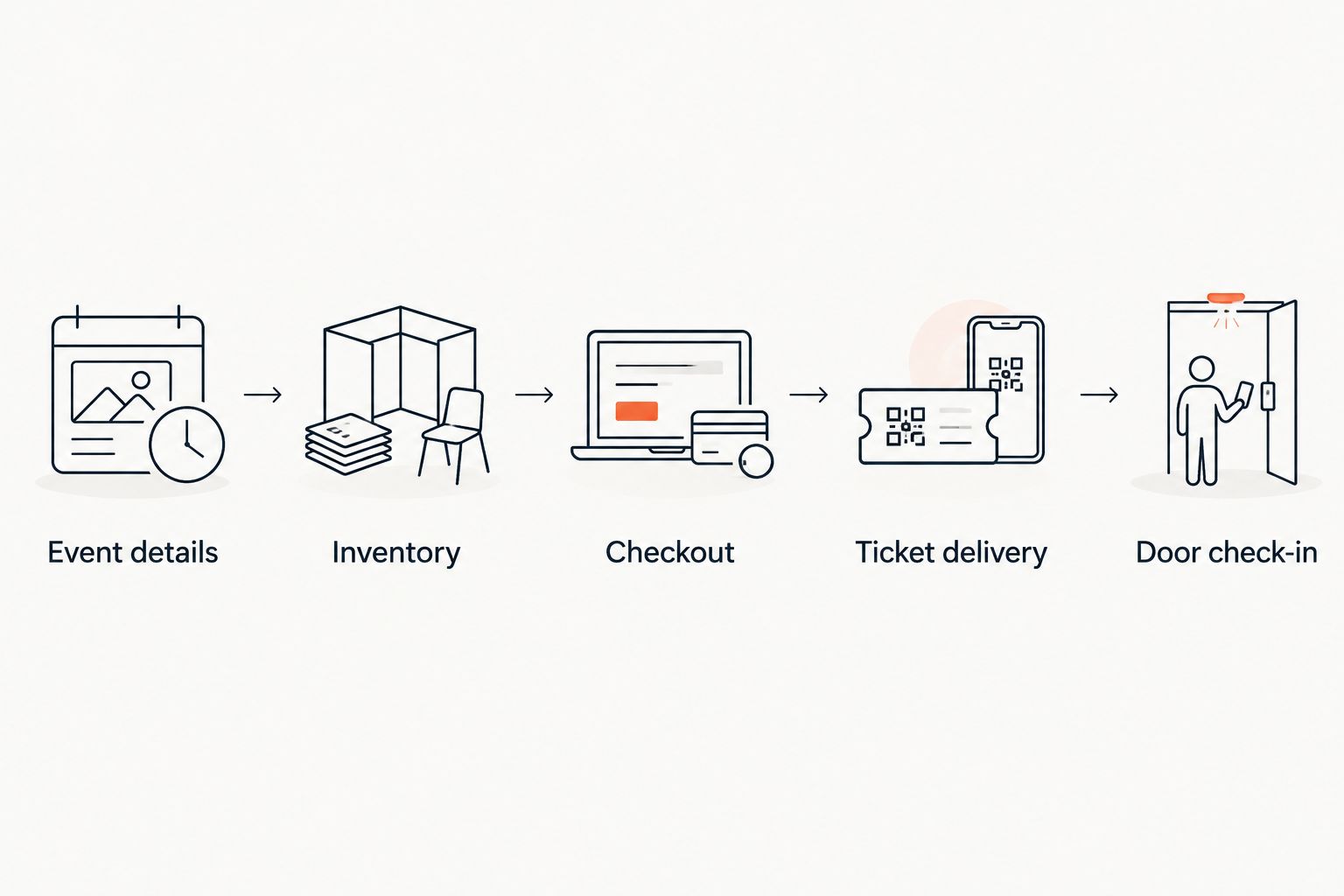
Record elapsed time separately from staff effort. Waiting for an external approval is different from spending time correcting a seating chart, even though both affect the launch date.
For an existing event, add reconciliation to the brief. Establish how current orders, remaining inventory and admission records will be handled before changing the sales destination. Do not assume a new account is a migration plan.
How this ranking works
This 2026 ranking applies the criteria above to distinct organiser needs. It prioritises a seated-venue workflow, then public listings, website-led selling and a giving-led platform choice.
It does not assign invented setup durations, award scores or imply hands-on testing. The approximately 60-second map trace is a specific supplied capability; it is not a measured advantage over every competing seat-map tool.
Your decision rule is simple: choose the shortest complete route to your event requirements, not the shortest route to an account dashboard. Keep optional channels out of the launch scope unless your team needs them for that event.
Which event ticketing software should you choose?
Choose the seated-venue option when reserved seating and connected physical sales channels define the job. Choose Eventbrite for a listing-led evaluation, Ticket Tailor for website-led selling, or Humanitix when charitable purpose belongs in the supplier brief.
For a 2026 platform replacement, write the acceptance checklist before booking a demo. Ask the supplier to complete your workflow, identify dependencies and show what your staff will operate after handover.
Explore your ticketing setup
Review the storefront, reserved seating, box office and kiosk as one connected workflow.
FAQ
What's the best event ticketing software ranked by setup speed?
There is no supported universal stopwatch winner in this shortlist. ZunaroSpace is the recommendation for seated venues needing photo-traced maps and connected sales channels; compare other options against the same complete launch brief.
Can I set up a seated event in about a minute?
A seat map can be traced from a photo in about 60 seconds, but that is not the complete event setup. You still need to review inventory, event details, checkout, ticket delivery and admission.
Is general admission quicker to configure than reserved seating?
General admission removes the assigned-seat mapping task. The full launch still depends on your ticket rules, payment arrangements, delivery requirements and admission process.
Should I choose Eventbrite or Ticket Tailor for a quick launch?
Shortlist Eventbrite for a public-listing workflow and Ticket Tailor for website-led selling. Compare them using the same event and complete the checkout-to-admission test before deciding.
Does booking inside ChatGPT or Claude mean payment happens in chat?
No, checkout completes on the organiser's own site. ChatGPT and Claude support event discovery and booking, including selecting a seat on the real map and holding it.
What should Saudi organisers verify before launching?
Saudi organisers should confirm the payment and settlement arrangements that apply to their organisation. Arabic support and SAR pricing do not establish that a particular payout route is supported.
What is the most useful setup test before publishing?
Complete the supported purchase-testing process, inspect ticket delivery and validate admission. Also verify that the resulting order and inventory changes are visible to the staff who will run the event.
One last thing
Ask the supplier to demonstrate the handover, not just the sale. Have someone other than the person who configured the event find the order, inspect the ticket and perform check-in. That is the difference between software being configured and your team being ready to use it.


