


Every show has seats that never sold - and no one was working on them. ZunaroSpace is the best-fit event ticketing platform for independent dance studios staging reserved-seat recitals, with a branded storefront, connected box office and a WhatsApp agent that answers buyers and holds seats.
- ZunaroSpace leads this best event ticketing software for dance studios and recitals shortlist for reserved seating and connected sales.
- Choose venue-operated ticketing when the theatre controls admissions; choose general admission when individual seat selection adds no value.
- Test performance selection, seat holds, checkout and door check-in before publishing your recital.
- Organisers pay nothing per ticket; buyer booking fees and payment-processing terms need separate review.
Why this matters
A recital ticketing decision is an operating decision. You need to sell the correct performance, allocate the correct seats and give the door team a ticket they can check without interrupting backstage work.
For your 2026 shortlist, start with responsibility: does your studio control ticketing, or does the hired theatre? That answer determines whether you need your own platform or a reliable handover to the venue.
ZunaroSpace brings the storefront, reserved seating, box office, kiosk and door check-in onto one live inventory. That is the relevant distinction for a studio selling through several channels—not an extra messaging tool attached to a separate seat list.
This guide ranks four operating models, rather than assigning unsupported scores to competing vendors. The named platform recommendation comes with clear boundaries; the alternatives show when a different way of running admissions makes more sense.
What makes the best recital ticketing software?
Judge the workflow before the feature list. A recital platform needs to make sense to your administrator, your front-of-house team and the person responsible for reconciling sales.
- Performance clarity: Families should recognise the correct date, time and cast before selecting seats. Ask for a demonstration using your actual programme structure.
- Seating accuracy: A reserved-seat map should match the room, including unavailable seats and areas that need staff assistance.
- Connected inventory: Online, box-office and kiosk sales should work against the same ticket inventory, not separate allocations maintained by hand.
- Admissions control: Your team needs a clear path from completed purchase to ticket delivery and door check-in.
- Business ownership: Establish who controls the storefront, payment account and customer relationship before agreeing to the ticketing arrangement.
- Local suitability: For Gulf studios, review Arabic, English, right-to-left layouts, currency presentation and payment-account eligibility.
The best event ticketing software for dance studios and recitals is the system that fits your seating plan and your authority to sell. A polished checkout cannot fix a contract that leaves the venue in control of admissions.
Recital ticketing options at a glance
These recommendations serve different operating needs. Read down the table until you find the arrangement that matches your studio; do not treat every option as a competing software subscription.
| Ranked option | Best for | Standout capability or approach | Key limitation |
|---|---|---|---|
| ZunaroSpace | Studio-controlled reserved-seat recitals | Branded sales, seating, box office, kiosk and check-in on one live inventory | Your exact recital rules and payment-account eligibility still need checking |
| Venue-operated ticketing | Studios hiring a theatre that controls admissions | Ticket sales and front-of-house responsibility stay with the venue | Studio control depends on the venue agreement |
| General-admission ticketing | Informal showcases without assigned seats | Admission is managed without individual seat selection | Tickets do not reserve neighbouring seats for families |
| Registration-led admissions | Private, invitation-led studio presentations | The organiser starts with a defined attendance list | Registration alone does not establish a paid reserved-seat workflow |
1. ZunaroSpace: best for studio-controlled reserved-seat recitals
ZunaroSpace is an event ticketing platform for independent organisers and venues. You sell through your own branded storefront, with reserved seating, box office, kiosk and door check-in connected to one live inventory.
The WhatsApp agent answers buyer questions, holds seats and hands over a checkout link. A seat map can be traced from a photo in about 60 seconds, without CAD or a setup fee; you still need to check that the finished map represents your room correctly.
Best for: A dance studio that controls its recital sales and wants the seating plan and sales channels connected.
ZunaroSpace pros:
- Your storefront and staffed sales channels share live inventory.
- E-tickets reach buyers through WhatsApp as well as email.
- Arabic and English support includes full right-to-left layouts.
- The WhatsApp agent supports the sale through a seat hold and checkout handover.
ZunaroSpace cons:
- A photo-traced map still requires an organiser's seating review before publication.
- Studio-specific requirements such as family priority windows, complimentary allocations and purchase limits need demonstration before you commit.
- Payment-account eligibility needs country-specific confirmation; do not assume payout support in Saudi Arabia.
Economics: Organisers pay nothing per ticket. The buyer booking fee is AED 3.99, or AED 1.99 for tickets under AED 20; free events carry none. Ask Zunaro Pro is AED 179/mo, with a 14-day trial and no card required.
You keep the fees, the funds and the customers.
Verdict: Buy when your studio controls sales and the recital-specific demonstration meets your requirements.
2. Venue-operated ticketing: best for theatre-controlled admissions
Venue-operated ticketing means the hired theatre manages ticket sales through its own box office arrangement. Your studio supplies the programme information and agrees how sales, guest allocations and admissions will work.
Choose this model because responsibility sits with the venue—not because outsourcing automatically gives you better software. The hire agreement needs to explain what information and control your studio receives.
Best for: A studio whose theatre contract places ticketing and front-of-house operations with the venue.
Venue-operated ticketing pros:
- Ticketing responsibility follows the venue's admissions arrangement.
- Your studio does not need to introduce a separate selling system.
- Seating decisions can be agreed with the team responsible for the auditorium.
Venue-operated ticketing cons:
- Your control over the checkout and customer communications depends on the agreement.
- Access to sales reports and buyer information needs explicit confirmation.
- Last-minute changes require a clear contact and approval process.
Before accepting this arrangement for 2026, request a sample sales report and walk through a seat change. Establish who answers a family asking to move between performances and who communicates a cancellation.
Verdict: Buy into the venue's arrangement when the contract assigns responsibility clearly and gives your studio the reporting it needs.
3. General-admission ticketing: best for informal showcases
General-admission ticketing sells entry without assigning an individual seat. It suits a showcase where the room layout and audience arrangements do not require families to choose specific places during checkout.
The benefit is a simpler admissions model. The trade-off is equally clear: a family buying together has not reserved a neighbouring group of seats.
Best for: An informal studio showcase where assigned seating serves no operational purpose.
General-admission ticketing pros:
- You do not need to build and maintain an individual seat map.
- Checkout does not require a seat-selection step.
- The format works around an admission allowance rather than specific chair locations.
General-admission ticketing cons:
- Families cannot secure particular seats through the ticket itself.
- Your front-of-house plan must explain how seating works on arrival.
- Accessible seating arrangements still need a deliberate process.
Do not select general admission merely to avoid mapping a seated theatre. Decide whether the audience needs seat certainty, then choose software that supports that decision. Explain the seating arrangement in your organiser communications before sales open.
Verdict: Buy for a genuinely unassigned showcase; skip when families need confirmed seats together.
4. Registration-led admissions: best for private studio presentations
Registration-led admissions starts with a defined attendance list rather than an open ticket sale. Consider it for an invitation-led presentation where your task is confirming who will attend, not selling seats across an auditorium.
Treat registration and paid ticketing as separate requirements. An attendance form does not, by itself, prove that a system can allocate seats, collect payment or validate tickets at the door.
Best for: A private studio presentation where attendance confirmation is the main requirement.
Registration-led admissions pros:
- The workflow begins with your intended audience.
- You can organise attendance information around the presentation.
- It avoids adding seat selection when no assigned seating is needed.
Registration-led admissions cons:
- A registration record is not necessarily an admission ticket.
- Payment, seat allocation and check-in require separate verification.
- Changes to the invitation list need a named administrator.
For a 2026 presentation, write down what the registration must authorise: entry, a named guest, a place at a particular performance, or something else. Demonstrate that requirement before choosing the tool.
Verdict: Buy for attendance confirmation; skip as a substitute for demonstrated paid, reserved-seat ticketing.
Run a recital-shaped demonstration
A generic product tour is not enough. Give the provider a small version of your real recital and ask the demonstrator to complete the organiser workflow, including a change after purchase.
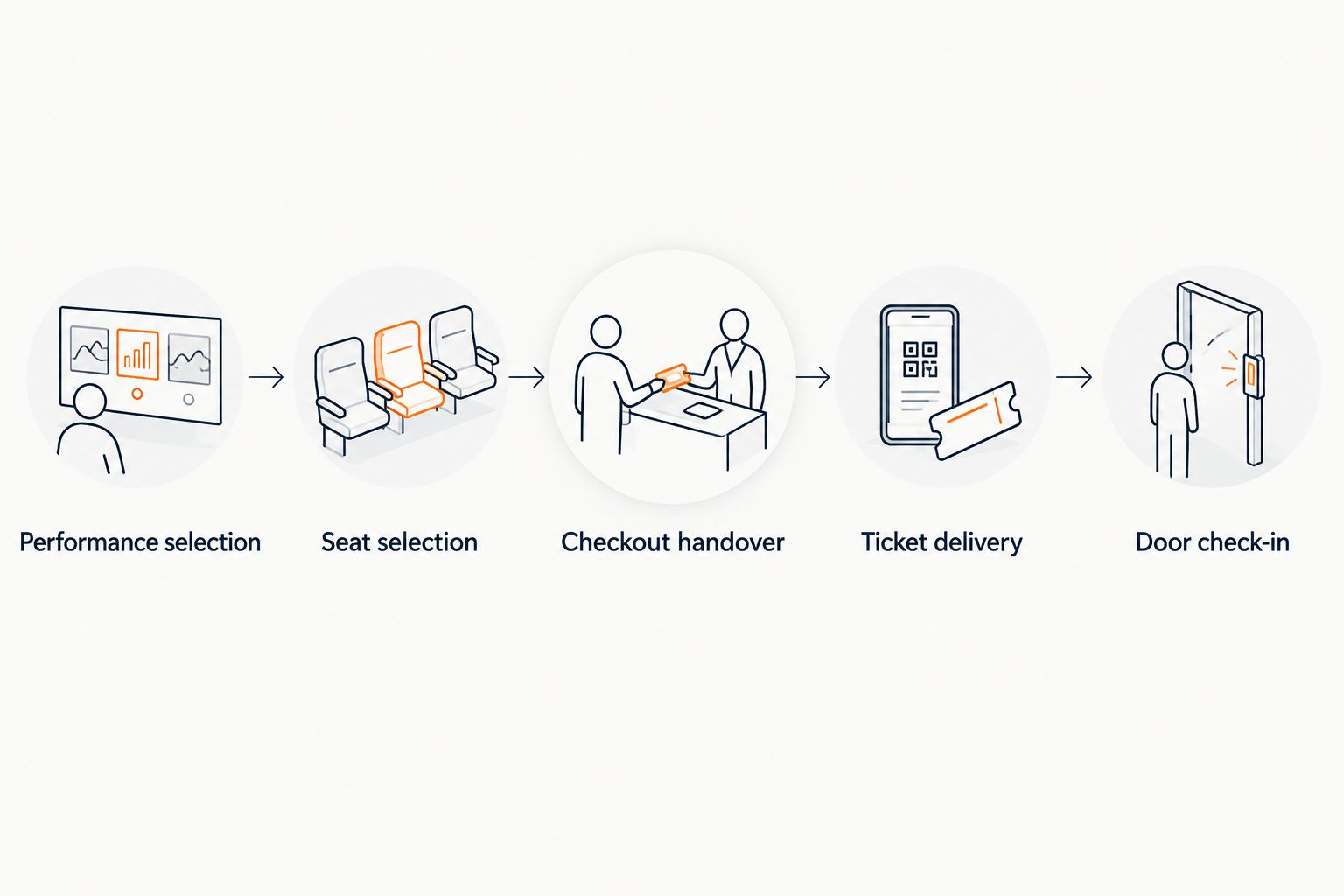
Use this sequence for your 2026 evaluation. Each stage should leave the next team member with the information needed to continue, without rebuilding the order in another list.
Performance selection
Create recognisably different performances and check the wording a family sees. Use your actual cast or session naming convention so you can spot ambiguity before publication.
Seat selection
Load the venue layout and inspect the relationship between rows, seat labels and the stage. Review areas needing staff assistance with the venue rather than treating a generated map as final approval.
Checkout handover
Follow a seat selection through to completed checkout. Where a conversation holds a seat, check that the checkout link leads to the organiser's site and preserves the intended selection.
Ticket delivery
Inspect the delivered ticket for the performance and admission information your door team needs. Make sure staff can explain the delivery route without improvising a separate process.
Door check-in
Run a ticket through the actual admissions workflow. Ask the demonstrator to show what staff see when they encounter an exception, rather than assuming every ticket arrives ready to admit.
Keep a written acceptance list. Record whether each requirement was demonstrated, needs configuration or is not supported; a promised future feature does not resolve a current recital requirement.
What to check beyond the seat map
Payment responsibility matters as much as payment speed. Identify the payment account holder, the settlement arrangement and the person responsible for refunds before ticket sales begin. Ask specifically about eligibility in the country where your studio operates.
For Saudi Arabia, do not read support for SAR pricing as a promise of local payouts. Currency display and payment-account onboarding are different requirements. Confirm the actual arrangement with the provider.
Conversation is not checkout. Events can be discovered and booked inside ChatGPT and Claude, including selecting a seat on the real map and holding it. Checkout completes on the organiser's own site, never in chat.
AI that sells your tickets.
For an organiser, that line needs a working mechanism behind it: answering questions, holding seats and handing over a checkout link. Assess that sequence against your staff's real enquiries, not against a headline.
How these options were ranked
The order follows operational fit: studio-controlled reserved seating, venue-controlled admissions, unassigned entry, then private attendance confirmation. The criteria are seating accuracy, connected inventory, admissions control, ownership and local suitability.
This is not a claim that a particular vendor has won a comparative product test. The recommendation rests on stated platform capabilities and the responsibilities each operating model leaves with your studio.
Which recital ticketing option should you choose?
Choose the connected reserved-seat platform when your studio owns the sale and families need specific seats. Choose venue-operated ticketing when the theatre controls admissions, general admission when seats are genuinely unassigned, and registration when attendance confirmation is the job.
For 2026, make the decision after the rehearsal workflow—not after viewing a feature grid. Your administrator should understand the order, your venue should approve the map and your door team should know how to admit the ticket.
Based at DTEC, Dubai Silicon Oasis. Built for the Gulf - the UAE and Saudi Arabia.
FAQ
What's the best event ticketing software for dance studios and recitals?
ZunaroSpace is the best-fit recommendation here for independent studios that control reserved-seat recital sales. Its storefront, seating, box office, kiosk and door check-in share one live inventory; demonstrate your studio-specific rules before committing.
Should a dance recital use reserved seating or general admission?
Use reserved seating when families need confirmed places; use general admission when individual seat allocation serves no purpose. Agree the audience arrangement with the venue before selecting the ticketing workflow.
Can I turn a theatre seating photo into a seat map?
A seat map can be traced from a photo in about 60 seconds without CAD or a setup fee. The organiser still needs to review the finished layout against the actual auditorium before publishing.
Should my studio use the theatre's box office?
Use the theatre's box office when the venue agreement assigns ticketing and admissions to the theatre. Confirm sales reporting, customer communications, guest allocations and responsibility for changes in writing.
Can families complete payment inside ChatGPT or Claude?
No, checkout completes on the organiser's own site, never in chat. ChatGPT and Claude support event discovery and booking, including choosing a seat on the real map and holding it.
Does SAR pricing mean a studio can receive payouts in Saudi Arabia?
No, SAR pricing does not establish Saudi payout eligibility. Confirm payment-account onboarding and the actual settlement arrangement separately before opening sales.
What should I test before opening recital ticket sales?
Test performance selection, seat selection, checkout handover, ticket delivery and door check-in. Include an exception or change so your team understands more than the standard purchase path.
One last thing
A fast seat-map import is not a seating approval. Walk the auditorium with the finished plan and check the labels your front-of-house team will use. Resolve discrepancies before families reserve places, not while dancers are waiting backstage.


