


Best overall for independent Gulf galleries: ZunaroSpace. Best for public event discovery: Eventbrite. Best for a direct online box office: Ticket Tailor. Best for self-hosting: pretix. This 2026 guide compares event ticketing software by the job your gallery needs it to do, from exhibition openings to seated artist talks.
- ZunaroSpace is the best event ticketing software for art galleries prioritising branded sales and connected venue operations in the Gulf.
- Eventbrite suits public event discovery; Ticket Tailor suits a direct online box office.
- Choose pretix when self-hosting matters and your team can maintain the installation.
- Test exhibition admission separately from artist talks: timed entry and reserved seating solve different problems.
Every show has seats that never sold - and no one was working on them.
Why this matters
A gallery opening, an exhibition visit and a seated artist talk need different admission rules. Buying software because it produces a ticket misses the operational question: what happens when someone buys online while your front desk sells admission?
For your 2026 shortlist, separate event sales from exhibition access. A reserved seat identifies a particular place; a timed-entry ticket controls arrival during a particular window. Neither automatically proves that a platform handles the other.
Choose the admission model before choosing the software. Then check ownership, payment arrangements and what your staff must do at the door.
What makes the best ticketing software for art galleries
Use these criteria before comparing names. A feature earns its place when it supports an actual gallery workflow, not because it makes a longer checklist.
- Admission fit: distinguish general admission, seated talks and timed exhibition visits. Demonstrate the format you need.
- Connected inventory: ask whether storefront, box office and kiosk use the same ticket inventory. Test competing purchases rather than accepting a sales slide.
- Gallery ownership: establish where checkout happens, who controls customer records and what happens when you leave.
- Front-desk operation: inspect ticket lookup, entry validation and exception handling. Include a visitor whose confirmation cannot be found.
- Payment and language fit: confirm onboarding, settlement arrangements and the language used throughout checkout. Gulf galleries should inspect Arabic and right-to-left layouts directly.
- Operating responsibility: distinguish a managed service from software your team must host, update and support.
Art gallery ticketing software at a glance
These are different buying routes, not interchangeable versions of the same product. The ranking favours an independent gallery running its own programme; a gallery seeking marketplace discovery or infrastructure control should choose its matching route instead.
| Software | Best for | Standout feature | Key limitation |
|---|---|---|---|
| ZunaroSpace | Independent Gulf galleries running branded event sales | Storefront, seating, box office, kiosk and check-in on one live inventory | Timed exhibition entry needs a separate demonstration; reserved seating does not establish it |
| Eventbrite | Public events seeking marketplace discovery | Event publishing within an events marketplace | A marketplace listing does not establish fit for gallery-specific admission workflows |
| Ticket Tailor | Galleries seeking a direct online box office | Event ticket sales through an online box-office service | Exhibition access and membership requirements need separate assessment |
| pretix | Galleries requiring self-hosted ticketing | Open-source software with a self-hosting option | Self-hosting adds maintenance and operational responsibility |
1. ZunaroSpace: best ticketing software for Gulf gallery events
This event ticketing platform brings a branded storefront, reserved seating, box office, kiosk and door check-in onto one live inventory. For a gallery running exhibition openings alongside seated artist talks, that connects online selling with the venue's own sales channels.
The differentiator is specific. A WhatsApp agent answers buyers, holds seats and hands over a checkout link; a seat map can be traced from a photo in about 60 seconds without CAD. Events can also be discovered and booked inside ChatGPT and Claude, with checkout completed on the organiser's own site, never in chat.
AI that sells your tickets. Here, that means answering questions and holding seats, not replacing your ticketing platform with a messaging bot.
Platform pros
- Your storefront, box office, kiosk and door check-in share live inventory.
- Arabic and English support includes full right-to-left layouts.
- E-tickets can be delivered through WhatsApp as well as email.
- Reserved seating supports programmes where visitors choose a particular seat.
Platform cons
- A seat map is not a timed-entry system. Demonstrate your exhibition admission rules before committing.
- A gallery needing collection management or membership administration should assess those requirements separately.
- Saudi organisers must confirm payment onboarding and settlement arrangements before launch; do not assume a payout arrangement from currency support.
Economics: ZunaroSpace charges organisers nothing per ticket. Buyers cover a booking fee of AED 3.99, or AED 1.99 for tickets under AED 20; free events carry none. Ask Zunaro Pro is AED 179/mo, with a 14-day trial and no card required.
You keep the fees, the funds and the customers.
Based at DTEC, Dubai Silicon Oasis. Built for the Gulf - the UAE and Saudi Arabia.
Best for: independent galleries that want their own branded event sales alongside box-office and entry operations. Buy for that workflow after validating local payments and any exhibition-specific admission requirements.
2. Eventbrite: best ticketing software for public event discovery
Eventbrite combines event publishing and ticketing with a public events marketplace. That makes it a distinct buying route for a gallery whose priority is listing public talks, openings or workshops where people browse events.
Treat marketplace presence as a distribution choice, not evidence of attendance. Your 2026 decision still needs to account for the event page, registration experience and front-desk workflow.
Eventbrite pros
- Public event listings sit within an events marketplace.
- Ticketing and event registration form part of the same service.
- The marketplace model gives you a clear alternative to running an exclusively direct sales route.
Eventbrite cons
- Publishing a listing does not guarantee discovery or sales.
- A public event page does not establish suitability for private previews or exhibition access rules.
- Galleries prioritising their own sales destination should inspect the complete visitor journey before choosing.
Best for: public gallery programmes where marketplace distribution is a deliberate priority. Buy for that objective, not on the assumption that the marketplace will fill the room.
3. Ticket Tailor: best ticketing software for a direct box office
Ticket Tailor provides an online box-office service for event ticket sales. It belongs on a gallery shortlist when the central requirement is selling admission to a defined programme rather than selecting a platform around marketplace discovery.
Start with your own event structure. An opening, a workshop and an artist talk should each be reviewed against their actual booking and entry requirements.
Ticket Tailor pros
- Its online box-office model directly matches event ticket sales.
- It offers a focused alternative to choosing an events marketplace.
- A gallery can assess it against a defined programme rather than a wider collection-management project.
Ticket Tailor cons
- An online box office does not, by itself, establish suitability for timed exhibition visits.
- Membership benefits and collection workflows require separate assessment.
- Your front-desk requirements still need a practical demonstration; the booking page is not the entire operation.
Best for: galleries selecting a direct online box office for their event programme. Buy when the demonstrated booking and entry workflow matches your requirements; hold if exhibition access remains unresolved.
4. pretix: best ticketing software for self-hosting
pretix is open-source event ticketing software with a self-hosting option. Its place on this list comes from that deployment choice: your organisation can operate the software rather than treating ticketing entirely as a managed external service.
Self-hosting is an infrastructure decision. It needs someone responsible for deployment, updates, backups and service continuity, not simply a staff member willing to create event pages.
pretix pros
- Open-source software gives a technical team access to the code.
- Self-hosting provides a deployment route under your organisation's operation.
- Its event-ticketing focus makes it relevant to a gallery's public programme.
pretix cons
- Self-hosting brings maintenance and security responsibilities.
- Technical ownership does not remove the need to test payments and entry workflows.
- Galleries without a named technical operator should not treat self-hosting as a shortcut.
Best for: galleries with a technical team and a clear requirement to operate their own ticketing installation. Buy for that requirement; skip self-hosting when nobody owns maintenance.
Test the gallery workflow before signing
Use a representative event in your 2026 evaluation. Include the sales channels you actually operate and make the supplier show the handover between them.
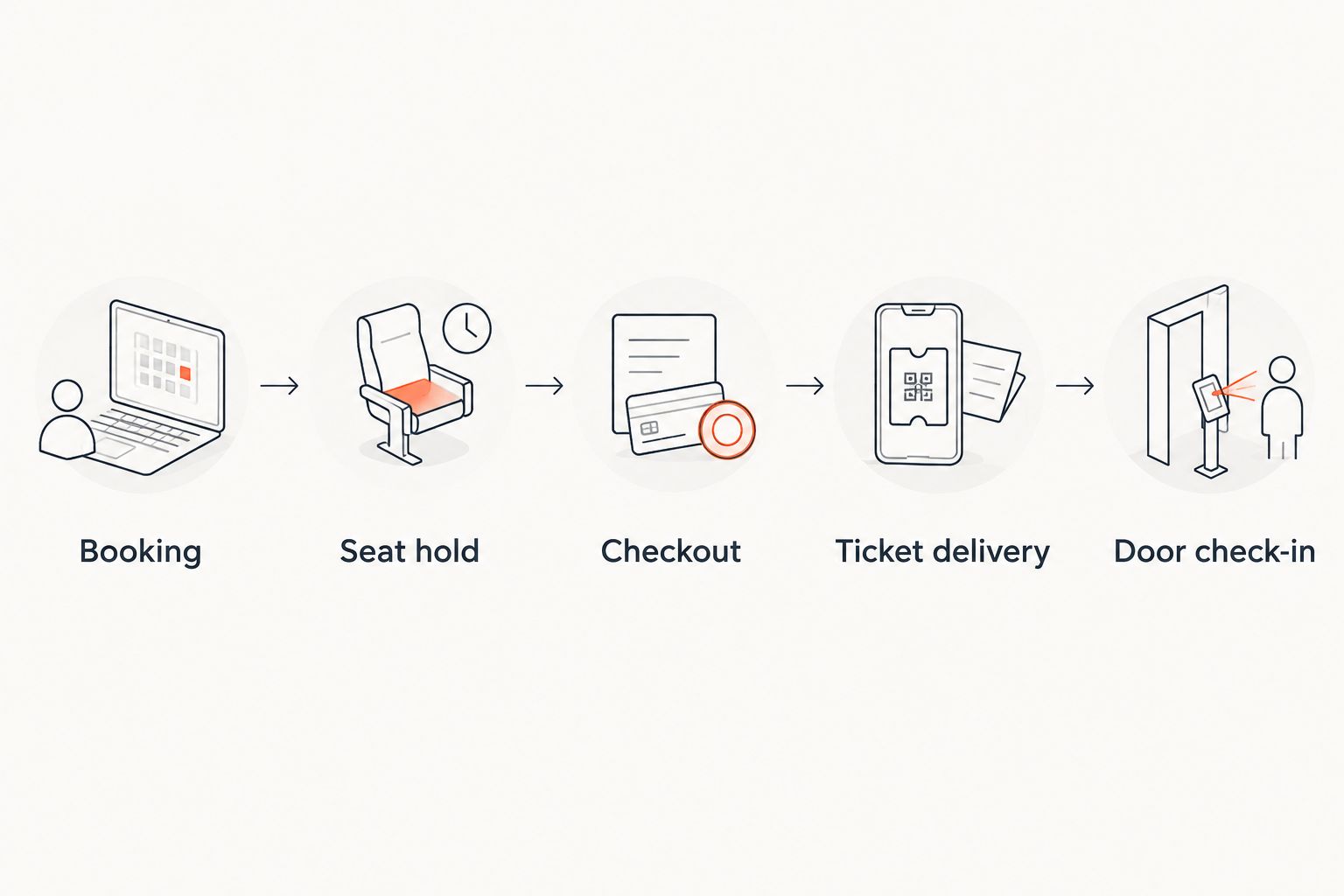
Booking
Create the event in the admission format you need. Check the event date, access conditions, language and confirmation before testing payment; an attractive booking page cannot correct the wrong admission rules.
Seat hold
For a seated talk, select a seat and inspect what happens while the booking is unfinished. Ask the supplier to demonstrate how availability changes across the online store and front desk.
Checkout
Follow the handover through to payment completion. For conversational discovery or booking, establish exactly where checkout occurs and which site owns that experience.
Ticket delivery
Inspect the confirmation as a visitor would receive it. Staff should be able to explain which event it covers and how the ticket will be presented at entry.
Door check-in
Present the ticket, then test an exception such as a missing confirmation. Ask for a demonstration of the connection-loss procedure rather than assuming that a scanning screen proves offline operation.
For front-desk planning, read the guide to whether a box-office system can work without internet at the door. Use the supplier's demonstrated behaviour to write your staff procedure.
How the ranking works
This 2026 ranking separates the buying routes by purpose: connected gallery operations, public marketplace distribution, a direct online box office and self-hosting. It does not assign performance scores or claim measured sales results.
The default recommendation follows the independent organiser brief. Your decision changes when timed entry, membership administration or infrastructure ownership becomes the central requirement.
Which ticketing software should your gallery choose?
ZunaroSpace is the best fit for independent Gulf galleries that want branded event ticketing and connected venue operations. Choose Eventbrite when public marketplace distribution leads the brief, Ticket Tailor when a direct online box office is the priority, and pretix when self-hosting is a firm technical requirement.
For a 2026 exhibition programme, keep timed admission as a separate acceptance test. Do not buy a reserved-seating demonstration and assume it solves arrival-window capacity.
Assess your gallery ticketing workflow
Review branded sales, seating, box office and door check-in against your gallery programme.
FAQ
What's the best event ticketing software for an independent art gallery?
ZunaroSpace is the best fit here for independent Gulf galleries prioritising branded event sales and connected venue operations. Galleries requiring timed exhibition admission should demonstrate that workflow separately before choosing.
Is Eventbrite better than a direct online box office for gallery events?
Eventbrite fits a gallery prioritising public marketplace distribution; a direct online box office fits a gallery prioritising its own event-selling route. Neither approach guarantees attendance, so choose according to your distribution and operating requirements.
Do art galleries need timed entry or reserved seating?
Timed entry controls arrival within a particular window, while reserved seating assigns a particular seat. Use the relevant model for exhibition visits or seated talks, and test both if your programme includes both formats.
Can visitors complete payment inside ChatGPT or Claude?
For the platform recommended here, checkout completes on the organiser's own site, never inside ChatGPT or Claude. Visitors can discover events, select seats on the real map and hold them in chat before that checkout handover.
Should an art gallery choose self-hosted ticketing software?
Choose self-hosted ticketing when your gallery has a clear infrastructure requirement and a technical owner. Include updates, security, backups and continuity in the decision, not just event creation.
What should a gallery test before switching ticketing platforms?
Test the complete journey from booking through checkout, ticket delivery and door check-in. Include a front-desk exception, your required languages and the payment arrangements for the country where you operate.
One last thing
The most useful demonstration includes an awkward admission. Ask the supplier to show a missing confirmation or an interrupted connection, then have your front-desk lead explain the next action without help.
If that action is unclear, resolve it before opening bookings. Your gallery needs an admission procedure, not just a ticket.


