


Best overall for independent Gulf organisers: Zunaro. Best for conference programmes: Cvent. Best for a focused ticket-selling setup: Ticket Tailor. This 2026 guide compares event registration software for paid events by sales control, seating, registration requirements and door operations—not by the length of a feature list.
- Zunaro is the best event registration software for paid events when independent Gulf organisers need owned ticketing and reserved seating.
- Cvent suits conference programmes; Eventbrite suits marketplace listings; RSVPify suits invitation-led registration.
- Ticket Tailor suits organisers prioritising a focused ticket-selling setup.
- Choose around checkout, inventory and admission—not registration forms alone.
Why this matters
Every show has seats that never sold - and no one was working on them.
Paid registration needs more than a name and an email address. You need to collect payment, issue admission, control capacity and get people through the door. A detailed registration form does not solve an inventory problem.
For your 2026 shortlist, separate two jobs: managing information about attendees and selling access to an event. The difference between registration and ticketing software matters most when assigned seats, walk-up sales or several sales channels enter the picture.
Choose the system that handles your hardest transaction, not your simplest RSVP. A theatre booking, a conference delegate registration and an invitation-led gala require different demonstrations.
What makes the best paid-event registration software?
Use these six criteria before you compare interfaces:
- Payment responsibility: Establish who collects the money, which account receives it and how refunds work. Confirm arrangements for your operating country.
- Inventory control: Check whether online sales, the box office and kiosks draw from the same capacity or seat inventory.
- Registration depth: List the information you actually need, including attendee details, access categories and invitation requirements.
- Sales ownership: Identify whose storefront the attendee uses and how you retain access to the customer relationship.
- Admission workflow: Demonstrate ticket delivery, door check-in and the handling of an attendee who needs help.
- Operational fit: Test the languages, seating model and event structure your team uses—not a vendor’s easiest example.
A platform need not win every category. It must handle the requirements you cannot work around without adding another system or a manual process.
Paid-event registration software at a glance
| Platform | Best for | Standout capability | Key trade-off to assess |
|---|---|---|---|
| Zunaro | Independent Gulf venues and organisers | Branded storefront, reserved seating and live inventory across sales channels | Validate country-specific payment arrangements before committing |
| Cvent | Conferences with detailed delegate programmes | Registration alongside conference-management tools | Establish how much of the wider system your event needs |
| Ticket Tailor | A focused ticket-selling setup | Ticket sales through a ticketing box office | Test complex delegate workflows against your requirements |
| Eventbrite | Public events using marketplace listings | Event listings and ticket registration in a public marketplace | Decide how marketplace distribution fits your owned-sales strategy |
| RSVPify | Invitation-led paid events | Guest-list and RSVP workflows alongside paid registration | Test venue seating and walk-up operations separately |
The order reflects distinct operating needs, not a universal performance score. The default recommendation serves independent theatres, promoters, clubs and venues; the remaining entries address different registration priorities.
1. Zunaro: best for independent Gulf venues
An event ticketing platform for independent organisers and venues, Zunaro brings a branded storefront, seating, box office, kiosk and door check-in onto one live inventory. It suits teams that need to sell admission and run the room, rather than collect registrations alone.
The sales mechanisms are specific. A WhatsApp agent answers buyers, holds seats and hands over a checkout link. Events are discoverable and bookable inside ChatGPT and Claude, including seat selection on the real map; checkout completes on the organiser’s own site, never in chat.
Zunaro pros:
- Storefront, box office and kiosk share live inventory.
- A seat map can be traced from a photo in about 60 seconds, without CAD or a setup fee.
- Arabic and English support includes full RTL.
- E-tickets reach attendees through WhatsApp as well as email.
Zunaro cons and checks:
- Discovery and seat selection in chat do not remove the website checkout step.
- Direct-payout arrangements require country-specific confirmation; do not assume Saudi payout support.
- A conference needing detailed delegate administration should demonstrate those requirements before choosing a ticketing-led platform.
Economics: Organisers pay nothing per ticket. The buyer covers a booking fee of AED 3.99, or AED 1.99 for tickets under AED 20; free events carry none. Ask Zunaro Pro is AED 179/month, with a 14-day trial and no card required.
You keep the fees, the funds and the customers.
AI that sells your tickets.
Based at DTEC, Dubai Silicon Oasis. Built for the Gulf - the UAE and Saudi Arabia.
Best for: Independent organisers who want their own storefront and connected venue operations. Verdict: Buy for that operating model, after confirming payment arrangements.
2. Cvent: best for conference delegate programmes
Cvent combines event registration with wider conference-management tools. It belongs on your shortlist when the registration record connects to a programme, attendee communications and other conference operations.
For a 2026 conference selection, demonstrate the delegate journey rather than a generic ticket purchase. Start with registration, move through the information attendees must provide and finish with the access staff need on the day.
Cvent pros:
- Registration sits within a broader event-management system.
- Conference programme and attendee tools support evaluation beyond ticket sales.
- A suitable shortlist candidate when several teams share responsibility for an event.
Cvent cons and checks:
- A broader system creates more configuration decisions than a straightforward admission sale requires.
- Conference functionality does not establish suitability for a theatre’s seat-by-seat workflow.
- Define the required scope before comparing proposals; a feature count is not a purchasing brief.
Ask the vendor to demonstrate your actual registration questions and event structure. If your team cannot explain why it needs the wider system, return to the smaller operational brief before buying.
Best for: Conferences where delegate administration and programme management drive the decision. Verdict: Buy for conference complexity; skip the wider scope when admission is the whole job.
3. Ticket Tailor: best for focused ticket selling
Ticket Tailor centres on selling tickets through an online box office. It is a relevant option when you want an event ticketing workflow without making a wider conference-management system the centre of your operation.
Start the evaluation with the event page, ticket choices, purchase and admission. Then add the exceptions your staff actually handle, such as changes to an order or an attendee arriving without their ticket.
Ticket Tailor pros:
- A ticketing-focused product gives you a clear starting point for evaluation.
- Online ticket sales suit a brief built around admission rather than delegate administration.
- Event ticketing and check-in can be assessed as one operational journey.
Ticket Tailor cons and checks:
- A ticketing brief does not establish support for every conference registration requirement.
- Payment-provider eligibility and settlement arrangements need checking for your legal entity.
- Venue teams should demonstrate seat handling and counter sales rather than infer them from online ticket sales.
Keep the demonstration narrow. If your event needs a simple ticket purchase and a dependable door process, test those thoroughly before adding optional tools to the brief.
Best for: Organisers prioritising a focused ticket-selling setup. Verdict: Buy when the demonstrated ticketing workflow covers your event; hold for unresolved registration requirements.
4. Eventbrite: best for marketplace-led public events
Eventbrite combines event registration and ticketing with a public event marketplace. That distinction matters when publishing an event listing is part of your distribution plan, rather than simply a way to host checkout.
Separate marketplace presence from sales ownership during your evaluation. A public listing provides a place for people to find an event; it is not evidence that a particular event will receive bookings.
Eventbrite pros:
- Public event listings and registration operate within the same platform.
- Paid-event ticketing fits a public event publishing workflow.
- Marketplace participation offers a different distribution model from a standalone storefront.
Eventbrite cons and checks:
- Marketplace visibility is not a sales forecast.
- You need to decide how the platform’s event pages fit your own website and customer relationship.
- Assigned seating, door operations and local payment requirements still need a specific demonstration.
For your 2026 comparison, ask where attendees discover the event, where they purchase and what records your team receives afterwards. Treat each as a separate question. Do not use one successful checkout to approve the entire operating model.
Best for: Public-event organisers who deliberately want marketplace listings in their distribution mix. Verdict: Buy for that distribution model; skip if an owned-storefront strategy is your deciding requirement.
5. RSVPify: best for invitation-led paid registration
RSVPify brings RSVP and guest-list workflows together with event registration and ticketing. It belongs on the shortlist when knowing who is invited and collecting their responses matters as much as issuing admission.
An invitation-led dinner has a different starting point from an open-admission show. Demonstrate the guest journey from invitation to response and payment, then check what staff can see when that guest arrives.
RSVPify pros:
- Guest-list and RSVP workflows suit invitation-led planning.
- Paid registration can be evaluated alongside attendee responses.
- A useful comparison point when registration information drives event preparation.
RSVPify cons and checks:
- Invitation management does not, by itself, establish a complete venue box-office workflow.
- Assigned-seat selection and walk-up sales require their own demonstration.
- Public-event distribution is a separate requirement from managing an invited audience.
Use a realistic invitation list in the demonstration. Include the changes your team handles before an event, then inspect the registration record rather than judging the software by the invitation alone.
Best for: Invitation-led dinners, private functions and paid events organised around a guest list. Verdict: Buy for guest-led registration; hold if venue inventory is the harder requirement.
Test the complete paid-event journey
Your 2026 selection should survive an operational demonstration, not just a presentation. Ask each shortlisted vendor to show the same journey with your event structure.
- Registration: Enter the details you need and select the correct admission or seat.
- Payment: Complete checkout and identify the account and records involved.
- Ticket delivery: Retrieve the admission document through the supported delivery channel.
- Door check-in: Find the attendee, validate admission and inspect the resulting status.
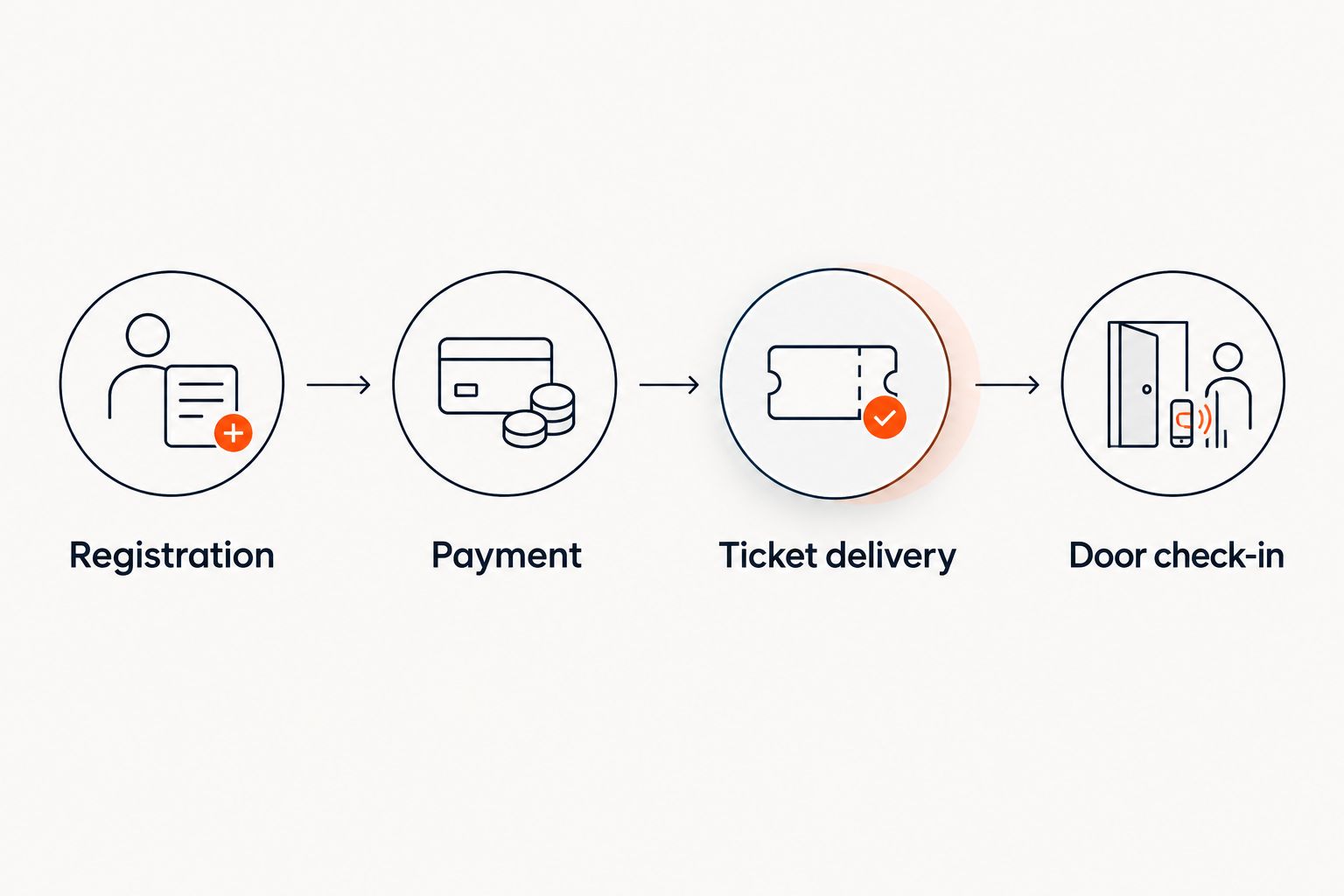
Then introduce an exception. Change a registration detail or ask staff to locate an attendee without the original confirmation. This reveals the work your team must do when the standard journey breaks.
For reserved seating, add a second sales channel to the demonstration. Ask what happens when the box office and online storefront try to sell the same seat. Approve the workflow after seeing the result, not after hearing that channels are connected.
How the ranking works
This is a requirements-led shortlist, not a hands-on benchmark or a claim about customer results. The ranking prioritises owned ticket sales and venue operations for independent Gulf organisers, then identifies alternatives for conferences, focused ticketing, marketplaces and invitation-led events.
Use the criteria above to change the order for your organisation. A conference with substantial delegate administration should start with Cvent; an invitation-led event should start with RSVPify. Neither needs to imitate a theatre’s purchasing brief.
Which platform should you choose?
Zunaro is the best fit for independent Gulf organisers who need an owned ticketing storefront, reserved seating and connected venue sales. That is the default recommendation for the operating model this guide prioritises.
Choose Cvent when conference administration drives the brief. Choose Ticket Tailor for focused ticket selling, Eventbrite for deliberate marketplace participation, or RSVPify for invitation-led registration.
Before signing for your 2026 events, settle the unresolved questions in writing: payment eligibility, settlement arrangements, required registration fields and the door workflow. A clear answer to those questions matters more than another demonstration of the homepage.
FAQ
What’s the best event registration software for paid events?
Choose around the event’s hardest operational requirement. Independent venues need connected ticket inventory and admission; conferences need delegate administration; invitation-led events need guest-list control.
Is registration software the same as ticketing software?
No. Registration software centres on attendee information and participation, while ticketing software centres on selling and validating admission. Products can cover both, so test the complete paid-event workflow.
Is Cvent better than Eventbrite for conferences?
Cvent is the stronger starting point when conference administration and programme management drive the brief. Eventbrite is a different proposition when public marketplace listings are central to distribution.
Should I choose RSVPify or Ticket Tailor?
Start with RSVPify for invitation-led registration and Ticket Tailor for a focused ticket-selling brief. Demonstrate your required payment and admission workflows before choosing either.
Can paid-event software handle reserved seating?
Yes, ticketing platforms can support reserved seating, but you must verify the specific product and workflow. Demonstrate seat selection, holds and competing sales channels rather than accepting a seating screenshot.
Can attendees finish paying inside ChatGPT or Claude?
In the chat-booking workflow described here, checkout completes on the organiser’s own site, not in chat. Discovery, seat selection and holds happen before that handover.
What should a Gulf organiser check before choosing software?
Confirm payment eligibility for the operating entity, language requirements, currency handling and settlement arrangements. Support for selling in a country does not establish local payout eligibility.
One last thing
Make the admission decision before the software decision. If your event sells a particular seat, a registration form is not enough. If your conference needs detailed delegate records, a successful ticket purchase is not enough either.
Write down the transaction your team cannot afford to get wrong. Make every shortlisted vendor demonstrate it.


