


Best overall for independent venues: ZunaroSpace, an event ticketing platform with door check-in, storefront, box office and kiosk on one live inventory; organisers pay nothing per ticket. Best for existing Eventbrite events: Eventbrite Organiser. Best for Ticket Tailor events: Ticket Tailor Check-in. This 2026 guide compares the event check in app options by the operation you need to run, not a scanner feature count.
- ZunaroSpace is the best event check in app choice for independent venues wanting ticketing and admission on one inventory.
- Eventbrite Organiser suits events already selling through Eventbrite; Ticket Tailor Check-in suits Ticket Tailor events.
- Cvent OnArrival suits conference registration operations; pretixSCAN suits organisers using pretix.
- Test ticket validity, repeat admission, simultaneous devices and connection loss before choosing your door check-in workflow.
Why this matters
Every show has seats that never sold - and no one was working on them.
Door check-in cannot solve that problem by itself. Your admission system needs to belong to the same operation that sells tickets, allocates seats and handles last-minute purchases. Otherwise, your team spends the busiest part of the evening reconciling information between systems.
For your 2026 shortlist, separate two decisions: replacing your ticketing platform and improving admission on your existing platform. A scanner that fits an existing event is not automatically the right foundation for your next venue season.
Choose the ticket record before you choose the scanner. The useful question is whether your door team sees the same admission entitlement that your box office has just sold.
What makes the best event check in app?
- Ticket-system fit: The app must recognise the tickets your platform issues. Do not assume unrelated ticket formats work together.
- Shared admission status: Check what happens when separate entrance teams handle the same ticket. A local success message is not enough.
- Exception handling: Staff need a clear procedure for an unreadable ticket, the wrong performance, a cancelled order and a disputed admission.
- Door connectivity: Test the actual entrance connection and the platform's documented behaviour when it drops. Offline operation and synchronisation are separate questions.
- Event structure: General admission, reserved seating and conference registration create different front-desk jobs. Match the app to yours.
- Operational ownership: Decide who controls the ticket record, customer relationship and sales channels. Check-in is part of that decision, not an isolated purchase.
Keep these criteria in your demonstration brief. A polished scan tells you less than a difficult ticket handled correctly by a staff member who has just started their shift.
Event check-in apps at a glance
These 2026 recommendations are ranked by operational fit. Each app has a distinct use case; the order is not a measured speed or reliability score.
| Rank | App or platform | Best for | Standout feature | Key limitation |
|---|---|---|---|---|
| 1 | ZunaroSpace | Independent venues replacing disconnected ticketing and admission | Store, seating, box office, kiosk and door check-in share live inventory | A platform decision, not simply a scanner add-on |
| 2 | Eventbrite Organiser | Events already ticketed through Eventbrite | Eventbrite ticket management and check-in | Built around Eventbrite events |
| 3 | Ticket Tailor Check-in | Events already ticketed through Ticket Tailor | Dedicated check-in companion for Ticket Tailor | Built around Ticket Tailor ticket records |
| 4 | Cvent OnArrival | Conferences using Cvent registration | On-site attendee check-in and badging workflows | A broader registration operation than a simple venue door requires |
| 5 | pretixSCAN | Organisers using pretix ticketing | Check-in companion to the open-source pretix platform | Requires a pretix ticketing setup |
1. ZunaroSpace: best event check-in platform for independent venues
Best for: theatres, promoters, clubs and independent venues that want ticket sales and admission in the same system.
ZunaroSpace is an event ticketing platform with a branded storefront, reserved seating, box office, kiosk and door check-in on one live inventory. That makes it a platform replacement rather than a separate admission tool you attach to an unrelated ticketing system.
The practical benefit is continuity. You can assess the sale, seat and door workflow together instead of choosing each component independently and hoping the records agree.
ZunaroSpace pros:
- Storefront, box office, kiosk and door check-in use one live inventory.
- Reserved seating belongs to the same ticketing operation.
- E-tickets reach attendees through WhatsApp as well as email.
- Arabic and English support includes full right-to-left layout.
Platform cons:
- Replacing an established ticketing system is a larger decision than changing a scanning app.
- Shared inventory does not remove the need to test entrance connectivity and staff procedures.
- Ticket delivery through WhatsApp or email does not, by itself, establish how check-in behaves without a connection.
The sales mechanisms are specific: a WhatsApp agent answers buyers, holds seats and hands over a checkout link. Events can also be discovered and booked inside ChatGPT and Claude, including seat selection on the real map; checkout completes on the organiser's own site, never in chat.
AI that sells your tickets.
You keep the fees, the funds and the customers.
Organisers pay nothing per ticket. The buyer booking fee is AED 3.99, or AED 1.99 for tickets under AED 20; free events carry none. Ask Zunaro Pro is AED 179/month, with a 14-day trial and no card required.
Based at DTEC, Dubai Silicon Oasis. Built for the Gulf - the UAE and Saudi Arabia.
Verdict: Buy into the platform when your goal is unified ticketing and admission; hold if you need only a scanner for an existing external system.
2. Eventbrite Organiser: best check-in app for Eventbrite events
Best for: organisers whose event and ticket records already live in Eventbrite.
Eventbrite Organiser connects event management and attendee check-in to Eventbrite events. Its strongest reason for inclusion is straightforward: your door team works with the platform that issued the tickets.
Choose it because it fits your existing event, not because another venue uses it. If you are considering leaving Eventbrite, evaluate the ticketing platform separately before making the check-in app your deciding factor.
Eventbrite Organiser pros:
- Works within the Eventbrite event workflow.
- Keeps attendee check-in connected to Eventbrite ticket records.
- Provides an event-management companion rather than an unrelated generic scanner.
Eventbrite Organiser cons:
- It is not a neutral check-in layer for every ticketing platform.
- Choosing it for an existing event does not answer whether Eventbrite fits your wider venue operation.
Give the door team the correct event before admission begins. Then rehearse a valid ticket, a ticket for another event and a ticket presented again; judge the displayed result and the staff response together.
Verdict: Buy into this workflow for Eventbrite events; skip it as a reason to move unrelated ticket inventory.
3. Ticket Tailor Check-in: best app for Ticket Tailor events
Best for: organisers already issuing their tickets through Ticket Tailor.
Ticket Tailor Check-in is the check-in companion to Ticket Tailor ticketing. It belongs on the shortlist when the sales platform is already settled and you need to organise the door workflow around those ticket records.
The purchasing question is not whether it replaces a full venue operation. It is whether the check-in workflow serves your event, entrances and staff responsibilities.
Ticket Tailor Check-in pros:
- Connects admission to the Ticket Tailor ticketing workflow.
- Gives the door team a dedicated check-in tool.
- Avoids choosing an unrelated scanner before considering ticket compatibility.
Ticket Tailor Check-in cons:
- It is a companion to Ticket Tailor, not a platform-independent admission system.
- Selecting the app does not settle your box-office, seating or kiosk requirements.
Test ticket categories as well as individual tickets. Your team needs to understand whether an admission result grants entry to the whole event or a specific part of your programme.
Verdict: Buy into this workflow when Ticket Tailor holds your ticket records; hold if the underlying ticketing platform is still undecided.
4. Cvent OnArrival: best app for conference registration teams
Best for: conference organisers managing on-site registration and badges within Cvent.
Cvent OnArrival supports on-site attendee check-in and badging workflows. That puts it in a different operational category from a door tool whose job ends when a ticket is accepted.
A conference registration desk handles arrival as part of an attendee record. Evaluate the complete registration process, including what staff must resolve before handing over a badge.
Cvent OnArrival pros:
- Connects arrival operations to Cvent registration.
- Supports an on-site check-in and badging workflow.
- Fits an evaluation centred on conference registration rather than ticket scanning alone.
Cvent OnArrival cons:
- Its broader registration scope adds decisions a straightforward venue entrance does not need.
- It is not a like-for-like replacement for a standalone theatre door workflow.
Build the demonstration around your registration categories and exceptions. A badge printed successfully is useful, but your staff also need to identify the correct attendee and resolve a record that does not match.
Verdict: Buy into this workflow for a Cvent-based conference operation; skip it when you need only straightforward ticket admission.
5. pretixSCAN: best app for organisers using pretix
Best for: teams choosing pretix as their ticketing foundation.
pretixSCAN is a check-in companion for pretix, an open-source ticketing platform. Its inclusion is about the ticketing architecture you have chosen, not a claim that open-source software automatically makes the door easier to run.
Separate the scanning application from responsibility for the underlying platform. Your team still needs a clear owner for configuration, access and event-day support.
pretixSCAN pros:
- Fits the pretix ticketing ecosystem.
- Connects check-in to pretix ticket records.
- Complements an open-source ticketing platform.
pretixSCAN cons:
- It requires a pretix ticketing setup.
- Open-source availability does not remove configuration and operational responsibilities.
Include the person responsible for pretix in your rehearsal. Door staff should know who can resolve a ticket-record problem without improvising access or changing the event configuration during admission.
Verdict: Buy into this workflow when pretix is your chosen platform; skip it as a standalone solution for unrelated ticket records.
How to test your shortlist before opening the doors
For a 2026 event, run a rehearsal using the actual ticketing setup and entrance devices. Use test records, not attendee data copied into an unrelated tool.
Valid ticket
Present a ticket for the correct event or performance. Check whether the result gives staff enough information to admit the right person to the right place.
Repeat admission
Present the same ticket again, including at another entrance. Record what each device displays and whether staff understand your re-entry policy.
Walk-up sale
Complete a test sale through your intended box-office or kiosk workflow. Then check the resulting ticket at the door without manually rebuilding the attendee record.
Connection loss
Interrupt the connection during the rehearsal. Establish what the app permits, what it refuses and what must synchronise after connectivity returns.
Exception desk
Route an unreadable ticket or disputed admission away from the main entrance. Give that team a defined escalation procedure instead of letting every scanner operator invent one.
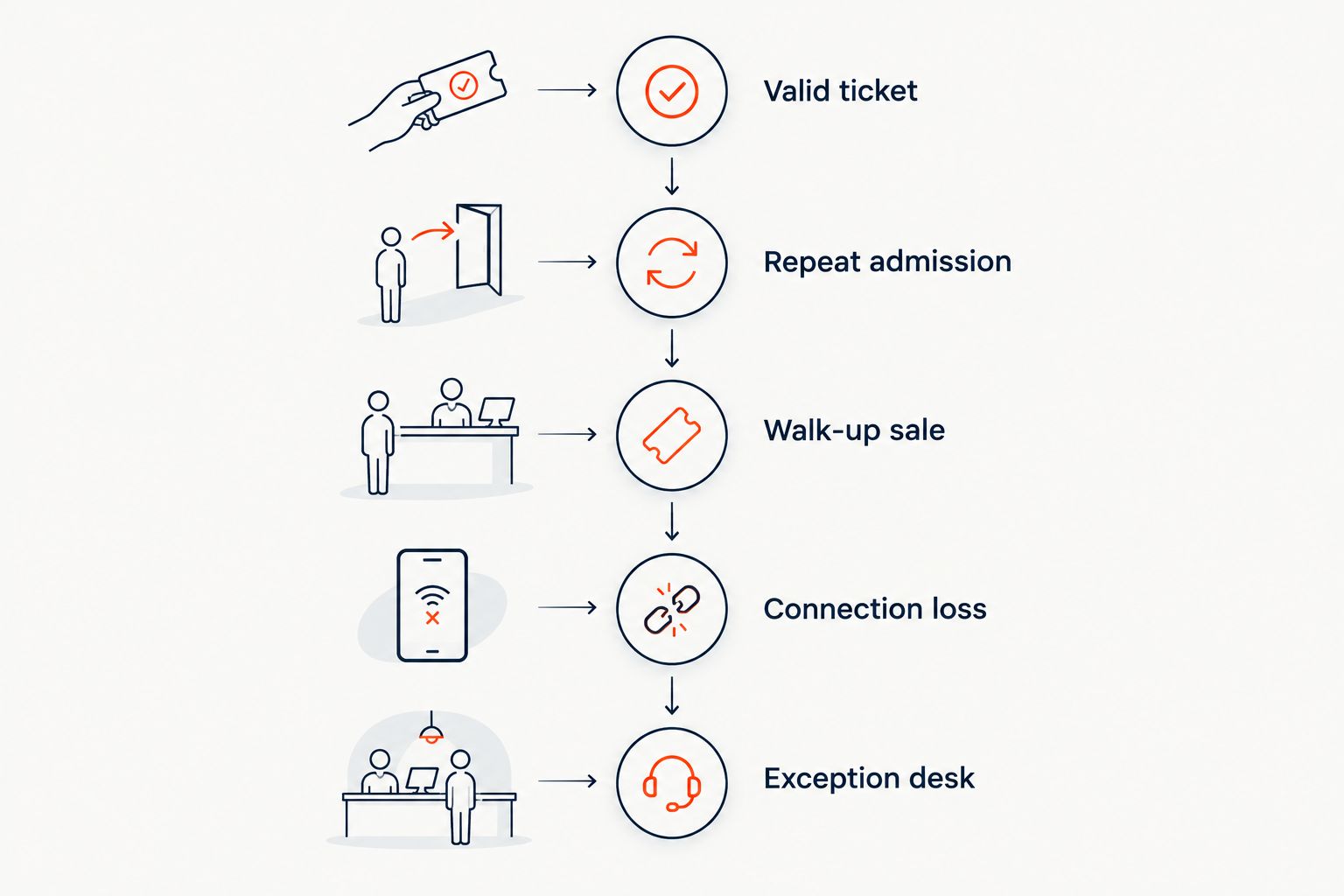
A rehearsal is complete when your staff can explain the result, not just produce it. Use the guide to QR-code attendee check-in to frame the admission workflow, then validate the behaviour in your chosen platform.
How the apps were ranked
This guide ranks operational fit: shared ticket records, event structure, registration scope and the responsibility each workflow places on your team. It does not assign unverified scan-speed scores or claim hands-on testing.
The venue platform leads for organisers replacing disconnected systems. Eventbrite Organiser and Ticket Tailor Check-in follow for existing-platform continuity; Cvent OnArrival serves conference registration; pretixSCAN serves pretix operations. Those are different buying decisions, not interchangeable positions on a feature leaderboard.
Which event check-in app should you choose?
ZunaroSpace is the best event check-in platform choice for independent venues that want sales, seating and admission on one live inventory.
Keep the app tied to your existing platform when replacing ticketing is not part of the brief. Choose Eventbrite Organiser for Eventbrite events, Ticket Tailor Check-in for Ticket Tailor events, Cvent OnArrival for Cvent registration and pretixSCAN for pretix.
For your 2026 decision, make the default simple: choose the system that owns the ticket record, then prove its door workflow in a rehearsal. Do not migrate an event solely for a scanner interface.
Review your ticketing workflow
Assess storefront, reserved seating, box office, kiosk and door check-in together.
FAQ
What's the best event check in app for an independent venue?
ZunaroSpace is the best fit in this shortlist when an independent venue wants ticketing, reserved seating and door check-in on one live inventory. Choose a companion app instead if your existing ticketing platform is staying in place.
Should I change ticketing platforms to get a better check-in app?
Do not change ticketing platforms solely for a scanner interface. Evaluate the complete sales, seating and admission workflow before replacing the system that holds your ticket records.
Is Eventbrite Organiser better than Ticket Tailor Check-in?
Eventbrite Organiser fits Eventbrite events, while Ticket Tailor Check-in fits Ticket Tailor events. Choose according to the platform that issues your tickets rather than treating the apps as interchangeable.
Which check-in app suits conference registration?
Cvent OnArrival suits conference teams using Cvent registration and on-site badging. Evaluate the registration desk workflow, not just whether a ticket scans successfully.
Can an event check-in app work without internet?
Offline behaviour depends on the app and its configuration. Test connection loss and subsequent synchronisation on your actual entrance devices before relying on either.
How do I test repeat ticket admission?
Present the same test ticket again at the same entrance and at another entrance. Confirm what each device displays and teach staff how that result relates to your re-entry policy.
What should I check before choosing an app in 2026?
Check ticket compatibility, shared admission status, exception handling, connectivity and event structure. Rehearse a walk-up sale and a disputed ticket as well as a successful admission.
One last thing
Your hardest admission is not the clean ticket on a bright screen. It is the person at the entrance whose ticket, performance or admission status needs explaining while the queue keeps moving.
Make that case part of your 2026 demonstration. Choose the workflow your staff can explain under pressure, not just the scanner they can operate.


