


Every show has seats that never sold - and no one was working on them. Instead of manually rebuilding mailing lists, use ZunaroSpace’s event ticketing platform to segment ticket buyers for campaigns, preview the audience and email, then schedule a checked blast: organisers pay nothing per ticket.
- ZunaroSpace suits independent organisers who want event ticketing and a campaign agent in the same platform.
- To segment ticket buyers for campaigns, define purchase-based eligibility and exclusions before preparing an email blast.
- Approve the audience preview, inspect the rendered email, send a test, then schedule.
- Treat scheduled campaigns and continuously updating buyer segments as separate workflows.
- Review attributed revenue after sending; do not treat every subsequent ticket sale as an email result.
Why this matters
A ticket purchase tells you what someone bought, not everything they want next. Someone who attended a previous production is a relevant prospect for another production, but that purchase does not establish permission for every marketing message.
For your 2026 campaign plan, separate three decisions: who qualifies, who must be excluded, and which event the email promotes. That makes the audience preview a useful approval step rather than a count you glance at before sending.
ZunaroSpace brings the storefront, seating, box office, kiosk and door check-in onto one live inventory. Its campaign agent creates a blast, previews the audience and rendered email, sends a test, schedules delivery and reports attributed revenue. You keep the fees, the funds and the customers.
The buyer booking fee is AED 3.99, or AED 1.99 under AED 20; free events carry none. Those are ticketing economics, not evidence that a campaign will produce sales.
Before you start
- Get the right access and materials. Have access to your organiser account, the event you intend to promote, buyer records you are authorised to use, and the event’s checkout destination.
- Write the inclusion and exclusion rules. Specify the qualifying purchase, relevant performance or event, and any date boundary. Keep marketing permission separate from purchase history.
- Resolve the timing gotcha. An audience preview is an approval checkpoint, not proof that membership updates until delivery. Check how the chosen audience handles later purchases before scheduling a purchase-sensitive message.
Keep the instructions and email copy separate. The campaign agent needs your brief; do not assume it will choose your audience, invent your offer or write suitable copy without direction.
Audience definition
Choose the purchase signal
- Identify the event you want to promote. Use its exact name and performance details in your working brief so similarly named productions do not get mixed together.
- Define the qualifying behaviour using records you actually hold. A completed order for a named previous event is clearer than an assumed interest such as theatre enthusiast.
- Add a date boundary when it serves the campaign. Use an explicit 2026 date range rather than a relative instruction such as recent buyers.
- Write the exclusions beside the inclusion rule. For an acquisition message, include an instruction to exclude people who already bought the promoted performance.
Expected result: another member of your team can read the brief and identify the same intended audience without guessing.
The table below compares campaign designs, not a list of promised software filters. Use a design only when your records and audience preview support it.
| Audience design | Best for | Advantage | Limitation |
|---|---|---|---|
| Buyers of a named previous event | Promoting a related production | Uses a specific purchase as the relevance signal | A previous purchase does not prove interest in every new event |
| Buyers of an earlier performance | Promoting another date in a series | Keeps the message tied to a known production | People already booked for the promoted date need separate handling |
| Buyers with a recorded language preference | Preparing Arabic or English messages | Matches the message to an explicit preference | Missing preferences must not be guessed from names |
Recommend the narrowest audience that matches the message. A smaller, clearly defined group is easier to inspect than a broad audience assembled from assumptions. This is an approval advantage, not a claim about conversion rates.
Separate buyers from attendees
An order purchaser and a ticket holder are different roles. When someone buys for a group, the purchasing record does not establish marketing permission for everyone attending.
Use the contact associated with the relevant buyer record, subject to your permission rules. Keep operational ticket delivery separate from promotional email. An event confirmation has a different purpose from an invitation to buy another event.
If you also maintain buyer records elsewhere, review the ticket buyer data to CRM workflow before designing a campaign around that external data. Do not assume a field exists in the campaign audience because it exists in another system.
Campaign brief and audience preview
Give the campaign agent a complete brief
- Ask the campaign agent to prepare a blast for the named event. State the audience inclusion rule, exclusions and intended language together.
- Supply the email’s purpose, subject direction and body copy or explicit drafting instructions. Keep the proposed message tied to the promoted event.
- Request the audience preview before approving delivery. Compare the returned audience description with your written rules.
- Resolve any mismatch before continuing. If the preview does not establish a requested exclusion, do not treat that exclusion as applied.
A useful instruction describes the audience in plain language: prepare a blast promoting the named performance to eligible buyers of the named previous event, excluding buyers already booked for the promoted performance. Replace each description with the actual event details in your account.
Expected result: you have a prepared blast and an audience preview that you can check against a specific brief. The preview, not the wording of your request alone, is the approval evidence.
Check the audience before the email
Inspect examples of included records where the preview permits inspection. Look for an eligible previous buyer, a person already booked for the promoted event, and a record that should not qualify.
Check the meaning of the audience total as well. Buyer contacts, orders and tickets are different units; none should be treated as interchangeable when approving a mailing.
For a 2026 repeat-event campaign, record the qualifying event and promoted performance in the campaign name or working notes. That makes later review easier without relying on memory.
Email testing, scheduling and reporting
Inspect the rendered email
- Request the rendered email preview. Check the subject, event name, performance date, venue details and destination link against your event record.
- Remove unsupported promises. Do not insert an offer, seating entitlement or access condition that the event does not provide.
- Ask the campaign agent to send a test. Open it in the inbox you use for campaign approval and follow the event link.
- Review the language and reading direction. ZunaroSpace supports Arabic and English with full RTL, but each message still needs its own editorial check.
Expected result: the test email communicates the intended event accurately and leads to the correct organiser checkout destination. A successful test delivery does not replace audience approval.
Schedule the approved blast
- Specify the intended sending date, time and time zone. For Gulf teams, a time without a zone is an incomplete instruction.
- Review the prepared schedule against your approval notes. Check the audience and message again if either changed after testing.
- Ask the campaign agent to schedule the approved blast. Keep a record of what was approved and when.
- After sending, review the campaign’s attributed revenue report. Keep attributed results distinct from total event revenue.
Expected result: your approved message has a defined sending schedule and a reporting checkpoint. Scheduling removes the need to initiate delivery at that moment; it does not remove your responsibility to approve the audience.
The operating sequence is: Audience brief, Audience preview, Email test, Scheduled blast, Revenue review. Keep that order for your 2026 campaign process so creative approval never substitutes for recipient approval.
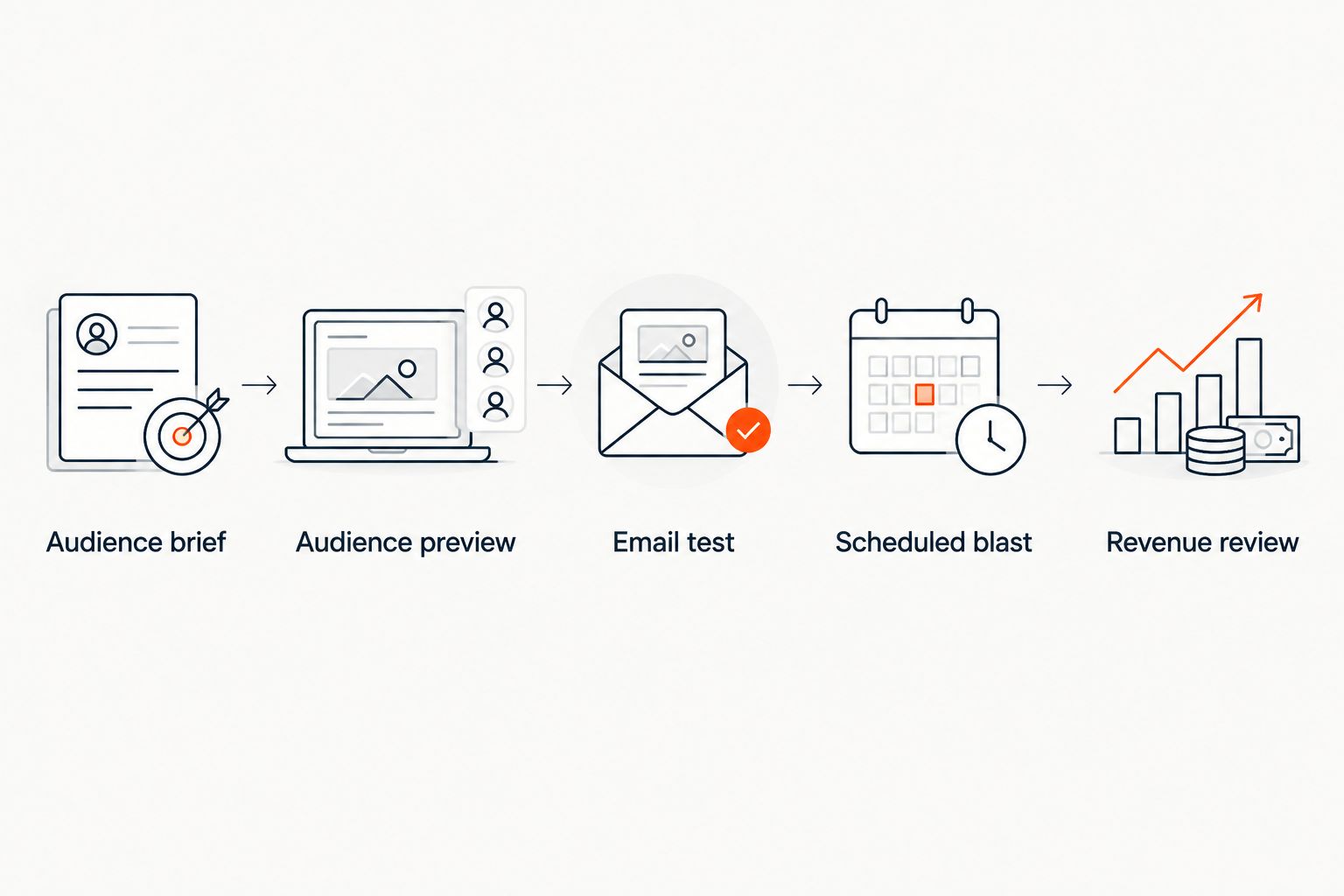
The campaign agent handles the stated preparation, preview, test, scheduling and reporting actions. It still needs your audience rules and approval. That is the practical trade-off: fewer separate campaign tasks, with an organiser responsible for relevance and accuracy.
Repeat the campaign when buyer records change
A second workflow is useful when purchases continue between campaign planning and delivery: refresh the campaign decision using the latest buyer position.
Do not describe a scheduled blast as an event-triggered automation unless you have verified the trigger and membership behaviour. A prepared audience and a continuously evaluated segment are different things.
- Revisit the qualifying buyer records before the next planned campaign.
- Reapply the same written inclusion rule and current-purchaser exclusion.
- Request a fresh audience preview rather than relying on an earlier approval.
- Retest any changed message, then approve its schedule separately.
Expected result: each campaign receives a current audience check. This repeatable process does not depend on an unverified background trigger.
Use this approach for another performance of a production or another event in a related programme. Keep service messages for existing ticket holders separate; those recipients need information about their booking, not another acquisition email for the same performance.
Troubleshooting
The audience includes people already booked
Recheck the promoted performance identifier and the exclusion wording. A production name alone can leave the intended date unclear. Request another preview after correcting the brief, and withhold approval until the returned audience matches the rule.
The audience is unexpectedly small
Check whether the rule refers to buyers, orders or ticket holders. Then inspect the event reference, date boundary and permission criteria separately. Do not widen the audience by removing safeguards just to increase the total.
The test email leads to the wrong event
Compare the destination with the promoted event record, including the performance date. Correct the link in the prepared message and send another test. Reusing copy from a previous performance does not make its destination correct.
Arabic copy reads incorrectly
Check the Arabic message as a complete email, including punctuation, embedded English names and links. Full RTL support does not correct mixed-language copy automatically. Approve the rendered version rather than the draft text alone.
Reported campaign revenue differs from event revenue
Read the report’s scope before comparing totals. Attributed campaign revenue and all sales for an event answer different questions. Keep the campaign, event and reporting period aligned; do not assign every sale after delivery to that email.
Customize your workflow
Expand the process by improving the brief, not by adding unverified automation. Save the audience definition, approved copy, destination and review notes so another organiser can repeat the campaign consistently.
ZunaroSpace is best for independent organisers who want event ticketing and a campaign agent in one platform. The benefit is a connected preparation and reporting workflow; the limitation is that an agent cannot replace your consent decisions or prove that a requested audience rule was applied without review.
Ask Zunaro Pro is AED 179/mo, with a 14-day trial and no card. Keep subscription decisions separate from your campaign approval process: buying access is not an approval to contact a particular audience.
FAQ
How do I segment ticket buyers for campaigns?
Define a purchase-based inclusion rule, apply relevant exclusions and permission checks, then inspect the audience preview before scheduling. Use named events and performances rather than assumed interests.
Can the campaign agent prepare and schedule an email blast?
Yes. The campaign agent can create a blast, preview the audience and rendered email, send a test, schedule delivery and report attributed revenue. Supply the campaign brief and approve the results before sending.
Does scheduling an email mean its buyer segment updates automatically?
No: scheduling alone does not establish continuously updating audience membership. Verify the selected audience’s behaviour and request a fresh preview when later purchases affect eligibility.
Should I exclude people who already bought the event?
Exclude existing purchasers when the message asks recipients to buy that same performance. Keep booking information and other service messages separate from the acquisition campaign.
Can I send separate Arabic and English campaigns?
ZunaroSpace supports Arabic and English with full RTL. Use recorded language preferences where available, check audience eligibility separately and test each rendered message.
Is campaign revenue the same as total ticket revenue?
No. Attributed campaign revenue is a campaign reporting measure, while total ticket revenue covers the event’s sales. Check the report’s scope and period before drawing conclusions.
What should an organiser check before an email campaign in 2026?
Check the audience definition, exclusions, marketing permission, event details, destination link and sending time zone. Approve both the audience preview and a test email before scheduling.
One last thing
A better subject line cannot fix the wrong recipient list. Make audience approval the decision that comes before creative approval, and repeat it whenever the qualifying purchase rules change.
AI that sells your tickets. Here, the mechanism is a campaign agent that prepares a blast, previews the audience and email, sends a test, schedules delivery and reports attributed revenue.
Based at DTEC, Dubai Silicon Oasis. Built for the Gulf - the UAE and Saudi Arabia.


