

Every show has seats that never sold - and no one was working on them. Instead of manually chasing unfinished orders, recover abandoned ticket checkouts with an email workflow that checks payment status, excludes completed purchases and returns eligible buyers to your own ticketing storefront.
- Recover abandoned ticket checkouts with payment checks and purchase suppression, not a general email blast.
- Zunaro suits independent organisers who want ticketing, customer relationships and their own branded storefront together.
- Confirm the abandonment trigger and checkout-link handling before enabling automatic recovery emails.
- Measure completed orders after recovery emails; opens and clicks are not recovered sales.
Why this matters
An unfinished checkout is not a completed order, and a reminder is not a reservation. Your recovery workflow needs to respect both distinctions. Otherwise, you risk emailing someone who has already paid or implying that an expired seat hold still exists.
Zunaro is an event ticketing platform for independent organisers and venues, with store, seating, box office, kiosk and door check-in on one live inventory. Its WhatsApp agent answers buyers, holds seats and hands over a checkout link. AI that sells your tickets.
Zunaro is best for independent organisers and venues that want event ticketing on their own branded storefront. You keep the fees, the funds and the customers.
For your 2026 recovery setup, separate the platform's confirmed campaign capabilities from the automation you need to configure. The campaign agent creates a blast, previews its audience and rendered email, sends a test, schedules delivery and reports attributed revenue. Those capabilities do not, by themselves, establish an automatic abandoned-checkout trigger.
Before you start
- Access and ownership: Have organiser access to your ticketing account, permission to manage email campaigns and a named person responsible for recovery messages. Confirm which checkout and payment records your workflow can read.
- Message and destination: Prepare an organiser-approved email, an appropriate permission and suppression policy, and a checkout destination that returns the recipient to the correct event or performance.
- The gotcha: Confirm that your setup exposes an identifiable unfinished checkout, a usable email address and a current payment status. If it cannot check for a completed purchase immediately before sending, do not enable unattended recovery.
This is a workflow specification, not a menu-by-menu account walkthrough. Confirm the available trigger, connection method and controls in your account before configuration; a scheduled campaign must not be presented as an automatic recovery integration.
Checkout eligibility
Define the recovery audience
- Identify the checkout record that represents an attempted purchase. Keep it separate from an event-page visit, a newsletter subscription or an existing ticket order.
- Require a usable email address and whatever permission your organisation needs for the proposed message. Apply unsubscribe and suppression rules before adding anyone to the audience.
- Match the attempt to its event, performance and checkout identifier. Preserve enough context to avoid directing a theatre buyer to the wrong show time.
- Choose an inactivity interval appropriate to your checkout process. Record the rule rather than copying an unsupported timing benchmark.
- Exclude completed purchases, cancelled events and checkouts that no longer have a valid route back to purchase.
Expected result: Your recovery audience contains identifiable, eligible unfinished checkouts, not everyone who viewed an event.
For a 2026 launch, write this eligibility rule in plain language before configuring it. For example, define abandonment as an eligible checkout remaining unpaid after your chosen interval, subject to a fresh payment check before delivery. Treat that as a proposed rule, not a description of an existing platform default.
Distinguish abandonment from payment uncertainty
A buyer leaving the page does not prove payment failed. Your workflow must distinguish an unpaid attempt from an order whose payment status is still being resolved.
Do not classify an unresolved payment as abandoned solely because the browser closed. Hold it out of recovery until your payment records establish the outcome. That protects the recipient from a second purchase request while an earlier transaction remains uncertain.
Recovery message
Prepare the return path
- Check whether the original checkout link remains usable after the selected inactivity interval. Test the actual behaviour rather than assuming it preserves the original basket.
- If the link has expired, use a supported route to the correct event or performance. Make the message match that destination.
- Verify the current seat-selection experience for reserved seating. Do not promise that the recipient's earlier seat selection is still held.
- Keep checkout on your organiser-owned site. Review the destination on a phone as well as a desktop browser.
Expected result: The email leads to a valid purchase journey, with no claim that an unpaid order or expired seat hold remains reserved.
Write the email around the unfinished action
Keep the event name, performance context and return action clear. Write a reminder to complete an attempted booking, not a ticket confirmation.
Use a subject that identifies the event without pretending a purchase has completed. In the body, explain that the booking was unfinished, provide the appropriate return action and give recipients a way to ask for help.
For Arabic and English communications, review the actual rendered message in each language. Zunaro supports Arabic and English with full RTL; that does not remove the need to inspect your email's text direction, punctuation and destination.
Expected result: A recipient understands which booking the message concerns and what happens after following its link.
Send controls
Connect the trigger to the final eligibility check
- Configure the supported abandonment trigger or audience process available to your setup. Do not substitute a general marketing audience for checkout-level eligibility.
- Recheck payment status immediately before sending. Remove a recipient whose matching order has completed since entering the workflow.
- Apply a duplicate-send guard using the checkout identifier and recovery stage. A repeated trigger must not create another copy of the same reminder.
- Recheck the event and return destination. Stop delivery when the checkout no longer has a valid purchase path.
- Send through the approved email route and retain a record of the attempt, destination and outcome.
Expected result: An eligible checkout receives the intended reminder, while a completed order stops the recovery journey.
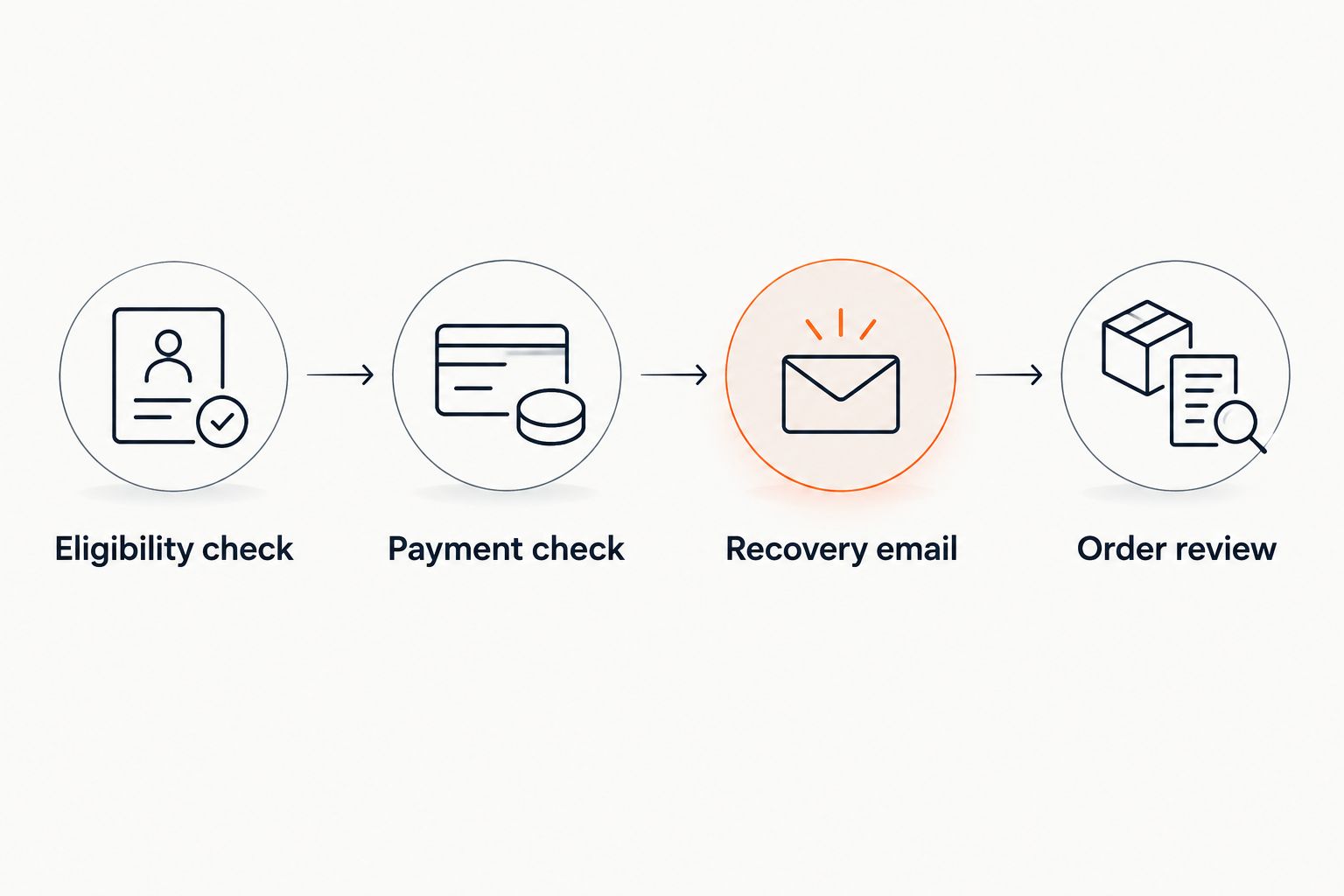
The central sequence is Eligibility check, Payment check, Recovery email, then Order review. Keep those controls together in your 2026 operating checklist; separating the audience export from the payment check creates a gap in which someone can buy and still receive a reminder.
Test before unattended sending
Use controlled test records rather than contacting real recipients during setup. Cover an unfinished checkout, a completed purchase, an expired return link, a repeated trigger and a suppressed email address.
Check both positive and negative outcomes. The unfinished checkout should reach the intended message; the completed purchase and suppressed address should not.
For reserved seating, inspect the return journey after the original hold has ended. A successful email delivery is not a successful workflow test unless the checkout destination also behaves correctly.
Recovery reporting
Separate delivery from completed sales
- Record which eligible checkout received each recovery email. Keep delivery and click activity distinct from order completion.
- Match a subsequent completed order to the recovery record using the supported identifiers and reporting rules.
- Document the attribution rule. State what qualifies as a recovery rather than treating every later purchase as caused by the email.
- Review duplicate messages, suppressed sends and broken return paths alongside completed orders.
Expected result: Your report distinguishes messages sent, recipients returning and orders completed.
Zunaro's campaign agent reports attributed revenue. Treat attribution as a reporting rule, not proof that every attributed order would otherwise have been lost. Its AI Sales Recovery charge is 2% of the extra sales that AI Sales Recovery recovers, not a flat charge on all ticket sales. No recovery, no fee.
For your 2026 reporting, keep the definition of a recovered sale visible next to the results. Do not claim an uplift without a valid comparison.
Variant: a reviewed recovery campaign
A reviewed campaign is a separate workflow for organisers who need to inspect the audience and message before sending. It is not an automatic substitute for checkout-level triggers.
| Workflow | Best for | Advantage | Limitation |
|---|---|---|---|
| Automatic checkout recovery | Organisers with supported checkout triggers and purchase suppression | Responds to eligible unfinished attempts without rebuilding an audience manually | Requires verified trigger behaviour, current payment checks and duplicate protection |
| Reviewed recovery campaign | Organisers who need to approve the audience and message | Provides a review point before delivery | Requires audience preparation and a fresh completed-order exclusion before sending |
For the reviewed variant, prepare the eligible audience, remove completed purchasers, preview the rendered message and send a test. Schedule only after checking the event details and return destination. Zunaro's confirmed campaign-agent capabilities support those campaign preparation actions; verify how your account supplies the eligible checkout audience.
Choose automatic recovery for repeatable checkout rules; choose reviewed campaigns when approval is essential. Neither approach justifies emailing a general contact list as though everyone abandoned a purchase.
Troubleshooting
Buyers receive reminders after paying
The audience was checked too early, or the workflow matched the wrong record. Move the completed-order check to immediately before delivery and verify the relationship between checkout and order identifiers.
The same reminder arrives repeatedly
A trigger is firing again without a duplicate-send guard. Record the completed send against the checkout and recovery stage, then verify that retrying the process does not create another delivery.
The email opens an expired checkout
The return link does not survive the recovery interval. Use a supported current destination and revise the message so it does not imply that the original basket or seats remain held.
The audience is empty
Check whether unfinished attempts actually contain usable email addresses and meet your eligibility rules. A visitor who left before providing an address cannot be recovered by email through that checkout record; do not replace the missing audience with unrelated contacts.
Clicks appear but completed orders do not
Inspect the destination, performance selection and purchase journey before changing the subject line. Use the guide to reduce ticket buyer drop-off at checkout to review the purchase path rather than treating email engagement as the end result.
Customise your workflow
Expand recovery by event and performance only when each branch retains the same payment checks and suppression rules. Keep language variants aligned with the recipient's recorded preference rather than guessing from their name.
Review the economics separately from the message. Organisers pay nothing per ticket; the buyer booking fee is AED 3.99, or AED 1.99 for tickets under AED 20. Free events carry no booking fee. Do not confuse those booking terms with the separate recovery charge.
For your 2026 review, assign an owner to inspect recovery messages whenever an event changes. A correct automation can still send an incorrect performance time if its source content is outdated.
Based at DTEC, Dubai Silicon Oasis. Built for the Gulf - the UAE and Saudi Arabia.
FAQ
How do I automatically recover abandoned ticket checkouts by email?
Use an eligible unfinished checkout as the trigger, recheck payment status before sending and direct the recipient to a valid purchase destination. Enable unattended sending only after verifying the trigger, suppression rules and return-link behaviour.
Does a scheduled email campaign count as automatic checkout recovery?
No. A scheduled campaign sends to a prepared audience; automatic checkout recovery also needs a supported abandonment trigger and a fresh completed-order check.
Can Zunaro prepare recovery email campaigns?
Zunaro's campaign agent creates a blast, previews its audience and rendered email, sends a test, schedules delivery and reports attributed revenue. Confirm the source of the eligible checkout audience and the automatic trigger separately.
Should a recovery email promise that the buyer's seats are reserved?
No, unless the reservation is still valid when the message is sent. An earlier seat hold does not establish that the same seats remain held when the recipient returns.
What should happen if someone pays before the reminder sends?
The completed purchase should suppress the reminder. Recheck payment immediately before delivery rather than relying on the status recorded when the checkout entered the workflow.
Can I recover an abandoned checkout without an email address?
Not by email through that checkout record. Email recovery requires a usable address and an appropriate basis for sending the message.
Which metric shows whether checkout recovery works?
Matched completed orders show whether recipients returned and purchased. Delivery, opens and clicks describe message activity, while a claim of incremental sales requires a valid comparison.
One last thing
The most useful recovery test is the email that never sends. Complete a controlled purchase after it enters the recovery audience but before delivery. If the reminder still arrives, fix purchase suppression before expanding the workflow.


