


Every show has seats that never sold - and no one was working on them. Instead of manually copying ticket sales into your accounts, use a repeatable transaction export and accounting import workflow: establish an accessible transaction source, map the records, reject duplicates, and reconcile the results before posting.
- Export ticket sales transactions with stable identifiers, explicit currencies and separate refund records.
- ZunaroSpace brings storefront, box office and kiosk ticketing onto one live inventory; confirm accounting export access before setup.
- Automate delivery and validation before allowing transactions into your accounting ledger.
- Reconcile ticket sales, payment activity and bank settlements separately; they answer different accounting questions.
Why this matters
Your sales report answers what sold. Your accounting records must also explain refunds, payment activity and money received. Copying a total between systems loses the detail needed to investigate a discrepancy.
ZunaroSpace is best for independent organisers and venues that want event ticketing across their own storefront, box office and kiosk. That shared inventory is useful operationally, but it does not establish which accounting exports or connections your account supports. Confirm the transaction source before building an automation around it.
The ZunaroSpace event ticketing platform puts store, seating, box office, kiosk and door check-in on one live inventory. You keep the fees, the funds and the customers. The accounting workflow below is an implementation plan, not a claim that a particular export button, connector or accounting integration exists.
Before you start
- Access: Arrange authorised access to your ticket transaction records, payment records and accounting import area. Confirm how your account can supply transaction data before choosing an automation tool.
- Materials: Get the destination's current import template and an accountant-approved mapping. Include successful sales, refunds and settlement records in your validation sample where applicable.
- The gotcha: Establish what each source row represents. An order, an individual ticket and a payment transaction are different units; importing all three as sales duplicates revenue.
For your 2026 setup, record the source, destination, responsible person and reporting timezone in a short operating note. Do not give an automation permission to post live entries until its output passes reconciliation.
Transaction source configuration
Establish a repeatable source
- Ask your ticketing administrator which transaction delivery methods your account supports: a downloadable file, scheduled delivery or documented programmatic access. Select a method that actually exists in your account.
- Obtain a sample containing transaction identifiers, dates, statuses, amounts and currencies. Check whether refunds are separate records or changes to earlier records.
- Write down the export's date-filter meaning. A filter based on purchase date will behave differently from one based on the date a record changed.
- Choose the transaction grain for accounting. Use payment-level records for payment reconciliation; retain order and event references as supporting detail.
- Save an untouched copy of each source file or response in a restricted archive. Keep the original alongside the processed output so an accountant can trace an entry back to its source.
Expected result: You have an accessible source, a defined row meaning and a reproducible way to retrieve the same reporting period.
Do not substitute attendance reports for transaction data. A scanned ticket describes admission, not a new payment. Likewise, a reserved seat or unfinished checkout is not evidence that money was collected.
Choose the delivery pattern
These are workflow options, not confirmed platform features. Choose between them after checking source access and the accounting destination's requirements.
| Workflow | Best for | Advantage | Limitation |
|---|---|---|---|
| File-based batch | Organisers whose source supplies transaction files | Preserves a reviewable source document | Delivery remains manual unless scheduled access exists |
| Scheduled retrieval | Teams with documented programmatic access | Repeats retrieval without copying files | Requires authentication, error handling and monitoring |
| Change-driven updates | Teams with documented change notifications | Processes changes without waiting for a batch | Requires replay protection and a recovery process |
Start with a validated batch, even when the eventual workflow is automatic. A connector cannot correct an accounting mapping that was wrong at the start.
Accounting field mapping
Define the import contract
- Open your accounting destination's current import template. Treat its documented column names and accepted values as authoritative.
- Build a mapping sheet between the source and destination. The labels below describe required concepts; they are not claimed interface labels or export headers.
- Specify date format, decimal format, currency handling and the sign convention for refunds.
- Obtain approval for account codes, tax treatment and revenue recognition. Do not infer these from an event name or a transaction status.
- Test the mapping using your validation sample before processing the full reporting period.
| Accounting concept | What to preserve | Validation rule |
|---|---|---|
| Transaction identifier | Stable identifier for the financial record | Reject an unexplained duplicate |
| Order reference | Link to the underlying purchase | Retain it for investigation |
| Event reference | Source event identifier or reference | Do not rely on the event title alone |
| Transaction date | Timestamp and its timezone | Apply one documented reporting convention |
| Status | Source payment or refund state | Exclude unfinished payment attempts from paid sales |
| Currency | Original transaction currency | Keep different currencies separate |
| Amount components | Explicit ticket, tax and fee components supplied by the source | Do not invent a missing breakdown |
| Refund reference | Link between a refund and its original payment | Preserve partial refunds separately |
Expected result: Each imported field has a source, an agreed meaning and a validation rule.
For your 2026 mapping, preserve original currency even when your ledger also records a converted amount. AED and SAR pricing are supported in the platform; that does not make an AED transaction and a SAR transaction interchangeable accounting amounts.
Keep fee treatment explicit
Organisers pay nothing per ticket. The buyer booking fee is AED 3.99, or AED 1.99 under AED 20; free events carry none. These commercial terms do not determine the accounting ownership of every amount appearing in a payment record.
Ask your accountant which supplied components belong in ticket revenue, liabilities, expenses or clearing accounts. Do not calculate missing fee components from a headline rate. Use the actual transaction breakdown and supporting payment records.
Keep platform subscriptions separate from ticket transaction imports. Ask Zunaro Pro has a 14-day trial with no card required; a subscription record and a ticket sale serve different accounting purposes.
Delivery and duplicate protection
Build the controlled import
- Send each retrieved batch to a staging area rather than directly to the live ledger. Restrict access to the people responsible for finance and the integration.
- Validate required identifiers, currencies, dates and amounts. Route invalid records to an exception list instead of silently dropping them.
- Apply a duplicate check using the source transaction identifier and record type. Where the source supports changed records, also retain the information needed to distinguish an update from a repeat delivery.
- Transform accepted records into the destination's documented format. Keep the original source reference in a reference field that the destination supports.
- Record whether each record was accepted, rejected or already processed. Retain the destination's import reference when supplied.
- Stop the batch on an unexplained control-total difference. Correct the cause before allowing posting.
Expected result: Repeating a delivery does not create another sale, and every rejected record has an actionable reason.
In your 2026 operating note, distinguish a delivery failure from an import failure. A missing file needs retrieval; a rejected currency needs a mapping correction. Treating both as a reason to resend everything creates avoidable duplicate risk.
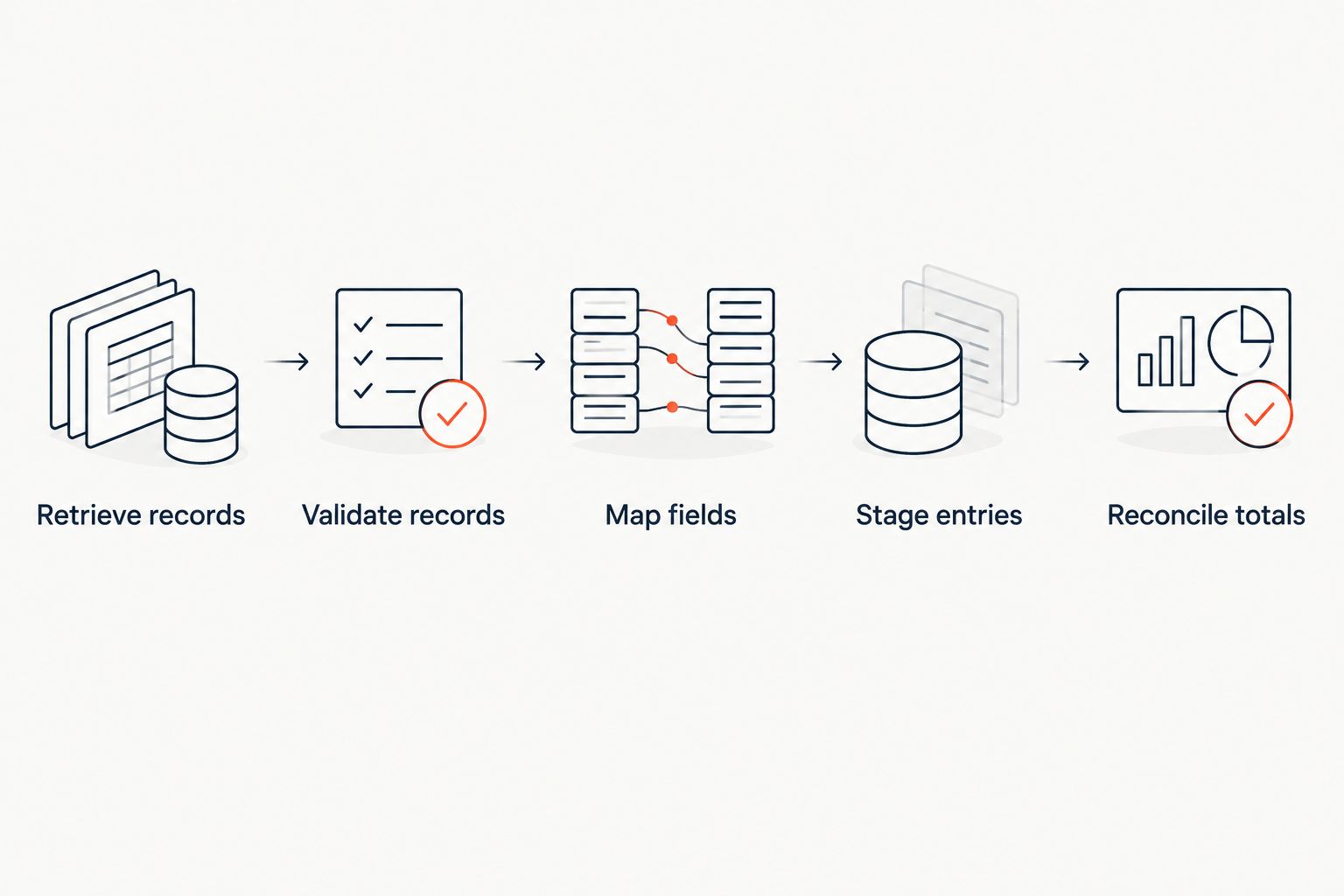
The sequence should remain visible to the person who owns the accounts: Retrieve records, Validate records, Map fields, Stage entries, Reconcile totals.
Reconciliation and posting
Prove the totals before posting
- Compare the source transaction count with the accepted, rejected and duplicate counts. Explain the disposition of every source record.
- Compare monetary totals by currency, transaction type and reporting period. Never combine currencies to make a control total balance.
- Compare successful payment activity with the relevant payment records. Keep refunds and other adjustments visible rather than hiding them in a single net sales figure.
- Reconcile bank settlements separately, using settlement references where supplied. A settlement can relate to a different period from the original ticket sale.
- Have the authorised finance owner approve the staged entries. Enable unattended posting only after the workflow reliably handles the cases your organisation needs.
Expected result: You can explain the path from a ticket transaction to an accounting entry and, separately, to a bank receipt.
Your 2026 reconciliation checklist should retain these distinctions after automation is enabled. Automatic delivery removes copying; it does not remove responsibility for the accounts.
For the distinction between selling and receiving funds, read how long it takes to get paid after selling tickets. Do not treat a sales date as a promised settlement date.
Export changes whenever a transaction is updated
A scheduled new-sales export is not enough if later refunds or status changes fall outside its selection rules. Add an update workflow when your source provides a documented way to retrieve changed records.
- Select records using the documented modification timestamp or change feed, rather than the original purchase date alone.
- Preserve the original transaction reference and the reference for each financial adjustment.
- Route a refund or reversal through the accountant-approved adjustment mapping. Do not overwrite a posted sale merely to make the latest report look tidy.
- Reprocess an overlapping retrieval period with duplicate protection enabled. Define that overlap from the source's documented behaviour, not an assumed delivery speed.
- Compare the resulting adjustments with the source before posting them.
Expected result: A later refund remains connected to its original sale without creating another sale or erasing the audit trail.
If changed-record access is unavailable, use a controlled comparison of successive source files and send differences for review. That is a review workflow, not proof of a live integration.
Troubleshooting
The same sale appears twice
Check whether the source contains both order rows and payment rows, or whether a repeated batch bypassed duplicate checks. Isolate the duplicated entries and follow your accounting system's correction procedure; do not delete source history to conceal the mismatch.
Refunds disappear from the export
Check the date filter and record selection. A purchase-date filter can exclude a later refund associated with an earlier sale; retrieve the relevant adjustment records and preserve their original payment references.
Sales totals do not match the bank
Compare like with like. Separate sales, refunds, supplied fee components and settlements, then investigate the remaining difference using payment and settlement references.
Dates fall into the wrong reporting period
Check source timezone, destination timezone and date parsing. Preserve the original timestamp, then apply the agreed reporting convention consistently rather than editing individual dates until totals match.
The accounting import rejects records
Read the actual rejection message and compare the file with the destination's current template. Correct unsupported currencies, account codes, date formats or required fields in staging, then retry the rejected records without resending accepted entries.
Customise your workflow
Once the basic import reconciles, add event, venue and sales-channel references where the source supplies them. These dimensions let finance investigate performance without rebuilding the financial record from event titles.
Keep personal information out of the accounting export unless the destination genuinely requires it. A transaction reference is often more useful for tracing a discrepancy than copying an entire buyer profile into another system.
ZunaroSpace combines event ticketing with mechanisms that help sell: a WhatsApp agent answers buyers, holds seats and hands over a checkout link. AI that sells your tickets. That selling workflow is separate from accounting validation; neither a conversation nor a seat hold belongs in paid-sales totals.
Based at DTEC, Dubai Silicon Oasis. Built for the Gulf - the UAE and Saudi Arabia.
FAQ
How do I export ticket sales transactions for accounting?
Retrieve transaction records through a supported source, map them to your accounting import template, check duplicates and reconcile before posting. Preserve identifiers, currencies, statuses and refund references throughout the workflow.
Can ZunaroSpace automatically export transactions to my accounting software?
Confirm supported transaction access and destination compatibility before planning an automatic export. This workflow does not establish the existence of a native accounting connector, scheduled export or particular interface control.
Should I export orders, tickets or payment transactions?
Choose the record type that matches the accounting purpose. Payment reconciliation requires financial transaction records; order and ticket references provide supporting detail and must not become duplicate sales.
How do I prevent duplicate accounting entries?
Check stable transaction identifiers before importing and retain a record of accepted entries. Repeated delivery must recognise an existing record rather than create another sale.
How should ticket refunds appear in an accounting export?
Preserve refunds as identifiable adjustments linked to their original payments. Use the accounting destination's approved adjustment process rather than overwriting a posted sale.
Why does my ticket sales export differ from my bank deposit?
Ticket sales and bank settlements describe different activity. Reconcile currencies, reporting periods, refunds and supplied payment adjustments before comparing the result with the bank receipt.
Can I combine AED and SAR ticket transactions in one total?
Keep AED and SAR transaction totals separate unless your accounting process explicitly converts them. Preserve original currency and use the accountant-approved conversion treatment for ledger reporting.
One last thing
Run the same validated batch twice before enabling unattended posting. The second run should recognise previously processed records rather than create additional sales. Add that replay test to your 2026 acceptance checks: an automation that works once has not yet proved it handles retries.


