


Yes—small venues can afford professional ticketing software when the charging model fits how they sell. In 2026, the decision depends on who pays the booking fee, what the venue needs to operate, and which services sit outside the ticketing agreement. A buyer-funded booking fee does not settle the whole question: payment processing, equipment, subscriptions and staff time need separate checks.
- Can small venues afford professional ticketing software? Yes—compare the full operating commitment, not just the booking-fee model.
- ZunaroSpace event ticketing suits independent venues that want their own storefront and shared seat inventory.
- Reserved seating, box office and door check-in should match your actual event workflow.
- Check processing terms, payout eligibility and cancellation responsibilities before moving an event.
Can small venues afford professional ticketing software?
Yes. A small venue does not need to buy every ticketing feature to run a professional operation. It needs a system that handles the sales channels, seating rules and admission process its events actually use.
ZunaroSpace provides event ticketing through an organiser’s branded storefront, box office and kiosk, with reserved seating and door check-in on one live inventory. Its booking-fee model places that fee with the buyer. Assess that model alongside the operational requirements below, rather than treating it as a complete statement of your costs.
Use this sequence to decide whether a platform fits your venue:
- Define the event. Record whether admission is general or reserved, where tickets sell, and how staff admit attendees.
- Map the charges. Separate booking fees, payment processing, subscriptions and any equipment requirements.
- Check payment arrangements. Confirm account eligibility, settlement terms and cancellation responsibilities for your venue’s country.
- Run the sales workflow. Follow a ticket from purchase through delivery and door check-in.
- Test a busy moment. Ask staff to handle an online order and a walk-up sale against the same inventory.
- Approve the operating commitment. Choose the configuration your team can run, not the longest feature list.
Professional ticketing is affordable only if you can afford to operate it—not merely open an account.
Why this matters
Every show has seats that never sold—and no one was working on them. Your ticketing decision should address that sales problem without creating a second problem at the box office or door.
For a small venue, the relevant comparison is not a large theatre’s software stack. It is your current way of selling, recording orders, answering questions and checking people in. Write down those tasks before evaluating a replacement.
Your 2026 shortlist should connect each feature to a job. Reserved seating belongs on the list when customers choose specific seats; a kiosk belongs there when self-service walk-up sales form part of your operation. A feature without an assigned job is not a reason to choose a platform.
General admission or reserved seating: buy for the room
The seating model determines what you need the software to do. Choose it from the event format, not from the platform’s most elaborate demonstration.
| Ticketing approach | Best for | Practical advantage | Limitation to check |
|---|---|---|---|
| General admission | Events where admission does not assign a specific seat | You do not need to maintain individual seat allocations | It does not provide a specific-seat promise |
| Reserved seating | Theatres and venues selling named seats | Buyers choose a seat, and staff work with its allocation | The map must reflect the room you actually sell |
| Mixed admission | Events combining seated and unallocated areas | Each area can follow its intended admission rule | Staff need clear instructions for each ticket type |
Choose general admission when the event does not require assigned seats. Do not build a seating map simply because a platform offers one. You still need clear capacity rules, order records and an admission process.
Choose reserved seating when the seat itself is part of the purchase. Check the map against the room: rows, seat labels, unavailable positions and the areas staff must recognise. A fast map-creation process does not replace that inspection.
For mixed admission, ask the provider to demonstrate your specific layout. Do not assume support for a particular combination of standing areas, tables and seats from a general reserved-seating claim.
Your storefront, box office and kiosk need the same inventory
Selling through several channels is an operating decision, not a requirement for every venue. Your online storefront, staffed box office and self-service kiosk each serve a different task.
| Sales channel | Best for | Practical advantage | Limitation to check |
|---|---|---|---|
| Branded storefront | Advance sales through the venue’s own online presence | Gives the organiser a direct place to sell | You still need to direct people to the event |
| Staffed box office | Walk-up sales and questions needing a person | Staff can handle the sale while answering questions | Someone must be available to operate it |
| Self-service kiosk | Venues that want an unattended purchasing point | Lets visitors complete a sale without a staffed counter | Device placement and assistance need a plan |
ZunaroSpace event ticketing connects its storefront, box office, kiosk and door check-in to one live inventory. That is relevant when your venue sells the same event through several channels. It does not mean you need to introduce every channel at once.
In a demonstration, ask the provider to show a sale in one channel and the resulting inventory in another. Then check what happens when staff select a seat that is already held. See the guide to syncing ticket inventory between kiosk and storefront for the workflow to examine.
Start with the channels you will actually staff and maintain. Add a kiosk because you have a place and purpose for it, not because the feature appears in a plan.
Why ticketing affordability varies
Venues with the same room size can need different ticketing workflows. These factors determine what you must evaluate in a 2026 agreement:
- Charging model. Identify whether the organiser, buyer or both bear the relevant charges. Distinguish booking fees from payment processing.
- Seating requirements. A named-seat event needs a maintained map; unallocated admission does not.
- Sales channels. A storefront, staffed counter and kiosk create different device and staffing requirements.
- Payment arrangements. Account eligibility and settlement terms must match the venue’s country and payment provider.
- Admission workflow. Door staff need a process they can follow, including what to do when connectivity fails.
- Customer communication. Assign responsibility for purchase questions, ticket delivery and cancellation messages.
Treat each factor as an agreement check. Ask what is included, what requires a separate service, and what remains your responsibility. Keep the answers beside the proposed contract so your team evaluates the same scope.
Check the full workflow before committing
A feature demonstration shows what a platform can do. Your acceptance test should show whether your staff can use it for your event.
Run the test in the order the work happens. Use a test event rather than making your opening-night audience part of the experiment, and ask the provider how to test payments without creating unintended live orders.
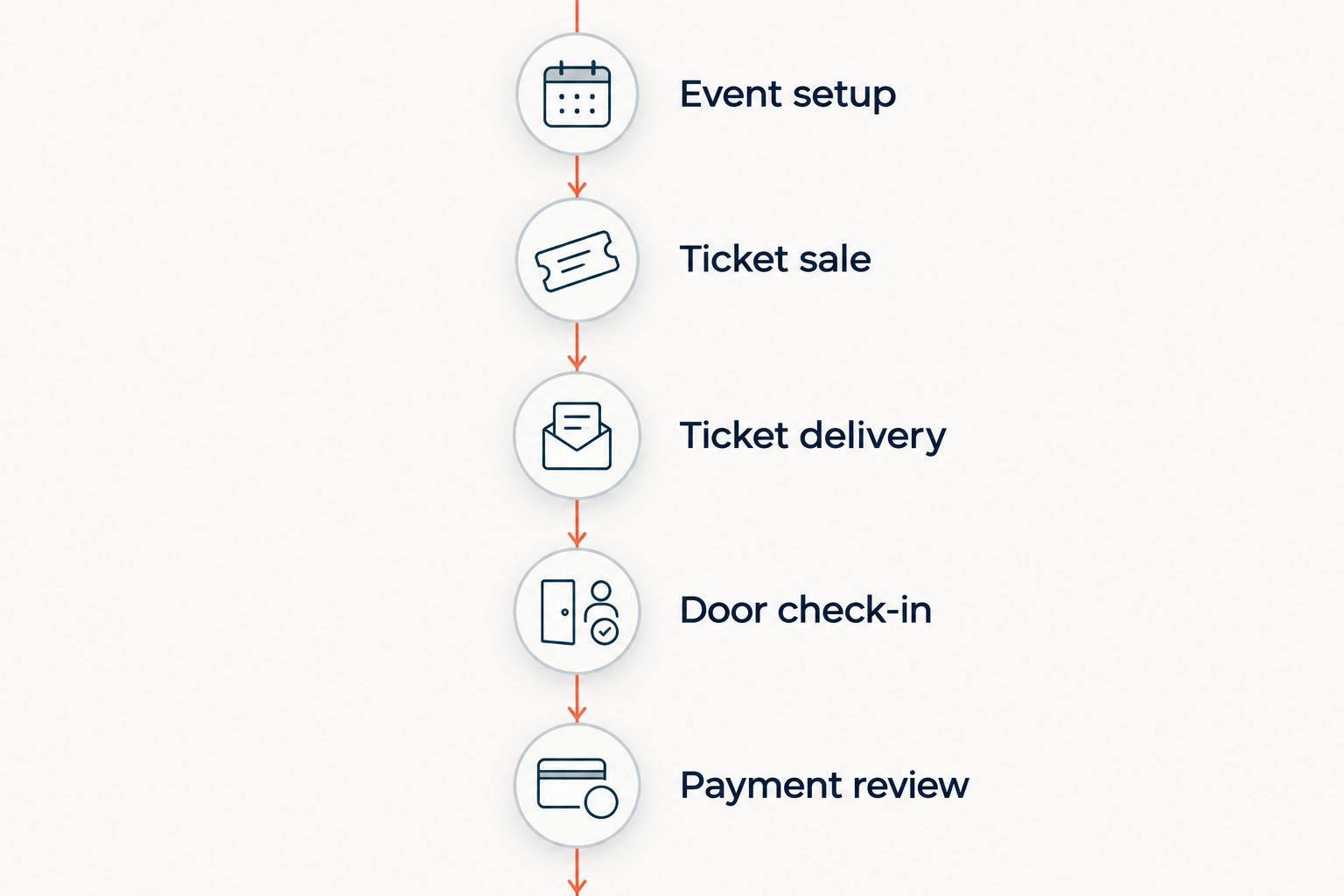
Event setup
Create the event information and admission structure your venue needs. If you sell reserved seats, inspect the map against the room rather than approving it from a thumbnail.
Assign someone to maintain the event. Decide who can change its details, who checks those changes, and what staff should do if a seating position becomes unavailable.
Ticket sale
Follow an online sale and a box-office sale. Check the order record and the effect on inventory after each action.
If you plan to use a kiosk, test that channel too. Its presence in a product demonstration does not answer where you will place the device or who will help someone who gets stuck.
Ticket delivery
Check the ticket the attendee receives and the information staff use to find an order. Confirm who handles a missing confirmation and how that person identifies the booking.
Ticket delivery and customer support are separate tasks. A delivered message does not resolve every question about arrival, seating or accessibility.
Door check-in
Ask a member of your door team to admit an attendee using the proposed workflow. Check how staff distinguish an unused ticket from one already admitted.
Then ask for the documented connectivity procedure. Do not infer offline check-in from the existence of a scanning screen or mobile interface.
Payment review
Confirm which account receives funds and which provider controls settlement. Obtain the terms that apply to your venue’s jurisdiction, rather than relying on a demonstration for another country.
Include refund and cancellation responsibilities in the review. A direct payment arrangement is not a promise of a particular payout time.
Where ZunaroSpace fits a small venue
ZunaroSpace suits independent venues that want their own branded storefront and shared seat inventory. It brings store, seating, box office, kiosk and check-in into the same ticketing platform. You keep the fees, the funds and the customers.
The sales mechanisms are specific. A WhatsApp agent answers buyers, holds seats and hands over a checkout link; a seat map can be traced from a photo. Events are also discoverable and bookable inside ChatGPT and Claude, including seat selection on the real map, but checkout completes on the organiser’s own site—not in chat.
For venues serving Arabic- and English-speaking audiences, the platform supports both languages and full right-to-left presentation. These are concrete requirements to test with your event information, not substitutes for an operating review.
The boundary matters. Chat-based booking does not mean payment happens in chat, and direct payouts do not establish settlement speed. For a Saudi venue, confirm the supported payment arrangement before committing; do not assume payout eligibility from regional availability.
Keep your 2026 evaluation focused on the platform’s fit for the venue. A branded store gives you a place to sell; it does not remove your responsibility for programming, promotion or customer service.
Check your venue’s ticketing fit
Review storefront, seating, box office and check-in against your venue’s workflow.
Can a small venue use professional software without a kiosk?
Yes—a kiosk is a sales channel, not the definition of professional ticketing. A venue using an online storefront and staffed box office should assess those workflows first.
Add self-service sales only when you have a clear use for them. Confirm the device requirements, placement and assistance process before including a kiosk in your operating plan.
Does passing booking fees to buyers make ticketing affordable?
A buyer-funded booking fee changes who bears that charge; it does not establish the venue’s full operating commitment. Payment processing, subscriptions, equipment and staff responsibilities still need separate checks.
Review how the fee appears during checkout as part of your 2026 acceptance test. Your team should be able to explain the charging model accurately without treating a booking fee as interchangeable with every other charge.
Is direct payment the same as immediate access to funds?
No—direct payment describes the payment destination, not guaranteed settlement speed. The applicable provider terms and account eligibility determine the arrangement you need to verify.
Get those terms for your own venue and country. Do not budget from an assumed payout date or from another organiser’s setup.
FAQ
Can small venues afford professional ticketing software in 2026?
Yes—small venues can choose professional ticketing software when its charging model and operating requirements fit their events. Compare booking fees, payment processing, subscriptions, equipment and staff responsibilities separately.
What is the best ticketing setup for a small venue?
The best setup handles the venue’s actual admission rules and sales channels. Choose reserved seating when you sell specific seats, and add a box office or kiosk only when you need that channel.
Do I need reserved seating software for a small theatre?
You need reserved seating software when your theatre sells specific seats. Check the map against the physical room and test how online and box-office sales update seat availability.
Can I sell online and at the box office together?
Yes—ZunaroSpace connects its branded storefront and box office to one live inventory. Test a sale in each channel and inspect the resulting seat or ticket availability before publishing an event.
Does a buyer-paid booking fee cover payment processing?
A buyer-paid booking fee does not establish the payment-processing arrangement. Check the applicable provider terms and identify who bears each charge before signing.
Do I need a kiosk to run professional ticketing?
No—a kiosk is optional when your venue’s sales workflow does not require self-service purchasing. Evaluate your storefront and staffed box office first, then assess whether a kiosk has a clear role.
Can event checkout happen inside ChatGPT or Claude?
Checkout for this platform completes on the organiser’s own site, not inside ChatGPT or Claude. Discovery, seat selection and booking can happen in chat before the buyer follows the checkout link.
One last thing
Test the handover, not just the sale. Ask someone who did not configure the event to find an order, recognise its seat or admission area, and check the attendee in using your written instructions.
Make that handover part of your 2026 decision. If the workflow depends on one person remembering undocumented steps, fix the process before publishing—not while people are waiting at the door.


