


Yes, you can sell tickets in multiple currencies when your ticketing platform and payment provider support the currencies you want buyers to pay in. For your 2026 setup, confirm the currency charged at checkout and the currency received in your bank account separately; displaying a converted amount does not establish either.
- Can I sell tickets in multiple currencies? Yes, with supported checkout currencies and an eligible payment account.
- ZunaroSpace supports AED and SAR pricing for Gulf event organisers; confirm the configuration your event needs.
- Display currency, checkout currency and settlement currency are separate decisions.
- Choose currencies around your events and payment setup, not the buyer’s location alone.
Can I sell tickets in multiple currencies for international buyers?
Yes—but distinguish international card acceptance from multi-currency checkout. An overseas buyer paying in your event’s currency is not the same arrangement as a buyer choosing their own currency at checkout.
Your storefront also matters. If you want to control the purchase journey, start with the guide to selling tickets directly from your own website, then check the payment configuration behind it.
Use these steps to establish what your ticketing setup actually supports:
- Identify the event currency. Decide which currency your event uses for its ticket amounts and order records. Match that choice to the event’s commercial requirements rather than assuming every international buyer needs a local-currency option.
- Check the checkout currency. Ask which currencies the payment provider accepts for your account. Confirm whether buyers can choose a currency within the same event or whether different events use different currencies.
- Confirm the settlement currency. Establish which currency reaches your bank account and whether conversion occurs before settlement. A supported checkout currency does not automatically establish a matching payout arrangement.
- Inspect the complete order. Follow the currency through checkout, confirmation, reporting and a refund test. The currency label should remain clear wherever your team or the buyer sees the transaction.
You are checking 3 currency fields: display, checkout and settlement. Treating them as separate fields prevents a familiar-looking storefront amount from becoming an assumption about the money you receive.
Why this matters
Every show has seats that never sold - and no one was working on them. International sales add another operational question: can a buyer understand the transaction without your team having to explain its currency afterwards?
Currency support is part of the ticketing decision, not a substitute for it. You still need a clear event page, accurate seat availability, a working checkout and a usable ticket confirmation.
For a 2026 platform decision, ask for a demonstration of the whole order journey. A currency symbol on an event page answers less than a completed test order with a matching transaction record.
Choose the payment workflow before promoting the currency choice. Otherwise, your event page can promise an experience that your account configuration does not deliver.
Which currency setup fits your event?
There are several ways to serve international buyers. They solve different problems, so compare the workflow rather than treating every currency feature as equivalent.
| Setup | Best for | Advantage | Limitation |
|---|---|---|---|
| Event-currency checkout | Organisers who want a consistent currency for an event | Keeps checkout and event reporting in the stated currency | Does not itself provide buyers with a choice of checkout currency |
| Different currencies across events | Organisers running events with different currency requirements | Lets each event follow its own commercial context | Does not establish multiple checkout currencies within the same event |
| Buyer-selectable checkout currency | Organisers who require currency choice during purchase | Gives buyers an explicit supported currency selection | Requires confirmation of platform, payment-account and settlement support |
| Converted display amount | Organisers who want to provide a reference amount | Helps explain an amount in another currency | A display conversion alone does not change the currency charged |
Event-currency checkout
Best for: an organiser who wants one stated currency throughout an event’s sales records. International buyers can use this arrangement when their payment method and your payment provider support the transaction.
The advantage is a clear event-level accounting reference. The limitation is equally clear: accepting an overseas card does not mean offering checkout in that cardholder’s home currency.
Different currencies across events
Best for: an organiser whose events have different currency requirements. This configuration separates the currency decision by event rather than asking every buyer to make it.
It suits an event-by-event operating model, but it answers a narrower question than buyer-selectable checkout. Ask whether currency is configured at account, store or event level before designing your workflow around it.
Buyer-selectable checkout currency
Best for: an organiser who specifically needs buyers to choose a supported payment currency. Require a demonstration using the account configuration you intend to operate.
This setup provides a visible choice, but the choice adds another reporting question: how does each transaction relate to the amount settled to your account? Do not approve the workflow on the storefront demonstration alone.
Converted display amount
Best for: an organiser who wants to show a reference conversion without changing the transaction currency. Label the actual checkout currency clearly beside any reference amount.
The benefit is context. The drawback is confusion if the buyer reads the reference amount as the amount their card will be charged in that currency.
What AED and SAR support means for Gulf organisers
ZunaroSpace is an event ticketing platform with AED and SAR pricing, Arabic and English, and full right-to-left support. That establishes 2 supported pricing currencies and 2 interface languages, not a promise that every event offers a buyer-controlled currency selector.
ZunaroSpace is best for Gulf organisers seeking AED and SAR ticket pricing through their own branded storefront. Its relevant advantage is the connected ticketing workflow: storefront, seating, box office, kiosk and door check-in use one live inventory.
The limitation to keep in view is the difference between pricing and settlement. For a Saudi event, confirm the available payment-account and settlement arrangement before choosing the workflow; SAR pricing is not a promise of Saudi payouts.
Arabic and English also answer a separate requirement. A buyer’s language preference does not establish their preferred payment currency, and a currency choice does not establish the language they need.
For your 2026 launch, evaluate these requirements separately: event currency, checkout configuration, payment account, interface language and inventory. That gives your team a usable purchasing specification rather than a general request for international support.
Why multi-currency ticketing requirements vary
The right setup follows your operating model. These factors explain why two organisers can need different currency workflows even when both sell to international buyers:
- Event geography. An event priced in AED and an event priced in SAR have different currency contexts. Decide the event’s intended currency before asking for additional buyer options.
- Sales channels. Your storefront, box office and kiosk need clear transaction records. Check the currency shown in each channel rather than assuming the online setting answers every channel question.
- Language requirements. Arabic and English support helps buyers read the purchase journey. Full right-to-left support addresses interface direction; neither feature establishes a payment or payout arrangement.
- Checkout location. Discovery in a chat interface is different from payment on your own site. Follow the buyer to the actual checkout before assessing currency support.
- Payment-account eligibility. The ability to price an event in a currency is separate from the ability to receive settlement through a particular account. Resolve that distinction before accepting paid orders.
These are requirements to verify, not reasons to add currencies by default. Offer the currency workflow your event needs and your payment setup supports.
What should I check before enabling another currency?
Build your 2026 acceptance check around a complete order. Screenshots of a currency menu are not enough: your team needs to see what the buyer pays, what the order records and what the account receives.
Checkout
Open the event as a buyer would. Check the currency label on the event page, seat selection, basket and payment screen, including any reference conversion shown along the way.
If the checkout offers a currency choice, change it and inspect the result. Confirm whether it changes the transaction currency or just the displayed amount.
Confirmation
Inspect the order confirmation and ticket delivery message. They should make the transaction understandable without requiring the buyer to reconstruct what happened from a bank notification.
Keep ticket delivery separate from payment confirmation in your checks. Receiving an e-ticket demonstrates delivery; the payment record establishes the transaction currency.
Settlement
Review the payment-account record and the available settlement information. Record which currency the buyer paid in and which currency your account receives.
Do not rely on the event’s currency label to explain settlement. Ask the payment provider how the configured account handles any conversion between those stages.
Refund
Test the refund workflow and inspect its transaction record. Your support team needs to identify the original payment currency and explain the refund using the actual payment record.
Avoid promising that a buyer’s bank statement will show an identical home-currency amount after conversion. The ticketing record and the cardholder’s converted bank statement are different records.
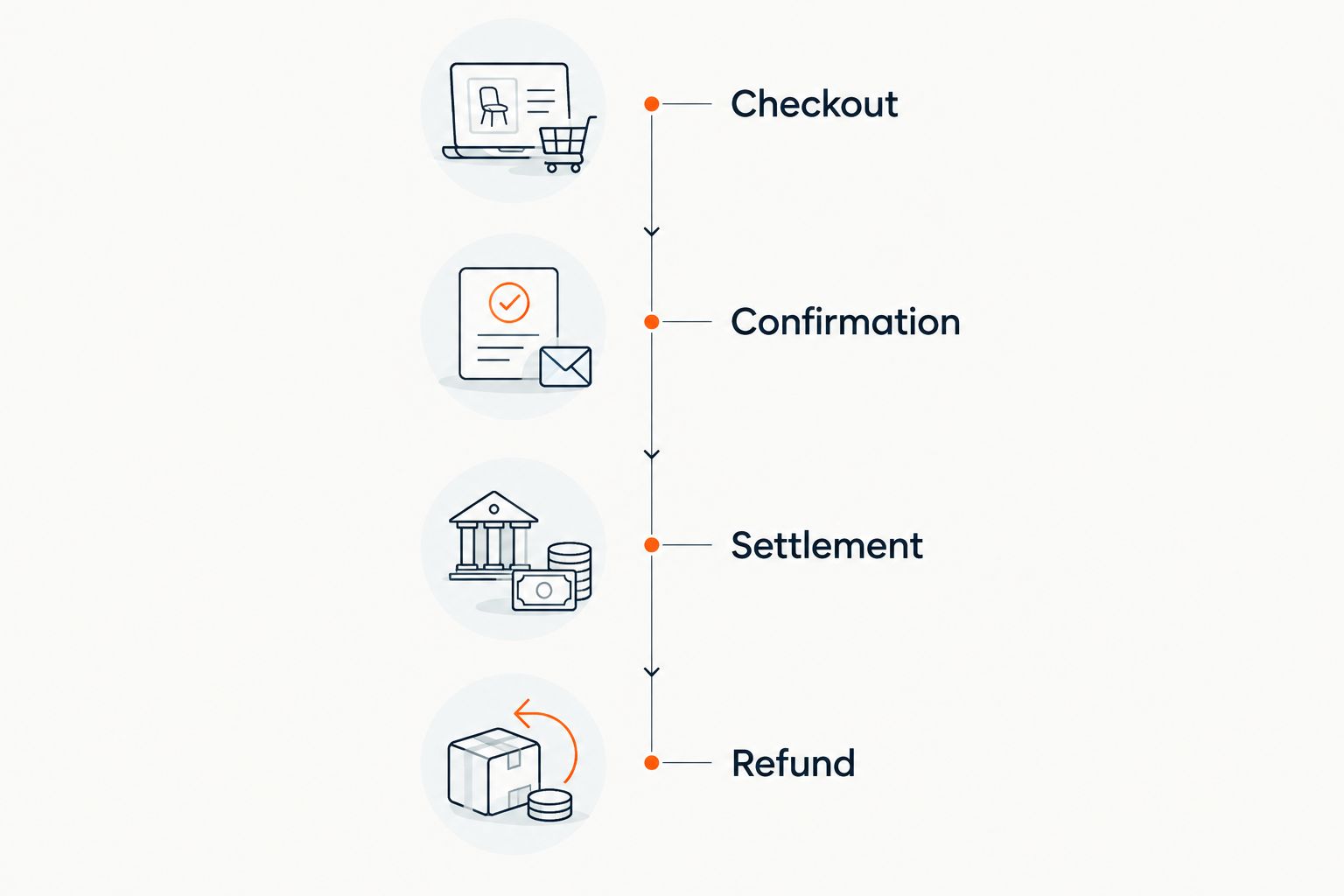
Keep the results in your event operating instructions. Box-office staff, finance staff and buyer support should use the same explanation of the currency workflow rather than improvise separate answers.
Can international buyers pay if my event uses one currency?
One event currency can serve international buyers when your payment provider accepts their payment method and the transaction is approved. You do not need to describe that arrangement as multi-currency checkout.
The practical question is whether the buyer can complete payment in your stated event currency. Test the supported payment journey and make that currency visible before the buyer commits.
Does SAR ticket pricing mean I can receive Saudi payouts?
SAR ticket pricing does not establish Saudi payout eligibility. Pricing, account onboarding and settlement are separate parts of the payment arrangement.
Confirm the account arrangement for your event directly before launch. Do not treat a supported currency label as confirmation that a Saudi bank account can receive payouts through the proposed provider.
Does booking through ChatGPT or Claude change the checkout currency?
Booking discovery does not establish the checkout currency. With ZunaroSpace, events can be found and booked inside ChatGPT and Claude, including seat selection on the real map, but checkout completes on the organiser’s own site—not in chat.
The WhatsApp agent answers buyers, holds seats and hands over a checkout link. Assess the currency at that linked checkout, where the payment transaction actually happens.
Keep discovery, seat holds and payment distinct. Your team can support an international buyer through the booking journey without claiming that the chat interface handles their money.
FAQ
Can I sell tickets in multiple currencies in 2026?
Yes, when your ticketing platform and payment account support the required checkout currencies. Confirm whether the feature applies across different events or lets buyers choose a currency within the same event.
Is accepting international cards the same as multi-currency ticketing?
No, international card acceptance and multi-currency checkout are different capabilities. An overseas buyer can pay in your event’s stated currency without choosing a different checkout currency.
Does a converted amount mean the buyer pays in that currency?
No, a converted display amount does not by itself change the payment currency. Check the currency specified at the actual payment step.
Which ticket pricing currencies does ZunaroSpace support?
ZunaroSpace supports AED and SAR pricing. Confirm the configuration required for your event rather than assuming that this includes buyer-selectable currency checkout.
Can I receive Saudi payouts because my event is priced in SAR?
SAR pricing does not confirm Saudi payout eligibility. Establish payment-account eligibility and the settlement arrangement separately before accepting paid orders.
Should ticket currency follow the buyer’s language?
No, language and currency are separate settings. Arabic or English support addresses how buyers read the purchase journey, not which currency their payment uses.
Do ticket payments complete inside ChatGPT or Claude?
No, ZunaroSpace checkout completes on the organiser’s own site. ChatGPT and Claude support event discovery and booking, including seat selection, rather than completing payment in chat.
One last thing
Before your 2026 launch, write the currency workflow in a single operational sentence: the event displays this currency, checkout charges this currency, and settlement reaches this account in this currency. Fill it from the demonstrated payment configuration, not the sales presentation.
If your team cannot complete that sentence, pause the currency claim—not the entire event plan. A clearly labelled, supported event currency is a better operating decision than an unverified promise of local-currency checkout.


