


Every show has seats that never sold - and no one was working on them. Yes—you can sell tickets for a hybrid event with a livestream option by separating venue admission from online viewing access. Use an event ticketing platform for sales and admission, then verify how your streaming service authenticates viewers, delivers access and handles cancellations before you publish.
- Hybrid event ticketing livestream sales need separate rules for venue admission and online viewing.
- ZunaroSpace provides branded ticketing, reserved seating, box office and door check-in; verify the livestream workflow before committing.
- Keep physical seat capacity separate from online viewing access.
- Test purchase, access delivery, playback and refunds before opening sales.
Why this matters
Selling a ticket and delivering a livestream are different jobs. A successful payment does not, by itself, give the purchaser authenticated access to a broadcast. Your setup needs to connect the purchase to the viewing permission you promised.
For the ticketing side, ZunaroSpace brings a branded storefront, seating, box office, kiosk and door check-in onto one live inventory. That addresses venue sales and admission; assess the streaming service and its connection to ticket purchases separately.
You keep the fees, the funds and the customers. For a hybrid event, put that ownership into practice by documenting who controls the order record, the viewing permission and the support conversation.
Can I sell tickets for a hybrid event with a livestream option?
Yes. Build the offer around what each ticket admits its holder to, then connect each purchase to the appropriate admission process. Do not use an unspecified “event access” label for tickets with different entitlements.
| Ticket option | Best for | What it includes | Advantage | Limitation |
|---|---|---|---|---|
| Venue admission | Organisers selling the physical experience | Entry to the venue under your published seating rules | Keeps physical capacity explicit | Does not include online viewing unless you expressly add it |
| Livestream access | Organisers serving a remote audience | Access to the specified online broadcast | Separates viewing access from physical seats | Needs a working stream and an access-control process |
| Combined access | Organisers offering attendance plus viewing | Venue admission and the stated online entitlement | Gives purchasers a defined combined offer | Adds rules for access delivery, transfers and refunds |
Set up the workflow in this order:
- Define the entitlement. Write exactly what the purchaser receives, including whether a recording is included.
- Separate capacity. Keep venue places distinct from any viewing limit imposed by your streaming arrangement.
- Choose access control. Decide how the streaming service identifies an authorised viewer.
- Connect purchase and access. Establish how a completed order produces a valid viewing permission.
- Test changes. Check what happens after cancellation, refund, transfer or a change of attendance format.
- Publish the instructions. Explain where access arrives, when viewing opens and how attendees request help.
These steps are acceptance criteria, not a claim that every ticketing platform performs every task. Ask the supplier to demonstrate the complete workflow with your proposed streaming service.
Venue admission: protect physical capacity
Best for organisers whose event depends on the room experience. A venue ticket should make the physical entitlement clear: the performance, date, entry conditions and seat or admission area.
Reserved seating belongs to the venue inventory. A remote viewer does not need a physical seat, so do not allocate one merely to make the online purchase fit a seating-based setup. That would confuse the room's remaining capacity with demand for the broadcast.
Venue-only admission has a clear operational boundary: the ticket is checked at the door. Its limitation is equally clear. Unless you explicitly include viewing access, the purchaser has no stated entitlement to watch online instead.
Before launch, decide whether someone who cannot attend can switch to the livestream. Document the procedure rather than leaving box office staff to improvise it during admission.
Livestream access: define the viewing entitlement
Best for organisers selling participation without venue attendance. State which broadcast the ticket covers, whether access is live-only, and whether any recording is included. A programme containing several sessions also needs an explicit session-access policy.
A public viewing link is easy to distribute, but it does not restrict access to ticket holders. If you require restricted viewing, select an authentication method supported by the streaming service and prove that it works with your purchase process.
Ask whether the viewer needs an account, a personal link or an access code. Then test the experience from a fresh browser rather than an account already signed in as the organiser.
The advantage is a clearly separate online offer. The limitation is dependence on broadcast delivery and viewer support: an order confirmation cannot resolve a failed stream or an invalid viewing permission.
Combined access: make the extra entitlement explicit
Best for organisers offering venue attendance with an additional viewing benefit. Describe the benefit precisely. Watching the live broadcast elsewhere is different from receiving access to a recording after attending the event.
Combined access gives you a way to package those entitlements together. It also creates more decisions: whether viewing permission survives a venue-ticket transfer, whether a partial refund is possible, and whether the online component can be used independently.
Do not assume a combined ticket needs to exist. If your programme offers no meaningful reason to use both formats, separate venue and livestream tickets keep the offer easier to explain.
Write the rule before configuring the product. The checkout description, confirmation message and support guidance should all describe the same entitlement.
Why the hybrid ticketing setup varies
The right setup depends on the access you promise, not simply on whether your event has a camera. Work through these factors before selecting a workflow:
- Attendance format: Venue admission, livestream access and combined access need different fulfilment instructions.
- Seating: Reserved seats require physical inventory control; online access needs a separate viewing entitlement.
- Programme: A single broadcast and a programme with selectable sessions require different access rules.
- Language: Your purchase instructions and viewing guidance need to match the languages you serve.
- Distribution: Email and WhatsApp delivery need clear message content and a tested destination for viewing access.
- Changes: Refunds, cancellations and transfers need corresponding rules for online permission.
Keep these decisions in a shared operating document. Your box office, broadcast operator and support team need the same answers, even when different suppliers handle their systems.
How should ticket purchases connect to livestream access?
Treat the connection as a fulfilment workflow. Begin with a completed purchase, establish the viewing entitlement, deliver the access instructions and verify that the intended viewer can enter.
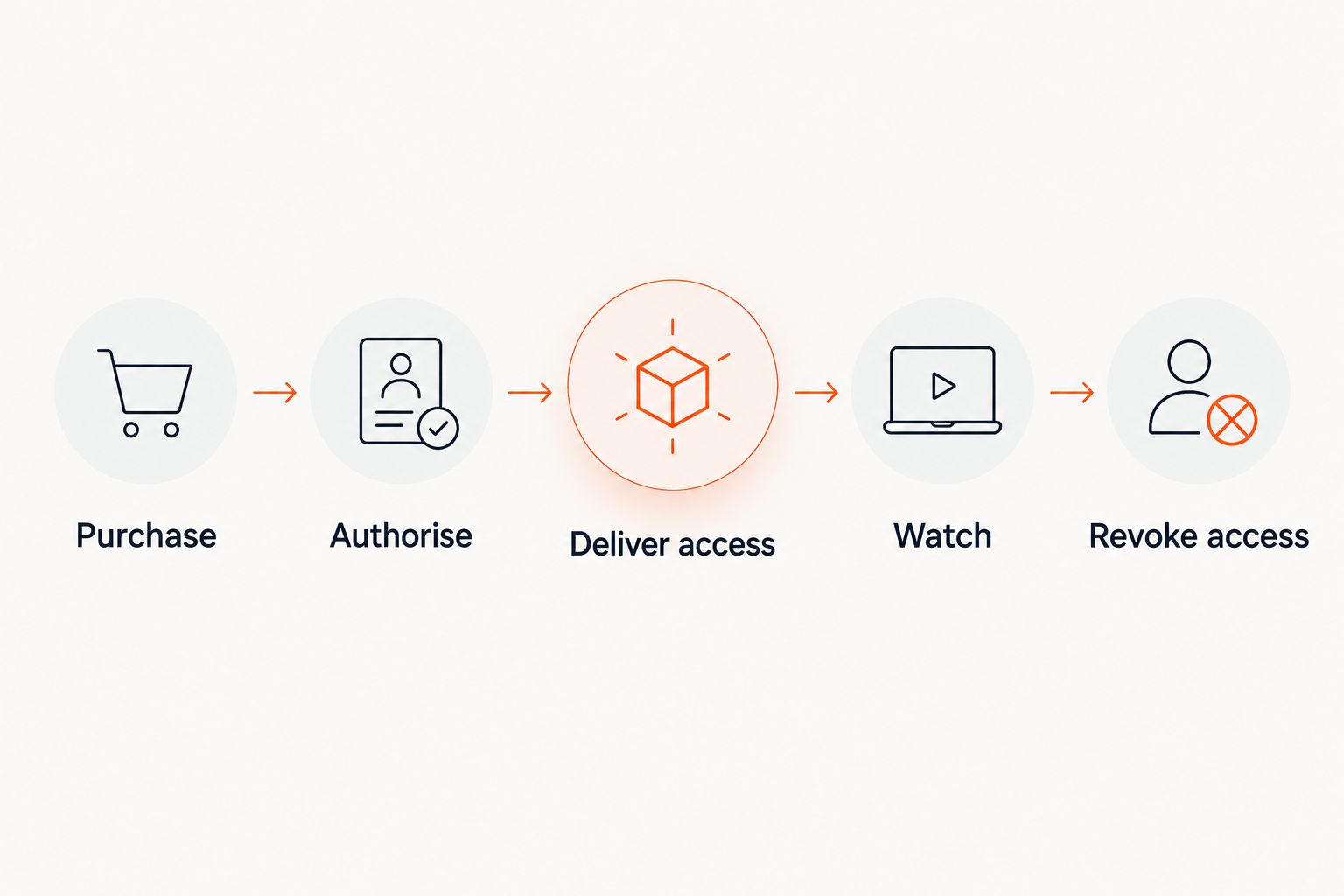
Use these stages when discussing the setup with suppliers:
- Purchase: The order records the ticket type and purchaser details required for fulfilment.
- Authorise: The streaming service recognises the correct viewing entitlement.
- Deliver access: The attendee receives accurate instructions through the agreed channel.
- Watch: The viewing experience works without organiser-level permissions.
- Revoke access: A cancelled entitlement stops granting access under your published policy.
A supplier demonstration should show the entire sequence, including the cancellation case. A successful payment demonstration alone does not establish that the streaming connection works.
Keep the attendee-facing instructions short. Name the viewing destination, explain any sign-in requirement and identify the support route. Do not place organiser credentials or broadcast-management links in attendee messages.
What should I test before opening hybrid event sales?
Run a rehearsal using the actual ticket descriptions and delivery messages. Work through the attendee journey without relying on information that appears only in your organiser dashboard.
Test the purchase and confirmation
Check that venue admission and livestream access are distinguishable before payment. Review the confirmation on a phone as well as a desktop, and make sure each ticket type receives the right instructions.
For combined access, confirm that the message explains both components. Avoid wording that suggests a door-admission code is automatically a streaming credential.
Test viewing and support
Open the access instructions in a fresh browser and follow them exactly. Check the stated sign-in process, the correct broadcast and any scheduled access restriction you intend to publish.
Then rehearse a failed-access request. Your support team needs a way to distinguish an incomplete order, an incorrect account and a broadcast problem without asking the attendee to diagnose the system.
Test changes and reconciliation
Cancel a test entitlement and check the effect on viewing access. Repeat the exercise for any transfer or format-switching process you plan to offer.
Reconcile venue admissions and streaming access separately. A door scan records physical entry; it does not establish that someone watched online. Likewise, a viewing permission is not proof of attendance at the venue.
Where does ZunaroSpace fit in a hybrid event setup?
ZunaroSpace event ticketing is best for independent organisers and venues that want branded sales and venue admission on one live inventory. Storefront, reserved seating, box office, kiosk and check-in sit within that ticketing operation.
Arabic and English support includes full right-to-left layouts. E-tickets can arrive through WhatsApp as well as email. Those capabilities are relevant to attendee communication, but a ticket-delivery channel is not the same thing as a livestream access-control system.
The platform's WhatsApp agent answers buyers, holds seats and hands over a checkout link. AI that sells your tickets. For a hybrid programme, ask separately how the online ticket entitlement reaches the streaming service; do not treat seat holding as a substitute for viewer authentication.
The decision boundary is the complete viewing workflow. Before selecting ZunaroSpace for hybrid event ticketing, request a demonstration covering your stream, access delivery and cancellation rules through the contact page.
Based at DTEC, Dubai Silicon Oasis. Built for the Gulf - the UAE and Saudi Arabia.
Do livestream tickets need to reserve a venue seat?
Livestream tickets should not reserve a venue seat unless physical admission is included. Separate the online entitlement from the room's seating allocation so each inventory represents what you actually sell.
Can I include a recording with a livestream ticket?
You can include a recording when your production arrangements, permissions and delivery setup support it. State whether replay access is included and define the viewing period before sales open; do not imply that a live ticket automatically includes a recording.
What happens if the livestream fails but the venue event continues?
Apply the policy you published for the online component. Define that scenario before launch, including who communicates the problem and how you handle livestream-only and combined-access orders.
FAQ
Can I sell in-person and livestream tickets for the same event?
Yes. Define separate venue and online entitlements, then verify how each purchase produces the correct admission or viewing permission.
Does a livestream ticket need a reserved seat?
No, unless the ticket also includes physical admission. Keep online viewing entitlement separate from venue seating inventory.
Can I send the livestream link with the ticket confirmation?
Yes, when your delivery workflow supports it. If access must be restricted, verify that the link or sign-in process grants viewing only under your chosen access rules.
Does an e-ticket automatically give someone access to the stream?
No. The streaming service must recognise the ticket holder's entitlement through a tested access process.
Can I sell a ticket that includes attendance and a replay?
Yes, when your recording permissions and delivery setup support that offer. Explain the venue admission and replay entitlement separately before purchase.
What should I ask a hybrid event ticketing supplier to demonstrate?
Ask for a complete purchase-to-viewing demonstration using your intended streaming service. Include confirmation delivery, viewer authentication, cancellation and access revocation.
Can I count livestream viewers as venue attendees?
Keep livestream viewing and venue attendance as separate measures. Door check-in records physical admission, while streaming records need their own defined reporting basis.
One last thing
Test a refund before you celebrate a successful purchase. The successful sale proves that money and order information moved through checkout. The refund test establishes whether your viewing permissions stay aligned with the entitlement after the order changes.
Give that test an owner. Your ticketing and broadcast teams should agree who removes access, who checks the result and who answers the attendee when the systems disagree.


