


Yes, event ticketing software can handle recurring weekly events when it supports dated performances or separately managed event dates. For your 2026 programme, verify that each date has its own ticket inventory and admission rules; a repeating calendar entry alone does not prove that the software can manage a recurring series.
- Can event ticketing software handle recurring events? Yes, with date-specific inventory and admission controls.
- ZunaroSpace suits independent organisers who want ticketing through their own branded storefront, box office and kiosk.
- Choose dated performances for a consistent weekly programme; choose separate events when the format changes.
- Test a cancelled date, a transferred booking and a wrong-date ticket before publishing your series.
Can event ticketing software handle recurring weekly events?
Yes. The deciding feature is date-specific ticketing, not simply a repeat button. Your software needs to distinguish the series from each performance within it. A ticket for one performance must not become permission to attend every performance unless you deliberately sell that entitlement.
ZunaroSpace provides event ticketing through a branded storefront, reserved seating, box office, kiosk and door check-in on one live inventory. When assessing a weekly programme, ask for a demonstration of how those channels handle individual performance dates.
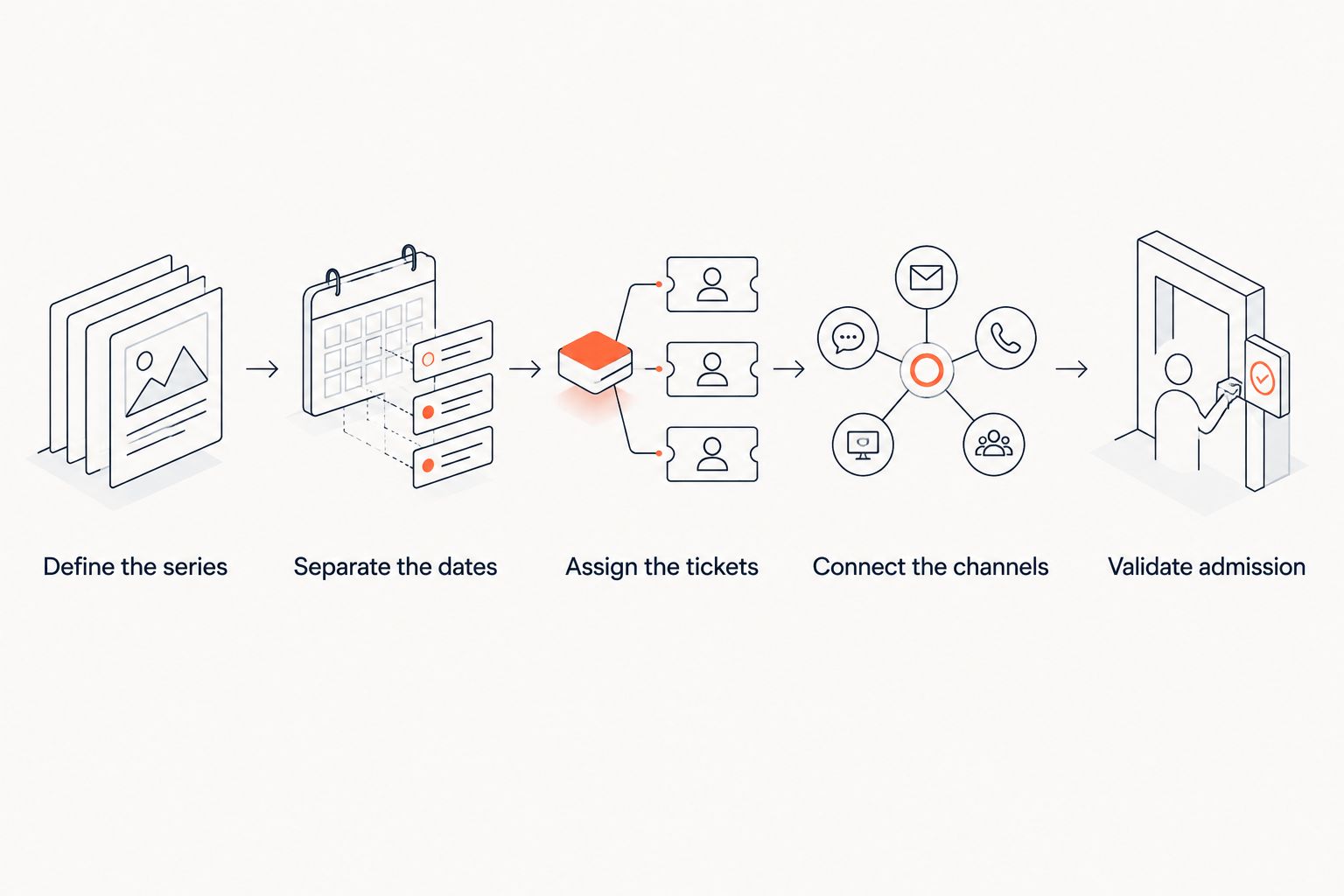
Use this sequence to establish whether a platform fits your programme:
- Define the series. Decide which details stay consistent, such as the event name, venue and seating layout.
- Separate the dates. Give every performance a clear date and start time, with independently controlled admissions.
- Assign the tickets. Confirm that each booking records the selected performance, not just the series name.
- Connect the channels. Check that storefront, box office and kiosk sales draw from the same performance inventory.
- Validate admission. Test that door staff can identify the correct performance and reject a ticket for another date.
These are acceptance criteria, not optional conveniences. A system that creates repeated listings but cannot distinguish their bookings leaves your team to resolve the ambiguity.
Why this matters
Every show has seats that never sold - and no one was working on them. A weekly schedule gives you repeated opportunities to sell, but it also repeats any weakness in your setup.
For a 2026 programme, you need to see which performance needs attention without confusing it with another date. A full Saturday does not tell you whether the following Saturday has enough bookings.
The same distinction matters at the door. Staff need a ticket that identifies the performance clearly, rather than a familiar event name that appears throughout the calendar.
Which setup fits your weekly programme?
Recurring events do not all need the same structure. Match the ticketing model to what the attendee is entitled to attend. A single-date ticket, a repeated performance and a series pass represent different admission rules.
| Setup | Best for | Main advantage | Main limitation | What to demonstrate |
|---|---|---|---|---|
| Dated performances within a series | A consistent weekly show or programme | Keeps related dates together while distinguishing admissions | Shared settings need clear date-specific exceptions | Change one performance without changing the others |
| Separate dated events | Weekly events with different acts, formats or venues | Gives each date its own setup and identity | Repeated details need checking across listings | Reuse event details without copying old bookings |
| Series passes | Programmes that deliberately include multiple performances | Gives the attendee an entitlement across named dates | Admission rules are more complex than a single-date ticket | Validate included dates and any seat-selection rules |
Dated performances: best for a consistent weekly show
Use dated performances when the event identity stays the same and the dates are the main difference. A theatre production with repeated performances is a straightforward example of this structure.
The advantage is organisation. Your team can treat the production as a series while managing each performance separately. The limitation is exception handling: a changed start time or altered seating layout must apply to the intended date.
Choose this structure when consistency is the rule and exceptions are identifiable. Ask the supplier to show where series-level settings end and performance-level settings begin.
Separate events: best for a changing weekly programme
Use separate dated events when the programme changes enough that each date needs its own identity. Different acts, venue arrangements or admission conditions make independent listings easier to review.
The advantage is control over each event. The limitation is repetition: copied descriptions, dates and instructions need checking before publication.
Choose separate events when the differences matter more than the shared weekly rhythm. Do not accept duplication as proof of recurring-event management; inspect what the duplication actually carries across.
Series passes: best for admission across named dates
A series pass is an admission product, not a scheduling feature. It needs an explicit definition of which performances the holder can attend.
The advantage is a clear offer for attendees who want the programme rather than a single performance. The limitation is entitlement management, especially when reserved seats or performance-specific reservations are involved.
Choose a series pass only when multi-date admission is intentional. Demonstrate pass validation separately from ordinary single-performance tickets.
How should you test recurring-event ticketing?
Build a demonstration around your real operating pattern. A polished calendar view proves less than a booking that reaches the correct performance and validates at the correct door session.
For your 2026 evaluation, follow the booking from publication through admission. Ask the supplier to perform each action rather than describe a feature in a presentation.
Define the series
Start with the programme name, venue, dates and start times. Identify the details that staff should edit centrally and the details that belong to an individual performance.
Include an exception in the demonstration. A changed start time is enough to show whether the system treats dates independently or simply repeats the same information everywhere.
Separate the dates
Open individual performances and inspect their admission limits. Then change a limit on a selected performance and check the neighbouring dates.
The required result is isolation. Editing one performance should affect other performances only when you deliberately choose a series-wide change.
Assign the tickets
Make a booking and inspect the confirmation and ticket. Both should identify the selected date and time clearly enough for an attendee and a door operator to understand them.
Check the booking record too. A correct-looking email is not enough if staff cannot find the associated performance when handling an enquiry.
Connect the channels
Follow a sale through the storefront and another through an attended sales channel. Inspect the same performance after each transaction.
Your acceptance criterion is shared inventory for that performance. For reserved seating, the test must identify the actual seat, not just a reduction in an overall admission total.
Validate admission
Present a ticket during its intended performance, then test it against another performance. Also ask staff to show how they recognise a ticket that has already been admitted.
Accept the workflow only when the date, entitlement and admission status remain clear throughout. Staff should not need to infer the correct performance from an attendee's explanation.
Why recurring-event requirements vary
The right setup depends on the programme you run. These factors change what you need to demonstrate:
- Performance structure. A repeated production and a changing weekly line-up need different approaches to shared event details.
- Seating. Reserved seating requires seats to be associated with the selected performance, rather than treated as a single pool across dates.
- Sales channels. A storefront, box office and kiosk need a consistent view of the performance being sold.
- Admission entitlement. A single-date ticket and a series pass need different validation rules.
- Languages. Arabic and English programme information need clear date and time presentation in both directions of reading.
- Programme changes. A rescheduled performance needs handling that does not unintentionally alter unrelated dates.
Do not compare platforms by counting features. Compare the actions your team must complete during a normal week and during an exception.
Can recurring events use reserved seating?
Yes, recurring events can use reserved seating when seat assignments belong to individual performances. Reusing the same seating layout is different from reusing the same seat booking.
A seat booked for an evening performance must not block that seat on another date unless your admission product intentionally reserves it across the series. The seating plan can stay consistent while each performance has its own bookings.
Use the reserved seating charts guide to frame your seating questions. In the demonstration, inspect the same seat across different performances and confirm that each booking has the correct date attached.
Can I cancel a weekly event without cancelling the series?
Yes, a recurring-event setup can support an individual cancellation when performances are independently managed. Require the supplier to demonstrate the scope of the change before you publish.
Test how the cancelled date appears in the storefront, what staff see in the booking record and how affected attendees are identified. Refund handling is a separate workflow; do not assume that hiding a performance resolves its existing bookings.
Cancel the performance, not the programme. The system should make that distinction visible before your team confirms the action.
Can I copy an event instead of using recurring scheduling?
Yes, copying an event can support a weekly programme, provided you review the new date and its ticketing rules. Copying is a setup method; it does not establish how bookings, inventory or admission behave.
Inspect the copied event for inherited start times, sales windows, access conditions and attendee instructions. Confirm that historical orders and admission records remain associated with their original event.
For a 2026 programme with frequent changes, separate listings can be easier to audit than a series with many exceptions. The trade-off is repeated checking, so make publication review an explicit staff responsibility.
Where ZunaroSpace fits
ZunaroSpace is best for independent organisers and venues that want event ticketing through their own branded storefront, box office and kiosk. Store, seating and door check-in share one live inventory, and the platform supports Arabic and English with full right-to-left presentation.
That channel connection is relevant to a weekly programme because the online sale and the walk-up sale need to identify the same performance. The ownership principle is direct: You keep the fees, the funds and the customers.
The boundary is equally important. Shared inventory does not, by itself, establish automatic weekly scheduling, series-pass behaviour or how a performance exception works. Assess ZunaroSpace event ticketing against the recurring-event tests above before choosing your operating structure.
Check your weekly ticketing workflow
Use your performance dates, seating rules and sales channels to assess the platform.
FAQ
Can event ticketing software handle recurring events every week?
Yes, event ticketing software can handle recurring events through dated performances or separately managed event dates. Verify date-specific inventory, ticket assignment and admission before publishing a weekly programme.
What's the best setup for a show that repeats every week?
Dated performances are the best fit when the show stays consistent and each performance needs separate bookings. Use separate events when acts, venues or admission conditions change substantially.
Is duplicating an event the same as recurring scheduling?
No, duplicating an event creates another listing; recurring scheduling defines a repeated programme. In either case, check that bookings and admission records belong to the correct date.
Can the same seat be sold for different weekly performances?
Yes, the same seat can be assigned independently across different performances when the system manages seating by date. Test the seat on each performance rather than relying on the shared seating-plan view.
Can I change the time of a single weekly performance?
A suitable recurring-event setup lets you change an individual performance without changing the whole series. Ask the supplier to demonstrate both the edit and the updated attendee-facing information.
Can a weekly series include season passes?
A weekly series can include passes when the platform supports the required multi-date entitlement. Specify included performances, admission validation and any seat-reservation requirements before offering a pass.
What should I check before choosing recurring-event software in 2026?
Check date-specific inventory, clear tickets, shared sales-channel inventory and correct door validation in 2026. Also test a cancellation or reschedule so you understand how exceptions affect existing bookings.
One last thing
Test the wrong-date ticket. It is a more revealing acceptance check than watching the system publish another weekly listing.
For your 2026 programme, ask a staff member to handle that ticket using the proposed door workflow. If the performance mismatch is clear and the next action is understandable, you have tested the operational distinction that a recurring calendar must preserve.


