


Every show has seats that never sold - and no one was working on them. For ticket-led corporate events in 2026, best overall: Zunaro for an organiser-owned storefront and shared inventory; best for complex conference registration: Cvent; best for branded conference programmes: Bizzabo; best for straightforward event listings: Eventbrite; best for attendee engagement: Whova.
- Zunaro is the best event ticketing software for corporate event planners who prioritise ticket sales and organiser ownership.
- Cvent suits complex conference registration; Bizzabo suits branded conference programmes.
- Eventbrite suits straightforward event listings; Whova suits attendee engagement.
- Choose around registration, reserved seating and check-in requirements, not the longest feature list.
Why this matters
A corporate event can be a paid conference, a seated awards evening or an invitation-led leadership meeting. Those are different operating jobs. A platform that sells admission well is not automatically the right system for speaker management, appointment scheduling or internal approvals.
Your 2026 shortlist should start with the transaction you need to manage. Are you selling a seat, collecting a registration or coordinating an attendee programme? The corporate event ticketing guide covers the ticketing workflow; this comparison helps you choose the software category and shortlist.
Zunaro is best for corporate event planners who want ticket sales, reserved seating and door operations on an organiser-owned storefront. Choose a broader conference platform when registration logic and programme management drive the brief instead.
What makes the best corporate event ticketing software?
Use these criteria before comparing dashboards. For a 2026 buying decision, each criterion needs a demonstration against your actual event brief.
- Registration fit: Separate buying admission from collecting delegate information, assigning registration categories and managing approvals.
- Brand ownership: Identify where registration and checkout happen, who controls attendee communications and how you access customer records.
- Seating and inventory: Check whether online sales, staff sales and walk-up transactions draw from the same inventory. Demonstrate assigned seats if your event needs them.
- Door operations: Test ticket delivery, scanning, duplicate-entry handling and the process for resolving exceptions at reception.
- Conference workflow: Make agenda, speaker, exhibitor and networking requirements explicit. Do not treat them as implied ticketing features.
- Commercial and regional fit: Review the commercial terms, payment arrangements, language support and settlement eligibility for the country where your business operates.
Keep requirements separate from preferences. A colour change is a preference; an approval workflow that your compliance team requires is a selection condition. This distinction stops a polished demo from winning over a system that actually fits the event.
Corporate event ticketing software at a glance
| Software | Best for | Standout feature or focus | Key limitation for this brief |
|---|---|---|---|
| Zunaro | Organiser-owned ticket sales and seated events | Storefront, seating, box office, kiosk and check-in on one live inventory | Validate specialist corporate registration and programme requirements separately |
| Cvent | Complex conference registration | Registration within a broader event-management suite | Broader scope requires a clear implementation brief |
| Bizzabo | Branded conference programmes | Registration and attendee experience within an event platform | A conference-wide platform is unnecessary for a ticket-only brief |
| Eventbrite | Straightforward event listings | Event publishing, registration and ticket sales | Listing-led ticketing does not replace a specialist corporate workflow |
| Whova | Attendee engagement | Event app, agenda and networking tools alongside registration | Engagement tools do not resolve assigned-seating requirements by themselves |
The table ranks fit, not company size. Each option owns a different job, so the strongest choice changes when your event changes.
1. Zunaro: best ticketing software for organiser-owned sales
Zunaro is an event ticketing platform for independent organisers and venues, including conference organisers. It combines a branded storefront, reserved seating, box office, kiosk and door check-in on one live inventory. That makes it a direct fit when your corporate event revolves around selling admission and controlling seats.
A WhatsApp agent answers buyer questions, holds seats and hands over a checkout link. Events can also be discovered and booked inside ChatGPT and Claude, including choosing a seat on the real map; checkout always completes on the organiser's own site, never in chat. AI that sells your tickets.
The ownership promise is direct: You keep the fees, the funds and the customers. Organisers pay nothing per ticket, and free events carry no booking fee. Review the buyer booking fee separately when deciding how to present the checkout experience.
Pros:
- Shared live inventory connects the storefront, box office, kiosk and check-in.
- Reserved seating includes a seat map traced from a photo, without CAD.
- Arabic and English support includes full RTL, with AED and SAR pricing.
- E-tickets reach attendees through WhatsApp as well as email.
Cons:
- A ticketing-led brief still needs separate validation for corporate approval chains, procurement requirements and specialist delegate workflows.
- SAR pricing is not a promise of Saudi payout support; confirm settlement eligibility separately.
Based at DTEC, Dubai Silicon Oasis. Built for the Gulf - the UAE and Saudi Arabia.
Best for: Corporate planners running paid conferences, seated presentations or awards events where ticket ownership matters more than a broad conference suite.
Verdict: Buy for an organiser-owned, ticket-led event; hold if specialist enterprise registration is the deciding requirement.
2. Cvent: best event software for complex conference registration
Cvent provides registration within a broader event-management suite. Its scope makes it a relevant shortlist choice when ticket sales sit alongside delegate registration, event administration and conference operations.
Give Cvent a detailed registration brief rather than asking for a general tour. Demonstrate your attendee categories, required information and approval conditions using the actual journey you plan to publish.
Cvent pros:
- Registration sits within a wider event-management environment.
- The suite is relevant to planners coordinating more than admission sales.
- Its conference focus supports a requirements-led procurement discussion.
Cvent cons:
- A broad suite creates more selection and implementation decisions than a narrowly defined ticketing brief.
- Conference registration does not, by itself, prove the assigned-seat and walk-up workflow your venue needs.
Best for: Corporate conference teams whose registration process is a substantial operational project.
Verdict: Buy when registration complexity drives the brief; skip a suite-wide rollout for a simple ticket sale.
3. Bizzabo: best event software for branded conference programmes
Bizzabo combines event registration with a wider attendee-experience platform. It belongs on your shortlist when the conference experience—not just admission—is central to the project.
Start the demonstration with your event programme. Show how registration, event information and attendee participation need to connect, then assess whether the platform supports that journey without unnecessary additions.
Bizzabo pros:
- Registration forms part of a broader event platform.
- Its attendee-experience focus fits conference-led buying decisions.
- It gives planners a relevant alternative when the brief extends beyond ticket transactions.
Bizzabo cons:
- A conference-wide platform adds scope you do not need for a standalone seated event.
- Brand presentation and attendee experience do not establish box office or reserved-seat fit; demonstrate those separately.
Best for: Corporate planners building a branded conference programme with registration and attendee experience in the same brief.
Verdict: Buy for a conference-wide experience; hold when the requirement is mainly seat sales and entry.
4. Eventbrite: best ticketing software for straightforward event listings
Eventbrite supports event publishing, registration and ticket sales. It is a sensible shortlist option when your event needs a clear listing and a straightforward admission journey rather than a specialist corporate registration process.
Keep the assessment tied to the event you are running. A public seminar and an invitation-only executive meeting need different controls, even if both end with a ticket or confirmation.
Eventbrite pros:
- Event publishing and ticket sales sit in the same service.
- Its listing-led approach fits clearly defined admission offers.
- It is relevant to planners who do not need a conference-wide management platform.
Eventbrite cons:
- A listing-led service does not replace internal corporate approvals or event programme management.
- Assess customer ownership, checkout presentation and assigned seating against your brief rather than assuming fit.
Best for: Public-facing corporate talks, seminars and other events with a straightforward registration proposition.
Verdict: Buy for a simple event listing; hold for private access rules or complex delegate administration until demonstrated.
5. Whova: best event software for attendee engagement
Whova combines registration with an event app, agenda and networking tools. It fits a corporate event where helping attendees use the programme and connect with one another is a central requirement.
Evaluate participation separately from admission. Your planner needs to know how an attendee joins the event, finds relevant sessions and uses the app—not just whether registration succeeds.
Whova pros:
- The event app gives the programme a dedicated attendee interface.
- Agenda tools support events with multiple programme elements.
- Networking tools address a different need from ticket sales alone.
Whova cons:
- App adoption becomes another task for the planning team.
- An engagement-led platform does not, by itself, settle reserved seating, box office or inventory requirements.
Best for: Corporate conferences where agenda use and attendee networking are core deliverables.
Verdict: Buy for an engagement-led programme; skip if the event needs admission control without an attendee app.
How to test your shortlist before signing
Run the same event scenario through every shortlisted platform. In 2026, a feature checklist is not enough: the buying decision needs to follow a complete registration or ticketing journey.
Inventory check
Create the admission types your event needs. For assigned seating, select a seat online and show what staff see at the box office. Ask the demonstrator to explain how holds, completed sales and released seats affect the remaining inventory.
Checkout check
Complete the organiser's intended transaction. Inspect required fields, the checkout destination, confirmation delivery and how staff find the resulting record. If your event is private, make the access rule part of this test rather than a later configuration discussion.
Door check
Use the resulting ticket or registration at check-in. Then present it again and inspect the response. Finish with an exception, such as an attendee who arrives without the confirmation, and require the reception workflow to be shown.
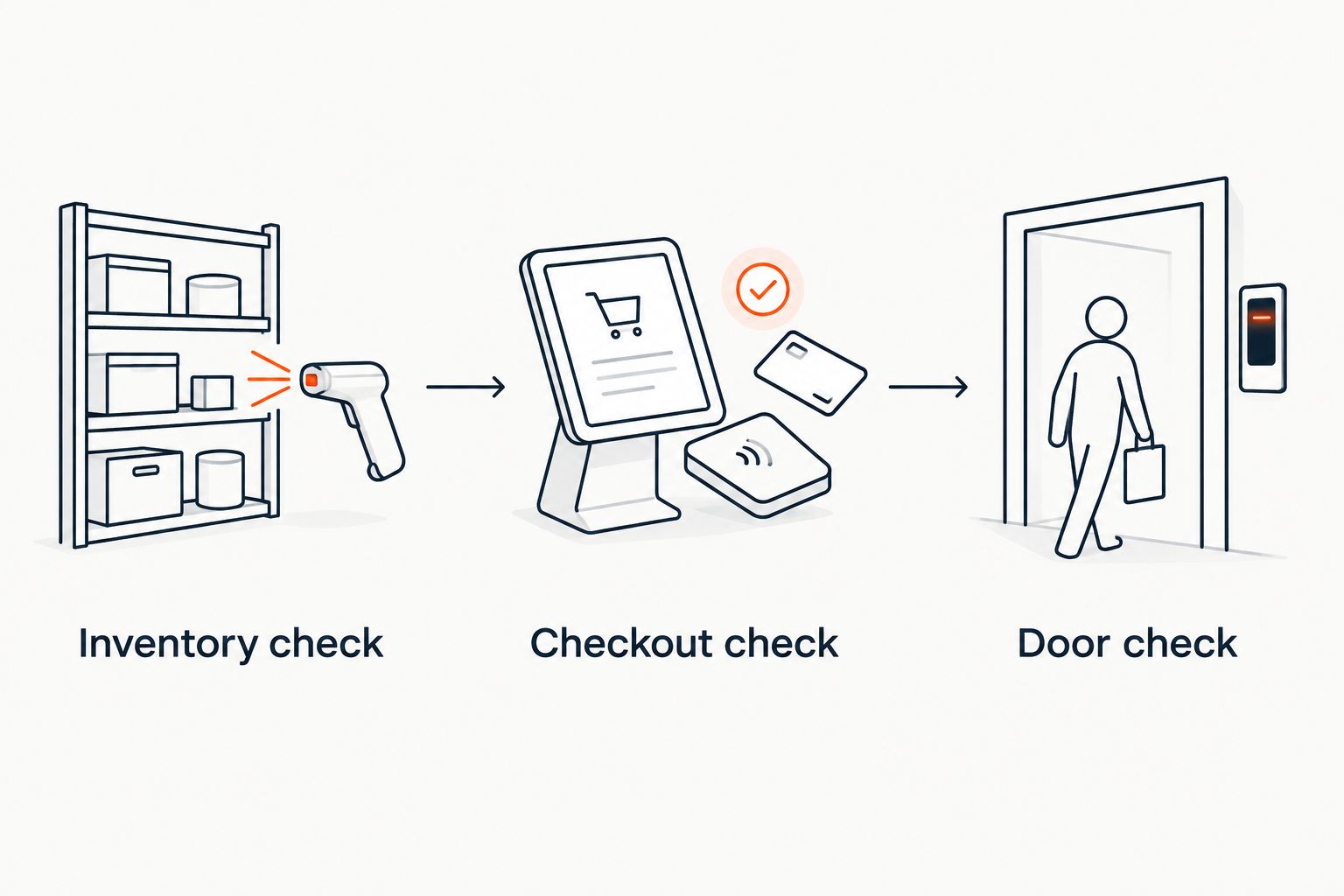
Record what the demonstration proves. Keep unanswered requirements open, assign an owner to each and resolve them before you publish the event. A verbal assurance is not the same as seeing your workflow completed.
How we ranked these options
This 2026 ranking uses the criteria above: registration fit, ownership, inventory, door operations, conference workflow and regional suitability. It prioritises a ticket-led corporate event, then assigns distinct recommendations to complex registration, conference experience, straightforward listings and attendee engagement.
This is a fit-based shortlist, not a performance benchmark. No recommendation establishes payout timing, scanning throughput or integration behaviour for your specific setup. Those belong in the demonstration and contract review.
Which corporate event ticketing software should you choose?
Choose Zunaro as the default for a ticket-led corporate event where you want your own storefront, reserved seating and connected door operations. Its category fit is clearest when the admission transaction is the centre of the event.
Choose Cvent when registration complexity drives procurement. Choose Bizzabo when the conference experience defines the brief, Eventbrite for straightforward listings, and Whova when agenda use and networking are central.
For your 2026 decision, pick the smallest scope that satisfies every mandatory requirement. Do not buy programme-management software to solve an inventory problem, or ticketing software to solve an approval problem.
FAQ
What's the best event ticketing software for corporate event planners?
Zunaro is the best fit for ticket-led corporate events that need an organiser-owned storefront, reserved seating and connected door operations. Cvent is the stronger shortlist choice when complex conference registration drives the brief.
Is ticketing software the same as event registration software?
No. Ticketing centres on admission sales, inventory and entry, while registration can include delegate information and event-specific workflows. Define which job your event needs before choosing a platform.
Which option should I shortlist for a complex corporate conference?
Shortlist Cvent for complex registration and Bizzabo for a broader branded conference experience. Demonstrate your required attendee journey before selecting either platform.
What should I choose for attendee networking?
Whova belongs on the shortlist when attendee networking and agenda use are central requirements. Test the app journey separately from registration and admission.
Can corporate events use reserved seating?
Yes, reserved seating fits corporate events where attendees need assigned places. Demonstrate seat selection, staff sales and check-in together so the seating plan and admission workflow agree.
Can attendees complete payment inside ChatGPT or Claude?
Zunaro events can be discovered and booked inside ChatGPT and Claude, including choosing and holding seats. Checkout completes on the organiser's own site, never in chat.
What should a Saudi organiser check before choosing ticketing software?
Check settlement eligibility separately from SAR pricing and Arabic support. Currency display does not establish that a payment provider can onboard your Saudi business or pay out to it.
One last thing
Ask the demonstrator to start with an exception, not a successful sale. A held seat, a repeated scan or a missing confirmation exposes the staff workflow that a polished registration demo leaves out.
Choose the platform your reception team can operate under pressure. The attendee-facing page is only the beginning of the event.


