


Most organisers find out who actually showed up the next morning, after someone manually reconciles box office receipts, kiosk printouts and online orders into one spreadsheet. Instead of that overnight scramble, keep every sales channel on one live inventory in Zunaro and pull attendee status the second a ticket sells or a scan happens at the door.
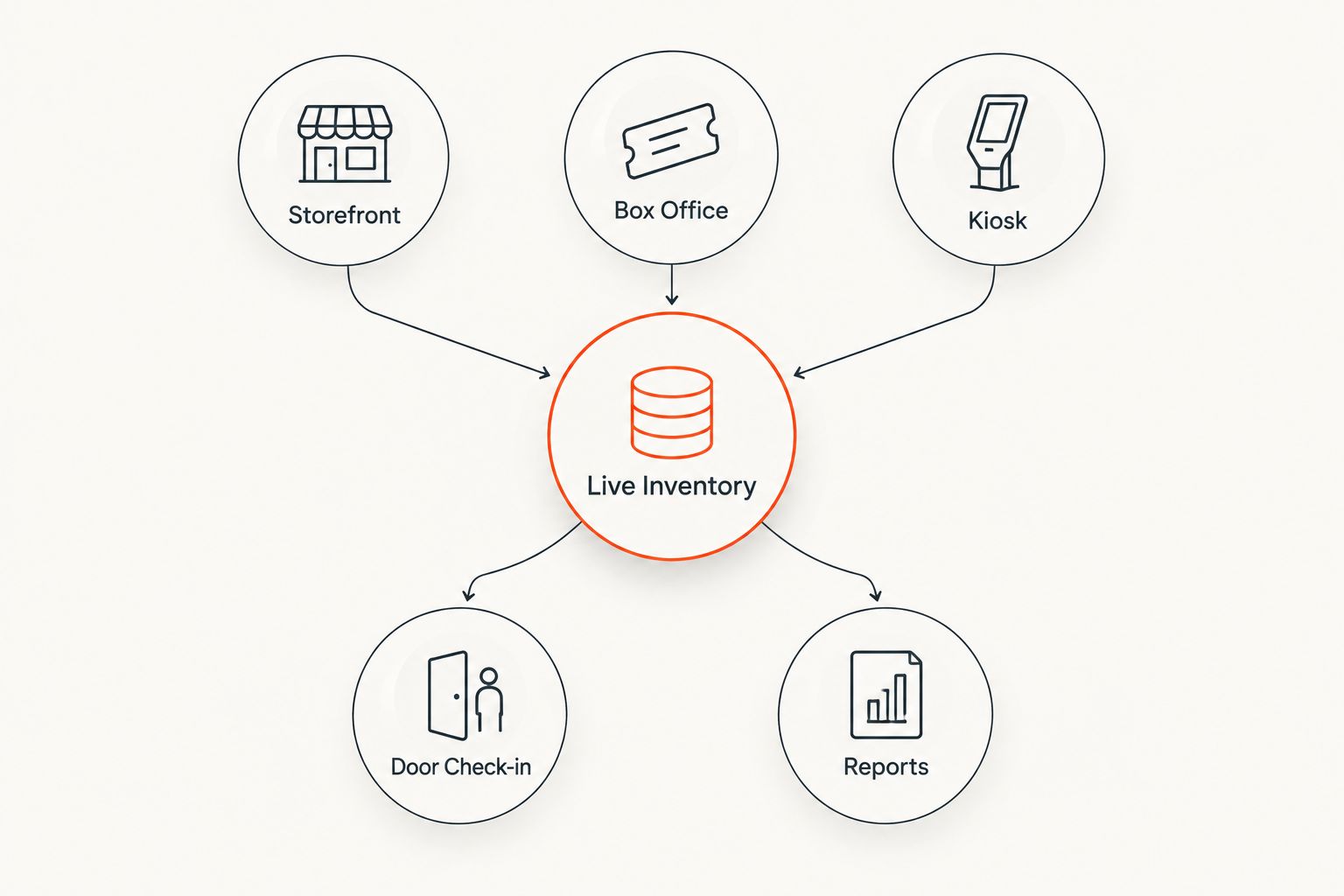
- Real-time attendee reports ticketing works when storefront, box office and kiosk share one live inventory instead of three separate ledgers.
- Zunaro's door check-in updates the same event record used by online sales, so arrival counts change the moment a ticket scans.
- Feeding ticket sales data to Google Analytics adds a marketing view on top of the same live numbers.
- The campaign agent reports attributed revenue per blast in real time, not at end-of-event reconciliation.
- Set this up once per event; it runs itself for every performance after that in 2026.
Why this matters
A report that's accurate at 6pm and wrong by 8pm isn't a report, it's a guess. When box office sales, kiosk sales and online orders sit in separate systems, someone has to manually merge them before anyone can answer "how many people are actually in the building right now." That delay is the whole problem with attendee reporting for live events in 2026: the data exists, it's just scattered across three tools that don't talk to each other.
Zunaro's approach is to keep the store, seating, box office, kiosk and door check-in on one live inventory, so there's nothing to merge. A ticket sold at the kiosk five minutes before doors reduces the same available-seat count as a ticket sold online three days earlier. That's the mechanism behind real-time attendee reports ticketing, and it's what this workflow sets up.
Before you start
- A published event with sales open on at least one channel — storefront, box office or kiosk. Box office and kiosk automatically draw from the same inventory as the storefront once the event is live, so there's no separate sync step to trigger.
- Door check-in access for whoever is scanning tickets on event day, logged into the correct event rather than a duplicate or test version of it.
- The gotcha: check-in scans queue locally on the scanning device and sync once it reconnects. If you pull an attendee report during a Wi-Fi drop at the door, the numbers will undercount arrivals for a few minutes until the queue clears. Don't treat a mid-outage read as final.
Set up one live inventory across storefront, box office and kiosk
- Publish the event on your Zunaro storefront with reserved seating configured, since seat-level data is what makes the attendee report useful rather than just a headcount.
- Open the event's box office view for phone and walk-up sales — every sale here deducts from the same seat map buyers see online, so a seat sold at the door disappears from the online map immediately.
- Enable kiosk mode on the device you're using for on-site self-serve sales. It reads from and writes to the same inventory as the storefront and box office.
- Confirm the seat map matches the venue. If it was traced from a photo, that setup takes roughly 60 seconds and needs no CAD file — but a mismatched seat map is the single most common reason attendee counts and physical capacity disagree later.
Expected result: one seat map, one inventory count, updated the instant any of the three channels sells a ticket.
Turn on door check-in for real-time attendee status
- Assign staff to the door check-in screen for the specific event, not a generic scanner login shared across shows.
- Scan tickets as guests arrive. Each scan flips that ticket from "sold" to "checked in" against the same record the box office and kiosk write to.
- Watch the live count of checked-in guests against total sold — this is the number that answers "how full is the room right now," not the sales total from three days ago.
Expected result: a checked-in count that moves in real time as scans happen, distinct from and more useful than total tickets sold.
Variant: real-time revenue reporting instead of day-of headcounts
Some organisers care less about who's in the building and more about which campaign sold the tickets. For that, the workflow shifts from door check-in to the campaign agent.
- Send a blast through the campaign agent to your list, previewing the audience and the rendered message before it goes out.
- Send a test message, then schedule the send.
- Check attributed revenue as orders come in — the report updates as each order completes, not after the campaign closes.
This variant is for marketing attribution, not attendance tracking. Run both in parallel and you get who bought because of which campaign, and who actually walked through the door.
Feed the same data into your reporting stack
Door check-in tells you who arrived. A feed to Google Analytics tells you where buyers came from before they arrived. Setting up an automatic feed of ticket sales data to Google Analytics layers a marketing funnel view on top of the same live sales numbers, without a second manual export.
| Reporting method | What it shows | Update speed | Best for |
|---|---|---|---|
| Door check-in live view | Who has arrived vs. who bought | Real-time, the moment a ticket scans | Day-of attendance tracking |
| Google Analytics feed | Traffic-to-sale funnel across channels | Near real-time as sales sync | Marketing attribution |
| Campaign agent revenue report | Attributed revenue per blast | Real-time as orders complete | Measuring campaign ROI |
Zunaro's real-time attendee reports work because one inventory feeds all three views instead of three tools each holding a partial picture. That's the sentence to remember if you're comparing this against a ticketing platform that treats box office, kiosk and online as separate products.
Troubleshooting
- Attendee count looks lower than expected mid-event. Check whether the scanning device dropped connection — queued scans sync once it's back online, so the number catches up within minutes.
- Box office sale doesn't show up online right away. Confirm the box office session is tied to the live event and not a saved draft or a duplicate event created during testing.
- Kiosk and storefront show different available seats. This almost always means the seat map was edited after the kiosk device last synced. Refresh the kiosk session.
- Google Analytics feed shows sales but no traffic source. UTM parameters need to be on the original storefront link — a raw shared link with no tracking parameters arrives in the report with no source attached.
- Campaign agent's attributed revenue looks lower than total sales for the night. That's expected; the campaign report only counts orders traced back to that specific blast, not every sale during the same window.
Customize your workflow
Once real-time attendee data is running, extend it two ways. Point your storefront at your own domain instead of a shared Zunaro subdomain — the guide to connecting your own domain to a Zunaro storefront covers the DNS steps. And if the next bottleneck is how fast money reaches your account rather than how fast you see attendee data, the same-day payouts via PayPal and card workflow runs on the same live-inventory logic described here.
Organisers pay nothing per ticket on Zunaro; the booking fee sits with the buyer. That means turning on real-time attendee reporting doesn't add a line item to your event budget in 2026 — it's the same inventory you already have, just read live instead of reconciled after the fact.
See live inventory in action
Publish an event and watch box office, kiosk and storefront sales sync in real time.
FAQ
What are real-time attendee reports in event ticketing?
Real-time attendee reports ticketing means attendee and sales counts update the moment a ticket sells or a guest checks in, instead of waiting for a manual export at the end of the night. Zunaro produces this by running box office, kiosk and storefront sales off one live inventory.
Does Zunaro update attendee counts across box office, kiosk and storefront instantly?
Yes, box office, kiosk and storefront sales draw from and write to the same event inventory, so a sale on any channel updates the seat count everywhere else immediately.
Can I see who checked in at the door in real time?
Door check-in flips each scanned ticket from sold to checked in against the live event record, so the checked-in count moves as guests arrive. It's a separate number from total tickets sold.
How do I send ticket sales data to Google Analytics in real time?
Zunaro supports an automatic feed of ticket sales data to Google Analytics, layering a marketing funnel view on the same live sales numbers used for attendee reporting.
Does real-time reporting work if the check-in device loses internet?
Scans queue locally on the device and sync once it reconnects, so a report pulled during an outage can undercount arrivals for a few minutes until the queue clears.
Can I track which WhatsApp or email campaign sold the most tickets in real time?
Yes, the campaign agent reports attributed revenue per blast as orders complete, separate from the day-of attendee headcount.
Do organisers pay extra for real-time attendee reports on Zunaro?
No, organisers pay nothing per ticket on Zunaro; the booking fee is covered by the buyer, and live inventory reporting runs on the same setup as any other event.
How is this different from downloading a sales report at the end of the night?
An end-of-night export tells you what happened after the fact; a live inventory tells you what's happening while doors are still open, which matters most for last-minute staffing and capacity decisions.
One last thing
The part organisers usually miss: the checked-in count and the tickets-sold count are two different numbers, and comparing them live — not after the show — is what tells you whether to open a second entrance lane at 7:45 instead of realizing at 8:15 that the line outside is longer than the room inside. Zunaro's ticketing platform keeps both numbers on the same screen for exactly that reason.


