


Every show has seats that never sold - and no one was working on them. To reduce ticket fees for attendees, choose an event ticketing platform with a clear booking fee, remove charges you control, and compare the attendee’s final payment rather than the advertised ticket price. Absorbing a fee reduces what attendees pay separately, but transfers that cost to your event budget.
- How to reduce ticket fees for attendees: compare final checkout totals, not headline ticket prices.
- Zunaro suits independent organisers seeking their own storefront, reserved seating and a clear buyer booking fee.
- Absorbing booking fees shifts the cost to your event; it does not remove it.
- Check paid tickets, lower-priced tickets and free registration separately before choosing event ticketing software.
Why this matters
A smaller fee line is not necessarily a smaller bill. If you move a charge into the ticket price, attendees still pay it. If you absorb the charge without raising admission, your event receives less from the sale.
Start with the event ticketing platform, then examine how it supports your selling process, then compare the economics. Zunaro combines a branded storefront, reserved seating, box office, kiosk and door check-in on one live inventory. That gives you a platform to assess, rather than a booking fee detached from the work of running an event.
For your 2026 platform review, separate attendee affordability from organiser cost. You need both views to decide whether a change genuinely reduces fees or simply moves them elsewhere.
How to reduce ticket fees for attendees
Use the same event, ticket type and purchase scenario when comparing platforms. Record the attendee’s final payment and the amount your organisation retains, then identify which charges you can remove or absorb.
- Inspect the final checkout. Follow the purchase journey through to the payment summary. Record the ticket price, booking fee, any optional extras and any other mandatory charge shown.
- Identify who pays each charge. Separate buyer-paid fees from organiser-paid costs. Do not treat a charge paid by your organisation as a charge that has disappeared.
- Compare equivalent purchases. Match ticket value, admission type and quantity. A comparison between a free registration and a paid reserved seat does not establish which platform has lower fees.
- Remove unnecessary extras. Review any optional paid additions you have chosen to offer. Keep essential admission separate from extras so your comparison reflects the event ticket itself.
- Choose the fee treatment deliberately. If your platform supports fee absorption, assess the effect on your event budget before enabling it. Check that capability rather than assuming every platform offers it.
- Verify the published checkout. Repeat the comparison after configuration. The attendee-facing payment summary, not your intended setup, is the evidence that the change worked.
Use this guide to ticketing platform fees alongside your checkout review. Keep the comparison focused on your event’s actual configuration, not a generic headline rate.
Which fee-reduction approach fits your event?
These are budgeting approaches, not claims about features available on every platform. Check the settings and agreement before choosing one.
| Approach | Best for | Advantage | Limitation |
|---|---|---|---|
| Choose a lower buyer booking fee | Organisers comparing platform contracts | Reduces the buyer’s fee when the replacement fee is lower | You must compare the complete payment and platform scope |
| Absorb the booking fee, where supported | Organisers prioritising the attendee’s separate fee line | Transfers the charge away from the attendee | Your organisation takes on the cost |
| Include a supported fee in admission pricing | Organisers seeking a clearer advertised total | Makes the pricing presentation easier to assess | Does not reduce total payment by itself |
| Remove optional paid extras | Organisers offering additions beyond admission | Keeps the basic purchase separate from extras | Removing an extra changes what the purchase includes |
Best for reducing the actual attendee bill: a lower total mandatory charge without a compensating increase in admission. Fee absorption is a separate choice about who pays. Clearer presentation is useful, but it is not a saving on its own.
Paid tickets: AED 3.99 booking fee
Zunaro event ticketing charges the buyer one booking fee of AED 3.99 for paid tickets outside the lower-priced tier. Organisers pay nothing per ticket. That gives you a stated buyer booking fee to compare against the final checkout on your current platform.
Do not compare that fee with another provider’s organiser-only rate. Those figures describe different sides of the transaction. Put the buyer’s complete payment beside the amount retained by your event, and review any separately contracted services before deciding.
Zunaro is best for independent organisers who want event ticketing on their own branded storefront with a stated buyer booking fee. The limitation is equally clear: paid bookings still carry a buyer fee. A platform with no organiser per-ticket charge is not the same as a fee-free purchase for attendees.
You keep the fees, the funds and the customers.
Tickets under AED 20: AED 1.99 booking fee
For tickets under AED 20, the buyer booking fee is AED 1.99. The threshold is explicitly under AED 20; do not treat a ticket priced at AED 20 as part of that tier.
Best for lower-priced paid admission, this tier gives you a separate fee to evaluate rather than applying the standard paid-ticket figure to every event. It still adds a booking fee to the purchase.
For your 2026 ticket plan, assess the admission price and booking fee together. Moving a ticket into a different tier changes the admission revenue as well as the fee treatment. Make that decision against your event budget, not solely to produce a smaller fee line.
Free events: no booking fee
Free events carry no booking fee. Best for events that genuinely require free registration, this removes the booking charge without introducing paid admission.
The trade-off is not a software defect: free registration does not generate ticket-sale revenue. Choose it when your event model supports free admission, not as a workaround for a paid event that needs ticket income.
Keep your free-registration review separate from your paid-ticket comparison. Confirm the event is configured as intended and inspect the registration journey before publishing. A free event and a paid event answer different budget questions.
Why attendee ticket fees vary
For this platform’s published fee model, the relevant differences are the ticket value and whether the event is paid or free. Your wider comparison also needs to distinguish buyer costs from organiser costs and optional software spending.
- Paid or free admission. Free events carry no booking fee; paid events have a buyer booking fee.
- Ticket value. Tickets under AED 20 use the lower AED 1.99 booking fee rather than the AED 3.99 standard paid-ticket fee.
- Who carries the charge. A buyer-paid fee affects checkout; an organiser-paid charge affects your event budget.
- Fee presentation. A separately displayed charge and an included charge can produce the same total. Compare the total before calling either approach cheaper.
- Optional software subscriptions. Evaluate subscription spending separately from the buyer booking fee. They are not interchangeable measures of attendee cost.
Ask Zunaro Pro is AED 179/mo, with a 14-day trial and no card required. Treat that subscription as a separate organiser software decision, not as the booking fee attendees pay.
Keep these categories separate in your 2026 comparison sheet. Otherwise, a platform’s subscription, an attendee’s booking fee and your admission revenue become one misleading number.
How should you check a lower-fee checkout before publishing?
Build your review around the purchase journey. Use the same ticket configuration before and after a change, and inspect the payment summary rather than relying on a fee label.
Choose admission
Select the event and ticket type you actually intend to sell. If your event uses reserved seating, include a seat selection in the review. Do not substitute a simpler registration flow for the one attendees will use.
Inspect charges
Check which charges are mandatory and which additions are optional. Confirm that the booking fee matches the applicable ticket tier. Read any separate payment or service terms relevant to your setup rather than assuming a booking fee describes every contractual cost.
Check ownership
Verify where the purchase completes and who controls the storefront. Selling from your own branded site is an ownership decision; it is not, by itself, evidence that the buyer pays less.
Compare totals
Record the complete attendee payment and your event’s retained amount. Keep the comparison tied to the same admission choice. If you change the ticket price as well as the fee, record both changes.
Publish clearly
Explain the admission price and booking fee without implying that paid registration is fee-free. Then check the live purchase journey again. Your published checkout needs to match the economics you have described.
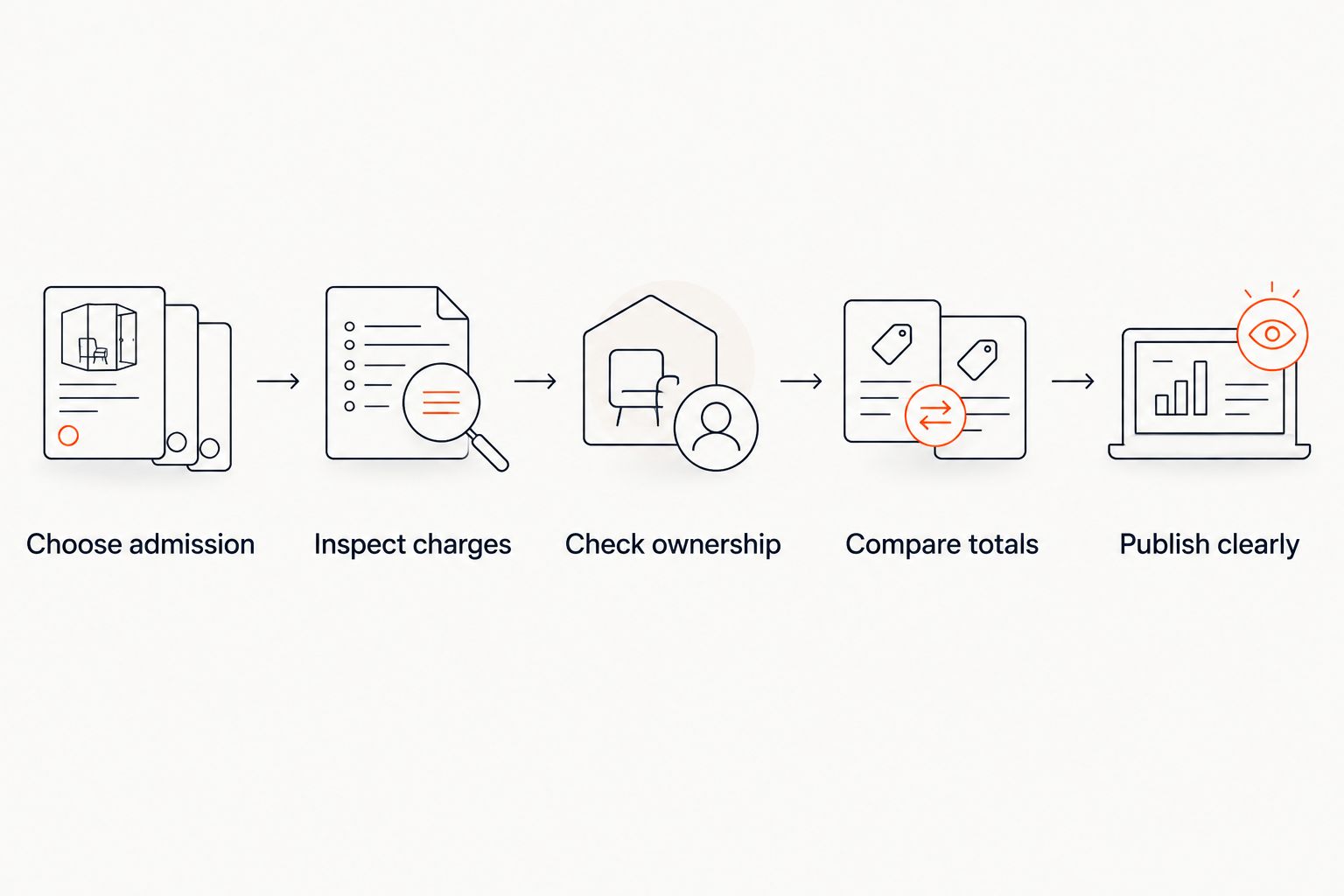
For your 2026 launch checklist, retain a record of the configuration you reviewed. When you change admission pricing or fee treatment, repeat the same journey. That keeps your assessment tied to the checkout you are publishing.
Does absorbing ticket fees make an event cheaper for attendees?
Absorbing a booking fee makes the purchase cheaper for attendees only when you do not recover that cost through a higher admission price or another mandatory charge. Your organisation then carries the cost.
Best for organisers who deliberately budget for attendee affordability, absorption needs an event-level decision. Confirm that your platform supports it and that your budget can accommodate it. Do not describe absorption as elimination.
Does selling through your own website remove ticket fees?
Selling through your own website does not automatically remove ticket fees. Storefront ownership and booking-fee policy are separate decisions.
The platform described here lets organisers sell from their own branded storefront, box office and kiosk. Its WhatsApp agent answers buyers, holds seats and hands over a checkout link. Events are also discoverable and bookable inside ChatGPT and Claude, with seats picked on the real map; checkout always completes on the organiser’s own site, never in chat.
AI that sells your tickets.
Those mechanisms describe how selling works, not an exemption from booking fees. Assess them alongside the economics rather than using discovery, messaging or branding as a substitute for a checkout comparison.
Can lower ticket fees replace a ticket discount?
Lower booking fees reduce an added charge; a ticket discount reduces admission revenue. They are different decisions, even when either lowers the attendee’s final payment.
Best for organisers protecting admission revenue, start by examining avoidable charges before changing the ticket price. If you still choose a discount, account for it separately. Keep the 2026 event budget clear about whether a reduction comes from your admission revenue or the platform’s fee.
FAQ
How do I reduce ticket fees for attendees without cutting admission prices?
Compare the complete mandatory charges and choose a lower-fee setup without increasing admission. Remove optional paid extras from the basic purchase where appropriate, and verify the final checkout.
Does absorbing a booking fee remove the cost?
No. Absorbing a booking fee transfers the cost to your organisation rather than removing it. Check whether your platform supports absorption before budgeting for it.
What booking fee do buyers pay on Zunaro?
Buyers pay one booking fee of AED 3.99, or AED 1.99 for tickets under AED 20. Free events carry none, and organisers pay nothing per ticket.
Does a ticket priced at AED 20 qualify for the lower booking fee?
No. The lower AED 1.99 booking fee applies to tickets under AED 20, not tickets priced at AED 20.
Do free events need a booking-fee budget?
Free events on this platform carry no booking fee. Assess free registration separately from paid admission because it does not generate ticket-sale revenue.
Will my own branded ticketing website automatically lower attendee fees?
No. A branded storefront gives you ownership of the selling experience, but the applicable fee model determines the booking charge. Compare the complete attendee payment.
Can attendees complete payment inside ChatGPT or Claude?
No. Events can be discovered and booked inside ChatGPT and Claude, including seat selection and holds, but checkout completes on the organiser’s own site.
One last thing
A fee label is not a savings calculation. Before changing platforms or absorbing charges, compare an equivalent purchase from admission selection to final payment. If the attendee pays the same total, you have changed the presentation or allocation of the cost—not reduced it.
For your 2026 decision, keep the attendee’s payment and your event’s retained revenue side by side. Choose the setup that meets both your affordability goal and your operating budget.
Based at DTEC, Dubai Silicon Oasis. Built for the Gulf - the UAE and Saudi Arabia.


